
AZZA PSAZ-850G
AZZA PSAZ-850G 80+ Gold 850W ATX 3.0 Power Supply
User Manual
Introduction
This manual provides comprehensive instructions for the installation, operation, and maintenance of your AZZA PSAZ-850G 80+ Gold 850W ATX 3.0 Power Supply. Please read this manual thoroughly before installation and operation to ensure proper functionality and safety.
The AZZA PSAZ-850G is an 80 PLUS Gold certified power supply, offering up to 90% efficiency under typical load conditions. It is ATX 3.0 ready, featuring a native 16-pin PCI-e 5.0 connector for next-generation graphics cards, and includes an ECO Fan Control for optimized cooling and noise levels.
Important Safety Instructions
- Do not open the power supply unit. High voltages are present inside, which can cause electric shock.
- Ensure the power supply is disconnected from the AC outlet before installation or handling.
- Install the power supply in a well-ventilated area, away from heat sources and direct sunlight.
- Use only the modular cables provided with this power supply. Using incompatible cables may damage the unit or connected components.
- This product is designed for use in computer systems only. Do not use it for any other purpose.
- Keep out of reach of children.
Package Contents
Verify that all items are present in your package:
- AZZA PSAZ-850G Power Supply Unit
- Modular Cable Set (including 16-pin PCI-e 5.0 connector)
- AC Power Cord
- Mounting Screws
- User Manual (this document)
Installation Guide
1. Physical Installation
- Ensure your computer case is compatible with ATX form factor power supplies.
- Position the power supply into the designated PSU bay in your computer case. Ensure the fan faces the correct direction for optimal airflow (typically facing downwards if there's a bottom vent, or inwards if a top vent).
- Secure the power supply to the case using the provided mounting screws.
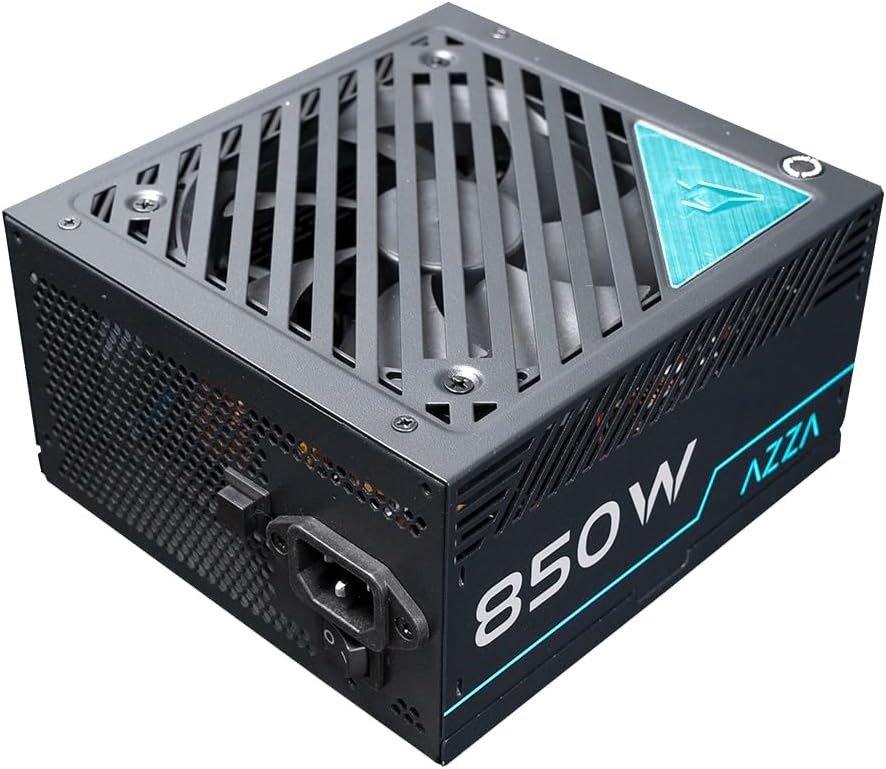
Figure 1: Top-down view of the AZZA PSAZ-850G Power Supply, illustrating the fan grille and AC power input. This view helps in understanding the unit's orientation during installation.
2. Cable Connections
Connect the necessary modular cables to the power supply and your computer components. Refer to your motherboard and component manuals for specific connection points.
- 24-pin ATX Motherboard Connector: Connect this main power cable to your motherboard.
- CPU Power Connectors (4+4 pin or 8-pin EPS): Connect to the CPU power socket(s) on your motherboard.
- PCI-e Power Connectors (6+2 pin or 16-pin 12VHPWR): Connect to your graphics card(s). The native 16-pin PCI-e 5.0 connector is designed for high-power graphics cards.
- SATA Power Connectors: Connect to SATA devices such as SSDs, HDDs, and optical drives.
- Peripheral (Molex) Power Connectors: Connect to other peripherals as needed.

Figure 2: Front view of the AZZA PSAZ-850G Power Supply, highlighting the modular cable connection ports. Each port is labeled to indicate its intended use, ensuring correct cable attachment.
3. AC Power Connection
- After all internal connections are made, connect the AC power cord to the power supply's AC inlet.
- Plug the other end of the AC power cord into a grounded wall outlet or surge protector.
Operation
1. Powering On/Off
- Ensure the power switch on the rear of the power supply is in the 'O' (Off) position before connecting the AC power cord.
- Once all connections are secure and the AC cord is plugged in, flip the power switch to the 'I' (On) position.
- You can now power on your computer using the case's power button.
2. ECO Fan Control
The AZZA PSAZ-850G features an ECO Fan Control button located on the rear panel. This function allows you to optimize the fan's operation for efficiency and noise reduction.
- ECO Mode (Button Pressed In): In this mode, the fan will remain off under low to moderate loads, providing silent operation. The fan will automatically activate when the power supply reaches a certain temperature threshold or load level.
- Standard Mode (Button Out): The fan operates continuously, adjusting its speed based on the power supply's temperature and load. This provides consistent cooling.
Choose the mode that best suits your preference for noise and cooling performance.

Figure 3: Rear view of the AZZA PSAZ-850G Power Supply, displaying the main power switch and the ECO Fan Control button. This panel is crucial for managing the power supply's operational modes.
Maintenance
To ensure the longevity and optimal performance of your power supply, follow these maintenance guidelines:
- Keep it Clean: Periodically clean the exterior of the power supply and the fan grille to prevent dust buildup. Use compressed air to gently clear dust from the fan blades and vents. Ensure the power supply is off and unplugged before cleaning.
- Ensure Proper Airflow: Make sure there are no obstructions to the power supply's intake and exhaust vents within your computer case. Good airflow is crucial for efficient cooling.
- Avoid Overloading: Do not exceed the rated wattage of the power supply. Overloading can lead to instability and reduced lifespan.
Troubleshooting
If you encounter issues with your AZZA PSAZ-850G Power Supply, refer to the table below for common problems and solutions.
| Problem | Possible Cause | Solution |
|---|---|---|
| System does not power on. | Power cord not connected properly. Power switch is off. Loose internal connections. | Check AC power cord connection to PSU and wall outlet. Ensure PSU power switch is in 'I' (On) position. Verify all modular cables are securely connected to PSU and components. |
| System powers on but shuts down immediately. | Overload protection triggered. Short circuit. Faulty component. | Ensure total system wattage does not exceed 850W. Check for any loose screws or components that might be causing a short. Test components individually if possible. |
| Fan is not spinning in ECO mode. | Normal operation for ECO mode under low load/temperature. | This is expected behavior. The fan will activate when needed. If you prefer continuous fan operation, switch to Standard Mode (ECO button out). |
| Unusual noise from PSU. | Dust buildup in fan. Loose screws. | Disconnect power and gently clean the fan and vents. Ensure PSU is securely mounted. If noise persists, contact support. |
Technical Specifications
| Feature | Specification |
|---|---|
| Model Name | PSAZ-850G |
| Brand | AZZA |
| Wattage | 850W |
| Efficiency Certification | 80 PLUS Gold |
| ATX Version | ATX 3.0 |
| PCI-e Connector | Native 16-pin PCI-e 5.0 |
| Form Factor | ATX |
| Cooling Method | Air (with ECO Fan Control) |
| Item Dimensions (LxWxH) | 4.6 x 9 x 12.2 inches |
| Item Weight | 6.01 pounds (2.73 Kilograms) |
| Compatible Devices | Computer, Gaming PC, Workstation, High-end Desktop |
Warranty and Support
The AZZA PSAZ-850G Power Supply comes with a 2-year warranty from the date of purchase. This warranty covers defects in materials and workmanship under normal use.
For technical support, warranty claims, or further assistance, please visit the official AZZA website or contact their customer service department. Please have your product model number (PSAZ-850G) and proof of purchase ready when contacting support.
AZZA Official Website: www.azza.com
Related documentsPSAZ-850G


Ask a question about this manual
Ask about setup, troubleshooting, compatibility, parts, safety, or missing instructions. Manuals+ will review the question and use this page’s manual context to help answer it.