
1. Introduction
This manual provides detailed instructions for the installation, operation, and maintenance of your Diamond Audio DMD600.4D 4-Channel Digital Amplifier. Please read this manual thoroughly before attempting installation or operation to ensure proper use and to prevent damage to the unit or connected components. Keep this manual for future reference.
2. Safety Instructions
Observe the following safety precautions to prevent injury or damage:
- Power Source: Connect the amplifier only to a 12V DC negative ground electrical system.
- Wiring: Ensure all wiring is correctly connected and insulated to prevent short circuits. Use appropriate gauge wires for power and ground connections.
- Mounting: Mount the amplifier securely in a location that allows for adequate ventilation and is protected from moisture and excessive heat.
- Volume Levels: Prolonged exposure to high volume levels can cause hearing damage. Adjust volume responsibly.
- Professional Installation: If you are unsure about any aspect of installation, consult a qualified professional.
3. Package Contents
Verify that all items are present in the package:
- Diamond Audio DMD600.4D Amplifier
- Mounting Hardware (screws, washers)
- User Manual (this document)
4. Product Features
The Diamond Audio DMD600.4D amplifier offers the following key features:
- 800W RMS power output.
- 4-channel configuration, suitable for various audio setups.
- Waterproof design for marine and motorsport applications.
- Compact size for flexible installation.
- Durable construction for long-lasting performance.
5. Setup and Installation
Proper installation is crucial for optimal performance and safety. Follow these steps carefully.
5.1 Mounting the Amplifier
- Choose a mounting location that is dry, well-ventilated, and secure. Avoid areas exposed to direct sunlight or excessive heat.
- Use the amplifier as a template to mark the mounting screw locations.
- Drill pilot holes if necessary, ensuring not to damage any vehicle components behind the mounting surface.
- Secure the amplifier using the provided mounting hardware.
5.2 Wiring Connections
Refer to the diagrams below for proper wiring connections. Ensure the vehicle's battery is disconnected before making any power connections.
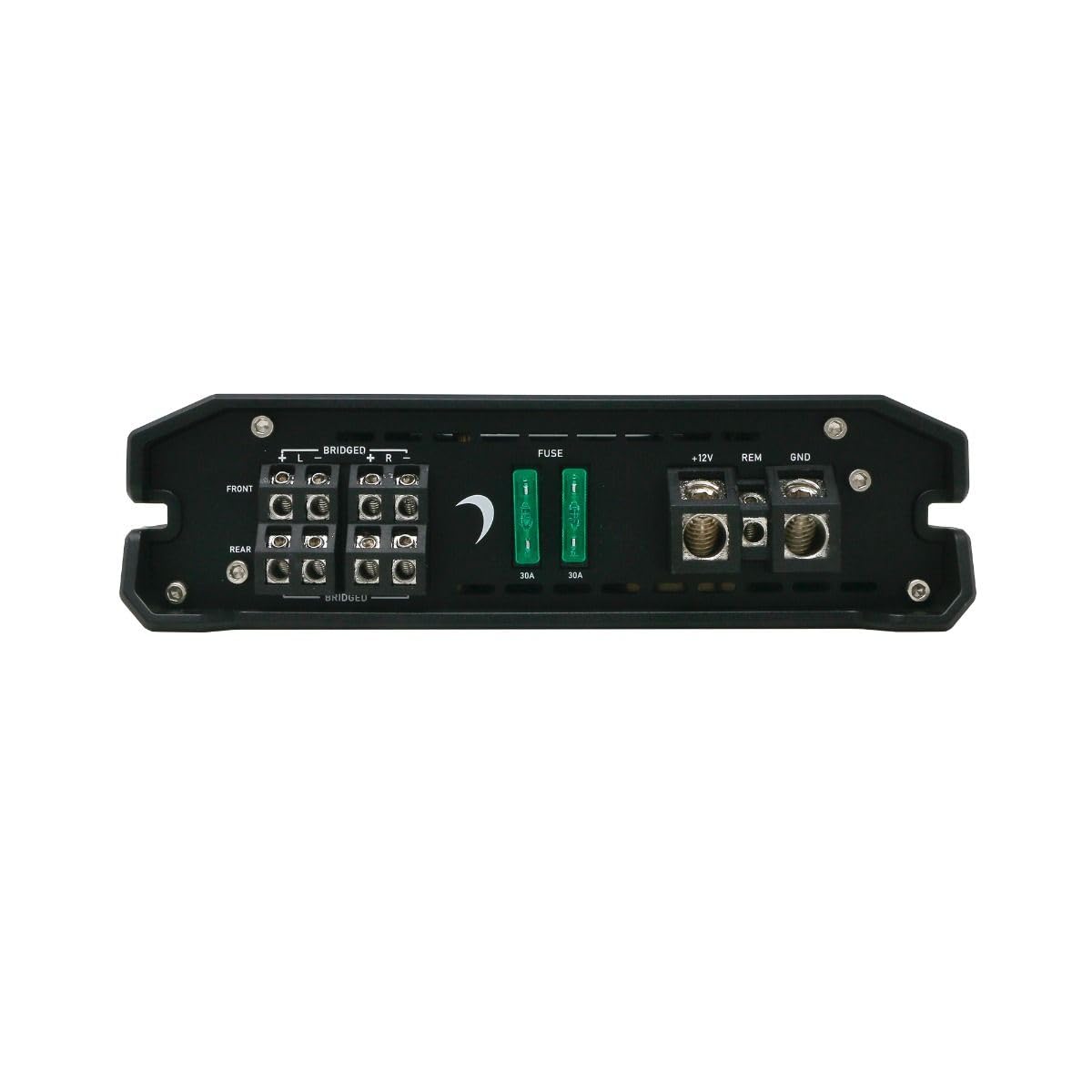
Figure 1: Rear panel connections for power, ground, remote, and speaker outputs.
- Power (B+ / +12V): Connect a suitable gauge power cable directly from the positive terminal of the vehicle's battery to the +12V terminal on the amplifier. Install an in-line fuse (not supplied) within 18 inches of the battery.
- Ground (GND): Connect a suitable gauge ground cable from the GND terminal on the amplifier to a clean, unpainted metal surface of the vehicle chassis. Ensure a solid, low-resistance connection.
- Remote (REM): Connect a remote turn-on wire from your head unit's remote output to the REM terminal on the amplifier. This wire turns the amplifier on and off with your head unit.
- Speaker Outputs: Connect your speakers to the designated speaker terminals (FRONT L/R, REAR L/R). Observe correct polarity (+ to + and - to -). For bridged mode, refer to the specific bridging instructions on the amplifier or in the specifications section.
- RCA Inputs: Connect RCA cables from your head unit's pre-amp outputs to the FRONT and REAR RCA input jacks on the amplifier.

Figure 2: Front panel with RCA inputs and audio control adjustments.
6. Operating Instructions
Once installed, adjust the amplifier settings for optimal audio performance.
6.1 Initial Setup and Adjustments
The DMD600.4D features various controls for fine-tuning your audio system:
- GAIN Control: Adjusts the input sensitivity of the amplifier to match the output of your head unit. Start with the gain at minimum and slowly increase until desired volume is achieved without distortion.
- X-OVER (Crossover) Control: Allows you to set the frequency range that the amplifier sends to your speakers.
- HPF (High Pass Filter): Allows frequencies above the set point to pass through. Useful for full-range speakers to prevent low-frequency distortion.
- LPF (Low Pass Filter): Allows frequencies below the set point to pass through. Typically used for subwoofers.
- MODE Switch: Selects the operating mode (e.g., 2-channel, 4-channel, bridged). Refer to the specific markings on the amplifier for available modes.
Important: Make adjustments incrementally and listen for clarity. Over-driving the amplifier or speakers can cause damage.
7. Maintenance
The Diamond Audio DMD600.4D amplifier requires minimal maintenance to ensure long-term performance.
- Cleaning: Periodically wipe the amplifier's exterior with a soft, dry cloth. Do not use harsh chemicals or abrasive cleaners.
- Ventilation: Ensure that the amplifier's cooling fins are free from dust and debris to maintain proper heat dissipation.
- Connections: Occasionally check all wiring connections for tightness and corrosion. Loose connections can lead to poor performance or damage.
8. Troubleshooting
If you experience issues with your amplifier, consult the following table before seeking professional service.
| Problem | Possible Cause | Solution |
|---|---|---|
| No Power / Amplifier Not Turning On | Blown fuse; Loose power/ground/remote wire; Faulty remote turn-on signal. | Check in-line fuse and amplifier fuses; Verify all power, ground, and remote connections are secure; Test remote wire for 12V signal. |
| No Audio Output | Loose RCA cables; Incorrect gain setting; Speaker wires disconnected; Amplifier in protection mode. | Check RCA connections; Adjust gain; Verify speaker wiring; Check for short circuits in speaker wiring. |
| Distorted Sound | Gain set too high; Incorrect crossover settings; Damaged speakers. | Reduce gain; Adjust crossover settings; Inspect speakers for damage. |
| Amplifier Overheating | Insufficient ventilation; Impedance too low; Prolonged high volume. | Ensure adequate airflow around amplifier; Verify speaker impedance matches amplifier specifications; Reduce volume. |
9. Specifications
Technical specifications for the Diamond Audio DMD600.4D Amplifier:
| Feature | Detail |
|---|---|
| Model Number | DMD600.4D |
| Brand | Diamond Audio |
| Number of Channels | 4 |
| Output Power | 800 Watts (RMS) |
| Mounting Type | Surface Mount |
| Package Dimensions | 9 x 9 x 4 inches |
| Weight | 4 Pounds |
10. Warranty and Support
Diamond Audio products are designed and manufactured to the highest quality standards. This product is covered by a limited warranty against defects in materials and workmanship. For specific warranty terms, duration, and claim procedures, please refer to the warranty card included with your product or visit the official Diamond Audio website.
For technical support or service inquiries, please contact Diamond Audio customer service through their official channels. Do not attempt to repair the amplifier yourself, as this may void your warranty.


