1. Introduction
The ZOYI ZT219 Digital Multimeter is a professional-grade instrument designed for accurate electrical measurements. It features 19999 counts resolution and True RMS technology, providing precise readings for various electrical parameters. This manual provides essential information for the safe and effective use of your ZT219 multimeter, including setup, operation, maintenance, and troubleshooting.
2. Safety Information
Always read and understand all safety warnings and operating instructions before using this instrument.
- This device is designed for professional use and should only be operated by qualified personnel.
- Do not apply voltage or current that exceeds the maximum specified limits for the meter.
- Ensure the test leads are in good condition and properly connected before each measurement.
- Exercise extreme caution when working with live circuits. High voltages can cause severe injury or death.
- The Non-Contact Voltage (NCV) detection feature enhances safety by identifying live wires without direct contact.
- The multimeter features overload protection and double insulation for enhanced user safety.
- Replace batteries immediately when the low battery indicator appears to ensure accurate readings.
- Do not operate the meter if it appears damaged or if the battery cover is not properly closed.
3. Setup
3.1 Package Contents
Verify that all items are present in the package:
- ZOYI ZT219 Digital Multimeter
- Test Leads (Red and Black)
- Temperature Probe
- Carrying Case
- AAA Batteries (2 included)

Image: ZOYI ZT219 Multimeter with its test leads, temperature probe, and carrying case.
3.2 Product Overview
Familiarize yourself with the main components of the ZOYI ZT219 Multimeter.

Image: Front view of the ZOYI ZT219 Digital Multimeter, showing the display, rotary dial, and input jacks.

Image: The ZOYI ZT219 Multimeter shown alongside its removable red protective silicone case.

Image: The ZOYI ZT219 Multimeter held in a hand, illustrating its compact size.
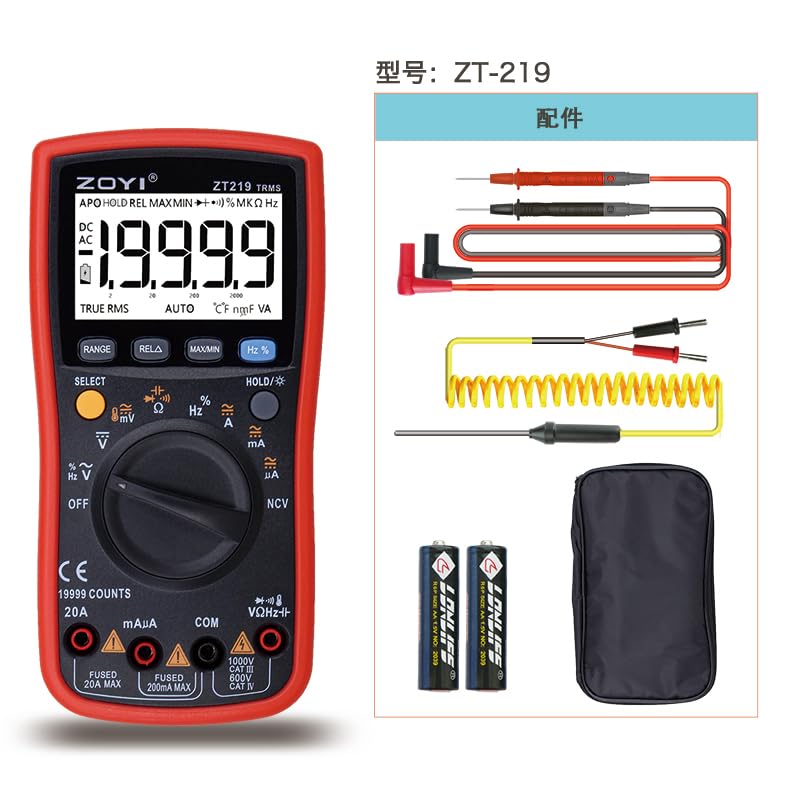
Image: Back view of the ZOYI ZT219 Multimeter, showing the integrated kickstand in an extended position.
3.3 Battery Installation
The ZOYI ZT219 Multimeter requires two AAA batteries (included). To install or replace batteries:
- Ensure the multimeter is turned OFF and disconnect all test leads from the input terminals.
- Locate the battery compartment on the back of the meter.
- Use a screwdriver to open the battery cover.
- Insert two AAA batteries, observing the correct polarity (+ and -).
- Replace the battery cover and secure it with the screw.
Image: The back of the ZOYI ZT219 Multimeter, indicating the location of the battery compartment.
4. Operating Instructions
4.1 Basic Operation
- Power On/Off: Rotate the central dial from the 'OFF' position to any desired function to turn the meter on. Rotate back to 'OFF' to power off.
- Function Selection: Use the rotary dial to select the desired measurement function (e.g., V~ for AC Voltage, V- for DC Voltage, Ω for Resistance).
- Input Terminals: Connect the red test lead to the appropriate input jack (e.g., VΩHz for voltage/resistance, mAμA for small current, 20A for large current). Connect the black test lead to the 'COM' (common) jack.
4.2 Measurement Functions
The ZT219 offers a wide range of measurement capabilities:
- DC/AC Voltage (V-, V~): Measures voltage up to 1000V. Connect test leads in parallel with the circuit.
- DC/AC Current (A-, A~, mAμA): Measures current up to 20A. Connect test leads in series with the circuit. Ensure correct input jack selection (mAμA or 20A).
- Resistance (Ω): Measures resistance. Ensure the circuit is de-energized before measuring.
- Capacitance (CF): Measures capacitance up to 9.999mF. Ensure capacitors are discharged before testing.
- Frequency (Hz) / Duty Cycle (%): Measures frequency up to 9.999MHz and duty cycle (1%-99%).
- Temperature (℃/℉): Measures temperature using the included K-type thermocouple probe (-20°C to 1000°C).
- Diode Test: Checks the forward voltage drop of a diode.
- Continuity Test: Indicates continuity with an audible buzzer if resistance is below a certain threshold.
- Non-Contact Voltage (NCV): Detects the presence of AC voltage without physical contact. Hold the NCV sensor near the conductor. The meter will indicate voltage with an audible beep and visual alert.
4.3 Special Features
- True RMS: Provides accurate measurements for non-sinusoidal AC waveforms.
- Auto-Ranging: Automatically selects the appropriate measurement range, simplifying operation.
- Data Hold (HOLD): Freezes the current reading on the display. Press the 'HOLD' button to activate/deactivate.
- MAX/MIN Recording: Records the maximum and minimum values during a measurement session. Press 'MAXMIN' to cycle through MAX, MIN, and current readings.
- Backlight: Illuminates the display for improved visibility in low-light conditions. Activated by pressing the 'HOLD/*' button.
- Auto Power-Off (APO): The meter automatically turns off after a period of inactivity to conserve battery life.
5. Maintenance
Proper maintenance ensures the longevity and accuracy of your ZOYI ZT219 Multimeter.
- Cleaning: Wipe the meter with a damp cloth and mild detergent. Do not use abrasives or solvents.
- Battery Replacement: Replace batteries when the low battery indicator appears on the display. Refer to Section 3.3 for instructions.
- Test Leads: Inspect test leads for any damage (cuts, cracks) before each use. Replace damaged leads immediately.
- Storage: Store the meter in a cool, dry place away from direct sunlight and extreme temperatures. Remove batteries if storing for extended periods.
6. Troubleshooting
If you encounter issues with your ZOYI ZT219 Multimeter, refer to the following common problems and solutions:
| Problem | Possible Cause | Solution |
|---|---|---|
| Meter does not power on | Dead or incorrectly installed batteries | Check battery polarity and replace batteries if necessary. |
| No reading or 'OL' displayed | Incorrect function selected, open circuit, or measurement range exceeded | Select the correct function. Check for continuity in the circuit. Ensure the measured value is within the meter's range. |
| Inaccurate readings | Low battery, damaged test leads, or external interference | Replace batteries. Inspect and replace test leads if damaged. Move away from strong electromagnetic fields. |
| Continuity buzzer not working | Circuit resistance too high | Ensure the resistance is below the continuity threshold (typically <50Ω). |
7. Specifications
Detailed technical specifications for the ZOYI ZT219 Digital Multimeter:
| Feature | Specification |
|---|---|
| Display | 19999 Counts, Backlit LCD |
| True RMS | Yes |
| DC Voltage | Up to 1000V |
| AC Voltage | Up to 750V |
| DC Current | Up to 20A |
| AC Current | Up to 20A |
| Resistance | Yes |
| Capacitance | Up to 9.999mF |
| Frequency | Up to 9.999MHz |
| Duty Cycle | 1% - 99% |
| Temperature | -20°C to 1000°C |
| Diode Test | Yes |
| Continuity | Yes |
| NCV (Non-Contact Voltage) | Yes |
| Power Source | 2 x AAA Batteries |
| Auto Power-Off | Yes |
| Dimensions | 3.15 x 1.97 x 0.79 inches (80 x 50 x 20 mm) |
| Item Weight | 1.54 Pounds (0.7 kg) |

Image: The ZOYI ZT219 Multimeter with its approximate dimensions (180mm length, 90mm width, 45mm height) indicated.
8. Warranty and Support
The ZOYI ZT219 Digital Multimeter comes with a 1-year warranty from the date of purchase, covering manufacturing defects. For warranty claims, technical support, or any inquiries regarding your product, please contact ZOYI customer service through the official ZOYI website or your retailer.
Please retain your proof of purchase for warranty validation.


