1. Introduction
Thank you for choosing the Philips DLP1812PV 10000 mAh Powerbank. This manual provides essential information for the safe and efficient use of your device. Please read it carefully before use and retain it for future reference.
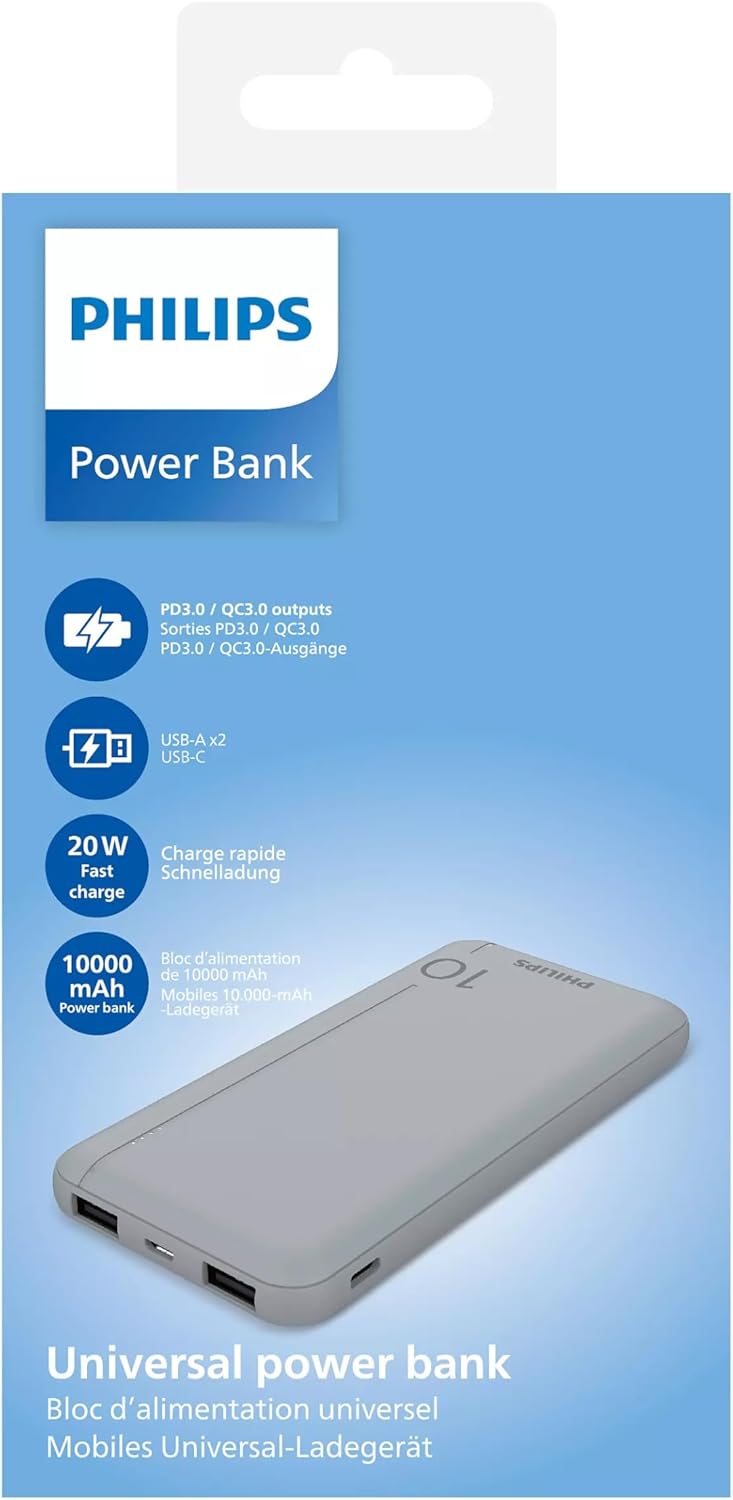
This power bank features a 10000 mAh capacity, equipped with USB-C Power Delivery (PD) 20W and dual USB-A Quick Charge (QC) 18W outputs, designed to charge your mobile devices efficiently.
2. Safety Information
To ensure safe operation and prevent damage to your device or injury to yourself, please observe the following precautions:
- Do not expose the power bank to extreme temperatures (above 45°C or below 0°C), direct sunlight, or high humidity.
- Avoid dropping, hitting, or disassembling the device.
- Keep the power bank away from water and other liquids.
- Do not use the power bank if it has been damaged or shows signs of swelling.
- Use only certified charging cables and adapters.
- Keep out of reach of children.
- Dispose of the power bank responsibly according to local regulations for lithium-polymer batteries.
3. Package Contents
Please check the package for the following items:
- Philips DLP1812PV 10000 mAh Powerbank
- USB Charging Cable (Type-A to Type-C, typically included)
- User Manual (this document)
4. Product Overview
The Philips DLP1812PV Powerbank is a portable charging solution. Familiarize yourself with its components:

4.1. Ports and Indicators
- USB-C Port: Used for both charging the power bank (input) and charging external devices (output) with Power Delivery.
- USB-A Ports (x2): Used for charging external devices with Quick Charge support.
- LED Indicators: Typically located on the side or front, these lights indicate the remaining battery level of the power bank. (Exact number and behavior may vary, refer to visual cues on the device).
5. Setup: Initial Charging
Before first use, it is recommended to fully charge your Philips DLP1812PV Powerbank.
- Connect the provided USB charging cable to the USB-C input port on the power bank.
- Connect the other end of the cable to a USB wall adapter (not included) or a computer's USB port. For faster charging, use a PD-compatible wall adapter.
- The LED indicators will illuminate to show the charging status. Once all LEDs are solid, the power bank is fully charged.
- Disconnect the cable once charging is complete.
6. Operating Instructions
6.1. Charging External Devices
To charge your smartphone, tablet, or other USB-powered devices:
- Connect your device's charging cable to one of the USB-A output ports or the USB-C output port on the power bank.
- Connect the other end of the cable to your device.
- The power bank should automatically begin charging your device. If not, press the power button (if available) to initiate charging.
- The LED indicators will show the remaining power bank battery level during charging.
- Disconnect your device once it is fully charged or when you wish to stop charging.

6.2. Recharging the Powerbank
When the power bank's battery is low, recharge it using the USB-C input port:
- Connect a USB-C charging cable to the USB-C input port on the power bank.
- Connect the other end of the cable to a suitable USB wall charger (e.g., a 20W PD charger for optimal speed) or a computer's USB port.
- The LED indicators will flash to show the charging progress. They will become solid when fully charged.
7. Maintenance
7.1. Cleaning
- Ensure the power bank is disconnected from all devices and power sources before cleaning.
- Wipe the surface with a soft, dry, lint-free cloth.
- Do not use abrasive cleaners, solvents, or harsh chemicals.
7.2. Storage
- Store the power bank in a cool, dry place, away from direct sunlight and extreme temperatures.
- For long-term storage, it is recommended to charge the power bank to approximately 50-70% every three months to maintain battery health.
8. Troubleshooting
- Power bank not charging:
- Ensure the charging cable is securely connected to both the power bank and the power source.
- Try a different USB-C cable and/or wall adapter.
- Verify the wall adapter is functioning correctly.
- Device not charging from power bank:
- Ensure the power bank has sufficient charge.
- Check that the charging cable connecting your device to the power bank is not damaged and is securely connected.
- Try a different output port on the power bank.
- Some devices may require pressing the power bank's button to initiate charging.
- Slow charging:
- Ensure you are using a compatible cable and your device supports fast charging protocols (PD/QC).
- The charging speed can be affected by the remaining battery level of both the power bank and the device being charged.
9. Specifications
| Model | DLP1812PV |
| Battery Capacity | 10000 mAh (Lithium Polymer) |
| USB-C Output | Power Delivery (PD) 20W |
| USB-A Output | Quick Charge (QC) 18W (x2) |
| Input (USB-C) | 5 Volt (PD compatible for fast recharge) |
| Product Weight | 80 g |
| Package Dimensions | 19.8 x 9.6 x 3.2 cm |
10. Warranty and Support
For warranty information or technical support, please refer to the warranty card included with your purchase or visit the official Philips website. You may also contact Philips customer service for assistance.
Philips Official Website: www.philips.com


