Introduction
The JENSEN JDASHCP is a versatile 7-inch portable wireless dash mount car stereo radio screen designed to bring modern connectivity to any vehicle. It supports Apple CarPlay and Android Auto, enabling seamless integration with your smartphone for navigation, music streaming, hands-free calling, and messaging. This manual provides detailed instructions for setup, operation, maintenance, and troubleshooting to ensure optimal performance and user experience.
What's in the Box
- JENSEN JDASHCP 7-inch Portable Wireless Dash Mount Car Stereo Radio Screen Unit
- On-Dash Suction Cup Mount
- 12V Power Adapter with integrated 3.5mm Aux Output
- External Microphone
- Optional GPS Antenna
- Quick Start Guide
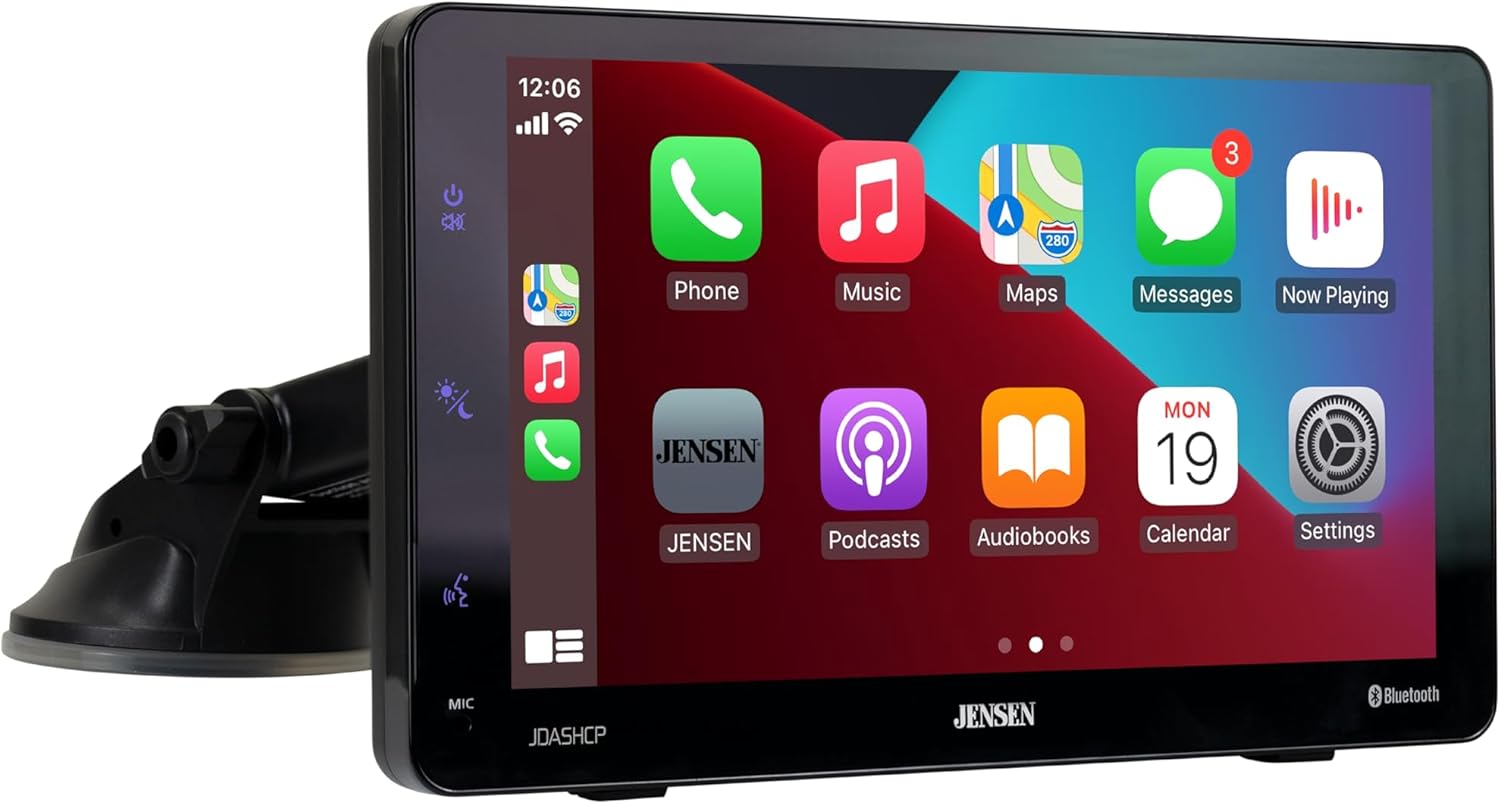
Image: The JENSEN JDASHCP unit with its included suction cup mount.
Product Overview
The JDASHCP features a 7-inch LED high-resolution touch screen (1024 x 600) for clear and responsive interaction. Its clean design is both solid and lightweight, making it easy to handle and position. The unit includes backlit buttons on the front-left for power/mute, screen dimmer, and voice activation. A built-in microphone is also integrated for hands-free communication.
The rear of the unit provides essential connectivity options, including a 2.1 amp fast-charging USB input for your phone, a Bluetooth mic input, a power input, and a connector for the optional GPS antenna. The versatile mounting options allow for secure attachment to your car's dashboard or windshield, with adjustable angles for optimal viewing.
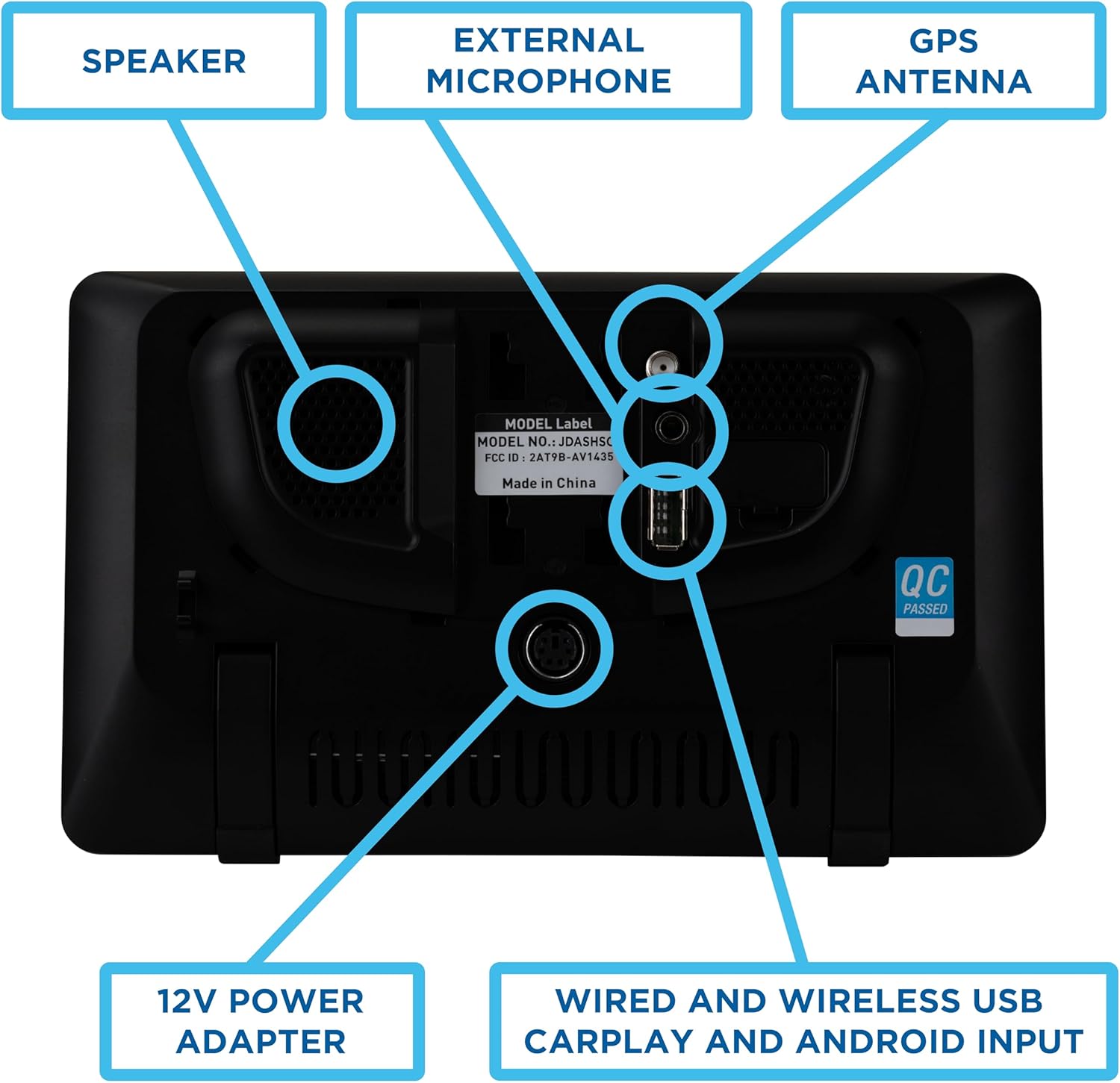
Image: Rear view of the JDASHCP unit, highlighting the speaker, external microphone port, GPS antenna port, 12V power adapter input, and wired/wireless USB CarPlay/Android input.

Image: A diagram illustrating the unit's features including USB & Wireless connectivity, AUX and FM Output, 7-inch Touch Screen, and 2.1A Fast Charging.
Setup
- Mounting the Unit: Attach the suction cup mount securely to your vehicle's windshield or dashboard. The mount is designed for stability and adjustability.
- Power Connection: Plug the 12V power adapter into your vehicle's 12V accessory outlet. Connect the power cable to the corresponding input on the back of the JDASHCP unit.
- Adjusting the View: Once installed, adjust the slide on the bracket and pan or tilt the screen to achieve your preferred viewing angle.
- Optional Connections: Connect the external microphone to the Bluetooth mic input on the back of the unit for enhanced call clarity. If desired, connect the optional GPS antenna to its dedicated connector.

Image: The JDASHCP unit shown mounted on both a windshield and a dashboard, demonstrating its versatile placement options.
Operating
Smartphone Connectivity (Apple CarPlay & Android Auto)
The JDASHCP supports both wired and wireless connections for Apple CarPlay and Android Auto. For wireless connection, ensure Bluetooth and Wi-Fi are enabled on your smartphone. The unit will remember your device and connect automatically when powered on and in range.
- Wireless Connection: From the unit's home screen, select the Apple CarPlay or Android Auto icon. On your phone, ensure Bluetooth and Wi-Fi are on. Select the JDASHCP from your phone's Bluetooth settings and follow any on-screen prompts to pair.
- Wired Connection: Connect your smartphone to the unit's USB input using a compatible USB cable. Select the Apple CarPlay or Android Auto icon on the unit's home screen.
Once connected, you will have seamless access to your phone's apps, maps, music, and more directly on the 7-inch touch screen. Enjoy full-screen navigation, control your music, and utilize voice commands for a safer driving experience.

Image: The JDASHCP screen showing both Apple CarPlay and Android Auto interfaces, demonstrating map display and music control.
Audio Output Options
The JDASHCP offers flexible audio output to your vehicle's sound system:
- 3.5mm Aux Output: Connect the integrated 3.5mm aux cable from the 12V power adapter directly to your car's auxiliary input for crisp audio.
- FM Transmitter: Utilize the built-in FM transmitter to broadcast audio to your car's radio. Simply select an unused FM frequency on the JDASHCP and tune your car's radio to the same frequency.
- Built-in Speaker: For vehicles without a working stereo or as a standalone solution, the unit includes a built-in speaker.
USB Media Playback
The USB input on the back of the unit allows you to play MP3 audio files directly from a USB thumb drive.
Maintenance
- Cleaning: Use a soft, dry cloth to clean the screen and exterior of the unit. Avoid abrasive cleaners or solvents.
- Software Updates: Periodically check the Jensenmobile.com website for any available firmware updates to ensure optimal performance and compatibility.
- Storage: If storing the unit for an extended period, disconnect it from power and store it in a cool, dry place.
Troubleshooting
| Problem | Possible Cause | Solution |
|---|---|---|
| Unit does not power on | No power from 12V outlet; loose connection | Check 12V power outlet for functionality. Ensure power adapter is securely plugged into both the outlet and the unit. |
| Cannot connect to Apple CarPlay/Android Auto wirelessly | Bluetooth/Wi-Fi off on phone; incorrect pairing | Ensure Bluetooth and Wi-Fi are enabled on your smartphone. Go to your phone's Bluetooth settings and ensure the JDASHCP is paired and connected. Try forgetting the device and re-pairing. |
| No audio output | Incorrect audio source selected; volume too low; aux cable not connected | Verify the correct audio output method (Aux, FM Transmitter, Built-in Speaker) is selected on the unit. Increase volume on both the JDASHCP and your car stereo. Ensure aux cable is fully inserted. If using FM, confirm frequencies match. |
| Screen is too dim/bright | Brightness settings need adjustment | Use the screen dimmer button on the front-left of the unit or access display settings in the menu to adjust brightness. |
| Mount is not stable | Surface not clean; suction cup not properly engaged | Clean the mounting surface thoroughly before attaching. Ensure the suction cup lever is fully engaged to create a strong vacuum seal. |
Specifications
- Model Number: JDASHCP
- Display: 7-inch LED High Resolution Touch Screen (1024 x 600)
- Dimensions (Product): 6.14 x 6.14 x 9.29 inches
- Weight (Item): 2.46 pounds
- Connectivity: Wireless (Bluetooth, Wi-Fi for CarPlay/Android Auto), Wired (USB)
- USB Input: 2.1 Amp Fast Charging USB Type A
- Audio Output: 3.5mm Aux, FM Transmitter, Built-in Speaker
- Control Method: Touch Screen, Voice (via phone assistant), Physical Buttons
- Compatible Devices: Mobile Phones (supporting Apple CarPlay or Android Auto)
- Color: Black
Warranty and Support
The JENSEN JDASHCP comes with a 2-year standard warranty. You can extend this to a 3-year warranty by registering your product on jensenmobile.com. For further support, troubleshooting, or product information, please visit the official Jensen website.