
1. Introduction
The Soundcast MGC-8 USB is a compact 8-channel audio mixer designed for musicians and audio professionals. It offers a versatile range of features including Bluetooth connectivity, an internal effects processor (EFX), and USB audio interface capabilities. This mixer is suitable for various applications such as auditoriums, bars, churches, and restaurants, providing high-quality sound mixing with ease of use.
Key features include +48V Phantom Power for condenser microphones, a 7-band master graphic equalizer, and individual 3-band EQs on mono channels. This manual provides detailed instructions for setting up, operating, maintaining, and troubleshooting your MGC-8 USB mixer.
2. Setup
2.1 Unpacking
- Carefully remove the mixer from its packaging.
- Inspect the unit for any signs of damage during transit.
- Ensure all accessories, including the power adapter, are present.
2.2 Power Connection
Connect the provided power adapter to the DC 12V input on the rear panel of the mixer. Plug the adapter into a suitable 110V/220V AC power outlet. Ensure the power switch is in the OFF position before connecting. Once connected, you can switch the power ON.
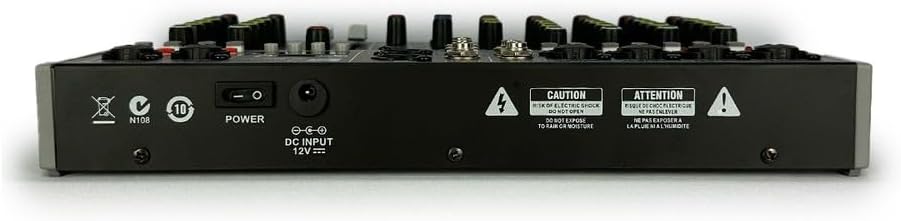
Image: Rear panel of the MGC-8 USB mixer, highlighting the DC 12V power input and power switch.
2.3 Input Connections
- Microphone/Line Inputs (Channels 1-6): Use XLR cables for microphones or 1/4" TRS/TS cables for line-level instruments (e.g., keyboards, guitars with preamps).
- Stereo Line Input (Channel 7/8): Use 1/4" TS cables for stereo line-level sources.
- USB Input: Connect a USB drive for media playback or a computer for audio interface functions.
2.4 Output Connections
- Main Outputs (L/R): Connect these XLR or 1/4" TRS outputs to your power amplifier, powered speakers, or recording device.
- Headphone Output: Connect stereo headphones to the 1/4" jack for monitoring.
3. Operation

Image: Overview of the MGC-8 USB mixer's control panel.
3.1 Channel Controls (1-8)
- MIC/LINE Input: XLR for microphones, 1/4" for line-level signals.
- Phantom Power (+48V): Activates +48V for condenser microphones. Use with caution and ensure microphones are compatible.
- PAD: Attenuates input signal by -26dB for high-level sources.
- HPF (High-Pass Filter): Cuts low frequencies (80Hz) to reduce rumble.
- EQ (HI, MID, LOW): 3-band equalizer for adjusting high, mid, and low frequencies of each mono channel.
- EFF (Effects Send): Controls the amount of signal sent to the internal effects processor.
- PAN: Adjusts the stereo position (left/right) of the channel signal.
- LEVEL: Controls the overall volume of the individual channel.
- PEAK LED: Illuminates when the input signal is too high, indicating potential clipping. Adjust gain to prevent this.
3.2 Master Controls
- 7-Band Graphic Equalizer: Adjusts the overall frequency response of the main mix.
- DSP Effects: Select and adjust internal digital effects (e.g., reverb, delay) using the PROGRAM and PARAMETER controls. The LEVEL knob controls the overall effect send to the main mix.
- MAIN LEVEL: Controls the overall output volume of the main mix.
- PHONES: Adjusts the volume for the headphone output.
- VU LED: Dual LED meters display the main output level.
3.3 Digital Audio Player (USB/Bluetooth)
- USB Playback: Insert a USB flash drive with audio files. Use the player controls (MODE, VOL-, VOL+, REC) to navigate and play tracks.
- Bluetooth Pairing: Press the MODE button to select Bluetooth. On your device, search for 'BT AUDIO' and pair. Use the player controls for volume and track selection.
- USB Recording: Connect a USB drive and press the REC button to record the main mix.
4. Maintenance
- Cleaning: Use a soft, dry cloth to clean the mixer's surface. Avoid abrasive cleaners or solvents.
- Storage: Store the mixer in a cool, dry place away from direct sunlight and extreme temperatures.
- Ventilation: Ensure proper ventilation around the mixer to prevent overheating. Do not block ventilation openings.
- Power Cord: Regularly check the power cord for any damage. Do not operate the unit with a damaged cord.
5. Troubleshooting
| Problem | Possible Cause | Solution |
|---|---|---|
| No sound output | Power off; cables disconnected; volume levels too low; incorrect input/output selection. | Check power connection and switch; ensure all audio cables are securely connected; increase channel and main levels; verify correct input source and output routing. |
| Distorted sound | Input signal too high (clipping); faulty cables; impedance mismatch. | Reduce input gain (check PEAK LED); replace faulty cables; ensure proper impedance matching for connected devices. |
| Bluetooth not connecting | Mixer not in Bluetooth mode; device too far; interference. | Press MODE button to select Bluetooth; ensure device is within range; minimize interference from other wireless devices. |
| Phantom Power not working | Phantom Power switch off; faulty microphone or cable. | Ensure +48V Phantom Power is activated for the channel; test with a different condenser microphone and XLR cable. |
6. Specifications
| Feature | Specification |
|---|---|
| Brand | Soundcast |
| Model Number | MGC-8 USB |
| Number of Channels | 8 |
| Connectivity Technology | Bluetooth |
| Power Source | Wired Electric (110V/220V) |
| Phantom Power | +48V |
| Equalization | 3-band EQ (mono channels), 7-band Graphic EQ (master) |
| Effects Processor | Internal DSP Effects |
| USB Functionality | Playback and Recording |
| Dimensions | 31 x 22 x 4 cm (approximate) |
| Weight | 2.3 kg (approximate) |
7. Warranty and Support
For warranty information and technical support, please refer to the documentation included with your purchase or contact Soundcast customer service directly. Keep your proof of purchase for any warranty claims.


