
Introduction
This manual provides essential information for the safe and efficient operation, maintenance, and troubleshooting of your Pulsar GX400BN 4000W Portable Ultra-Quiet Dual Fuel Inverter Generator. Please read this manual thoroughly before operating the generator to ensure proper use and to prevent injury or damage.

Figure 1: Main view of the Pulsar GX400BN Inverter Generator.
Key Features
- Dual Fuel Capability: Operates on both gasoline (4000 peak watts / 3200 running watts) and propane (3600 peak watts / 2800 running watts).
- Ultra-Quiet Operation: Produces approximately 62dB at half-load, suitable for various environments.
- CO Sentry Carbon Monoxide Shutoff: Enhanced safety feature that automatically shuts down the generator if carbon monoxide levels become unsafe.
- Portable Design: Equipped with a telescopic handle and wheels for easy transport.
- RV-Ready: Features a dedicated AC 120V 30A outlet for recreational vehicle use.
- Multiple Outlets: Includes AC 120V 20A outlets, USB-A, and USB-C ports for versatile power options.
- Parallel Capability: Allows connection of two GX400BN units for increased power output.
- Efficient Engine: Powered by a high-speed 5.5HP 149cc engine.
- Safety Protections: Features overload protection, short circuit protection, and low oil shutdown.

Figure 2: Key features of the generator, highlighting Recoil Start and Eco Switch.
Setup
1. Initial Preparation
Before first use, ensure the generator is placed on a flat, stable surface in a well-ventilated area, away from any combustible materials. The generator is shipped without oil or fuel.
Adding Engine Oil
- Locate the oil fill cap/dipstick on the side of the generator.
- Remove the oil fill cap/dipstick.
- Carefully add the recommended 10W-30 engine oil (provided) into the oil fill opening. The capacity is approximately 0.6 liters (20.3 fl oz).
- Check the oil level using the dipstick; it should be at the upper limit.
- Securely replace the oil fill cap/dipstick.

Figure 3: Side view of the generator, indicating the oil fill location.
Adding Fuel (Gasoline or Propane)
- Gasoline: Unscrew the fuel cap and carefully pour unleaded gasoline into the fuel tank. Do not overfill. The tank capacity is 1.18 gallons.
- Propane (LPG): Connect a standard propane tank (not included) to the LPG inlet on the control panel using the provided propane hose. Ensure all connections are tight.
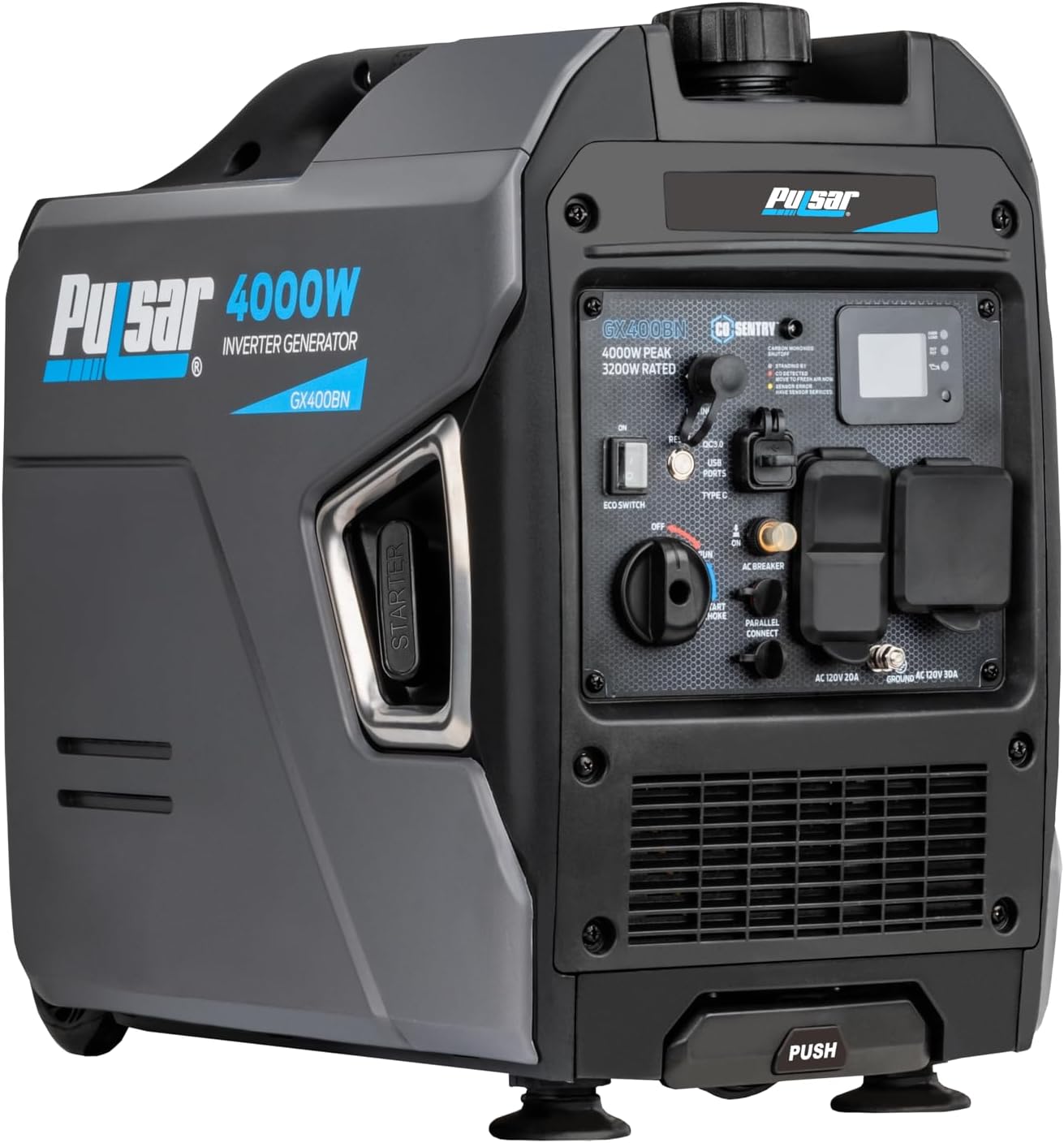
Figure 4: Front view of the generator, showing the fuel cap and control panel with LPG inlet.
Grounding the Generator
For safety, always ground the generator before operation. Connect a grounding wire (not included) from the generator's grounding terminal to an appropriate grounding rod or approved grounding source.

Figure 5: Close-up of the control panel, showing the grounding terminal.
Operating Instructions
Starting the Generator
- Ensure the generator is properly set up and fueled.
- Turn the engine switch to the "ON" position.
- If starting on gasoline, apply choke as needed. If starting on propane, ensure the propane tank valve is open.
- Firmly pull the recoil starter handle until the engine starts.
- Once started, gradually return the choke to the "RUN" position if used.
Using Outlets
The GX400BN offers various outlets for different power needs:
- AC 120V 20A Outlets: Standard household outlets for general appliances.
- AC 120V 30A RV Outlet: Designed for RV hookups.
- USB-A & USB-C Ports: For charging sensitive electronics like phones and tablets.
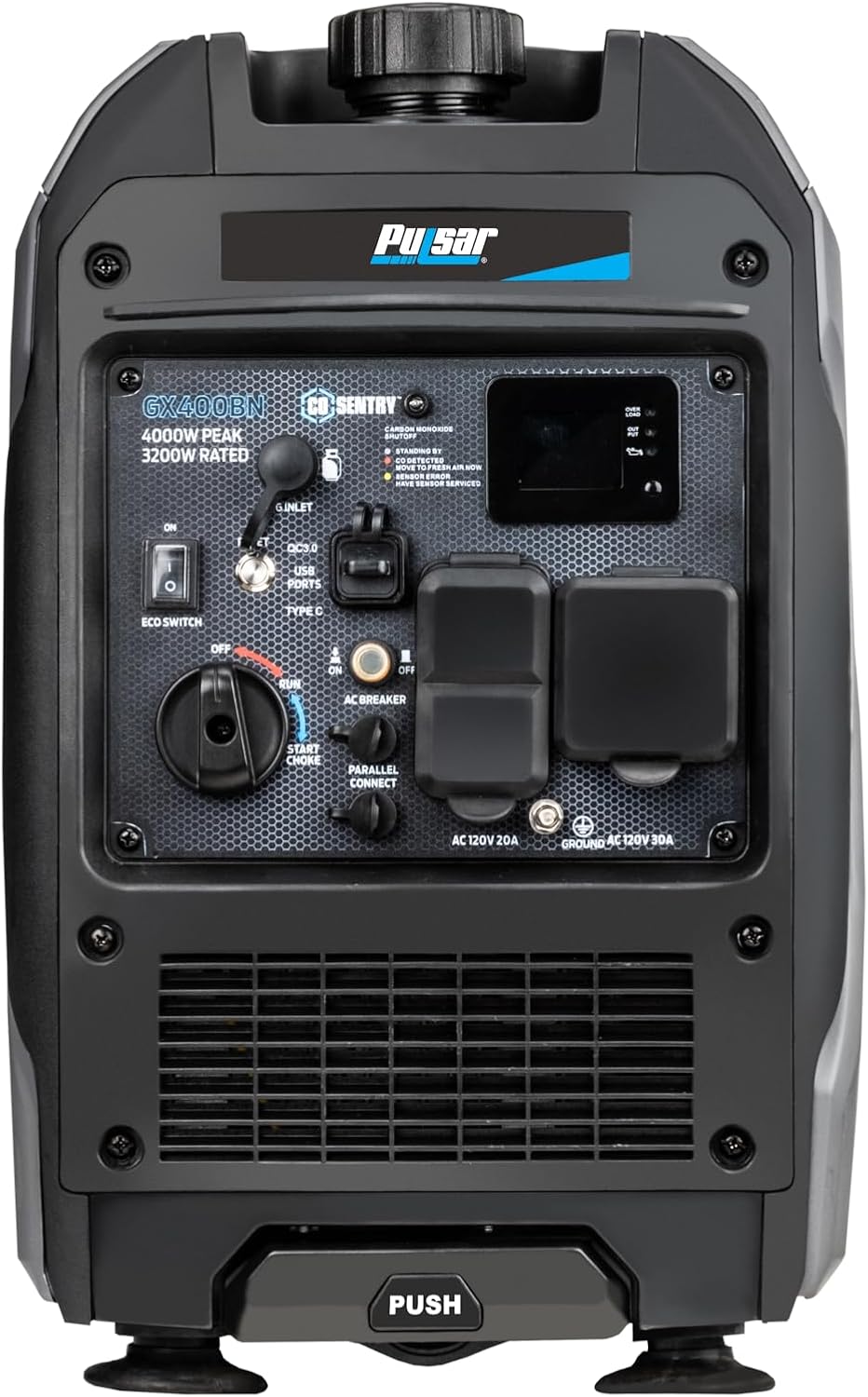
Figure 6: Generator in use, powering various devices.
Eco Mode
The Eco Switch allows the generator to automatically adjust engine speed to match the load, improving fuel efficiency and reducing noise. Turn the Eco Switch "ON" for lighter loads and "OFF" for full power or heavy loads.
Parallel Operation
For increased power, two Pulsar GX400BN generators can be connected in parallel using a compatible parallel kit (sold separately). Refer to the parallel kit's instructions for detailed setup.

Figure 7: Two GX400BN generators connected for parallel operation.
Official Product Video: Pulsar GX400BN Overview
Video 1: An overview of the Pulsar GX400BN generator, demonstrating its features and capabilities.
Maintenance
Regular maintenance is crucial for the longevity and optimal performance of your generator. Always turn off the engine and allow it to cool before performing any maintenance.
Oil Change
Change the engine oil after the first 20 hours of operation, and then every 100 hours or annually, whichever comes first. Refer to the oil fill section for location. Ensure the engine is warm for easier draining.
Spark Plug Inspection/Replacement
Inspect the spark plug every 100 hours or annually. Clean or replace if necessary. Use only the recommended spark plug type.
Air Filter Cleaning
Check and clean the air filter regularly, especially in dusty conditions. A dirty air filter can reduce engine performance and increase fuel consumption.
Storage
For long-term storage, drain the fuel tank and carburetor (if using gasoline), or disconnect the propane tank. Store the generator in a clean, dry place.
Troubleshooting
| Problem | Possible Cause | Solution |
|---|---|---|
| Engine will not start | No fuel; Low oil level; Choke not set correctly; Spark plug issue | Add fuel; Fill oil to proper level; Adjust choke; Inspect/replace spark plug |
| No power output | Overload; Circuit breaker tripped; Eco mode engaged with heavy load | Reduce load; Reset circuit breaker; Turn off Eco mode for heavy loads |
| Engine runs rough | Stale fuel; Dirty air filter; Incorrect fuel type | Drain and replace fuel; Clean/replace air filter; Use recommended fuel |
| CO Sentry light active | High carbon monoxide levels detected | Move generator to fresh air immediately; Do not operate in enclosed spaces. |
Specifications
| Attribute | Value |
|---|---|
| Model | GX400BN |
| Engine Type | 149cc 4-Stroke |
| Fuel Type | Gasoline, Liquefied Petroleum Gas (LPG) |
| Gasoline Peak Watts | 4000W |
| Gasoline Running Watts | 3200W |
| Propane Peak Watts | 3600W |
| Propane Running Watts | 2800W |
| Voltage | 120V |
| Frequency | 60 Hz |
| Noise Level (Half-Load) | 62dB |
| Gasoline Tank Volume | 1.18 Gallons |
| Runtime (Half-Load) | 6 hours |
| Item Weight | 55 Pounds |
| Product Dimensions (L x W x H) | 20" x 12.2" x 18.9" |

Figure 8: Dimensions of the Pulsar GX400BN Inverter Generator.
Warranty and Support
The Pulsar GX400BN Inverter Generator comes with a 3-year manufacturer's warranty. For warranty claims, technical support, or replacement parts, please contact Pulsar customer service. Keep your proof of purchase for warranty validation.
For additional support and resources, visit the official Pulsar website or refer to the contact information provided in your product packaging.

