
Fafeicy MT24
Fafeicy MT24 Automatic Water Pressure Boost Pump User Manual
Model: MT24 | Brand: Fafeicy
1. Introduction
This manual provides comprehensive instructions for the installation, operation, and maintenance of your Fafeicy MT24 Automatic Water Pressure Boost Pump. Please read this manual thoroughly before installation and use to ensure safe and efficient operation. Keep this manual for future reference.

Figure 1: Fafeicy MT24 Automatic Water Pressure Boost Pump and included accessories. The image displays the compact white and black pump unit, a flexible braided hose with blue connector, mounting screws and anchors, and an AC/DC power adapter.
2. Safety Information
Always observe the following safety precautions to reduce the risk of injury or damage.
- Ensure the power supply voltage matches the pump's requirements (100-240V AC input for the adapter, 24V DC for the pump).
- Do not operate the pump with damaged cords or plugs.
- Do not immerse the pump or power adapter in water. The pump has an IP56 rating, indicating protection against dust and strong jets of water, but it is not submersible.
- Disconnect power before performing any maintenance or installation.
- Keep children and unauthorized persons away from the operating pump.
- Install the pump in a well-ventilated area, protected from extreme temperatures and direct sunlight.
- Ensure all connections are secure and leak-free to prevent water damage.
3. Product Specifications
| Feature | Specification |
|---|---|
| Model Number | MT24-25-100p (Fafeicynedipg03c6-12) |
| Power | 100W |
| Voltage | 24V DC (via AC/DC converter 100-240V AC input) |
| Maximum Flow Rate | 25 Liters Per Minute |
| Rated Current | DC 4.2A |
| Protection Class | IP56 |
| Insulation Class | H |
| Fluid Temperature Range | 0-65°C |
| Outlet Diameter | 15 mm |
| Material | Acrylonitrile Butadiene Styrene (ABS) |
| Dimensions (Package) | 7.2 x 7.05 x 5.12 inches |
| Weight (Package) | 2.04 Pounds |
4. Installation and Setup
The Fafeicy MT24 pump is designed for various household water pressurization applications. Follow the diagrams and instructions carefully for proper installation.
4.1 General Installation Guidelines
- Identify the cold and hot water inlet/outlet pipes.
- Install the booster pump on the water line requiring increased pressure. The pump is typically installed on the cold water inlet line before the mixing valve for faucets and showers, or on the hot water outlet line for water heaters.
- Ensure the flow direction arrow on the pump matches the water flow.
- Use appropriate plumbing fittings and sealants to prevent leaks.
- Mount the pump securely using the provided screws and anchors.
- Connect the power adapter to the pump and then plug it into a suitable electrical outlet.
4.2 Application-Specific Installation Diagrams

Figure 2: Installation diagrams for faucet and sprinkler pressurization. The left diagram shows the pump installed on the cold water inlet pipe leading to a kitchen faucet. The right diagram illustrates the pump installed on the cold water line before the mixing valve for a shower sprinkler system.
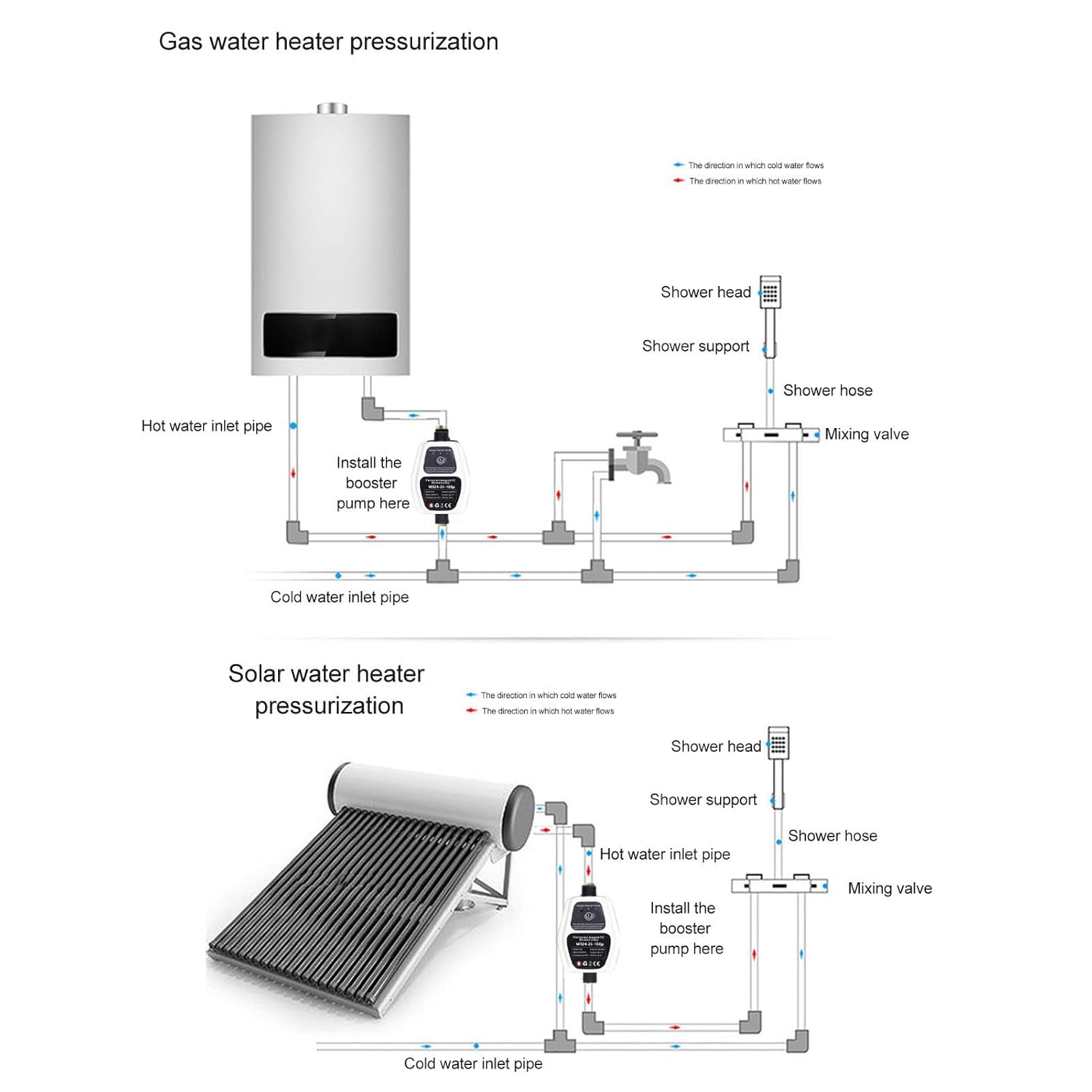
Figure 3: Installation diagram for electric water heater pressurization. The pump is shown installed on the hot water outlet pipe from the electric water heater, before the mixing valve that leads to a shower system.

Figure 4: Installation diagrams for gas water heater and solar water heater pressurization. The top diagram shows the pump on the hot water outlet of a gas water heater. The bottom diagram shows the pump on the hot water outlet of a solar water heater, both before the mixing valve for a shower system.
5. Operating Instructions
The Fafeicy MT24 pump features intelligent sensing and automatic control for ease of use.
5.1 Automatic Mode
- Once installed and powered on, the pump will enter automatic mode.
- In automatic mode, the pump detects water flow. When a faucet is opened, the pump automatically starts to boost water pressure.
- When the faucet is closed, the pump automatically stops.
- The pump develops an effective boosting program based on varying water flow and pressure conditions.

Figure 5: The pump's automatic control feature. The image shows the pump unit with a power button and indicator lights, alongside illustrations of a faucet being turned on (pump starts) and off (pump stops automatically).
5.2 Low-Pressure Start Mode
- If the initial water flow is too low for the automatic mode to activate, the pump can be switched to low-pressure mode.
- Refer to the pump's control panel for instructions on activating the low-pressure start mode (indicated by "Self-start" on the pump label).
5.3 Water Shortage Protection
- The pump is equipped with water shortage protection. If the water inlet flow is near zero, the pump will automatically stop working to prevent dry running and damage.

Figure 6: Key operational features of the pump. This image highlights "Intelligent Start Stop" (automatic operation with faucet), "Low Pressure Start" (manual override for low flow), and "Water Shortage Protection" (automatic shutdown when water inlet is near zero). It also mentions the permanent magnet brushless motor and centrifugal impeller for energy saving and quiet operation.

Figure 7: Visual comparison of water output before and after pump installation. The top pair of images shows a faucet with weak flow on the left and strong flow on the right. The bottom pair shows a shower head with weak spray on the left and a full, strong spray on the right, demonstrating the boosting effect.
6. Maintenance
Regular maintenance ensures the longevity and optimal performance of your Fafeicy MT24 pump.
- Cleaning: Periodically clean the exterior of the pump with a damp cloth. Do not use harsh chemicals or abrasive cleaners.
- Check for Leaks: Regularly inspect all plumbing connections for any signs of leaks. Tighten connections as necessary.
- Filter Inspection: If your water supply has a pre-filter, ensure it is cleaned or replaced according to its manufacturer's instructions to prevent debris from entering the pump.
- Winterization (if applicable): In areas prone to freezing temperatures, drain the pump and associated plumbing lines if they are exposed to prevent damage from freezing water.
- Power Cord: Inspect the power cord and adapter for any damage. Replace immediately if damaged.
7. Troubleshooting
If you encounter issues with your pump, refer to the following common problems and solutions.
| Problem | Possible Cause | Solution |
|---|---|---|
| Pump does not start | No power; Insufficient water flow; Pump in water shortage protection mode. | Check power connection; Ensure adequate water supply; Switch to low-pressure start mode if flow is very low. |
| Low water pressure after pump installation | Incorrect installation direction; Air in the system; Clogged inlet/outlet. | Verify pump flow direction; Bleed air from the system; Check for obstructions in pipes or pump. |
| Pump runs continuously | Leak in plumbing system; Faucet not fully closed; Sensor malfunction. | Check for and repair leaks; Ensure all faucets are completely closed; Contact support if issue persists. |
| Unusual noise from pump | Air in the system; Debris in impeller; Loose mounting. | Bleed air; Disconnect power and inspect impeller for debris (if safe to do so); Secure pump mounting. |
If the problem persists after attempting these solutions, please contact customer support.
8. Warranty and Support
For warranty information and customer support, please refer to the documentation provided with your purchase or contact Fafeicy customer service directly.
You can visit the official Fafeicy store for more information: Fafeicy Store on Amazon.
Related Documents - MT24
 |
Skymee MK-MT24 User Manual and FCC Statement This document provides the user manual and FCC statement for the Skymee MK-MT24 device, detailing its operation, compliance, and features. |
 |
Polymaster Product Guide 2026 - Water Tanks, Agricultural Solutions & More Explore the comprehensive Polymaster Product Guide 2026, featuring a wide range of high-quality storage solutions and agricultural equipment. Polymaster offers durable, reliable products manufactured to meet rigorous Australian standards, including water, septic, diesel, and AdBlue tanks, troughs, feeders, and fire-fighting equipment. |
 |
Zemismart Roller Shade System Driver FCC Test Report - Model MT25B FCC test report for the Zemismart Roller Shade System Driver, Model MT25B, detailing conducted and radiated emissions, power output, bandwidth, and antenna requirements. Tested by Shenzhen Anbotek Compliance Laboratory Limited. |
Ask a question about this manual
Ask about setup, troubleshooting, compatibility, parts, safety, or missing instructions. Manuals+ will review the question and use this page’s manual context to help answer it.