1. Introduction
This manual provides comprehensive instructions for the safe and effective operation of your Generic SC02 4K Action Camera. Please read this manual thoroughly before using the device to ensure proper functionality and to prevent damage. Keep this manual for future reference.
2. Product Overview
2.1 Key Features
- Video Resolution: 4K at 60 FPS
- Photo Resolution: 20 Megapixels
- Waterproof: IP68 rated, submersible up to 5 meters (without external case)
- Lens: 170-degree wide-angle lens
- Display: 2-inch LCD screen
- Connectivity: 2.4G Wi-Fi for smartphone/tablet control
- Control: Integrated microphone and 2.4G wireless remote control
- Modes: Single Photo, Burst Photo, Time Lapse, Loop Recording
- Storage: Supports Micro SD cards up to 128GB (not included)
- Battery Life: Approximately 1 hour and 30 minutes (4K recording)
- Image Stabilization: 6-axis multi-sensor lens to reduce shake
2.2 Package Contents
The following items are included with your Generic SC02 4K Action Camera:

Image: Generic SC02 4K Action Camera and various accessories, including mounting brackets, straps, a remote control, a cleaning cloth, and a USB cable.
- Generic SC02 4K Action Camera
- 2.4G Wireless Remote Control
- Various Mounting Accessories (e.g., helmet mounts, bike mounts, adhesive mounts)
- USB Charging Cable
- Cleaning Cloth
- User Manual (this document)
2.3 Camera Components

Image: Front view of the Generic SC02 4K Action Camera, showing the lens, power button, mode button, and SOS button.
- Lens: 170-degree wide-angle lens for capturing expansive views.
- Power Button: Used to turn the camera on/off and switch modes.
- Mode Button: Cycles through different camera modes (video, photo, etc.).
- SOS Button: For emergency signaling or specific functions.
- Up/Down Buttons: For navigation in menus and zoom control.
- LCD Screen: 2-inch display for live view, playback, and menu navigation.
- Microphone: Integrated for audio recording.
- Speaker: For audio playback.
- USB Port: For charging and data transfer.
- Micro SD Card Slot: For memory card insertion.
3. Setup
3.1 Charging the Battery
- Connect the camera to a USB power source (e.g., computer, wall adapter) using the provided USB cable.
- The charging indicator light will illuminate.
- Charging is complete when the indicator light turns off or changes color (refer to camera display for battery status).
3.2 Inserting a Micro SD Card
A Micro SD card (up to 128GB, Class 10 or higher recommended) is required for storing photos and videos. The card is not included.
- Locate the Micro SD card slot on the camera.
- Insert the Micro SD card with the gold contacts facing the back of the camera until it clicks into place.
- To remove, gently push the card in until it clicks, then release, and it will eject.
3.3 Powering On/Off
- To Power On: Press and hold the Power button for a few seconds until the LCD screen illuminates.
- To Power Off: Press and hold the Power button again until the screen turns off.
4. Operating the Camera
4.1 Navigating Modes
Press the Mode button repeatedly to cycle through the available modes: Video, Photo, Playback, and Settings.
4.2 Video Recording
- Switch to Video mode.
- Press the Shutter/OK button to start recording. A red indicator light will flash, and a timer will appear on the screen.
- Press the Shutter/OK button again to stop recording. The indicator light will stop flashing.
4.3 Taking Photos
- Switch to Photo mode.
- Press the Shutter/OK button to take a photo. The screen may briefly flash.
Photo Modes:
- Single Photo: Captures one image per press.
- Burst Photo: Captures multiple images in quick succession.
- Time Lapse Photo: Captures photos at set intervals to create a time-lapse sequence.

Image: The Generic SC02 4K Action Camera with its flash feature highlighted, indicating its use for night photography.
4.4 Wi-Fi Connectivity and Remote Control
The camera features 2.4G Wi-Fi for connection to a smartphone or tablet, and a 2.4G wireless remote control.

Image: A visual representation of the Generic SC02 4K Action Camera being controlled by a wrist-worn remote and a smartphone application, with a person kitesurfing in the background.
- Wi-Fi Activation: In camera settings, enable Wi-Fi. The camera's Wi-Fi name and password will be displayed.
- Smartphone Connection: Download the compatible app (available for Android and iOS). Connect your smartphone/tablet to the camera's Wi-Fi network.
- App Functions: Use the app to control camera functions, view live footage, play back media, and share content.
- Remote Control: The included 2.4G remote control allows activation of main camera functions from up to 10 meters away, ideal for capturing action shots or selfies.
4.5 Waterproof Operation
The SC02 camera is IP68 rated, allowing it to be submerged up to 5 meters without an additional waterproof case. Ensure all ports and covers are securely closed before exposing the camera to water.
4.6 Image Stabilization

Image: A side-by-side comparison demonstrating the effectiveness of the image stabilization feature. The 'OFF' side shows a blurry image of a person on a dirt bike, while the 'ON' side shows a clear, stable image of the same scene.
The camera features a 6-axis multi-sensor lens system designed to minimize camera shake, resulting in clearer and more stable photos and videos, especially during dynamic activities.
4.7 Wide-Angle Lens
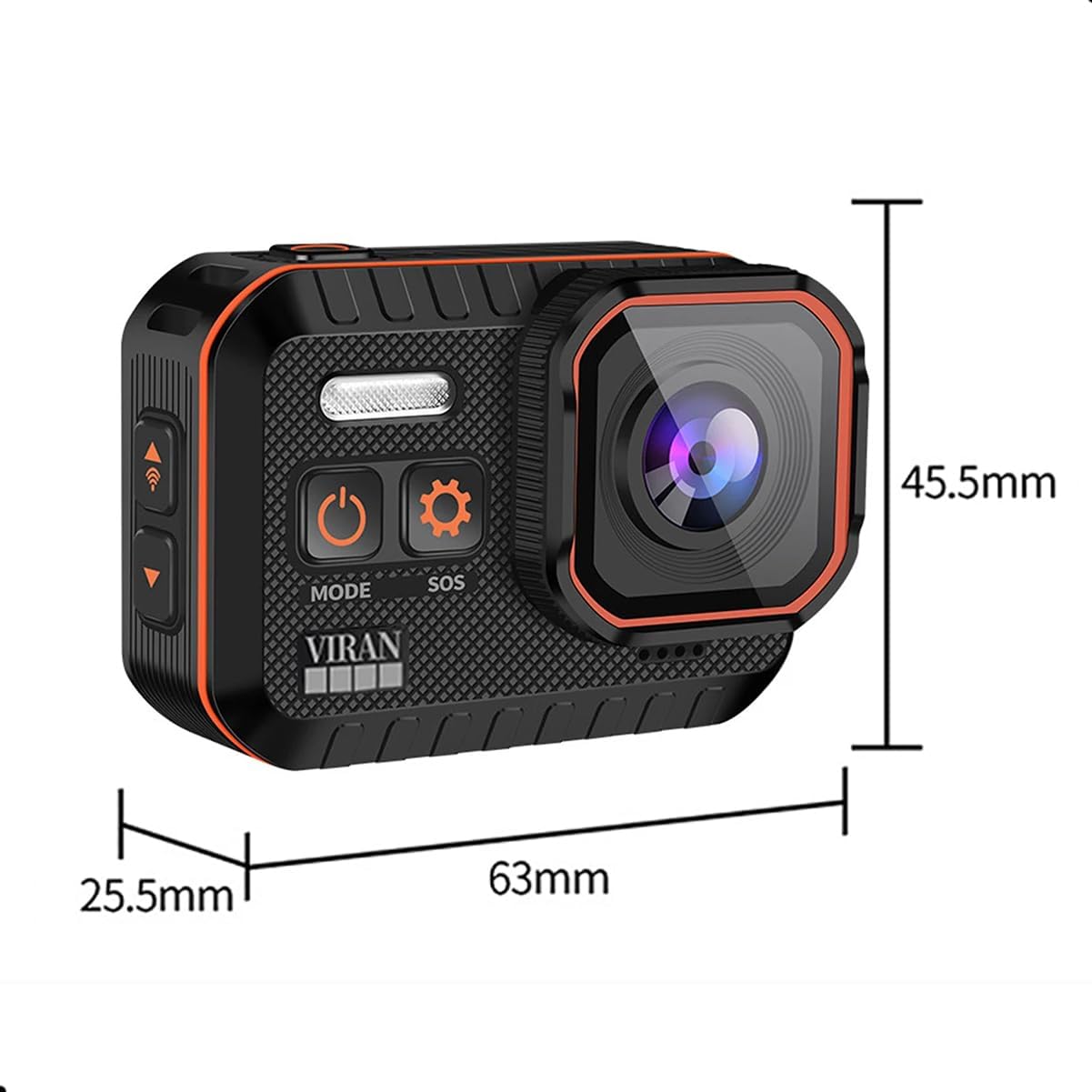
Image: The Generic SC02 4K Action Camera positioned above a scenic landscape, with an arc illustrating its 170-degree wide-angle field of view. Several optical lens elements are shown below.
The 170-degree wide-angle lens captures a broad field of view, ideal for action sports, landscapes, and immersive footage.
4.8 LCD Screen

Image: The Generic SC02 4K Action Camera showing a vibrant image on its 2-inch LCD screen, with a person skateboarding in the background.
The 2-inch LCD screen allows for real-time viewing of your shots, easy menu navigation, and instant playback of recorded content.
5. Maintenance
5.1 Cleaning the Camera
- Use a soft, lint-free cloth to clean the camera body.
- For the lens, use a specialized lens cleaning cloth and solution. Avoid touching the lens with your fingers.
- Do not use harsh chemicals or abrasive materials.
5.2 Waterproof Seal Care
- Regularly inspect the rubber seals around ports and covers for any dirt, debris, or damage.
- Clean seals gently with a soft cloth. Do not use sharp objects.
- Ensure all covers are firmly closed before exposing the camera to water.
5.3 Storage
- Store the camera in a cool, dry place away from direct sunlight and extreme temperatures.
- Remove the battery if the camera will not be used for an extended period.
6. Troubleshooting
| Problem | Possible Cause | Solution |
|---|---|---|
| Camera does not turn on | Low battery; Battery not inserted correctly; Camera malfunction | Charge the battery; Reinsert battery; Contact support |
| Cannot record video/take photos | No Micro SD card; SD card full; SD card error; Incorrect mode | Insert SD card; Delete files or replace SD card; Format SD card (backup data first); Switch to correct mode |
| Wi-Fi connection issues | Wi-Fi not enabled; Incorrect password; App not installed; Interference | Enable Wi-Fi in camera settings; Re-enter password; Install compatible app; Move closer to camera, avoid interference |
| Remote control not working | Remote battery low; Not paired; Out of range | Replace remote battery; Refer to remote pairing instructions; Operate within 10 meters |
| Poor image/video quality | Dirty lens; Low light conditions; Incorrect settings; Lack of stabilization | Clean the lens; Use flash or better lighting; Adjust resolution/settings; Ensure stabilization is active |
7. Specifications

Image: The Generic SC02 4K Action Camera with dimensions indicated: 63mm length, 45.5mm height, and 25.5mm depth.
| Feature | Specification |
|---|---|
| Brand | Generic |
| Model Reference | SC02 |
| Product Type | Compact Action Camera |
| Video Resolution | 4K |
| Photo Resolution | 20 Megapixels |
| Waterproof Rating | IP68 (up to 5 meters without case) |
| Screen Size | 2 inches (LCD) |
| Connectivity Technology | Wi-Fi (2.4G) |
| Compatible Devices | Smartphone, Tablet |
| Lens Type | Wide-angle (170 degrees) |
| Photo Sensor Technology | CMOS |
| Flash Memory Type | Micro SD (up to 128GB) |
| Video Capture Format | MP4 |
| Battery Duration | Approx. 1 hour 30 minutes (4K recording) |
| Included Components | Remote control, integrated microphone, 2-inch LCD screen, waterproof up to 5 meters without case |
8. Warranty and Support
For warranty information and technical support, please refer to the documentation provided at the time of purchase or contact your retailer. Keep your proof of purchase for any warranty claims.


