
Introduction
This manual provides instructions for the NKF RC-199M Remote Control. This remote is designed for use with various ATYME TV models, offering direct functionality without complex setup procedures. Please read this manual carefully to ensure proper use and maintenance of your remote control.
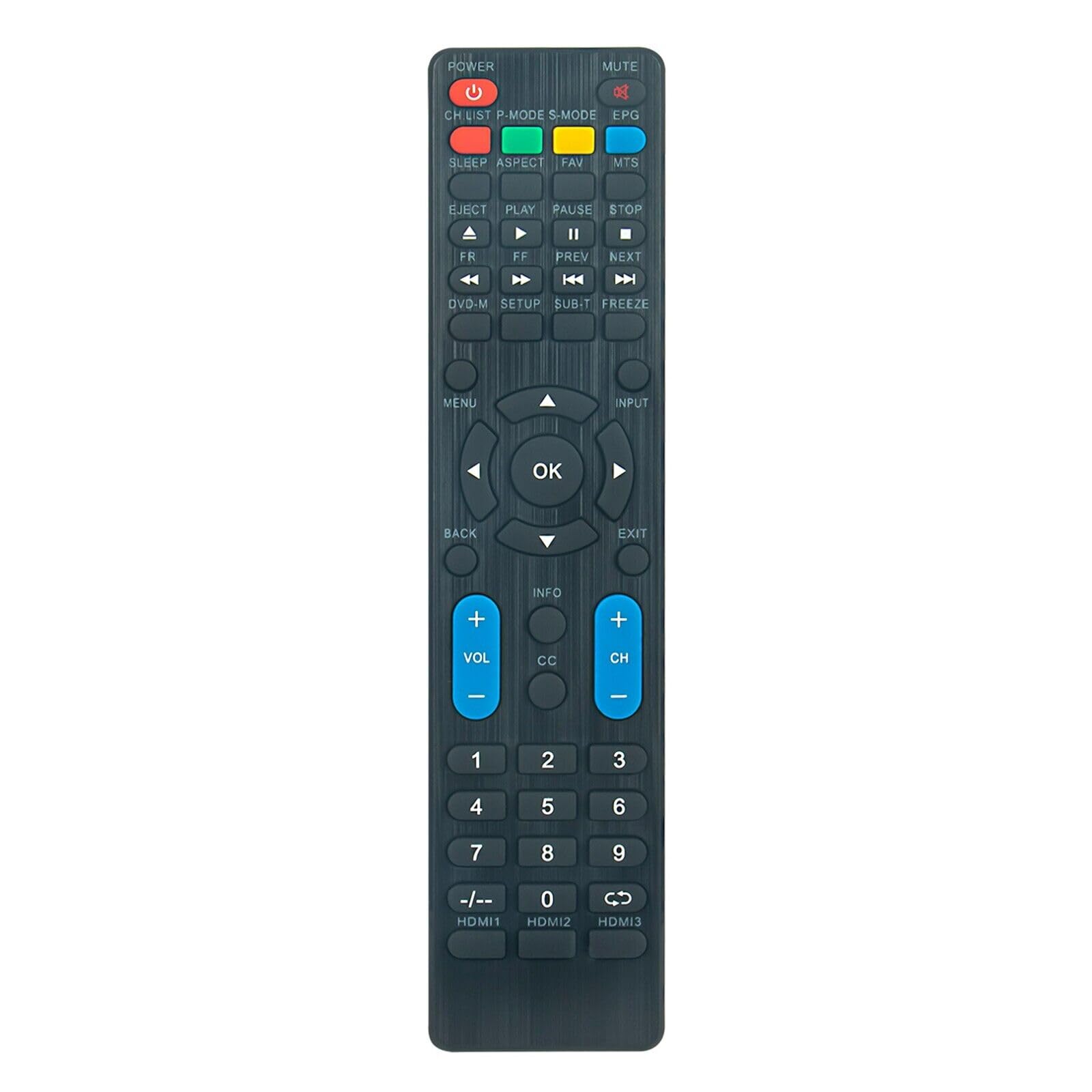
Figure 1: Front view of the NKF RC-199M Remote Control.
Setup
Battery Installation
The RC-199M remote control requires two (2) AAA alkaline batteries (not included). Follow these steps to install the batteries:
- Locate the battery compartment on the back of the remote control.
- Press down on the tab and slide the battery cover downwards to open it.
- Insert two AAA batteries, ensuring the positive (+) and negative (-) terminals align correctly with the markings inside the compartment.
- Slide the battery cover back into place until it clicks securely.
Note:
- Do not mix old and new batteries.
- Do not mix alkaline, standard (carbon-zinc), or rechargeable (nickel-cadmium) batteries.
- Remove batteries if the remote control will not be used for an extended period.

Figure 2: Battery compartment on the back of the remote control.
Initial Use
Once batteries are installed, the remote control is ready for use. No additional programming or setup is required for compatible ATYME TV models.
Operating Instructions
The RC-199M remote control provides full functionality for compatible ATYME TV models. Point the remote control directly at the TV's infrared receiver for optimal performance. The maximum effective range is approximately 10 meters (33 feet).
Compatible ATYME TV Models
This remote control is compatible with the following ATYME TV models:
- 490AM7HD, 320GM5HD, 400AM7DVD, 416AM7DVD
- 430AM7UD, 650PM9HD, 480AM7HD, 320AM5DVD
- 395AM7HD, 500PM7UD, 650AM7UD, 400AM7HD
- 500AM7HD, 490AM7UD, 500AX7UD, 320AM5HD
- 320PM5HD, 500AM7UD, 650GM7UD, 240AM5HD
- 395AM7DVD, 416AM7HD, 400PM7HD, 550PM7UD
- 500PM7HD, 550PM8HD, 650PM7UD, 395AH7HD
- 550AM7UD
Button Functions
The remote control features 52 buttons, each designed for specific functions. Common button functions include:
- POWER: Turns the TV on or off.
- MUTE: Mutes or unmutes the TV audio.
- CH.LIST: Displays the channel list.
- P.MODE: Changes picture modes.
- S.MODE: Changes sound modes.
- EPG: Accesses the Electronic Program Guide.
- SLEEP: Sets the sleep timer.
- ASPECT: Changes the screen aspect ratio.
- FAV: Accesses favorite channels.
- MTS: Selects Multi-channel Television Sound options.
- EJECT, PLAY, PAUSE, STOP, FR, FF, PREV, NEXT: Media playback controls (for models with integrated DVD players).
- DVD-M, SETUP, SUB.T, FREEZE: Additional media and setup functions.
- MENU: Opens the TV's main menu.
- Navigation Arrows (Up, Down, Left, Right): Navigates through menus and options.
- OK: Confirms selections.
- BACK: Returns to the previous screen or menu.
- INPUT: Selects input sources (HDMI1, HDMI2, HDMI3, etc.).
- EXIT: Exits the current menu.
- VOL (+/-): Adjusts the volume level.
- INFO: Displays program information.
- CC: Activates or deactivates Closed Captions.
- CH (+/-): Changes channels.
- Number Pad (0-9): Directly enters channel numbers.
- -/--: Toggles between single and double-digit channel entry.
- HDMI1, HDMI2, HDMI3: Direct access to HDMI input sources.
Maintenance
To ensure the longevity and optimal performance of your RC-199M remote control, follow these maintenance guidelines:
- Cleaning: Wipe the remote control regularly with a soft, dry cloth. For stubborn dirt, lightly dampen the cloth with water or a mild, non-abrasive cleaner. Avoid using harsh chemicals or abrasive materials.
- Storage: Store the remote control in a cool, dry place away from direct sunlight, extreme temperatures, and high humidity.
- Battery Care: Replace batteries when the remote's response becomes sluggish or inconsistent. Remove batteries if the remote will not be used for an extended period to prevent leakage.
- Avoid Drops: Protect the remote control from physical impact, as drops can damage internal components.
Troubleshooting
If you encounter issues with your RC-199M remote control, refer to the following common troubleshooting steps:
| Problem | Possible Cause | Solution |
|---|---|---|
| Remote not responding | Dead or incorrectly installed batteries. | Replace batteries with new AAA alkaline batteries, ensuring correct polarity. |
| Remote not responding | Obstruction between remote and TV. | Ensure a clear line of sight between the remote control and the TV's infrared receiver. |
| Remote not responding | Remote is too far from the TV. | Operate the remote within the effective range of 10 meters (33 feet). |
| Some buttons do not work | Button malfunction or specific TV model incompatibility for certain advanced functions. | Ensure the button is relevant to your TV model. If the issue persists for basic functions, the remote may be faulty. |
Specifications
| Feature | Detail |
|---|---|
| Model Number | RC-199M |
| Brand | NKF |
| Compatible Devices | ATYME Televisions (various models listed in Operating Instructions) |
| Connectivity Technology | Infrared (IR) |
| Power Supply | 2 x 1.5V AAA Alkaline Batteries (not included) |
| Maximum Range | 10 Meters (approx. 33 feet) |
| Button Quantity | 52 |
| Color | Black |
| Item Weight | 2.15 Ounces (approx. 61 grams) |
| Dimensions (L x W x H) | 8.5" x 2" x 0.55" (approx. 21.6 cm x 5.1 cm x 1.4 cm) |
Support
For further assistance or if troubleshooting steps do not resolve your issue, please contact the manufacturer or retailer where the product was purchased. Provide your product model number (RC-199M) and a detailed description of the problem.