
Cardo PTHP0002
Cardo Packtalk Edgephone ORV Single Pack Instruction Manual
Model: PTHP0002
1. Introduction
The Cardo Packtalk Edgephone ORV Single Pack is a wireless, hands-free communication system designed for off-road vehicle environments. It facilitates group intercom communication, allowing users to communicate within a vehicle or between vehicles without physical restrictions or the need for cellular coverage. The unit is built to withstand various outdoor conditions, being sand, mud, and waterproof, and features audio engineered by JBL for clear sound in noisy environments.
This manual provides essential information for the proper setup, operation, maintenance, and troubleshooting of your Packtalk Edgephone ORV Single Pack.

Figure 1.1: Cardo Packtalk Edgephone ORV Single Pack Headset
2. What's in the Box
Verify that all components are present in your package:
- Cardo Packtalk Edgephone ORV Headset
- Packtalk Edge Communication System Unit
- Carrying Case
- Detachable Microphone
- Installation Guide
- Charging Cable (not explicitly listed but implied by battery)
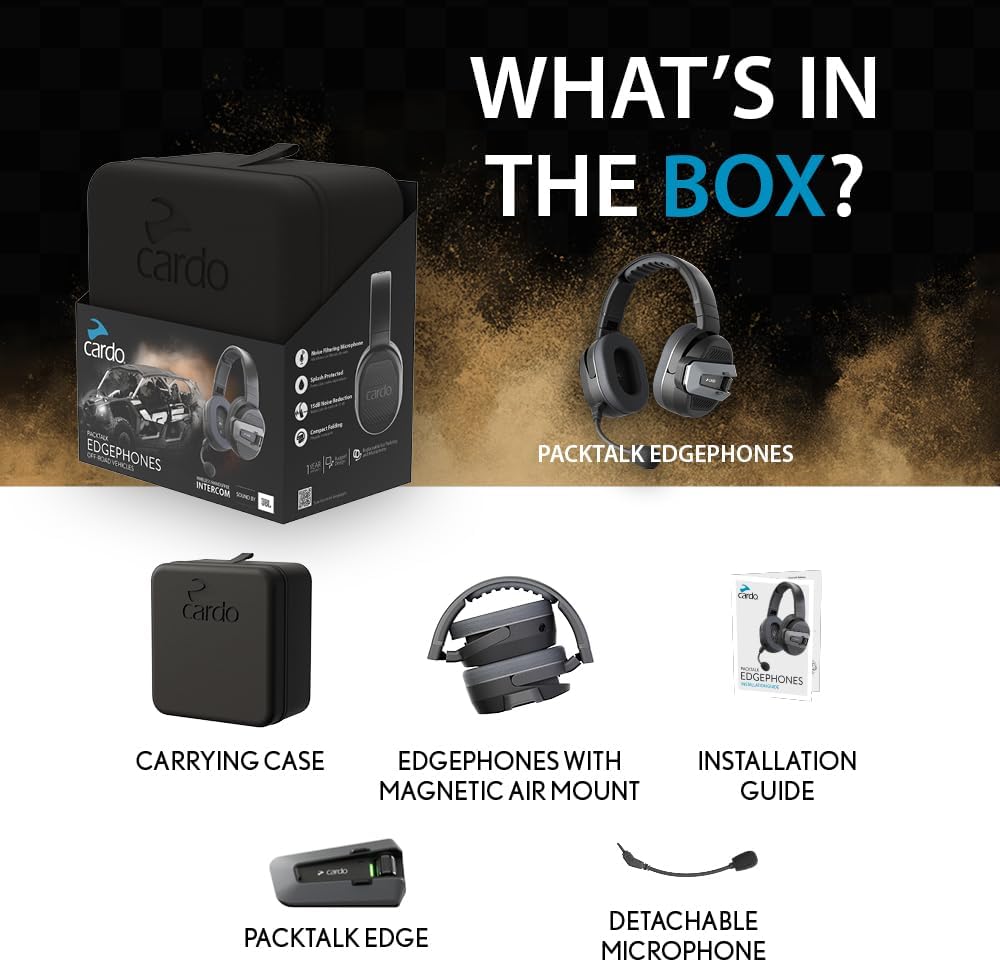
Figure 2.1: Included components of the Packtalk Edgephone ORV Single Pack
3. Setup
3.1 Initial Charging
Before first use, fully charge the Packtalk Edgephone unit. Connect the provided charging cable to the unit and a suitable power source. The LED indicator will show charging status.
3.2 Attaching the Communication Unit
The Packtalk Edge communication unit attaches to the headset via a one-click magnetic air mount. Align the unit with the designated slot on the headset and it will snap into place securely.
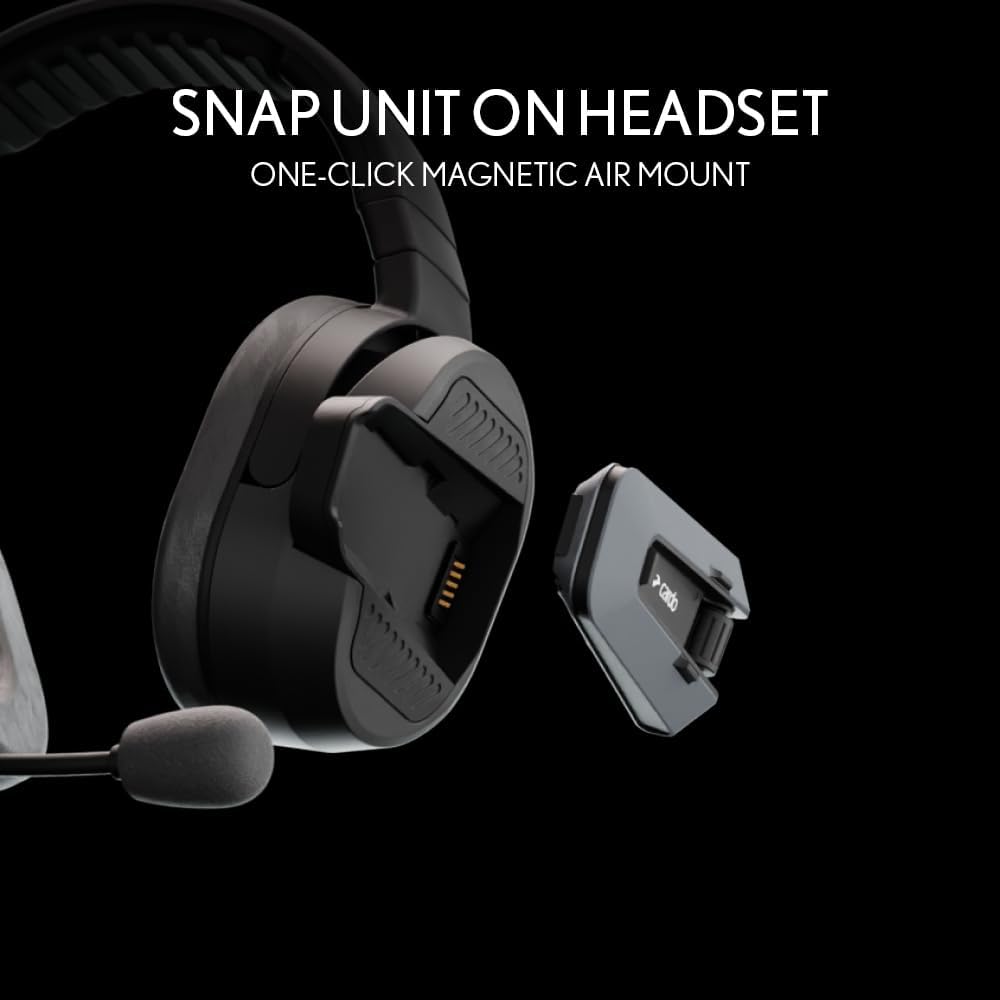
Figure 3.1: Magnetic Air Mount for the Packtalk Edge unit
3.3 Microphone Attachment
Attach the detachable boom microphone to the designated port on the headset. Ensure it is securely connected for optimal voice transmission.
3.4 Pairing and Connectivity
The Packtalk Edgephone uses Bluetooth for wireless communication. For optimal functionality and pairing, it is recommended to download the official Cardo Connect app from the Cardo website. Follow the in-app instructions for pairing your device with other Packtalk units or smartphones. Avoid using QR code scans from printed materials as they may lead to outdated applications.

Figure 3.2: No complex installation required for the headset
4. Operating Instructions
4.1 Power On/Off
Refer to the installation guide for specific button presses to power the unit on or off. Typically, this involves holding a main button for a few seconds.
4.2 Wireless Hands-Free Intercom
The Packtalk Edgephone provides wireless, hands-free intercom communication. Once paired, the system allows for continuous, always-on communication within your group, up to a 1-mile range. This system operates independently of cellular coverage.

Figure 4.1: Wireless Hands-Free Intercom
4.3 Freedom to Roam
The system allows users to move freely in and out of their vehicle while maintaining communication. This feature is beneficial for activities such as spotting for your group, as connectivity remains active.

Figure 4.2: Freedom to Roam with continuous connectivity
4.4 Communication in Challenging Environments
The Packtalk Edgephone is designed for use in various terrains and weather conditions, including sand, mud, and water. The unit is waterproof, dustproof, and mudproof. JBL-engineered 40mm high-definition speakers provide clear audio even in noisy environments, supported by an improved music processor and three audio profiles.

Figure 4.3: Communication in all terrains and weather

Figure 4.4: Clear sound in noisy environments with JBL audio
4.5 Controls
The device features media control and touch control methods. It also includes a built-in voice assistant for hands-free operation. Refer to the detailed installation guide for specific button functions and voice commands.
5. Maintenance
5.1 Cleaning
Despite its waterproof design, it is recommended to clean the headset and communication unit regularly. Use a damp cloth to wipe away dirt, mud, or dust. Avoid using harsh chemicals or abrasive materials. Ensure all ports are dry before charging.
5.2 Storage
When not in use, store the Packtalk Edgephone in its provided carrying case to protect it from physical damage and environmental elements. Store in a cool, dry place.
6. Troubleshooting
6.1 Pairing Issues
- Ensure the Cardo Connect app is downloaded from the official Cardo website, not through third-party QR codes or app stores directly, as this can lead to outdated versions.
- Restart both the Packtalk Edgephone unit and the device you are trying to pair with.
- Ensure both devices are in pairing mode.
- Check for any firmware updates for your Packtalk Edgephone via the Cardo Connect app.
6.2 Audio Quality Issues
- Ensure the microphone is securely attached and positioned correctly near your mouth.
- Adjust volume settings on both the headset and the connected device.
- Verify that the earpieces are properly seated over your ears for optimal sound and noise reduction.
6.3 Discomfort During Use
- The headset may feel tight initially. Allow for a break-in period.
- Adjust the headband for a comfortable fit.
6.4 Voice Delay
- A slight delay in voice communication (approximately 0.25 seconds) is inherent in some wireless intercom systems. This is generally normal operation.
7. Specifications
| Model Name | PACKTALK EDGEPHONES FOR ORV - SINGLE PACK |
| Item Model Number | PTHP0002 |
| Connectivity Technology | Wireless (Bluetooth) |
| Noise Control | Adaptive Noise Cancellation, 15 dB Noise Reduction |
| Audio Driver Type | Dynamic Driver (Sound by JBL) |
| Earpiece Shape | Over-ear |
| Control Method | Touch, Media Control, Built-In Voice Assistant |
| Water Resistance Level | Waterproof |
| Material | Plastic |
| Item Weight | 0.94 Kilograms (2.07 pounds) |
| Batteries | 1 Lithium Ion battery (included) |
| UPC | 828831844040 |
8. Warranty Information
The Cardo Packtalk Edgephone ORV Single Pack typically comes with a 1-year warranty. For detailed warranty terms and conditions, please refer to the official Cardo website or the warranty card included in your product packaging. Keep your proof of purchase for warranty claims.

Figure 8.1: Product packaging indicating 1-year warranty
9. Support
For further assistance, technical support, or to access the latest user guides and firmware updates, please visit the official Cardo Systems website:
You may also find helpful resources and FAQs on their support pages.
Related documentsPTHP0002


Ask a question about this manual
Ask about setup, troubleshooting, compatibility, parts, safety, or missing instructions. Manuals+ will review the question and use this page’s manual context to help answer it.