Introduction
This manual provides essential instructions for the safe and effective use of your Daikin Room Air Conditioner Wireless Remote Control, model ARC476A65. Please read this manual thoroughly before using the product and keep it for future reference.

Image: Daikin ARC476A65 Wireless Remote Control. This image displays the front view of the remote control, showing its buttons and display screen.
Setup
Battery Installation
- Open the battery compartment cover on the back of the remote control.
- Insert new batteries (typically AAA or AA, refer to the compartment for specific type) according to the polarity indicators (+ and -) inside the compartment. Ensure the positive (+) and negative (-) ends are aligned correctly.
- Close the battery compartment cover securely.
Note: Always replace all batteries at the same time with new ones of the same type. Do not mix old and new batteries or different types of batteries.
Operation
The Daikin ARC476A65 remote control is designed for specific Daikin room air conditioner models. Its functions include power on/off, temperature adjustment, mode selection (e.g., cool, heat, fan, dry), fan speed control, and timer settings. For detailed operation of specific features, please refer to the user manual of your Daikin air conditioner unit, as functions may vary by model.
Basic Functions
- Power Button: Press to turn the air conditioner ON or OFF.
- Temperature Adjustment: Use the ▲ and ▼ buttons to increase or decrease the temperature setting.
- Mode Selection: Press the "MODE" button to cycle through available operating modes (e.g., Cool, Heat, Fan, Dry, Auto).
- Fan Speed: Press the "FAN" button to adjust the fan speed (e.g., Low, Medium, High, Auto).
Ensure the remote control is pointed directly at the air conditioner's receiver when operating.
Maintenance
Battery Replacement
When the remote control's display becomes dim or the unit does not respond to commands, it is time to replace the batteries. Follow the battery installation steps outlined in the Setup section.
Cleaning
Wipe the remote control with a soft, dry cloth. Do not use liquid cleaners or abrasive materials, as they may damage the surface or internal components.
Troubleshooting
If your remote control is not working or responding, please check the following common issues:
Common Troubleshooting Steps
- Is the remote control compatible with your appliance?
This remote control is only compatible with specific Daikin air conditioner models. Please verify the model number of your air conditioner against the list of applicable models for this remote control. - Are the batteries depleted?
Replace the batteries with new ones. - Are the battery polarities (+/-) inserted correctly?
Ensure the batteries are inserted with the correct orientation as indicated inside the battery compartment. - Are there any electronic devices, audio equipment, or cooking appliances nearby?
To avoid radio wave interference from other devices that use radio waves (e.g., microwave ovens, cordless/wireless devices), try turning off the interfering device or moving the remote control as far away as possible from other devices and then test it.
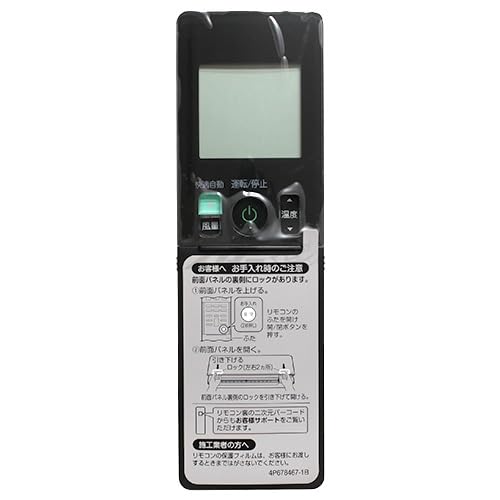
Image: Troubleshooting guide. This image illustrates common checks if the remote control is not functioning, including battery status and potential interference.
Specifications
| Model Number | ARC476A65 |
| Brand | Daikin |
| External Dimensions (W x L x H) | 59 mm x 189 mm x 24 mm |
| Applicable Air Conditioner Models | F223ATSSK, S713ATSVK, F283ATSSK, F363ATSSK, F403ATSPK, F403ATSVK, F563ATSPK, F563ATSVK, F633ATSPK, F633ATSVK, F713ATSPK, F713ATSVK, S223ATSSK, S253ATSSK, S283ATSSK, S363ATSSK, S403ATSPK, S403ATSVK, S563ATSPK, S563ATSVK, S633ATSPK, S633ATSVK, S713ATSPK, F253ATSSK |
Warranty & Support
Specific warranty information for this remote control is not provided in the product data. For warranty details, please refer to the documentation included with your Daikin air conditioner unit or contact Daikin customer support directly.
For further assistance or inquiries, please visit the official Daikin store or contact their customer service:
- Daikin Official Store: Daikin on Amazon.co.jp
- Customer Service: Please refer to the contact information provided in your air conditioner's main manual or Daikin's official website.
Disclaimer: Please note that returns or exchanges due to customer convenience are not accepted for this product as it is an order-to-order item from the manufacturer. Cooling-off period regulations do not apply. Compensation for construction delays caused by product delays is not provided. Images are for reference; products are shipped according to the model number. Your understanding is appreciated.


