
Universal Audio GPM-LION
Universal Audio Lion '68 Super Lead Amp Pedal Instruction Manual
Model: GPM-LION
Introduction
The Universal Audio Lion '68 Super Lead Amp Pedal is a compact stompbox designed to deliver authentic late-'60s British 100-watt tube amplifier tones. Utilizing powerful dual-engine processing and world-class UAD modeling, this pedal provides the distinct sounds of three classic plexi amplifiers, offering a range from clean tones to aggressive breakup and hot-rodded distortion. It is engineered to bring iconic rock sounds to your setup, whether for live performance, studio recording, or practice.
Key Features
- Authentic Tube Amp Emulation: Powerful UAFX dual-engine delivers the most authentic late-'60s British 100-watt tube sound ever placed into a stompbox.
- Multiple Amp Models: Authentic emulations of three legendary high-powered tube amplifiers — Super Lead, Super Bass, and "Brown" models.
- Integrated Speaker Cabinet Emulations: Includes world-class speaker cabinet, mic, and room tones derived from the award-winning OX Amp Top Box.
- Customization Options: Features "hot rod" amp and speaker mods, plus free additional downloadable speaker cabinets and mics upon registration.
- Flexible Usage: Bypass cabinet/mic emulations to use the pedal in front of your amplifier for added tonal flavor and overdrive sounds.
- UAFX Mobile App Integration: The UAFX mobile app allows customization of footswitches, tweaking of noise gate settings, recalling and archiving presets, unlocking additional features, and downloading artist presets.
- Durable Construction: Timeless UA design and craftsmanship, built to last decades.
Setup Guide
Follow these steps to set up your Universal Audio Lion '68 Super Lead Amp Pedal:
- Power Connection: Connect a 9VDC power supply (not included) to the 9VDC input jack on the rear of the pedal. Ensure the power supply meets the pedal's requirements for stable operation.
- Input Connection: Connect your guitar or other instrument to the IN 1/MONO input jack. For stereo operation, connect a second instrument or stereo source to the IN 2/STEREO input jack.
- Output Connection: Connect the OUT 1/MONO output jack to your amplifier, audio interface, or mixer. For stereo output, connect the OUT 2/STEREO output jack as well.
- USB Connection (Optional): For firmware updates and advanced control via the UAFX mobile app, connect a USB-C cable from the pedal's USB port to your computer or mobile device.
- Initial Power On: Once all connections are secure, apply power to the pedal. The status LEDs will illuminate.

Figure 1: Rear panel connections of the Lion '68 pedal, including 9VDC power, mono/stereo inputs and outputs, and a USB port for connectivity.
Operating Instructions
The Lion '68 pedal offers a range of controls to shape your tone. Familiarize yourself with the layout and functions:
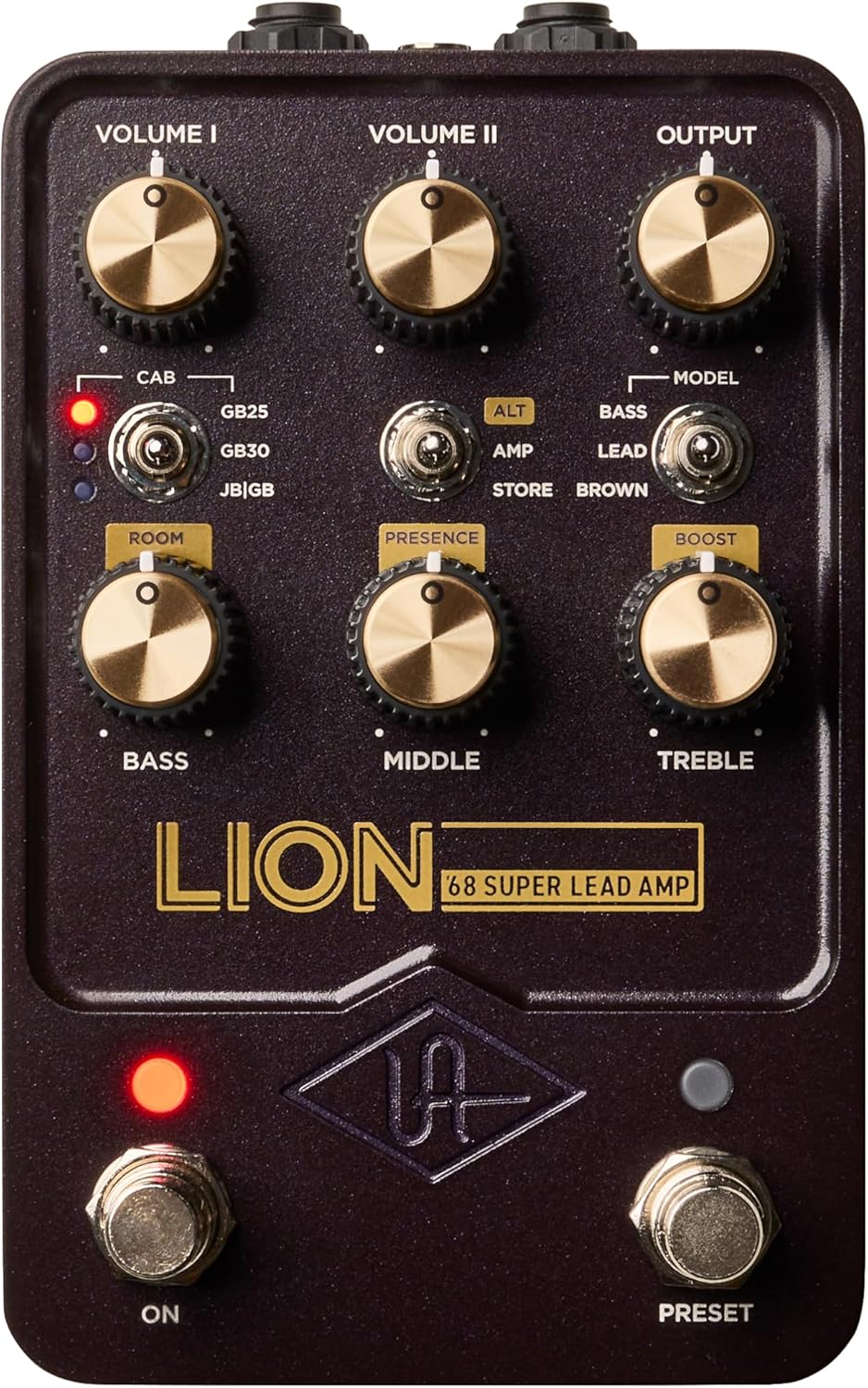
Figure 2: Front panel controls of the Lion '68 pedal, featuring Volume I, Volume II, Output, EQ knobs, and various switches.
Controls and Functions:
| Control | Function |
|---|---|
| VOLUME I | Controls the input gain for the first channel, affecting overall drive and saturation. |
| VOLUME II | Controls the input gain for the second channel, providing additional gain staging and tonal variations. |
| OUTPUT | Adjusts the overall output level of the pedal. |
| BASS | Adjusts the low-frequency response of the emulated amplifier. |
| MIDDLE | Adjusts the mid-range frequency response, crucial for shaping the character of the tone. |
| TREBLE | Adjusts the high-frequency response, controlling brightness and presence. |
| PRESENCE | Controls the very high-frequency response, adding clarity and cut. |
| BOOST | Engages an additional gain boost for increased saturation and volume. |
| CAB Switch | Selects between different speaker cabinet emulations:
|
| MODEL Switch | Selects between the three primary amplifier models:
|
| ALT Switch | Activates alternate functions for certain knobs (e.g., Room, Store). Refer to the UAFX app for full details on alternate functions. |
| ON Footswitch | Toggles the pedal effect on or off. |
| PRESET Footswitch | Cycles through saved presets. Presets can be managed and customized via the UAFX mobile app. |
Using the UAFX Mobile App:
The UAFX Control mobile app (available for iOS and Android) significantly expands the functionality of your Lion '68 pedal. Connect your pedal via Bluetooth to:
- Customize footswitch assignments.
- Tweak advanced parameters like noise gate settings.
- Recall and archive your custom presets.
- Unlock additional features and download new speaker cabinets/mics.
- Download artist presets for instant access to professional tones.
- Perform firmware updates to ensure optimal performance and access new features.

Figure 3: The Lion '68 pedal integrated into a larger setup, demonstrating its compact size and versatility.
Maintenance
Proper maintenance ensures the longevity and optimal performance of your Lion '68 pedal:
- Cleaning: Use a soft, dry cloth to clean the pedal's exterior. Avoid abrasive cleaners, solvents, or excessive moisture, which can damage the finish and internal components.
- Storage: Store the pedal in a cool, dry place away from direct sunlight, extreme temperatures, and high humidity. When not in use for extended periods, disconnect all cables.
- Firmware Updates: Regularly check for and install firmware updates via the UAFX mobile app or Universal Audio's website. Updates often include performance improvements, bug fixes, and new features.
- Cable Management: Ensure all cables are in good condition and properly connected. Avoid bending cables sharply or placing heavy objects on them.
Troubleshooting
If you encounter issues with your Lion '68 pedal, refer to the following common problems and solutions:
| Problem | Possible Cause / Solution |
|---|---|
| No Sound Output |
|
| Digital Clicks or Unwanted Noise |
|
| Noise Gate Issues / Unexpected Behavior |
|
| Volume Dropouts or Random Distortion Increase |
|
| Difficulty Connecting to UAFX App |
|
Specifications
| Attribute | Detail |
|---|---|
| Model Number | GPM-LION |
| Manufacturer | Universal Audio |
| Product Dimensions | 4.72 x 7.09 x 3.15 inches (12 x 18 x 8 cm) |
| Item Weight | 1.25 pounds (567 grams) |
| Compatible Devices | Guitar |
| Output Wattage | 100 Watts (emulated) |
| Color | Black |
| Power Requirement | 9VDC, center-negative (power supply not included) |
Warranty and Support
Universal Audio products are designed for reliability and performance. For detailed warranty information, please refer to the warranty card included with your product or visit the official Universal Audio website. For technical support, product registration, or service inquiries, please contact Universal Audio customer support through their website or designated support channels. Keeping your product registered and firmware updated ensures access to the latest features and support.
Ask a question about this manual
Ask about setup, troubleshooting, compatibility, parts, safety, or missing instructions. Manuals+ will review the question and use this page’s manual context to help answer it.