
Introduction
Thank you for choosing the GP ReCyko Speed Charger M451 (USB). This charger is designed for efficient and safe charging of NiMH AA and AAA rechargeable batteries. Please read this manual carefully before use to ensure optimal performance and safety.

Image: The GP ReCyko Speed Charger M451, a compact USB charger, shown with four AAA rechargeable batteries inserted.
Safety Information
To prevent personal injury and property damage, please observe the following safety precautions:
- Only charge NiMH rechargeable batteries. Do not attempt to charge alkaline, carbon-zinc, or any other type of non-rechargeable batteries, as this may lead to leakage, rupture, or explosion.
- Do not short-circuit the battery terminals.
- Do not disassemble or modify the charger or batteries.
- Keep the charger and batteries away from water, moisture, and extreme temperatures.
- Ensure proper ventilation during charging.
- The charger features an automatic shut-off timer to prevent overcharging and overheating, enhancing safety.
- Supervise children when they are near the charger.
- Unplug the charger from the power source when not in use.
Package Contents
The GP ReCyko Speed Charger M451 package typically includes:
- 1 x GP ReCyko Speed Charger M451 (USB)
- 1 x USB Charging Cable
- 4 x GP ReCyko AAA NiMH 950 mAh Rechargeable Batteries
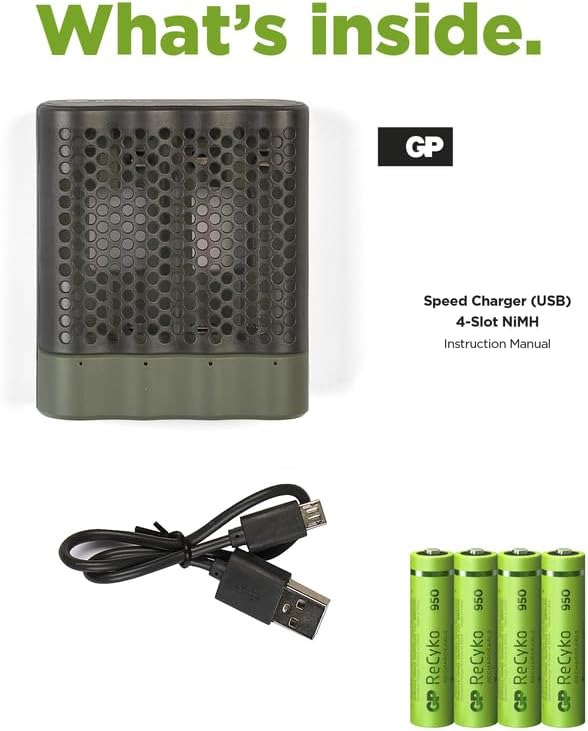
Image: A visual representation of the package contents, including the charger, a USB cable, and four GP ReCyko AAA batteries.
Product Features
- 4 Charging Slots: Capable of charging up to four AA or AAA NiMH batteries simultaneously.
- USB Powered: Conveniently powered via any standard USB port.
- LED Indicators: Individual LED indicators for each charging slot display charging status and error alerts.
- Fast Charging: Charges batteries in approximately 3 hours (for 950 mAh AAA batteries).
- Safety Features: Equipped with an automatic shut-off timer to prevent overcharging and overheating.
- Compact and Lightweight: Designed for portability and ease of use.
Setup
- Connect the Charger: Insert the small end of the USB charging cable into the charger's USB port.
- Connect to Power: Plug the larger end of the USB cable into a compatible USB power source (e.g., a computer USB port, a USB wall adapter, or a power bank).
- Insert Batteries: Open the charger cover and insert 2 or 4 NiMH AA or AAA rechargeable batteries into the charging slots. Ensure correct polarity (+ and - ends match the markings in the charger). The charger is designed to charge batteries in pairs.
Operating Instructions
Once batteries are correctly inserted and the charger is connected to a power source, the charging process will begin automatically.
- Charging Indication: The LED indicators above each battery slot will illuminate to show the charging status. A steady green light typically indicates active charging.
- Charging Completion: When charging is complete, the LED indicator may change color or turn off, depending on the specific model's design. For this model, a full charge is typically achieved in approximately 3 hours for the included 950 mAh AAA batteries.
- Error Detection: If a non-rechargeable battery or a faulty battery is inserted, the corresponding LED indicator may flash or display a different color (e.g., red) to alert the user. Remove any non-rechargeable or faulty batteries immediately.

Image: Close-up of the charger showing the LED light indicators, which display charging status and alert for single-use or bad batteries.
After charging, disconnect the charger from the power source and remove the fully charged batteries.
Maintenance
- Cleaning: Use a soft, dry cloth to clean the charger. Do not use liquid cleaners or solvents.
- Storage: Store the charger and batteries in a cool, dry place away from direct sunlight and extreme temperatures.
- Battery Care: For optimal battery life, avoid fully discharging NiMH batteries before recharging.
Troubleshooting
| Problem | Possible Cause | Solution |
|---|---|---|
| LED indicators do not light up. | Charger not connected to power, faulty USB cable, or no batteries inserted. | Ensure USB cable is securely connected to both the charger and a working USB power source. Insert batteries. Try a different USB cable or power source. |
| LED indicator flashes or shows a red light. | Non-rechargeable battery inserted, faulty battery, or incorrect battery polarity. | Remove the battery. Check if it is a NiMH rechargeable battery. Ensure correct polarity. If the issue persists, the battery may be faulty and should be replaced. |
| Batteries are not fully charged after 3 hours. | Batteries have higher capacity than 950 mAh, or batteries are very old/damaged. | Charging time varies with battery capacity. Higher capacity batteries will take longer. Consider replacing very old or damaged batteries. |
Specifications

Image: The compact size of the GP ReCyko Speed Charger M451, highlighting its portability with approximate dimensions of 6.8 cm by 7.8 cm.
| Feature | Detail |
|---|---|
| Brand | GP |
| Model Number | GP Speed USB Charger 4 ore (M451) |
| Compatible Battery Types | NiMH AA, NiMH AAA |
| Number of Charging Slots | 4 |
| Input Power | USB (Type-A) |
| Approximate Charge Time | 3 hours (for 950 mAh AAA batteries) |
| Output Current | 950 mA |
| Special Features | Lightweight, Automatic Shut-off Timer |
| Weight | 184 Grams (charger only, approximate) |
| Color | White (charger body) |


