
UMAY CW1
UMAY Under Desk Treadmill with Incline
Model: CW1
Introduction
This manual provides essential information for the safe and effective operation, maintenance, and troubleshooting of your UMAY Under Desk Treadmill with Incline. Please read this manual thoroughly before initial use and retain it for future reference.

Image: The UMAY Under Desk Treadmill with Incline, showcasing its compact design and integrated incline feature.
Important Safety Information
To reduce the risk of serious injury, read all important precautions and instructions in this manual before using the treadmill. UMAY assumes no responsibility for personal injury or property damage sustained by or through the use of this product.
- Always place the treadmill on a level surface.
- Keep children and pets away from the treadmill during operation.
- Do not operate the treadmill if it has a damaged cord or plug, or if it is not working properly.
- Wear appropriate exercise clothing and athletic shoes.
- Do not use the treadmill outdoors or in damp areas.
- Always hold the handrails when starting or stopping the treadmill.
- Ensure the safety key is properly attached before starting your workout.
Package Contents
Verify that all components are present before assembly.
- UMAY Under Desk Treadmill Unit
- Power Cord
- Remote Control
- Safety Key
- User Manual (this document)
- Assembly Tools (if applicable)
Setup
The UMAY Under Desk Treadmill is designed for minimal assembly. Follow these steps for initial setup:
- Unpacking: Carefully remove all components from the packaging.
- Placement: Place the treadmill on a firm, level surface, ensuring adequate space around it for safe operation.
- Unfolding (if applicable): If the handle is folded, gently lift and lock it into the upright position. Refer to the image below for the fully foldable design.
- Power Connection: Connect the power cord to the treadmill's power input and then to a grounded electrical outlet.
- Safety Key: Attach the safety key to the designated slot on the console. The treadmill will not operate without the safety key in place.

Image: Illustration of the UMAY treadmill's fully foldable design, highlighting its compact dimensions (105cm/41inch length, 50cm/20inch width, 90cm/36inch height when folded) and ease of movement and convenient storage.
Operating Instructions
Familiarize yourself with the control panel and remote control before beginning your workout.
Starting and Stopping
- Ensure the safety key is in place.
- Press the "Start" button on the console or remote control. The treadmill will begin at a low speed.
- To stop, press the "Stop" button. For emergency stops, pull the safety key.
Speed Adjustment
The treadmill offers dual speed control via console buttons and the remote control. The speed can be adjusted up to 12 km/h.
- Use the "+" and "-" buttons on the console or remote to increase or decrease speed incrementally.
- Quick buttons "3" and "6" are available to instantly set the speed to 3 km/h and 6 km/h, respectively.

Image: Close-up of the treadmill's control panel and remote, illustrating the two ways to adjust speeds and display metrics like Distance, Time, Speed, and Calories.
Incline Function
The treadmill features an adjustable incline function to simulate hill training, increasing workout intensity and calorie burn.
- Adjust the incline manually or via the console/remote (if applicable to your model).
- Increasing the incline by 30%-50% can significantly accelerate calorie burn and strengthen leg muscles.

Image: Visual representation of the treadmill's 9% incline feature, comparing calorie burn at 0% incline (220 Kcal/H) versus 9% incline (340 Kcal/H).
Workout Modes (Working, Walking, Running)
The treadmill supports various activity levels:
- Working: 1-3 km/h, ideal for light activity while working at a standing desk.
- Walking: 4-6 km/h, suitable for brisk walking.
- Running: 7-12 km/h, for higher intensity cardio workouts.

Image: A collage demonstrating the treadmill's versatility for different activities: a person working at a desk while walking (1-3 km/h), a person walking (4-6 km/h), and a person running (7-12 km/h).
Maintenance
Regular maintenance ensures the longevity and optimal performance of your treadmill.
- Cleaning: Wipe down the treadmill after each use with a damp cloth to remove sweat and dust. Do not use abrasive cleaners.
- Belt Lubrication: The running belt may require periodic lubrication. Refer to the specific instructions provided with your treadmill's lubrication kit or contact customer support for guidance.
- Belt Tension and Alignment: Check the running belt tension and alignment regularly. Adjust as needed according to the instructions in the full product manual or by contacting customer support.
- Storage: When not in use, the treadmill can be folded for convenient storage. Store in a dry, cool place away from direct sunlight.
Troubleshooting
If you encounter issues with your treadmill, refer to the following common problems and solutions:
| Problem | Possible Cause | Solution |
|---|---|---|
| Treadmill does not start. | Power cord not connected; Safety key not in place; Power switch off. | Ensure power cord is securely plugged in; Insert safety key fully; Turn on power switch. |
| Running belt slips or hesitates. | Belt too loose; Insufficient lubrication. | Adjust belt tension; Lubricate the running belt. |
| Unusual noise during operation. | Loose components; Motor issue; Belt friction. | Check for loose screws and tighten; Contact customer support if noise persists. |
| Display not working. | Loose connection; Power issue. | Check all connections; Ensure stable power supply. |
If the problem persists after attempting these solutions, please contact UMAY customer support.
Specifications
Key technical specifications for the UMAY Under Desk Treadmill (Model: CW1).
- Model: CW1
- Color: Black&red
- Material: Aluminium
- Product Dimensions (Unfolded): 124D x 58W x 13H centimetres
- Product Dimensions (Folded): 120 x 56 x 10 cm
- Weight: 23 kg
- Maximum Speed: 12 Kilometers per Hour
- Motor: High-performance brushless motor (67% more power, < 60 dB noise)
- Features: Foldable, Incline, Step Counter
- Shock Absorption: Precision diamond-textured running belt, eight-layer shock-absorbing mat, 6 shock pads.
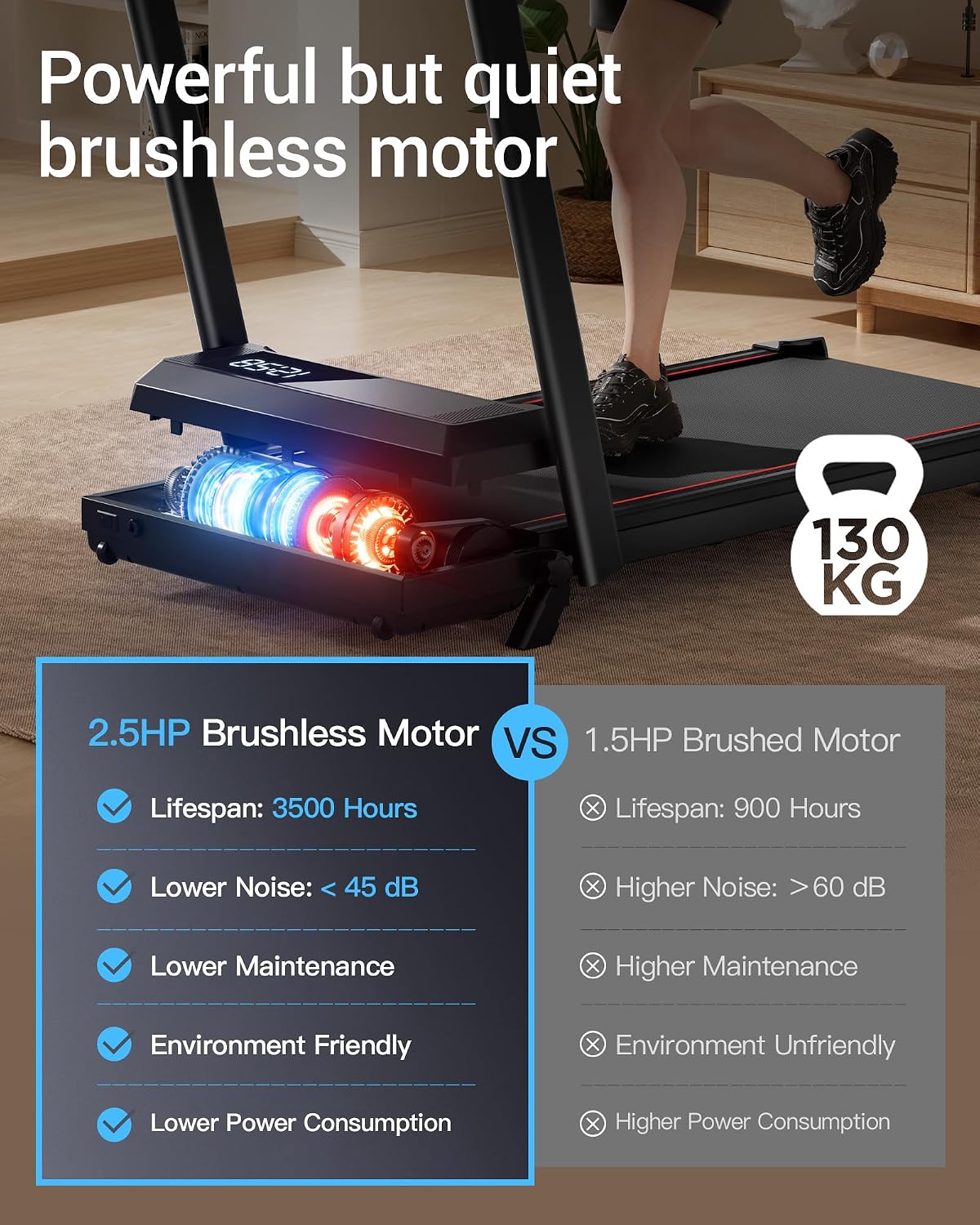
Image: Comparison highlighting the benefits of the 2.5HP Brushless Motor (3500 hours lifespan, <45 dB noise, lower maintenance, environment friendly, lower power consumption) over a 1.5HP Brushed Motor.

Image: Diagram illustrating the treadmill's advanced shock absorption system, featuring 6 shock pads and a 7-layer running belt designed to reduce stress on knees.
Warranty and Support
For warranty information, product registration, or technical support, please refer to the warranty card included with your product or visit the official UMAY website. Please have your model number (CW1) and purchase date available when contacting support.
Related documentsCW1


Ask a question about this manual
Ask about setup, troubleshooting, compatibility, parts, safety, or missing instructions. Manuals+ will review the question and use this page’s manual context to help answer it.