
ANCTOR HK-KBF-25
ANCTOR King Size Bed Frame User Manual
Model: HK-KBF-25
Brand: ANCTOR
1. Introduction and Overview
The ANCTOR King Size Bed Frame is designed to provide a comfortable and highly functional sleeping solution. This upholstered platform bed features an integrated storage headboard with a convenient charging station, along with three spacious under-bed drawers. Its sturdy construction eliminates the need for a box spring, offering a modern and efficient design for your bedroom.
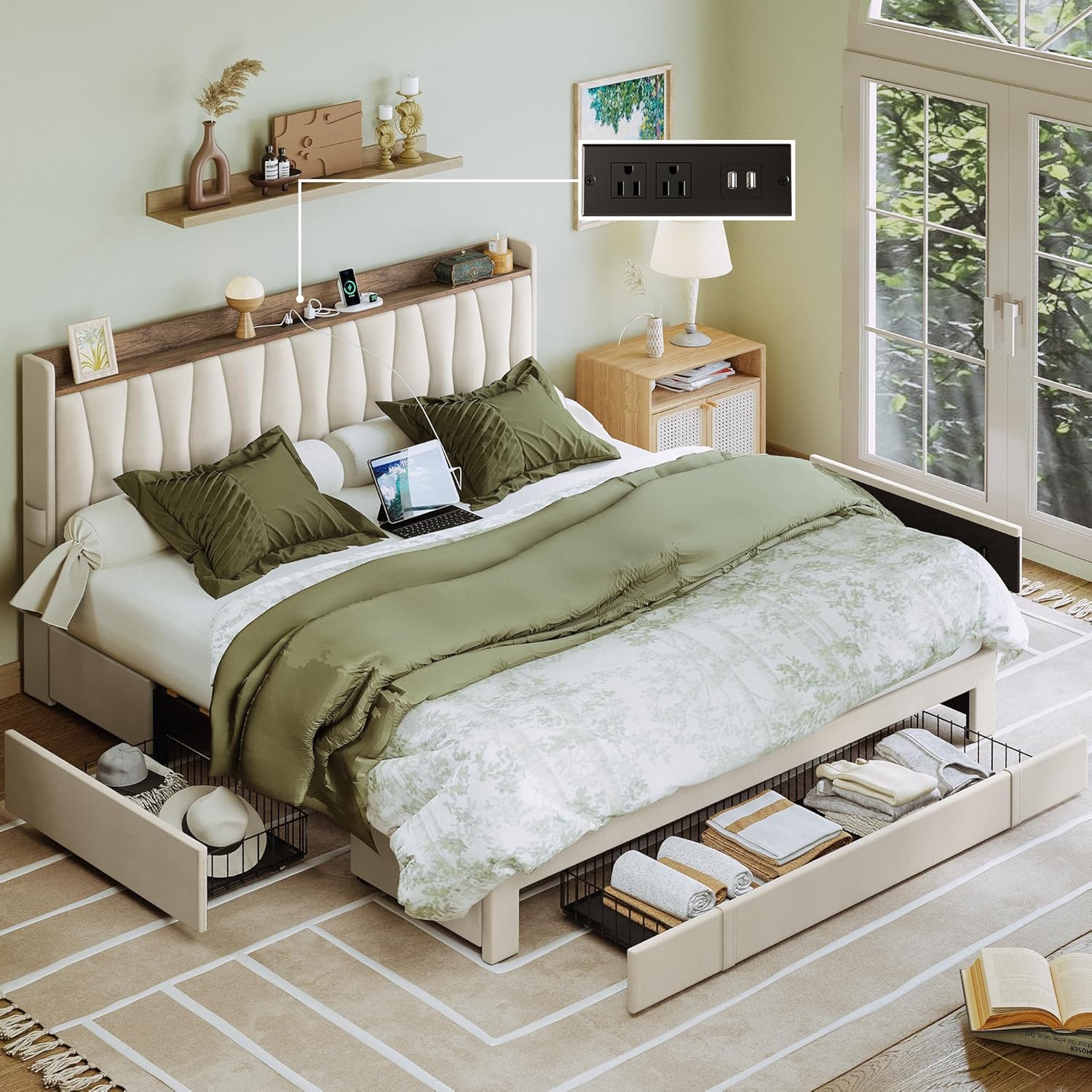
Figure 1.1: ANCTOR King Size Bed Frame with integrated storage and charging station.
2. Safety Information
- Weight Capacity: Do not exceed the maximum weight capacity of 1300 lbs (approximately 590 kg) for the bed frame.
- Assembly: Assemble the bed frame on a soft, clean surface (e.g., carpet or cardboard) to prevent scratching or damage to the product and your floor.
- Tools: Use only the tools provided or recommended in the assembly instructions. Do not overtighten screws, as this may damage the components.
- Children and Pets: Keep small parts and packaging materials away from children and pets during assembly to prevent choking hazards.
- Electrical Safety: Ensure the charging station is properly connected to a suitable power outlet. Do not overload the electrical outlets. Disconnect power before cleaning or if any damage is suspected.
- Stability: Ensure all connections are securely tightened before using the bed. Periodically check and re-tighten all bolts and screws to maintain stability.
3. Package Contents
Your ANCTOR King Size Bed Frame comes conveniently packed in a single box, containing all necessary components for assembly. Please verify that all parts listed below are present and undamaged before beginning assembly.
| Component | Description |
|---|---|
| Headboard | Upholstered headboard with integrated storage shelf and charging station. |
| Bed Frame Components | Metal frame parts, side rails, and support legs. |
| Slats | Twelve thickened wooden slats for mattress support, with Velcro design for easy installation. |
| Drawers (x3) | Steel drawers with rolling wheels and locking mechanism for under-bed storage. |
| Power Outlet Unit | Integrated unit with 110V/12A AC outlets and 5V/2A USB ports. |
| Hardware Pack | All necessary screws, bolts, washers, and assembly tools. |
| Installation Manual | Detailed step-by-step assembly instructions. |
4. Setup and Assembly
The ANCTOR King Size Bed Frame is designed for easy and quick assembly, typically manageable by one person. Refer to the included detailed Installation Manual for step-by-step visual guides and specific instructions for each component.
- Preparation: Clear an adequate space for assembly. Lay out all components and hardware on a soft, clean surface to prevent damage.
- Headboard Assembly: Begin by assembling the headboard components, including the upholstered sections and the wooden shelf. Ensure the power outlet unit is correctly installed as per the manual.
- Frame Construction: Assemble the main metal bed frame, connecting the side rails and central support. The sturdy metal frame and central cross design provide robust support.
- Slat Installation: Attach the twelve thickened wooden slats. The Velcro design simplifies this process, ensuring secure and noise-free mattress support. An EVA silent strip is integrated between the bed and the iron frame to reduce frictional noise.
- Drawer Assembly: Assemble the three steel drawers. These are designed with rolling wheels for easy movement and a special lock design to keep them in place under the bed.
- Final Checks: Once assembled, ensure all screws and bolts are securely tightened. The bed frame is suitable for 8" to 12" mattresses and does not require a box spring.

Figure 4.1: Product dimensions and drawer details for assembly reference.

Figure 4.2: Illustration of the heavy frame structure and easy slat installation.
5. Operating Instructions
5.1. Using the Storage Headboard and Charging Station
The integrated headboard provides a convenient shelf for personal items and a built-in charging station to keep your devices powered.
- Shelf Use: Place items such as glasses, books, or decorative pieces on the headboard's top shelf for easy access.
- Charging Devices: Connect your electronic devices to the two 110V/12A AC outlets or the two 5V/2A USB ports located on the headboard. Ensure the bed frame's power cord is plugged into a wall outlet.
- Side Pockets: Utilize the small pockets on both sides of the headboard for additional storage of smaller items like remote controls or phones.

Figure 5.1: Close-up of the charging station with AC outlets and USB ports.
5.2. Utilizing the Under-Bed Storage Drawers
The three steel drawers provide ample space for storing bedding, clothing, or other personal belongings, helping to keep your room tidy.
- Accessing Drawers: Gently pull the drawers out from under the bed using the integrated handles. The rolling wheels ensure smooth operation on various floor surfaces.
- Securing Drawers: The special lock design allows the drawers to stay securely in place when pushed in, preventing them from rolling out unintentionally.
- Placement: The drawers are independent and can be positioned as needed, allowing flexibility for nightstands or other furniture.

Figure 5.2: View of the bed frame with under-bed storage drawers pulled out.
6. Maintenance
Regular maintenance will help prolong the life and appearance of your ANCTOR bed frame.
- Cleaning Upholstery: For general cleaning, gently wipe the upholstered surfaces with a clean, damp cloth. For spills, blot immediately with a clean, dry cloth. Avoid harsh chemicals or abrasive cleaners.
- Frame Cleaning: Wipe metal and wooden parts with a soft, dry cloth.
- Hardware Check: Periodically (e.g., every 3-6 months) check all bolts, screws, and connections to ensure they are tight. Re-tighten if necessary to maintain the bed's stability and prevent squeaks.
- Drawer Maintenance: Keep the drawer wheels free of debris to ensure smooth operation.
7. Troubleshooting
If you encounter any issues with your bed frame, please refer to the common solutions below. If the problem persists, contact customer support.
| Problem | Possible Cause | Solution |
|---|---|---|
| Bed frame is noisy/squeaks. | Loose connections; insufficient lubrication; missing EVA silent strip. | Ensure all bolts and screws are tightly secured. Verify the EVA silent strip is correctly placed between the slats and frame. |
| Drawers do not slide smoothly. | Obstruction under the bed; dirty wheels; misaligned drawer. | Check for any objects obstructing the drawer path. Clean the wheels. Ensure the drawer is properly aligned and not overloaded. |
| Charging station not working. | Power cord not plugged in; faulty outlet; device issue. | Verify the bed frame's power cord is securely plugged into a functional wall outlet. Test the wall outlet with another device. Ensure your device's charging cable is working. |
| Missing parts during assembly. | Packaging error; lost during unpacking. | Carefully check all packaging materials. If parts are still missing, contact ANCTOR customer support immediately with your purchase details. |
8. Specifications
| Attribute | Detail |
|---|---|
| Size | King |
| Product Dimensions (L x W x H) | 87.4"L x 78"W x 46"H |
| Special Features | No Box Spring Needed, Storage Drawer, USB Port |
| Color | Beige |
| Finish Type | Unfinished (frame components) |
| Included Components | Drawer, Headboard, Installation Manual, Slat |
| Compatible Mattress Size | 8-12" thickness recommended |
| Brand | ANCTOR |
| Assembly Required | Yes |
| Ground To Item Distance | 4.7 Inches |
| Item Weight | 119 pounds |
| Maximum Weight Capacity | 1300 lbs |
9. Warranty and Support
ANCTOR is committed to providing high-quality products and excellent customer service. If you have any questions regarding the quality of the product, assembly, or require assistance, please do not hesitate to contact us.
Our customer service team aims to provide a solution within twenty-four hours. Please refer to your purchase documentation for specific warranty details and contact information, or reach out via the retailer's platform where you purchased the product.
For direct support, you may visit the ANCTOR Store on Amazon: ANCTOR Store
Related documentsHK-KBF-25

Ask a question about this manual
Ask about setup, troubleshooting, compatibility, parts, safety, or missing instructions. Manuals+ will review the question and use this page’s manual context to help answer it.