1. Introduction
Thank you for choosing the Electrolux Pure 500 EPO50351SW Air Purifier. This device is designed to improve your indoor air quality by filtering out various airborne particles and pollutants. Please read this manual carefully before using the appliance to ensure safe and efficient operation.
The Electrolux Pure 500 features a 4-stage filtration system, including a HEPA filter and active carbon, to capture up to 99.97% of particles as small as 0.3 micrometers, and neutralize bacteria and viruses.
2. Safety Information
Always follow basic safety precautions when using electrical appliances to reduce the risk of fire, electric shock, or injury.
- Do not operate the appliance with a damaged cord or plug.
- Keep the air purifier away from water or other liquids.
- Ensure the air inlet and outlet are not blocked.
- Do not insert objects into any openings.
- Unplug the appliance before cleaning or performing any maintenance.
- This appliance is for indoor use only.
- Keep out of reach of children and pets.
3. Package Contents
Verify that all items are present in the packaging:
- Electrolux Pure 500 Air Purifier Unit
- 4-Stage Filter (pre-installed or separate)
- Power Cord
- User Manual
4. Setup
4.1 Unpacking and Placement
- Carefully remove the air purifier from its packaging.
- Place the unit on a firm, level surface. Ensure there is at least 30 cm (12 inches) of clear space around the air inlet and outlet for optimal airflow.
- Avoid placing the unit near heat sources, direct sunlight, or in areas with high humidity.

Image: The Electrolux Pure 500 Air Purifier, a compact and modern device, shown in a living room environment, demonstrating its discreet presence.
4.2 Filter Installation
The 4-stage filter may come pre-installed or require installation. Refer to the diagram below for filter structure.
- Unscrew the bottom cover of the air purifier.
- Remove the filter from its protective plastic packaging.
- Insert the filter into the unit, ensuring it is seated correctly.
- Replace and secure the bottom cover.

Image: An exploded view illustrating the four distinct layers of the air purifier's filter system: pre-filter, HEPA filter, active carbon filter, and an anti-bacterial/viral layer.
4.3 Power Connection
Plug the power cord into the designated port on the air purifier, then connect it to a suitable electrical outlet.
4.4 Initial Power-On and App Connection
Upon first power-on, the unit may enter a setup mode. For smart features, download the Electrolux app from your device's app store and follow the in-app instructions to connect your air purifier. This enables smart programs, voice control, and personalized settings.

Image: A smartphone screen displaying the Electrolux app interface, showing a graph of indoor air quality data over time, indicating a 'Very good' status.
5. Operating Instructions
5.1 Control Panel Overview
The control panel is located on the top of the unit.
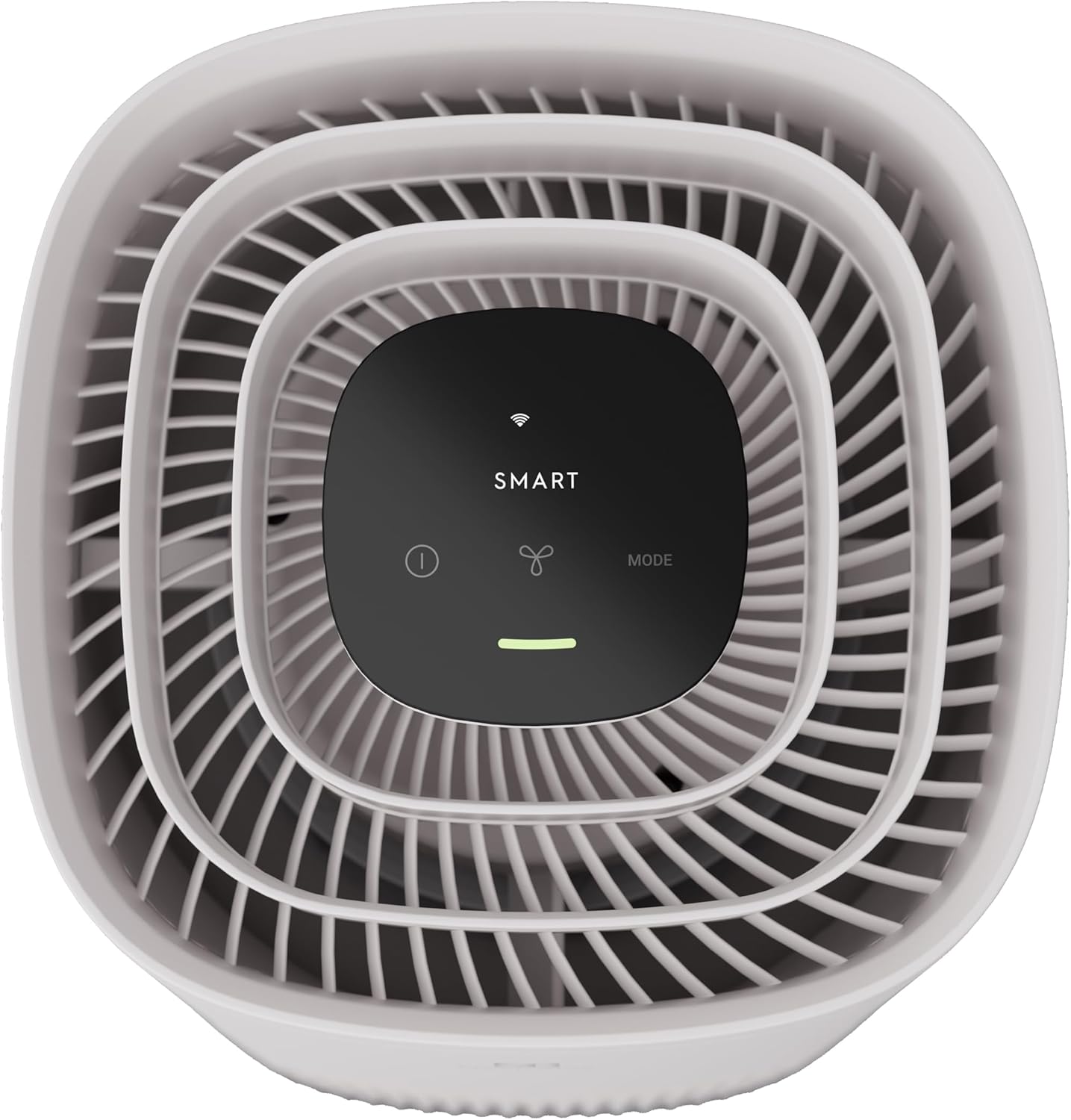
Image: A top-down view of the Electrolux Pure 500 Air Purifier, highlighting its minimalist control panel with touch-sensitive buttons for power, fan speed, and mode selection, along with a 'SMART' indicator.
5.2 Power On/Off
Press the power button (usually indicated by a circle with a vertical line) on the control panel to turn the unit on or off.
5.3 Mode Selection
The air purifier offers various operating modes:
- Smart Mode: The unit automatically adjusts fan speed based on detected air quality.
- Silent Mode: Operates at a low noise level (approximately 20dB), suitable for use during sleep.
- Manual Fan Speed: Allows you to manually select the desired fan speed.
Use the 'MODE' button or the fan icon on the control panel to cycle through available modes or adjust fan speed. The spiral air outlet design ensures efficient circulation, purifying a 10 m² room in approximately 11 minutes.

Image: The Electrolux Pure 500 Air Purifier operating in a living room, with visual representations of clean air being expelled upwards and circulating throughout the space.
5.4 Air Quality Indicator
The unit features an air quality indicator light that changes color to reflect the current air quality in the room. Refer to the manual for specific color meanings (e.g., blue for good, yellow for moderate, red for poor).
6. Maintenance
Regular maintenance ensures optimal performance and extends the lifespan of your air purifier.
6.1 Filter Replacement
The 4-stage filter has a limited lifespan and needs to be replaced periodically. The Electrolux app or an indicator light on the unit will notify you when a filter change is required.
- Unplug the air purifier from the power outlet.
- Unscrew the bottom cover and remove the old filter.
- Dispose of the old filter responsibly.
- Insert a new genuine Electrolux 4-stage filter.
- Replace and secure the bottom cover.
- Reset the filter life indicator (refer to the app or unit instructions).
6.2 Cleaning the Unit
- Wipe the exterior of the unit with a soft, dry cloth.
- Do not use abrasive cleaners or solvents.
- Periodically clean the air quality sensor opening with a soft brush or vacuum cleaner attachment to ensure accurate readings.
7. Troubleshooting
If you encounter issues with your air purifier, refer to the following common problems and solutions:
| Problem | Possible Cause | Solution |
|---|---|---|
| Unit does not turn on | No power supply | Check power cord connection and wall outlet. |
| Poor air purification | Clogged filter / Incorrect filter installation | Replace filter if needed. Ensure filter is installed correctly and protective packaging is removed. |
| Unusual noise | Obstruction in fan / Unit not on a level surface | Check for foreign objects. Place unit on a stable, flat surface. |
| App connectivity issues | Wi-Fi signal weak / Incorrect setup | Ensure strong Wi-Fi signal. Re-attempt app pairing process. |
If the problem persists, please contact Electrolux customer support.
8. Specifications
- Model: EPO50351SW
- Brand: Electrolux
- Dimensions (D x W x H): 25 cm x 15 cm x 60 cm
- Weight: 4.48 Kilograms
- Power Source: Corded Electric
- Filtration System: 4-Stage (Pre-filter, HEPA, Active Carbon, Anti-bacterial/viral)
- Filtration Efficiency: Filters up to 99.97% of airborne particles as small as 0.3 µm. Neutralizes 99.99% of captured bacteria and 99% of airborne viruses.
- Noise Level: As low as 20dB in Silent Mode
- Room Coverage: Purifies air in a 10 m² room in approximately 11 minutes.
9. Warranty and Support
Your Electrolux Pure 500 Air Purifier comes with a manufacturer's warranty. Please refer to the warranty card included in your package or visit the official Electrolux website for detailed warranty terms and conditions specific to your region.
For technical support, spare parts, or service inquiries, please contact Electrolux customer service through their official website or the contact information provided in your warranty documentation.