
1. Introduction
Thank you for choosing the Silva Free 1200 XS Headlamp. This manual provides essential information for the safe and efficient use of your headlamp. Please read it thoroughly before operating the device and retain it for future reference.
The Silva Free 1200 XS Headlamp is designed for outdoor activities, offering a powerful and versatile lighting solution with a focus on comfort and performance. Its innovative design integrates power cords directly into the headband, enhancing user experience.
2. Package Contents
Ensure all items are present in the package:
- Silva Free 1200 XS Headlamp Unit
- Rechargeable Lithium-ion Battery (14.4 Wh)
- Headband with integrated power cords
- USB Charging Cable
- User Manual (this document)
3. Product Overview
The Silva Free 1200 XS Headlamp features advanced technology for optimal performance and comfort.
- Light Output: Up to 1200 lumens for powerful illumination.
- Free Technology: Power cords are seamlessly integrated into the headband, eliminating loose cables.
- Airflow Technology: Designed for maximum ventilation to keep the headlamp cool during extended use.
- Silva Intelligent Light: Combines a long-reach spotlight with a close floodlight for comprehensive vision.
- Three Brightness Levels: Adjustable brightness ranging from 80 to 1200 lumens.

Figure 3.1: The Silva Free 1200 XS Headlamp, showcasing its compact design and integrated headband.

Figure 3.2: The headlamp unit connected to its battery pack, ready for use.
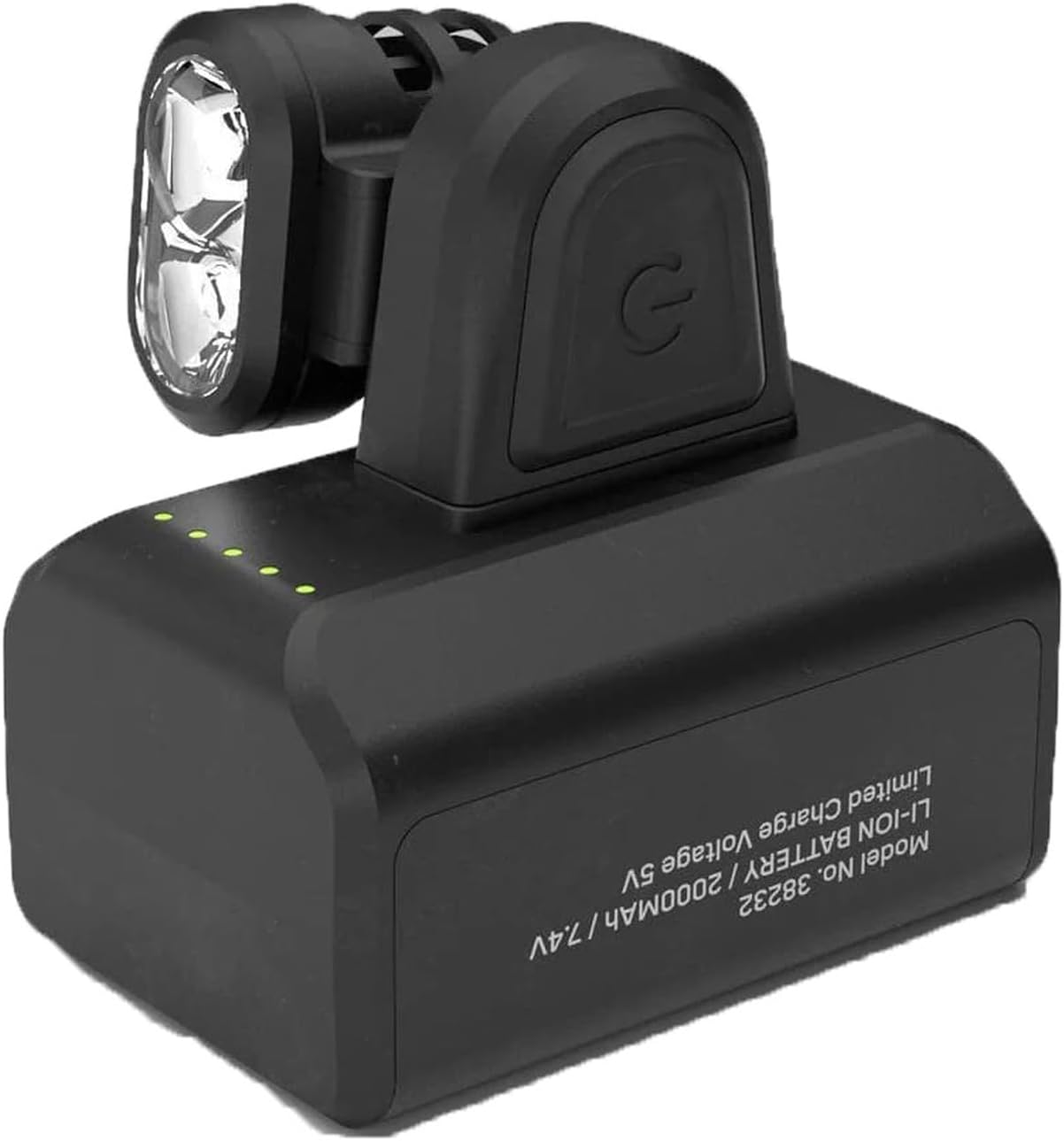
Figure 3.3: Close-up view of the rechargeable battery pack, displaying model and voltage information.

Figure 3.4: The headlamp unit and battery pack shown separated, highlighting their modular design.

Figure 3.5: Detailed view of the electrical connection points for attaching the headlamp unit to the battery pack.

Figure 3.6: Close-up of the headlamp unit, showing the ventilation fins designed for Airflow Technology.
4. Setup
4.1 Initial Charging
- Connect the supplied USB charging cable to the battery pack's charging port.
- Plug the other end of the USB cable into a standard USB power adapter (not included) or a computer USB port.
- The battery indicator lights on the pack will illuminate to show charging status. A full charge is indicated when all lights are solid.
- Allow approximately 4-6 hours for a full charge from empty.
4.2 Assembling the Headlamp
- Attach the headlamp unit to the front of the headband by aligning the connectors and pressing firmly until it clicks into place.
- Secure the battery pack to the rear of the headband, ensuring the integrated power cords connect properly.
- Adjust the elastic headband for a comfortable and secure fit on your head. The headband should be snug but not overly tight.
5. Operating Instructions
5.1 Power On/Off
- To turn on the headlamp, press and hold the power button located on the headlamp unit for 1 second.
- To turn off the headlamp, press and hold the power button for 1 second.
5.2 Adjusting Brightness Levels
- While the headlamp is on, short press the power button to cycle through the three brightness levels: Low (80 lumens), Medium, and High (1200 lumens).
- The headlamp will remember the last used brightness setting when turned off and on again.
5.3 Battery Level Indicator
The battery pack features LED indicators to display the remaining charge:
- 4 Green LEDs: 75-100% charge
- 3 Green LEDs: 50-75% charge
- 2 Green LEDs: 25-50% charge
- 1 Green LED: 10-25% charge
- 1 Red LED (flashing): Below 10% charge, recharge immediately.
6. Maintenance
6.1 Cleaning
- Wipe the headlamp and battery pack with a damp cloth. Do not use harsh chemicals or abrasive cleaners.
- Ensure the charging port is free from dirt and moisture.
- The headband can be hand-washed with mild soap and water, then air-dried.
6.2 Battery Care and Storage
- For optimal battery life, avoid fully discharging the battery frequently.
- If storing the headlamp for an extended period, charge the battery to approximately 50-75% and store in a cool, dry place. Recharge every 3-6 months to prevent deep discharge.
- Do not expose the battery to extreme temperatures or direct sunlight.
7. Troubleshooting
| Problem | Possible Cause | Solution |
|---|---|---|
| Headlamp does not turn on. | Battery is depleted. | Charge the battery fully. |
| Headlamp unit not properly connected to battery. | Ensure the headlamp unit and battery pack are securely connected to the headband. | |
| Light output is dim. | Low battery charge. | Recharge the battery. |
| Headlamp is in a lower brightness mode. | Press the power button to cycle to a higher brightness setting. | |
| Battery not charging. | Faulty USB cable or power source. | Try a different USB cable or power adapter. Ensure the connection is secure. |
| Charging port is dirty. | Clean the charging port gently with a dry, soft brush. |
8. Specifications
| Feature | Detail |
|---|---|
| Model Number | SLV38221 |
| Light Output | 1200 Lumens (Max) |
| Brightness Levels | 80, Medium, 1200 Lumens |
| Light Source Type | LED |
| Power Source | Battery Powered |
| Battery Type | Lithium-ion, 14.4 Wh |
| Material | Plastic |
| Color | Black |
| Item Weight | 116 Grams (4.1 ounces) |
| Water Resistance Level | IPX5 (Water Resistant) |
| Mounting Type | Head Mount |
| Included Components | USB Cable |
9. Warranty and Support
Silva products are manufactured to high quality standards. For information regarding warranty coverage, please refer to the warranty card included with your purchase or visit the official Silva website. For technical support or service inquiries, please contact Silva customer service through their official channels.
Please retain your proof of purchase for any warranty claims.


