
1. Introduction
This manual provides essential instructions for the safe and efficient operation of your eKids Disney Wish Karaoke Machine, Model WH-555. Please read this manual thoroughly before using the device and retain it for future reference.

Image 1.1: Front view of the eKids Disney Wish Karaoke Machine with its wired microphone.
2. Safety Information
To ensure safe operation, please observe the following precautions:
- Do not expose the unit to extreme temperatures, direct sunlight, or moisture.
- Do not immerse the unit in water or other liquids.
- Use only the provided USB cable for charging.
- Keep the unit away from heat sources such as radiators, heat registers, stoves, or other apparatus (including amplifiers) that produce heat.
- Do not attempt to disassemble or modify the unit. Refer all servicing to qualified service personnel.
- This product is intended for use by children under adult supervision.
3. Package Contents
Verify that all items are present in the package:
- eKids Disney Wish Karaoke Machine (Model WH-555)
- Wired Microphone
- USB Charging Cable
4. Product Overview
Familiarize yourself with the various parts and controls of your karaoke machine.
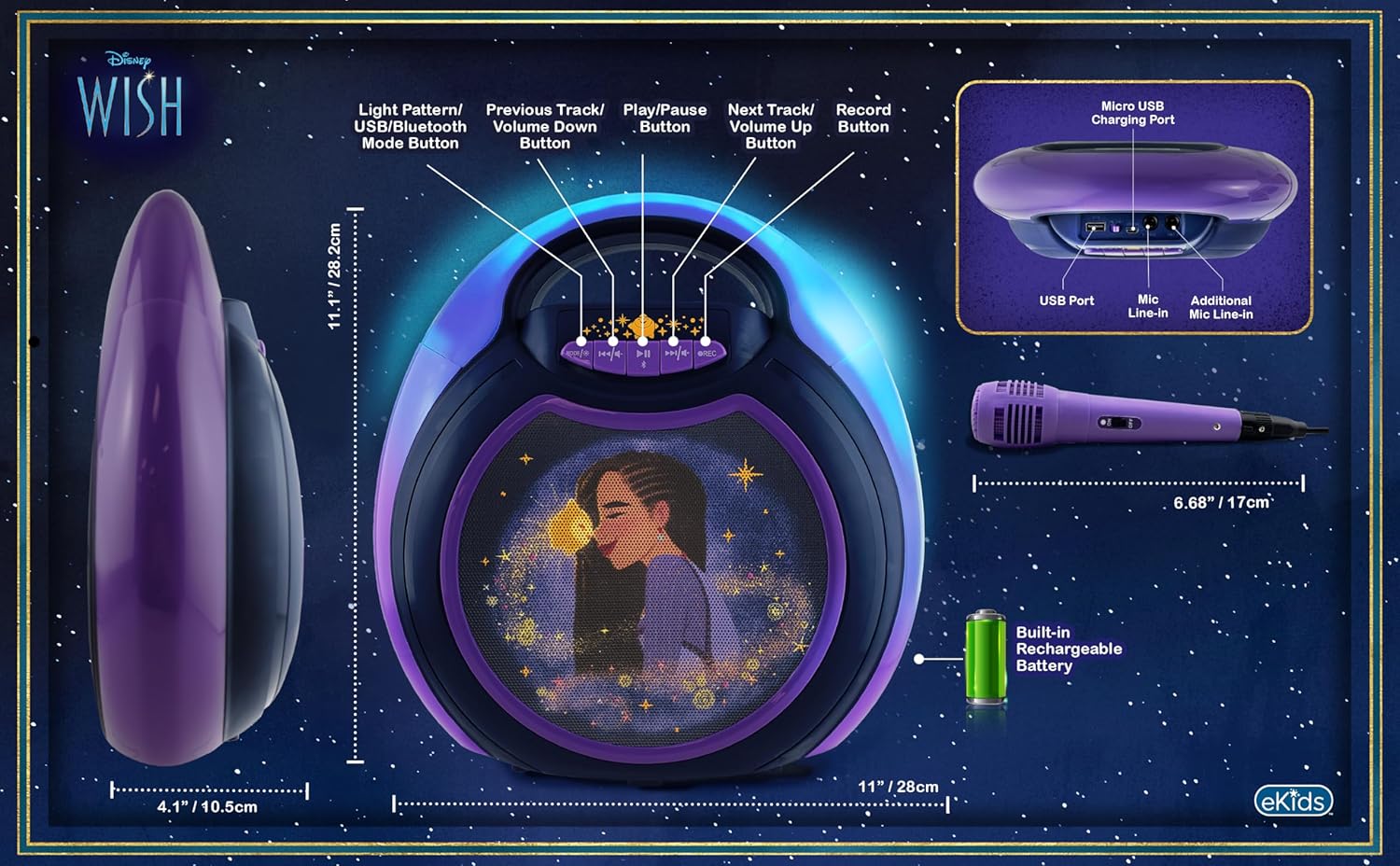
Image 4.1: Diagram of the eKids Disney Wish Karaoke Machine's controls, ports, and dimensions.
Controls and Ports:
- MODE / # Button: Switches between input modes (Bluetooth, USB) and adjusts light patterns.
- Previous Track / Volume Down Button: Navigates to the previous track or decreases volume.
- Play / Pause Button: Plays or pauses audio.
- Next Track / Volume Up Button: Navigates to the next track or increases volume.
- REC Button: Initiates recording (requires USB flash drive).
- Micro USB Charging Port: For charging the internal battery.
- USB Port: For connecting a USB flash drive for recording or playback.
- Mic Line-in: Primary port for the included wired microphone.
- Additional Mic Line-in: For connecting a second microphone (not included) for duets.
5. Setup
5.1 Charging the Unit
Before first use, fully charge the karaoke machine. Connect the provided USB charging cable to the Micro USB Charging Port on the unit and to a standard USB power adapter (not included) or a computer's USB port. The charging indicator will illuminate during charging and turn off when fully charged.
5.2 Connecting the Microphone
Plug the wired microphone's connector into the 'Mic Line-in' port on the karaoke machine. For duet performances, an additional microphone (not included) can be connected to the 'Additional Mic Line-in' port.

Image 5.1: Side view of the karaoke machine with the wired microphone connected.
6. Operating Instructions
6.1 Powering On/Off
Press and hold the MODE / # button to power the unit on or off.
6.2 Bluetooth Pairing
When the unit is powered on, it will automatically enter Bluetooth pairing mode. The indicator light will flash. On your compatible device (smartphone, tablet, etc.), enable Bluetooth and select "eKids Wish Karaoke" from the list of available devices. A confirmation tone will sound when pairing is successful.

Image 6.1: Bluetooth compatibility with various devices.
6.3 Playing Music
Once paired via Bluetooth, start playing music from your connected device. Use the Play / Pause, Previous Track / Volume Down, and Next Track / Volume Up buttons on the karaoke machine to control playback.
6.4 Using the Microphone
Ensure the microphone is connected to the 'Mic Line-in' port. Adjust the microphone's volume using the dedicated switch on the microphone itself. Sing into the microphone while music plays from the speaker.
6.5 Recording Performances
To record your singing, insert a USB flash drive (not included) into the USB Port. Press the REC button to start recording. Press it again to stop recording. Recordings will be saved to the USB flash drive. Refer to the Product Overview (Image 4.1) for the location of the USB port.
6.6 Light Show Modes
Press the MODE / # button repeatedly to cycle through different color-changing LED light show patterns.
6.7 Volume Control
Adjust the main speaker volume using the Previous Track / Volume Down and Next Track / Volume Up buttons. The microphone has its own volume control switch.
7. Maintenance
7.1 Cleaning
Wipe the unit with a soft, dry cloth. Do not use liquid cleaners or abrasive materials.
7.2 Storage
When not in use, store the unit in a cool, dry place, away from direct sunlight and extreme temperatures.
8. Troubleshooting
- No Power: Ensure the unit is charged. Connect the USB charging cable and allow it to charge for a period.
- No Sound: Check that the volume on both the karaoke machine and the connected Bluetooth device is turned up. Ensure the microphone is properly connected and its switch is on.
- Bluetooth Not Connecting: Make sure Bluetooth is enabled on your device and the karaoke machine is in pairing mode. Try unpairing and re-pairing the device. Ensure no other devices are currently connected to the karaoke machine.
- Recording Not Working: Verify that a compatible USB flash drive is inserted into the USB port and has sufficient free space.
9. Specifications
| Model Number | WH-555 |
| Dimensions | 11.07 x 4.14 x 11.11 inches |
| Weight | 3.67 pounds |
| Power Source | Battery Powered (Rechargeable) |
| Voltage | 3 Volts |
| Connectivity | Bluetooth, USB |
| Speaker Count | 1 |
| Special Features | Light Up Speaker, Recording Function |
10. Warranty and Support
For warranty information and customer support, please refer to the documentation included with your purchase or visit the official eKids website. Keep your proof of purchase for warranty claims.

