
1. Product Overview
The Hisense AP0822CW1W Portable Air Conditioner is designed to provide versatile climate control for medium-sized rooms, up to 350 square feet. This unit offers three distinct operating modes: cooling, fan, and dehumidifier, allowing users to select the most suitable comfort setting. Its innovative drain-free design eliminates the need for manual water removal, ensuring continuous and convenient operation. The unit is engineered for quiet performance, contributing to a peaceful environment. Control is facilitated through an included remote control and the ConnectLife smart app, enabling remote management of settings.

Figure 1: Front view of the Hisense AP0822CW1W Portable Air Conditioner.
Key Features:
- 3 Operating Modes: Cooling, Fan, and Dehumidifier for adaptable comfort.
- Drain-Free Design: Eliminates the need for manual water removal, ensuring uninterrupted operation.
- Quiet Operation: Engineered to minimize noise for a relaxing environment.
- Snap-Assembly Window Kit: Designed for quick and straightforward installation.
- Remote Control: Provides convenient adjustment of settings from a distance.
- ConnectLife App Control: Allows remote management of the unit via a mobile device.
- Washable, Removable Filter: Facilitates easy cleaning and maintenance for optimal air quality and unit longevity.
2. Setup and Installation
2.1 Unpacking
Carefully remove the air conditioner and all accessories from the packaging. Inspect the unit for any signs of damage. Retain the packaging materials for future storage or transport.
2.2 Placement Guidelines
- Place the unit on a flat, stable surface.
- Ensure there is at least 20 inches (50 cm) of clear space around the unit for proper airflow.
- Position the unit near a window for exhaust hose installation.
- Avoid placing the unit in direct sunlight or near heat sources.
2.3 Window Kit Installation
The snap-assembly window kit is designed for easy installation in most standard vertical or horizontal sliding windows. Follow these steps:
- Assemble the window slider kit components to fit your window opening. The kit is adjustable for window sizes between 18 to 50 inches.
- Open the window and place the assembled window kit into the window frame. Extend the kit to fit snugly and secure it in place.
- Attach the exhaust hose to the unit and then to the window kit adapter. Ensure a secure connection to prevent air leakage.
- Close the window firmly against the window kit to seal the opening.

Figure 2: Portable air conditioner with exhaust hose installed in a window.

Figure 3: Rear view of the unit showing the exhaust hose connection.
3. Operating Instructions
3.1 Control Panel
The control panel is located on the top of the unit. It features an LED display and various buttons for mode selection, temperature adjustment, fan speed, and timer settings.

Figure 4: Top-mounted control panel with LED display and function buttons.
3.2 Remote Control
The included remote control allows for convenient operation from across the room. It duplicates most functions available on the unit's control panel.
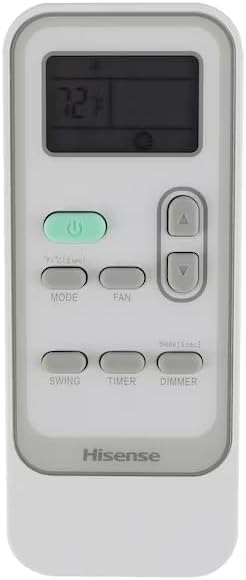
Figure 5: Remote control for the portable air conditioner.
3.3 Operating Modes
- Cooling Mode: Select this mode for active cooling. Adjust the desired temperature using the up/down arrows.
- Fan Mode: Operates the fan without cooling, providing air circulation. Fan speed can be adjusted (Low, Medium, High).
- Dehumidifier Mode: Reduces humidity in the room. The unit will operate to extract moisture from the air.
3.4 Wi-Fi and Smart App Control
The Hisense AP0822CW1W is Wi-Fi enabled and can be controlled using the ConnectLife smart app. Download the ConnectLife app from your mobile device's app store and follow the in-app instructions to pair your air conditioner. This allows you to:
- Turn the unit on or off remotely.
- Change operating modes.
- Adjust temperature settings.
- Set timers and schedules.

Figure 6: Remote control via smartphone app, compatible with smart home assistants.
4. Maintenance
4.1 Filter Cleaning
The unit features a washable and removable filter designed for easy cleaning. Regular cleaning of the filter is essential for maintaining optimal performance and air quality.
- Turn off and unplug the air conditioner before cleaning.
- Locate and remove the air filter, typically found behind the front grille.
- Wash the filter with warm, soapy water. Rinse thoroughly.
- Allow the filter to air dry completely before reinstalling it.
- Reinstall the dry filter and plug the unit back in.
It is recommended to clean the filter every two weeks, or more frequently depending on usage and air quality.
4.2 Drain-Free Operation
This unit is designed with a drain-free system, meaning it typically evaporates condensed moisture automatically. Under conditions of very high humidity, some water may accumulate. If the unit indicates a full water tank, turn off the unit and refer to the troubleshooting section for instructions on manual draining.
4.3 General Cleaning
Wipe the exterior of the unit with a soft, damp cloth. Do not use harsh chemicals or abrasive cleaners, as these can damage the surface. Ensure the unit is unplugged before any cleaning.
5. Troubleshooting
Before contacting customer support, please review the following common issues and solutions:
- Unit does not turn on: Check if the power cord is securely plugged into a working outlet. Ensure the circuit breaker has not tripped.
- Unit is not cooling effectively: Verify that the exhaust hose is properly installed and sealed. Check if the air filter is clean. Ensure windows and doors are closed to prevent warm air entry. The room size should be within the unit's cooling capacity (up to 350 sq ft).
- Excessive noise: Ensure the unit is placed on a flat, stable surface. Check for any obstructions around the air intake or exhaust.
- Water leakage: If water is leaking, ensure the unit is level. In very high humidity, the internal water tank may become full. Refer to the manual for specific instructions on how to drain the unit manually if necessary.
- Remote control not working: Check and replace the batteries in the remote control. Ensure there are no obstructions between the remote and the unit's receiver.
If the issue persists after attempting these solutions, please contact Hisense customer support.
6. Specifications
The following table details the technical specifications for the Hisense AP0822CW1W Portable Air Conditioner:

Figure 7: Detailed product specifications for model AP0822CW1W.
| Specification | Value |
|---|---|
| Brand | Hisense |
| Model Number | AP0822CW1W |
| Cooling Capacity (SACC) | 8000 BTU |
| Voltage | 115 Volts |
| Wattage | 2344 watts |
| Noise Level | 50 dB |
| Recommended Floor Area | Up to 350 Square Feet |
| Product Dimensions (D x W x H) | 12.8 x 16.93 x 27.36 inches |
| Item Weight | 65 pounds |
| Refrigerant | R 410A |
| Filter Type | Washable Pre-Filter |
| Installation Type | Portable (Window Vent) |
| Special Features | Portable, Remote Controlled, Wi-Fi Enabled |

Figure 8: Unit dimensions (Height 27.4", Width 19.6", Depth 12.8").
7. Warranty and Support
7.1 Warranty Information
This Hisense Portable Air Conditioner, Model AP0822CW1W, typically includes a warranty covering parts and labor for a period of two years from the date of purchase. Please refer to your purchase documentation or contact Hisense customer service for specific warranty terms and conditions.
7.2 Customer Support
For technical assistance, troubleshooting beyond this manual, or warranty claims, please contact Hisense customer support. You can find contact information on the Hisense official website or through your product's registration materials.
Hisense USA Corporation
7310 McGinnis Ferry Road, Suwanee, GA 30024
Tel: 1-800-968-3426
Web: www.hisense-usa.com