Product Overview
The Hilitand Heating Coil Temperature Controller is a digital display device designed for precise temperature management of heating coils. It features electronic control for stability and reliability, ensuring accurate temperature regulation for various applications.
Key features include:
- Lightweight and compact design for easy installation.
- Digital display for clear indication of current heating temperature.
- Button control for straightforward temperature setting.
- Wide temperature range, with a default setting of 710℉.
- Excellent stability and reliability for long-term use.

Figure 1: Front view of the Heating Coil Temperature Controller, highlighting the digital display and user interface buttons.
Setup Instructions
Before operating the device, ensure it is properly connected to a power source and the heating coil. Follow these steps for initial setup:
- Unpack the Controller: Carefully remove the Heating Coil Temperature Controller from its packaging. Inspect for any visible damage.
- Connect the Heating Coil: Locate the input port for the heating coil on the controller. Connect your heating coil securely to this port.
- Connect to Power: Plug the power cord into the controller's power input. Ensure the power source matches the specified voltage (85-260V).
- Power On: Locate the power switch, typically on the back or side of the unit, and switch it to the 'ON' position. The digital display should illuminate.
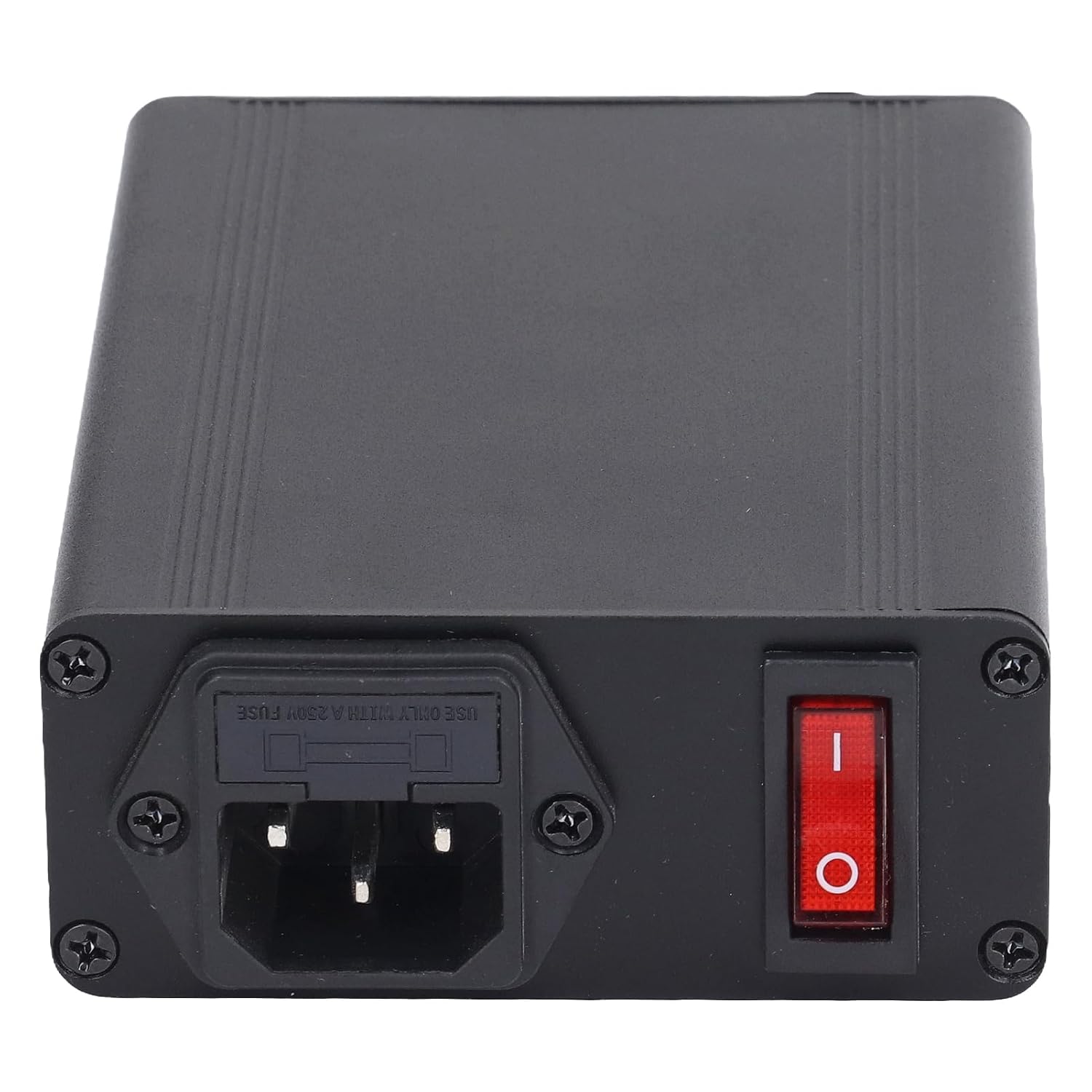
Figure 2: Rear view of the controller, illustrating the power input and main power switch.
Operating Instructions
Once the controller is powered on, you can easily set and monitor the desired temperature for your heating coil.
- View Current Temperature: The digital display will show the current temperature of the heating coil.
- Enter Setting Mode: Press the SET button to enter the temperature setting mode. The display may flash or indicate that it is ready for input.
- Adjust Temperature: Use the UP (▲) and DOWN (▼) buttons to increase or decrease the target temperature. The default temperature is 710℉, but you can adjust it within the device's operational range.
- Confirm Setting: Press the SET button again to confirm your desired temperature. The controller will then begin to regulate the heating coil to maintain this temperature.
- Monitoring: The display will continuously show the actual temperature, allowing you to monitor the heating process.

Figure 3: Angled view of the controller's front panel, detailing the digital display and control buttons for temperature adjustment.
Maintenance
To ensure the longevity and optimal performance of your Heating Coil Temperature Controller, follow these simple maintenance guidelines:
- Cleaning: Regularly wipe the exterior of the controller with a soft, dry cloth. Do not use abrasive cleaners or solvents, as they may damage the surface or internal components.
- Storage: When not in use for extended periods, store the controller in a cool, dry place, away from direct sunlight and extreme temperatures.
- Connections: Periodically check all connections (power and heating coil) to ensure they are secure and free from corrosion.
- Ventilation: Ensure that the controller has adequate ventilation and that its vents are not obstructed, to prevent overheating.
Troubleshooting
If you encounter issues with your Heating Coil Temperature Controller, please refer to the following common problems and solutions:
| Problem | Possible Cause | Solution |
|---|---|---|
| Controller does not power on. | No power supply; power switch off; faulty power cord. |
|
| Temperature reading is inaccurate or fluctuating. | Loose coil connection; faulty heating coil; environmental interference. |
|
| Cannot set desired temperature. | Incorrect button sequence; internal error. |
|
If the problem persists after attempting these solutions, please contact customer support.
Specifications
| Attribute | Value |
|---|---|
| Item Type | Heating Coil Temperature Controller |
| Material | Stainless Steel |
| Voltage | 85-260V |
| Default Temperature | 710℉ |
| Model Number | Hilitand8knhoxdgvz |
| Package Dimensions | 5.12 x 4.33 x 1.57 inches |
| Item Weight | 10.58 ounces |
| Manufacturer | Hilitand |
| Date First Available | December 23, 2023 |
Warranty and Support
Hilitand products are manufactured with high-quality materials and undergo stringent quality control. While specific warranty details are not provided in this manual, please retain your proof of purchase for any warranty claims.
For technical support, troubleshooting assistance beyond what is covered in this manual, or warranty inquiries, please contact Hilitand customer service through the retailer where the product was purchased or visit the official Hilitand brand store online:
Hilitand Official Store on Amazon
Please provide your product model number (Hilitand8knhoxdgvz) and a detailed description of the issue when contacting support.


