
1. Introduction
This manual provides essential information for the proper use and maintenance of your Dpofirs SOYES XS13 Mini Smartphone. Please read it thoroughly before operating the device to ensure optimal performance and longevity.
2. Package Contents
Verify that all items are present in your product package:
- 1 x SOYES XS13 Mini Smartphone
- 1 x USB Data Cable
- 1 x SIM Ejector Tool
- 1 x Screen Protector Film
- 1 x Protective Case
- 1 x User Manual (this document)

Image: The SOYES XS13 Mini Smartphone displayed with its accessories, including the USB cable, protective case, screen protector, and SIM ejector tool.
3. Setup
3.1. SIM Card and Memory Card Installation
- Locate the SIM card tray on the side of the device.
- Insert the SIM ejector tool into the small hole next to the tray and press gently until the tray pops out.
- Place your 2G/3G SIM card(s) and an optional microSD memory card (up to 64GB) into the designated slots on the tray. Ensure the gold contacts face downwards.
- Carefully reinsert the tray into the phone until it clicks into place.

Image: A close-up view of the SOYES XS13 Mini Smartphone with its SIM card tray partially ejected, showing the slots for SIM and memory cards.
3.2. Charging the Battery
Before first use, fully charge the device. Connect the USB data cable to the phone's charging port and the other end to a compatible USB power adapter or computer.
3.3. Powering On/Off
- To power on: Press and hold the Power button until the screen lights up.
- To power off: Press and hold the Power button, then select 'Power off' from the options on the screen.
4. Operating Instructions
4.1. Basic Navigation
The SOYES XS13 features a 2.5-inch touchscreen display. Navigate by tapping, swiping, and pinching. The bottom navigation bar typically includes Back, Home, and Recent Apps buttons.
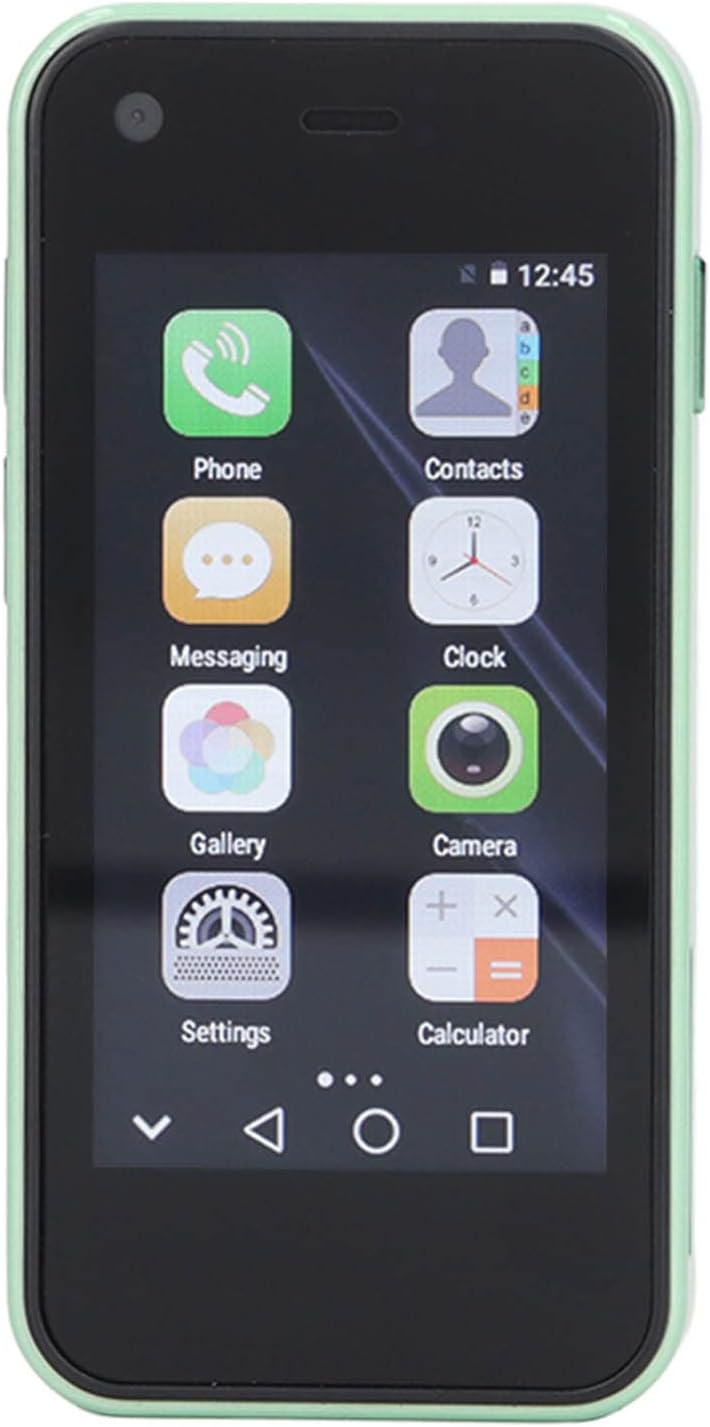
Image: The front of the SOYES XS13 Mini Smartphone displaying its home screen with various application icons such as Phone, Contacts, Messaging, Clock, Gallery, Camera, Settings, and Calculator.
4.2. Making Calls
- Tap the 'Phone' icon on the home screen.
- Enter the phone number using the dial pad or select a contact from your address book.
- Tap the call button to initiate the call.
4.3. Messaging
Tap the 'Messaging' icon to send and receive SMS/MMS messages. You can compose new messages, view conversations, and manage message settings.
4.4. Connecting to Wi-Fi
- Go to 'Settings' > 'Wi-Fi'.
- Toggle Wi-Fi on.
- Select your desired network from the list and enter the password if prompted.
4.5. GPS Navigation
The device supports GPS navigation. You can use pre-installed mapping applications or download others from the app store for turn-by-turn directions and location services.
4.6. App Download
The SOYES XS13 runs on Android 6.0, allowing you to download and install various applications from compatible app stores. Access the app store icon on your home screen or app drawer to browse and install applications.
4.7. Camera Usage
The phone is equipped with a 2MP front camera and a 5MP rear camera.
- Tap the 'Camera' icon to open the camera application.
- Tap the shutter button to take a photo.
- Switch between front and rear cameras using the camera toggle icon.

Image: A dual view of the SOYES XS13 Mini Smartphone, showing both its front display with app icons and its rear panel with the camera module.
5. Maintenance
5.1. Battery Care
- Avoid extreme temperatures, which can degrade battery life.
- Do not leave the phone charging for extended periods after it is fully charged.
- Use only the provided or certified charging accessories.
5.2. Cleaning
Use a soft, lint-free cloth to clean the screen and body of the phone. Avoid using harsh chemicals or abrasive materials.
5.3. Software Updates
Periodically check for software updates in 'Settings' to ensure your device has the latest features and security patches.
6. Troubleshooting
- Device not turning on: Ensure the battery is charged. Connect to a charger and try again.
- Poor network signal: Check if your SIM card is properly inserted. Move to an area with better network coverage. Verify your SIM card supports the 2G GSM (850, 900, 1800, 1900) or 3G WCDMA (B1/B5) bands.
- Apps crashing or freezing: Close background applications. Restart the phone. Clear app cache in 'Settings' > 'Apps'.
- Battery drains quickly: Reduce screen brightness. Close unused apps. Disable Wi-Fi, Bluetooth, or GPS when not in use.
- Touchscreen unresponsive: Restart the device. If the issue persists, contact customer support.
7. Specifications
| Feature | Specification |
|---|---|
| Model Name | SOYES XS13 |
| Model Number | Dpofirsbq5a9oyixg-13 |
| Screen Size | 2.5 inches |
| Operating System | Android 6.0 |
| Processor | MTK6580M Quad Core |
| RAM | 1GB |
| Internal Storage | 8GB |
| Memory Expansion | Supports up to 64GB (microSD, not included) |
| SIM Card Slot | Dual SIM, Dual Standby |
| Front Camera | 2 MP |
| Rear Camera | 5 MP |
| Battery Capacity | 1580 mAh Lithium Battery |
| 2G Frequency Bands | GSM 850, 900, 1800, 1900 |
| 3G Frequency Bands | WCDMA B1/B5 (W2100, W850) |
| Connectivity | Bluetooth, Wi-Fi, GPS |
| Other Features | MP3, MP4, Calculator, Alarm Clock, Calendar |
8. Warranty and Support
8.1. Manufacturer's Warranty
This product comes with a 1 Year Warranty Against Manufacturer Defects. Please retain your proof of purchase for warranty claims.
8.2. Customer Support
For technical assistance, troubleshooting not covered in this manual, or warranty inquiries, please contact Dpofirs customer support through your retailer or the official Dpofirs website.