
Introduction
This instruction manual provides comprehensive guidance for the Arducam 12MP IMX708 Quad-Camera Kit, specifically designed for the Raspberry Pi 5. This kit enables advanced vision applications through its stereo synchronized, wide-angle autofocus camera modules. Please read this manual thoroughly before installation and operation to ensure proper use and optimal performance.
Product Overview
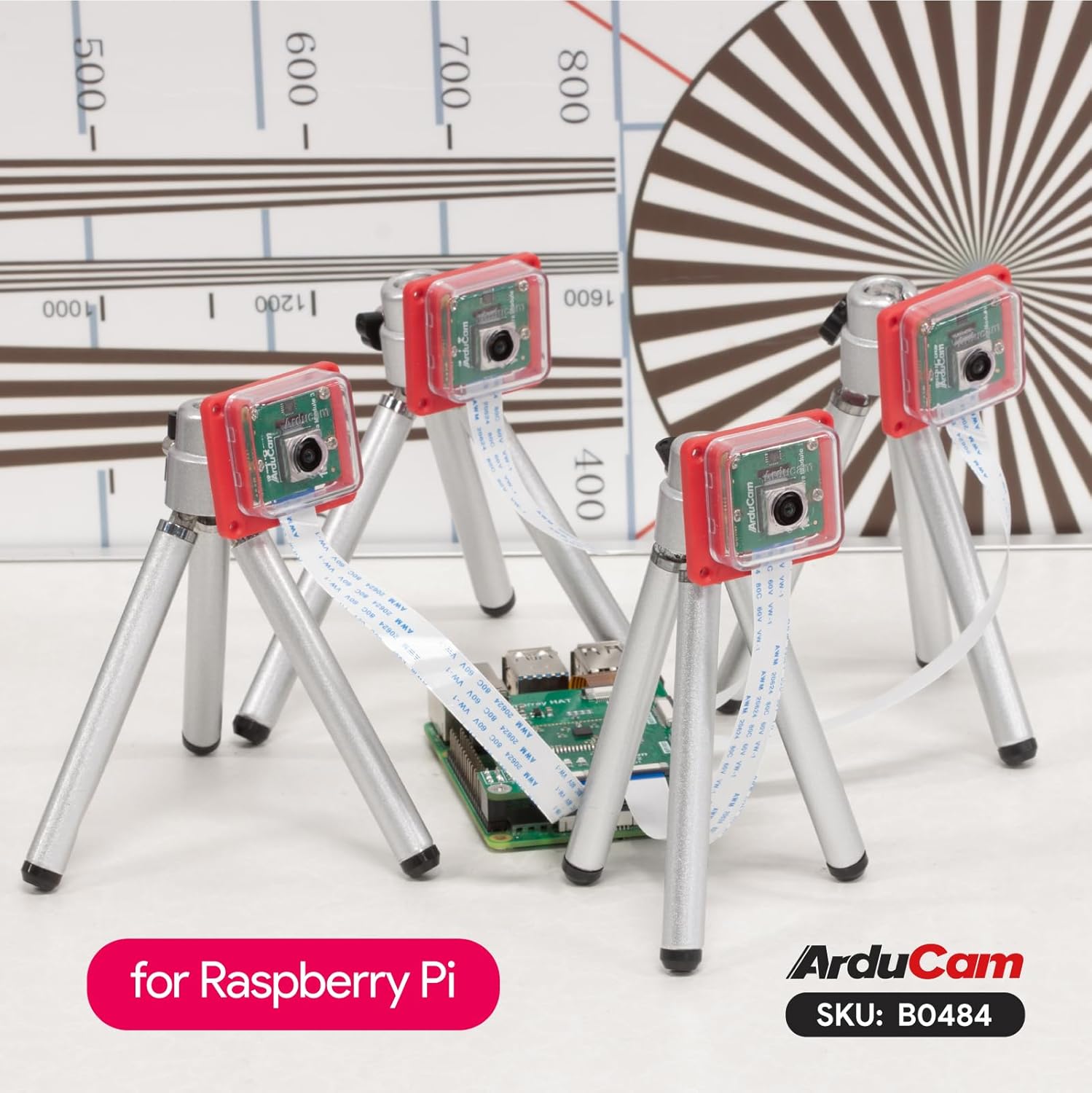
The Arducam 12MP IMX708 Quad-Camera Kit integrates four high-resolution camera modules with a Camarray HAT, offering robust features for various applications.
- Stereo Synchronized: This kit achieves full hardware-level frame synchronization across all four cameras, accurate to the millisecond level, for both video and still photographs. This eliminates the need for additional time-stamping.
- Four in One Capability: The system combines four autofocus cameras into a single frame. Each camera operates at a 1/4 resolution (1152×648), yielding a maximum output of 4608×2592 for still images and 1920×1080 for video. Note that frame rates are halved compared to single-camera operation.
- Flexible Control: The kit defaults to quad-channel mode for simultaneous image and video capture. It also supports channel switching (Single/Dual/Quad) for enhanced versatility.
- Exact V3 Function Match: This camera kit is modified based on the Raspberry Pi Camera Module 3 for compatibility with the IMX708 sensor. It shares I2C signals and clock while retaining original features such as Phase Detection Autofocus (PDAF) and High Dynamic Range (HDR).
- Variable Baseline Extension: The Arducam Camarray HAT implements Variable Baseline Extension, facilitating synchronized stereo vision across multiple cameras.

Package Contents
Verify that all components are present in your package:
- 4 x Arducam 12MP IMX708 Camera Modules
- 1 x Arducam Camarray HAT (UC-512)
- 4 x FPC Cables for camera connection
- 1 x FPC Cable for Raspberry Pi connection
- Mounting hardware (screws, standoffs)

Setup Instructions
Follow these steps to assemble and connect your Arducam Quad-Camera Kit to your Raspberry Pi 5.
1. Connecting Camera Modules to Camarray HAT
- Carefully connect each of the four camera modules to the MIPI RX0, RX1, RX2, and RX3 ports on the Camarray HAT using the provided FPC cables. Ensure the silver contacts on the FPC cable face the corresponding contacts on the HAT connector.
- Gently push the FPC cable into the connector and then close the connector latch to secure it.

2. Connecting Camarray HAT to Raspberry Pi 5
- Connect the Camarray HAT to your Raspberry Pi 5 using the provided FPC cable. The HAT connects to the MIPI CSI/DSI port on the Raspberry Pi.
- Ensure the HAT is securely mounted, potentially using standoffs if included, to prevent short circuits and provide stability.

3. Software Configuration
After physical assembly, software configuration is required. Please refer to the official Arducam Quick Start Guide for detailed software setup instructions, driver installation, and example code:
Operating Instructions
Once the hardware is connected and software configured, you can begin operating your camera kit.
Camera Modes
- Quad-Channel Mode (Default): In this mode, all four cameras capture images or video simultaneously. This is ideal for stereo vision, 360-degree imaging, or applications requiring multiple synchronized views.
- Channel Switching (Single/Dual): The kit supports switching between single, dual, or quad-camera operation. This allows you to focus on specific camera feeds or reduce processing load when fewer cameras are needed. Refer to the Quick Start Guide for commands and API usage for channel switching.
Image and Video Capture
Utilize the provided software examples and libraries (as detailed in the Quick Start Guide) to capture still images and record video. The IMX708 sensor supports autofocus (PDAF) and HDR capabilities, which can be configured through software.
Maintenance
Proper maintenance ensures the longevity and performance of your camera kit.
- Cleaning: Use a soft, lint-free cloth to gently clean the camera lenses. Avoid abrasive materials or harsh chemicals.
- Storage: When not in use, store the camera kit in a dry, dust-free environment.
- Handling: Handle the FPC cables and camera modules with care to avoid damage to the delicate connectors and components.
- Firmware Updates: Periodically check the Arducam website or Quick Start Guide for any available firmware or software updates for improved performance and new features.
Troubleshooting
If you encounter issues, refer to the following common troubleshooting steps:
- Camera Not Detected:
- Ensure all FPC cables are correctly and securely connected to both the camera modules, the Camarray HAT, and the Raspberry Pi.
- Verify that the Raspberry Pi's camera interface is enabled in the software configuration (e.g., via
raspi-config). - Check for any driver installation issues as per the Quick Start Guide.
- Poor Image Quality:
- Clean the camera lenses for dust or smudges.
- Ensure adequate lighting in the environment.
- Check software settings for resolution, exposure, and white balance.
- Synchronization Issues:
- Confirm that the Camarray HAT is properly powered and connected.
- Refer to the Quick Start Guide for specific synchronization troubleshooting steps and software configurations.
For further assistance, consult the Arducam community forums or contact Arducam technical support.
Specifications
| Feature | Detail |
|---|---|
| Brand | Arducam |
| Model Name | IMX708 |
| Sensor Resolution | 12 Megapixels (IMX708) |
| Camera Type | Quad-Camera Kit, Wide Angle, Autofocus |
| Connectivity Technology | MIPI CSI-2 |
| Operating System Compatibility | Linux (Raspberry Pi OS) |
| Item Weight | 4.8 ounces (approx. 136g) |
| Package Dimensions | 4.7 x 3.5 x 2.6 inches (approx. 11.9 x 8.9 x 6.6 cm) |
| Special Features | Stereo Synchronized, Autofocus (PDAF), HDR, Flexible Channel Control (Single/Dual/Quad) |

Warranty and Support
Arducam products are designed for reliability and performance. For specific warranty information, please refer to the official Arducam website or your purchase documentation.
For technical support, product inquiries, or to access additional resources, please visit the Arducam official website or contact their customer service department. Online forums and community support are also available for common questions and project ideas.
Arducam Website: www.arducam.com
