
1. Important Safety Information
Please read all safety and operating instructions carefully before using your television. Keep these instructions for future reference.
- Power Source: Connect the TV only to the type of power source indicated on the marking label.
- Ventilation: Ensure proper ventilation. Do not block any ventilation openings.
- Water and Moisture: Do not expose the TV to rain or moisture. Do not use near water.
- Cleaning: Unplug the TV from the wall outlet before cleaning. Use a soft, dry cloth. Do not use liquid or aerosol cleaners.
- Placement: Place the TV on a stable, level surface. Avoid placing it in direct sunlight or near heat sources.
- Lightning: Unplug the TV during lightning storms or when unused for long periods.
2. Package Contents
Verify that all items listed below are included in your TV package:
- coocaa ROKU 50R5G 50-inch UHD Smart LED TV
- Remote Control with Batteries
- TV Stand (2 pieces)
- Stand Screws
- Power Cable
- Quick Start Guide (this manual)
3. Setup
3.1 Unpacking and Stand Installation
Carefully remove the TV from its packaging. It is recommended to have two people for this process. Place the TV face down on a soft, clean surface to prevent screen damage.
To install the TV stand:
- Align each stand piece with the corresponding slots on the bottom of the TV.
- Secure the stands using the provided screws. Ensure they are tightened firmly.
Alternatively, for wall mounting, consult a professional installer and use a VESA-compatible wall mount (not included).

This image illustrates the coocaa Roku TV seamlessly integrated into a modern living room environment, mounted on a light blue wall. The TV is positioned above a minimalist wooden TV cabinet, demonstrating a typical installation scenario.
3.2 Connecting Power and Initial Setup
- Connect the power cable to the TV's power input and then to a wall outlet.
- Press the power button on the remote control or the TV.
- Follow the on-screen instructions to complete the initial Roku OS setup, including language selection, country, and channel scanning for the triple tuner (satellite, cable, or antenna).
3.3 Network Connection
To access Smart TV features and streaming services, connect your TV to the internet:
- Wi-Fi: During initial setup or via the Settings menu, select 'Network' and then 'Wireless'. Choose your Wi-Fi network from the list and enter the password.
- LAN (Ethernet): Connect an Ethernet cable from your router to the LAN port on the back of the TV. The TV will automatically detect the wired connection.
4. Operating Your TV
4.1 Roku OS Home Screen
The Roku OS home screen provides quick access to all your entertainment. It combines linear TV and streaming services into one intuitive interface.

This image shows the coocaa Roku TV from the front, powered on and displaying its intuitive home screen. The screen features icons for popular streaming services like Netflix, Disney+, Apple TV, and live TV options, alongside inputs for cable box and game console. A '2023 Heimkino Innovation Award' badge is visible on the bottom left bezel.
- Streaming Channels: Access popular apps like Netflix, Disney+, and Apple TV.
- Live TV: Watch broadcast television via the integrated triple tuner.
- Inputs: Easily switch between connected devices (e.g., game console, cable box).
- Search: Use the cross-channel search to find content by title, actor, or genre.
4.2 Using the Remote Control
The user-friendly remote control provides all necessary functions:
- Navigation Pad: Use the arrow buttons to navigate menus and select items.
- OK Button: Confirm selections.
- Home Button: Return to the Roku OS home screen.
- Back Button: Go back to the previous screen.
- Instant Replay: Replay the last few seconds of video.
- Quick Access Buttons: Dedicated buttons for popular streaming services.
- Voice Search: Use the voice search feature for hands-free control (if supported by remote model).
4.3 Input Sources
Connect external devices to your TV using the available ports:
- HDMI: The TV features three HDMI inputs for connecting devices like Blu-ray players, game consoles, or set-top boxes.
- USB: One USB port is available for media playback or Timeshift functions.
- Digital Audio Out: For connecting to external audio systems.
4.4 Smart TV Features
Your coocaa Roku TV offers a wide range of smart features:
- Streaming Services: Access pre-installed apps like Netflix, Disney+, Apple TV, and more.
- Voice Assistant Support: Compatible with Apple AirPlay, Apple Home, Alexa, and Google Home for integrated smart home control.
- Roku Mobile App: Control your TV, use voice search, and listen to audio via headphones using the free Roku app for iOS and Android devices.
4.5 Audio and Video Settings
Optimize your viewing experience:
- Picture Modes: Select from various picture modes (e.g., Standard, Movie, Sport) or customize brightness, contrast, and color settings.
- HDR Support: Enjoy enhanced contrast and color with HDR10 and HLG content.
- Sound Modes: Choose sound modes (e.g., Standard, Music, Speech) or adjust equalizer settings for optimal audio.
5. Maintenance
5.1 Cleaning Your TV
To maintain the TV's appearance and performance:
- Unplug the TV before cleaning.
- Use a soft, dry, lint-free cloth to wipe the screen and cabinet.
- For stubborn marks, lightly dampen the cloth with water. Never spray cleaner directly onto the TV.
- Avoid using abrasive cleaners, waxes, or solvents.
5.2 Software Updates
Your Roku TV automatically checks for and installs software updates when connected to the internet. These updates provide new features, performance improvements, and bug fixes. Ensure your TV remains connected to the internet for timely updates.
6. Troubleshooting
If you encounter issues with your TV, refer to the following common solutions:
| Problem | Possible Solution |
|---|---|
| No Power | Check if the power cable is securely connected to the TV and the wall outlet. Try a different outlet. |
| No Picture, but Sound is Present | Ensure the correct input source is selected. Check cable connections to external devices. |
| No Sound, but Picture is Present | Check the volume level and mute status. Ensure external audio systems are correctly connected and powered on. |
| Cannot Connect to Wi-Fi | Verify your Wi-Fi password. Restart your router and modem. Move the TV closer to the router or use a wired connection. |
| Remote Control Not Working | Replace the batteries. Ensure there are no obstructions between the remote and the TV. |
7. Specifications
Detailed technical specifications for the coocaa ROKU 50R5G TV:

This image displays the official product data sheet (Produktdatenblatt) for the coocaa 50R5G television. It provides comprehensive technical specifications, including energy efficiency class, power consumption, screen resolution, panel technology, and guaranteed software/spare parts availability, as per EU regulations.
| Parameter | Value |
|---|---|
| Brand | coocaa |
| Model Name / Item Model Number | 50R5G |
| Operating System | Roku OS |
| Screen Size | 50 Inches (126 cm) |
| Display Technology | LED LCD |
| Resolution | 3840 x 2160 pixels (4K UHD) |
| Aspect Ratio | 16:9 |
| Refresh Rate (Standard) | 50 Hz |
| Connectivity | Wi-Fi, LAN (Ethernet), 3x HDMI, 1x USB |
| Special Features | Integrated Speaker, HDR10, HLG, Triple Tuner |
| Supported Internet Services | Netflix, Disney+, Apple TV, Prime Video, RTL+ |
| Product Dimensions (W x H x D) | 110 cm x 65 cm x 9 cm (approx.) |
| Energy Efficiency Class (SDR) | G |
| Power Consumption (SDR) | 70.0 W / 70 kWh/1000h |
| Energy Efficiency Class (HDR) | G |
| Power Consumption (HDR) | 103 W / 103 kWh/1000h |
| Guaranteed Software/Firmware Updates | 8 years (from end of market placement) |
| Guaranteed Spare Parts Availability | 7 years (from end of market placement) |
| Guaranteed Product Support | 7 years |
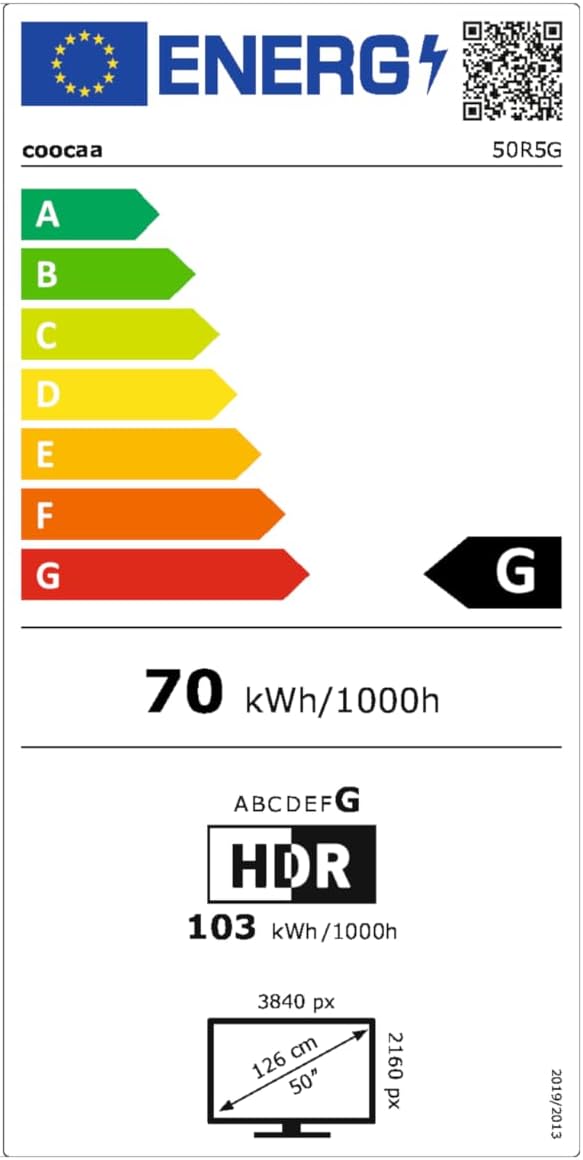
This image presents the EU Energy Label for the coocaa 50R5G TV. It indicates an energy efficiency class of 'G' for both Standard Dynamic Range (SDR) and High Dynamic Range (HDR) content, with power consumption values of 70 kWh/1000h for SDR and 103 kWh/1000h for HDR. The label also shows the screen size of 50 inches (126 cm) and resolution of 3840x2160 pixels. A QR code is included for accessing the EPREL database: EPREL Database Link
8. Warranty and Support
Your coocaa ROKU 50R5G TV comes with a manufacturer's warranty. Please refer to the official product documentation for specific terms and conditions.
- General Warranty Period: 2 years from the date of purchase.
- Product Support: Guaranteed for 7 years.
- Spare Parts: Guaranteed availability for 7 years after the product is no longer placed on the market.
- Software Updates: Guaranteed for 8 years after the product is no longer placed on the market.
For technical assistance or warranty claims, please contact coocaa customer support through their official website or the retailer where the product was purchased.


