
PERLESMITH PSTVS13, PSTVS33
PERLESMITH Universal Swivel TV Stand Base
Models: PSTVS13 & PSTVS33
Instruction Manual
1. Introduction
Thank you for choosing the PERLESMITH Universal Swivel TV Stand Base. This manual provides detailed instructions for the safe and proper assembly, operation, and maintenance of your PSTVS13 or PSTVS33 TV stand. Please read this manual thoroughly before installation and keep it for future reference.

Image: Overview of the PERLESMITH Universal Swivel TV Stand Bases (PSTVS13 and PSTVS33).
2. Safety Information
WARNING: Failure to read and follow all instructions may result in personal injury or damage to the product.
- Do not exceed the weight capacity specified for your model.
- Ensure the mounting surface can safely support the combined weight of the stand and the TV.
- Use only the provided hardware. Do not use power tools for assembly unless specifically instructed.
- Keep small parts away from children.
- If you have any questions or encounter difficulties, contact PERLESMITH customer service.
3. Package Contents
Verify that all components are present and undamaged before beginning assembly. Refer to the parts list included in your product packaging for specific component identification.
Note: The exact number and type of fasteners may vary slightly between PSTVS13 and PSTVS33 models.
4. Setup and Assembly
Follow these steps carefully to assemble your PERLESMITH TV stand. It is recommended to have a second person assist with lifting and positioning the TV.
4.1. Base Assembly
Attach the main support column to the glass or metal base. Ensure all screws are tightened securely.
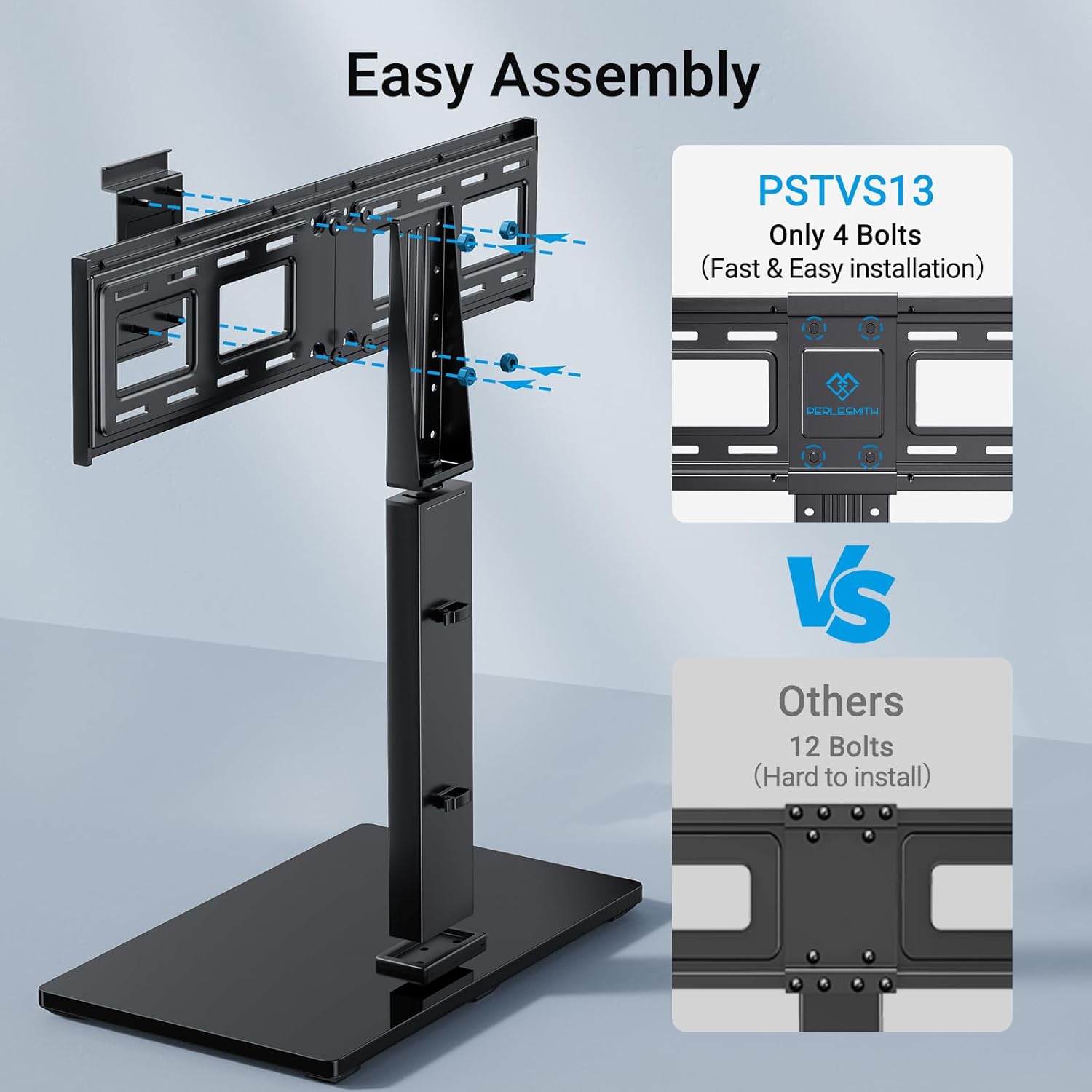
Image: Simplified assembly process for PSTVS13, highlighting fewer bolts required for installation.
For model PSTVS13, the assembly is designed for ease with only 4 main bolts required for the core structure, simplifying the installation process.
4.2. Attaching TV Brackets
Identify the correct VESA mounting holes on the back of your TV. Attach the vertical TV brackets to the back of your television using the appropriate screws and spacers from the hardware kit. Ensure the brackets are level and securely fastened.

Image: Compatibility details for PSTVS33, showing supported TV sizes, VESA patterns, and weight capacity.
The PSTVS33 model supports TVs from 24 to 60 inches and VESA patterns from 100x100mm to 400x400mm, with a maximum weight capacity of 99 lbs. The PSTVS13 model fits most 37-75 inch TVs and VESA patterns up to 600x400mm.
4.3. Mounting the TV to the Stand
Carefully lift the TV with the attached brackets and hook them onto the main support column of the stand. Secure the TV to the stand using the provided safety screws or locking mechanisms to prevent accidental dislodgement.
5. Operating Instructions
5.1. Swivel Function
Both PSTVS13 and PSTVS33 models feature a swivel function to optimize your viewing angle.
- PSTVS33: Offers a swivel range of 50° (25° left or 25° right) to direct the screen towards your viewing position.
- PSTVS13: Allows for a swivel of 60° (30° left or 30° right), providing flexibility to customize your home theater experience.

Image: Illustration of the 50° swivel capability of the PSTVS33 model, allowing for wider viewing angles.

Image: Illustration of the 30° swivel capability (60° total) of the PSTVS13 model, enhancing viewing flexibility.
5.2. Height Adjustment
Both models offer multiple height adjustment positions to suit your viewing preference and accommodate soundbars or other devices.
- PSTVS33: Features 8 height configurations, allowing you to set the TV at various levels.
- PSTVS13: Provides 9 different height adjustment positions, offering a total of 8 inches of vertical movement. This allows for precise positioning, from the highest level for larger TVs to the lowest level for stability.

Image: Visual representation of the 8 height configurations available on the PSTVS33 model.
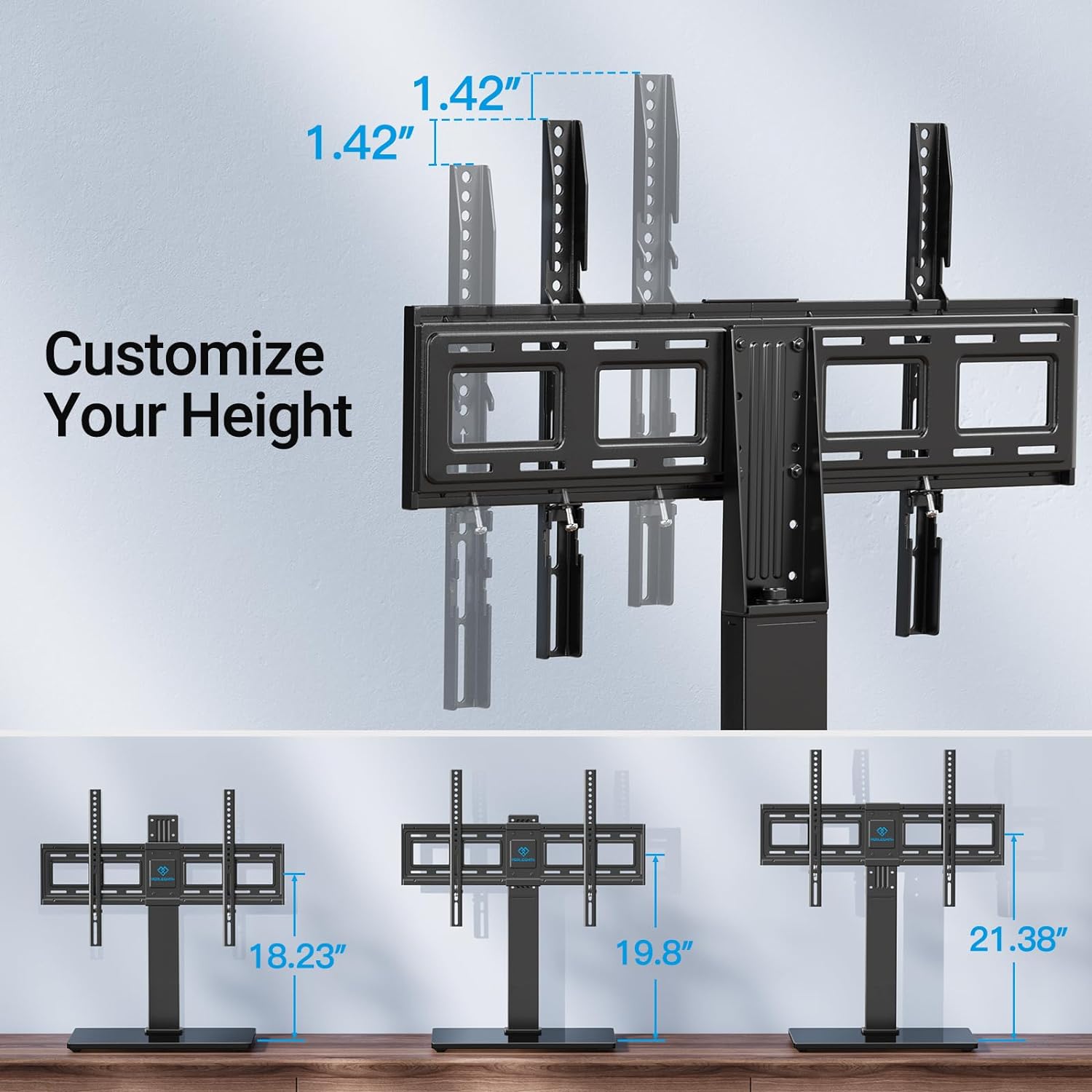
Image: Detailed view of the height customization options for the PSTVS13 model, showing various height settings.
To adjust the height, carefully lift the TV slightly and reposition the TV brackets to the desired height setting on the main support column. Ensure the TV is securely seated before releasing.
6. Maintenance
- Regularly check all screws and connections to ensure they remain tight and secure.
- Clean the stand with a soft, dry cloth. Do not use abrasive cleaners or solvents, as they may damage the finish.
- Avoid placing heavy objects on the stand's base that could obstruct its stability or cause damage.
7. Troubleshooting
| Problem | Possible Cause | Solution |
|---|---|---|
| Stand is wobbly after assembly. | Screws are not fully tightened. | Check and tighten all assembly screws, especially those connecting the base and column. |
| TV does not fit the stand. | Incorrect VESA pattern or TV size/weight. | Verify your TV's VESA pattern, size, and weight against the stand's specifications (PSTVS13: 37-75", up to 600x400mm VESA; PSTVS33: 24-60", up to 400x400mm VESA, 99 lbs). |
| Difficulty swiveling the TV. | Friction or obstruction. | Ensure no cables are snagged. Apply a small amount of silicone lubricant to the swivel mechanism if necessary (avoid oil-based lubricants). |
8. Specifications
| Feature | PSTVS13 | PSTVS33 |
|---|---|---|
| Compatible TV Sizes | 37-75 inches | 24-60 inches |
| Max Weight Capacity | Not explicitly stated, but generally similar to PSTVS33 for comparable VESA. | 99 lbs (45 kg) |
| VESA Compatibility (mm) | 200x100 to 600x400 | 100x100 to 400x400 |
| Swivel Range | ±30° (60° total) | ±25° (50° total) |
| Height Adjustment | 9 positions (8" total movement) | 8 configurations |
| Material | Alloy Steel | |
| Mounting Type | Tabletop Mount | |
Note: Specifications are subject to change without notice. Always refer to the product packaging for the most accurate information.
9. Warranty and Customer Support
PERLESMITH products come with a limited warranty. Please refer to the warranty card included with your product for specific terms and conditions. For technical support, missing parts, or any questions, please contact PERLESMITH customer service:
- Website: www.perlesmith.com
- Email: support@perlesmith.com
- Phone: Refer to your product packaging or the PERLESMITH website for contact numbers.
When contacting support, please have your product model (PSTVS13 or PSTVS33) and purchase information ready.
Related documentsPSTVS13, PSTVS33


Ask a question about this manual
Ask about setup, troubleshooting, compatibility, parts, safety, or missing instructions. Manuals+ will review the question and use this page’s manual context to help answer it.