
1. Introduction
This manual provides essential instructions for the safe and efficient operation, maintenance, and troubleshooting of your Towallmark Automatic Meat Slicer, Model YQR-300. Please read this manual thoroughly before operating the appliance and retain it for future reference.

Image 1.1: Overview of the Towallmark Automatic Meat Slicer with examples of sliced meat.
2. Important Safety Instructions
Always follow basic safety precautions when using electrical appliances to reduce the risk of fire, electric shock, and personal injury. This appliance is designed for slicing food items only. Do not use it for any other purpose.
General Safety
- Read all instructions before use.
- Keep hands clear of the blade at all times. The blade is extremely sharp.
- Ensure the appliance is placed on a stable, level, and dry surface.
- Do not immerse the motor unit in water or other liquids.
- Unplug the slicer from the outlet when not in use, before cleaning, or when changing accessories.
- Never operate the slicer with a damaged cord or plug, or after the appliance malfunctions or has been damaged in any manner.
- Supervise children closely if they are near the appliance. This appliance is not intended for use by persons with reduced physical, sensory, or mental capabilities, or lack of experience and knowledge, unless they have been given supervision or instruction concerning use of the appliance by a person responsible for their safety.
Blade Safety
- Always use the blade guard when operating the slicer.
- Exercise extreme caution when handling or cleaning the blade.
- Ensure the blade is securely installed before operation.

Image 2.1: Key safety features of the slicer, including blade guard and emergency stop button.
3. Setup and Initial Preparation
Unpacking
- Carefully remove all packaging materials from the slicer.
- Inspect the appliance for any damage. Do not operate if damaged.
- Ensure all components listed in the packing list are present.
Placement
- Place the slicer on a clean, dry, stable, and level surface.
- Ensure there is adequate space around the slicer for ventilation and safe operation.
- The anti-slip rubber feet should firmly grip the surface to prevent movement during operation.
Initial Cleaning
Before first use, clean all parts that will come into contact with food. Refer to the 'Cleaning and Maintenance' section for detailed instructions.
4. Operating Instructions
Power Connection
Plug the slicer into a grounded electrical outlet (110-120V/60Hz).
Loading Food
- Place the food item (e.g., frozen meat, bread, vegetables) onto the automatic meat feeding device.
- Use the fixtures board locking knob to firmly secure the food item in place, preventing sliding during slicing.

Image 4.1: The automatic meat feeding device, capable of handling items up to 8.27 inches wide.
Adjusting Slice Thickness
- Locate the thickness adjustment knob on the side of the slicer.
- Rotate the knob to set the desired slice thickness between 0 and 14 mm. Turn towards 'Thin' for thinner slices and 'Thick' for thicker slices.

Image 4.2: The thickness adjustment knob allows precise control over slice thickness from 0 to 14 mm.
Slicing Operation
- Ensure the blade guard is in place.
- Press the 'ON' button for the blade cutting switch to start the blade rotation.
- Press the 'ON' button for the meat pushing plate switch to activate the automatic feeding mechanism.
- The slicer will automatically feed the food item and produce slices at the set thickness.
- To stop slicing, press the 'STOP' button or the emergency stop button.
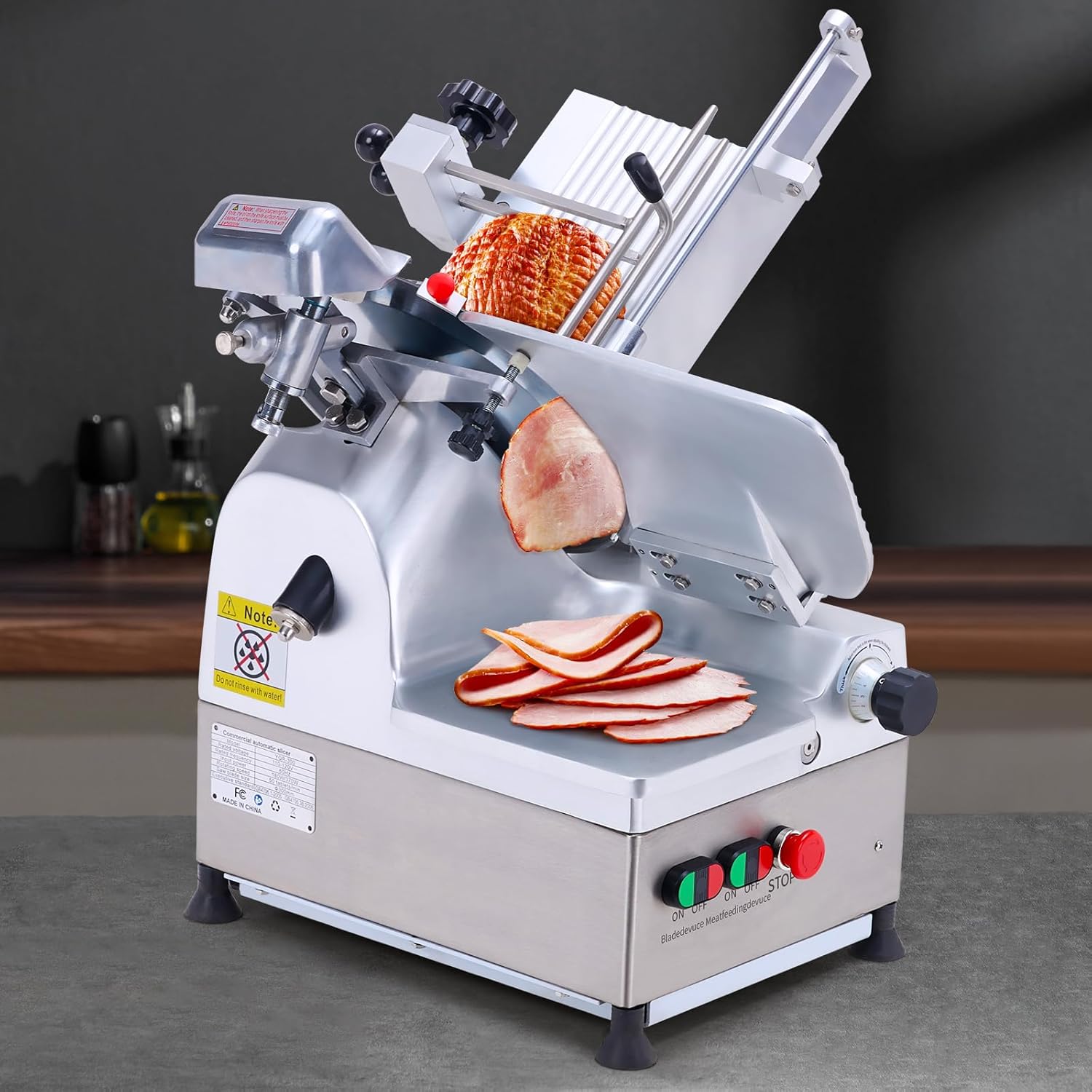
Image 4.3: The slicer in operation, demonstrating its automatic feeding and slicing capabilities.
5. Cleaning and Maintenance
Regular cleaning and maintenance are crucial for the longevity and safe operation of your slicer. Always unplug the appliance before cleaning.
Cleaning
- Hand Wash Only: All removable parts that come into contact with food should be hand washed with warm, soapy water. Rinse thoroughly and dry immediately.
- Wipe down the main body of the slicer with a damp cloth. Do not use abrasive cleaners or immerse the motor unit in water.
- Exercise extreme caution when cleaning around the blade. Use a brush or a thick cloth to avoid direct contact with the sharp edge.
Blade Sharpening
The slicer is equipped with a built-in sharpener to maintain blade sharpness.
- Ensure the slicer is unplugged.
- Locate the built-in sharpener.
- Place the sharpener in contact with the edge of the blade.
- Turn on the blade switch briefly (refer to specific instructions on the sharpener mechanism if provided on the unit) to sharpen the blade automatically. This process should take less than a minute.
- After sharpening, clean any residue from the blade.

Image 5.1: The built-in sharpener for convenient blade maintenance.
6. Troubleshooting
If you encounter issues with your slicer, refer to the following common problems and solutions:
| Problem | Possible Cause | Solution |
|---|---|---|
| Slicer does not turn on | Not plugged in; Power switch off; Circuit breaker tripped | Check power cord connection; Ensure switches are 'ON'; Reset circuit breaker |
| Blade not rotating | Blade switch off; Obstruction around blade | Turn on blade switch; Unplug and carefully remove any obstruction |
| Uneven slices | Food not secured; Blade dull; Thickness setting incorrect | Ensure food is firmly locked; Sharpen blade; Adjust thickness knob |
| Slicer vibrates excessively | Unstable surface; Loose components | Place on a stable, level surface; Check for any loose parts and tighten if safe to do so |
7. Specifications
Technical specifications for the Towallmark Automatic Meat Slicer YQR-300:

Image 7.1: Visual representation of the slicer with its key dimensions and specifications.
| Feature | Specification |
|---|---|
| Brand | Towallmark |
| Model Number | YQR-300 |
| Product Dimensions (L x W x H) | 21.5" x 18.5" x 26" (545mm x 500mm x 660mm) |
| Item Weight | 126.7 pounds |
| Material | Aluminum-Magnesium Alloy + Stainless Steel |
| Color | Silver |
| Operation Mode | Automatic |
| Blade Material | Carbon Steel |
| Blade Diameter | 12 inches (300mm) |
| Cutting Thickness | 0-14 mm (Adjustable) |
| Cutting Width | 21 cm (8.27 inches) |
| Cutting Speed | Up to 50 pieces / minute |
| Motor Power | 550W (Dual Motors: 370W + 180W) |
| Voltage/Frequency | 110-120V/60Hz |
| Special Features | Adjustable Thickness, Anti-Slip Feet, Powerful Dual Motor, Built-in Sharpener |
| Recommended Uses | Meat, Bread, Vegetables |
| Product Care Instructions | Hand Wash Only |
| UPC | 196336760098 |
8. Warranty and Support
For warranty information or technical support, please contact Towallmark customer service. Keep your purchase receipt as proof of purchase.
For further assistance, please visit the official Towallmark website or contact their support channels.