
VORMOR Z2
VORMOR Z2 Translator User Manual
Model: Z2
Introduction
The VORMOR Z2 Translator is an advanced, portable voice translation device designed to facilitate seamless communication across language barriers. It offers instant two-way translation, photo translation, recording translation, and offline capabilities, making it an indispensable tool for travel, business, and learning. This manual provides comprehensive instructions for setting up, operating, and maintaining your VORMOR Z2 Translator.
Safety Information
Please read all safety instructions before using the device to ensure safe and proper operation. Keep the device away from water and excessive moisture. Avoid exposing the device to extreme temperatures. Do not attempt to disassemble or repair the device yourself. Use only the specified charging accessories.
Product Overview
Familiarize yourself with the components and key features of your VORMOR Z2 Translator.

Figure 1: The VORMOR Z2 Translator device, showcasing its compact and ergonomic design. The front features a touch screen display with various function icons, while the back includes a camera lens and speaker grille.

Figure 2: The VORMOR Z2 Translator in action, demonstrating its application in diverse scenarios, from professional consultations to casual interactions, emphasizing its ease of use and broad utility.

Figure 3: Key features of the VORMOR Z2 Translator, illustrating its high accuracy and speed, along with connectivity options and display specifications.
Setup
1. Charging the Device
Before first use, fully charge your VORMOR Z2 Translator. Connect the device to a power source using the provided USB cable. The battery indicator on the screen will show charging status. A full charge typically takes approximately 2-3 hours.

Figure 4: Visual representation of the VORMOR Z2's battery life, highlighting its 1500mAh capacity for extended usage.
2. Powering On/Off
- To power on: Press and hold the power button (usually located on the side) until the screen lights up.
- To power off: Press and hold the power button, then select "Power Off" on the screen.
3. Initial Setup and Network Connection
- Upon first power-on, follow the on-screen prompts to select your preferred system language.
- Connect to a Wi-Fi network: Go to Settings > Wi-Fi, select your network, and enter the password.
- Alternatively, you can connect via a mobile hotspot for online translation features.
4. Downloading Offline Languages
For offline translation, you must download the necessary language packs in advance. Navigate to the "Offline Translation" section on the device, select the languages you wish to download, and ensure you have a stable internet connection during the download process.
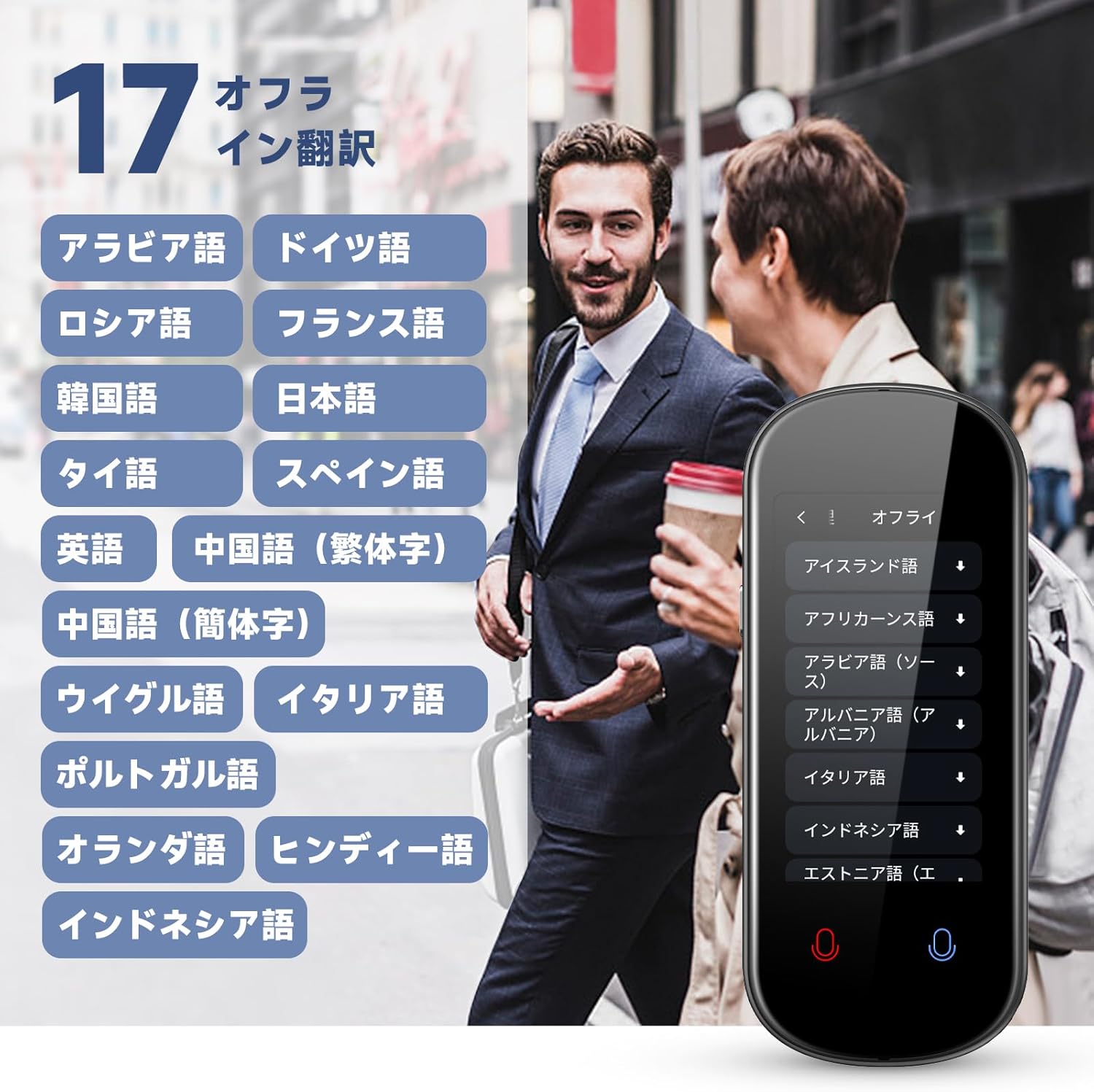
Figure 5: The offline language download interface, displaying the range of languages supported for translation without an internet connection.
Operating Instructions
1. Online Voice Translation
- Select "Online Translation" from the main menu.
- Choose the source and target languages (supports 137 languages across 283 countries).
- Press and hold the corresponding language button (e.g., blue for one language, red for the other) and speak clearly into the microphone.
- Release the button to hear and see the translated text.
2. Offline Voice Translation
- Select "Offline Translation" from the main menu.
- Ensure the required language packs have been downloaded (supports 17 languages).
- Proceed with translation as you would with online voice translation.
3. Camera Translation
- Select "Camera Translation" from the main menu.
- Point the device's camera at the text you wish to translate (e.g., signs, menus).
- The device will automatically focus and translate the text displayed on the screen.

Figure 6: The camera translation function in use, illustrating how the device captures and translates text from physical documents or signs.
4. Recording Translation and Transcription
- Select "Recording Translation" from the main menu.
- Press the record button to start recording conversations or audio. The device can pick up voices from up to 2 meters away.
- The VORMOR Z2 will transcribe the audio and translate it into your pre-set language.
- Recorded conversations can be saved for later review.

Figure 7: The recording and transcription feature, showing the device's ability to capture audio and convert it into text, with a list of saved recordings.
5. Group Translation and ChatGPT
The VORMOR Z2 also supports group translation for multi-person conversations and integrates with ChatGPT for advanced language processing. Refer to the on-screen instructions within these specific applications for detailed usage.
Maintenance
Cleaning
Wipe the device with a soft, dry cloth. Do not use liquid cleaners or abrasive materials. Keep the screen clean to ensure optimal touch response and camera performance.
Storage
Store the device in a cool, dry place away from direct sunlight and extreme temperatures. If storing for an extended period, ensure the battery is partially charged (around 50%) to prolong its lifespan.
Battery Care
To maximize battery life, avoid fully discharging the device frequently. Charge the device regularly, even if not in constant use.
Troubleshooting
- Device not powering on: Ensure the device is charged. Connect to a charger and try again.
- Translation inaccuracy: Ensure clear speech and proper pronunciation. Check network connection for online translation.
- Loud startup sound: This is a known characteristic of the device and cannot be adjusted. Consider powering on in a private setting if noise is a concern.
- Difficulty picking up audio from videos (e.g., YouTube): The device is optimized for direct voice input. External audio sources may not be picked up effectively.
- Offline translation not working: Verify that the required language packs have been successfully downloaded.
- Screen unresponsive: Restart the device. If the issue persists, contact customer support.
Specifications
| Feature | Detail |
|---|---|
| Model | VORMOR Z2 |
| Dimensions | 5.67 x 3.43 x 1.65 inches |
| Weight | 6.7 ounces |
| Color | Black (Z2) |
| Battery Capacity | 1500mAh |
| Continuous Use Time | Up to 8 hours |
| Standby Time | Up to 160 hours |
| Screen | 3.0-inch Touch Panel |
| Online Translation Languages | 137 languages (compatible with 283 countries) |
| Offline Translation Languages | 17 languages |
| Translation Speed | 0.1 - 0.2 seconds |
| Voice Pickup Range | Up to 2 meters |
| Connectivity | Wi-Fi, Hotspot |
Warranty and Support
For warranty information and technical support, please refer to the product packaging or contact VORMOR customer service through their official website or the contact details provided at the point of purchase. Keep your purchase receipt as proof of purchase for warranty claims.
Related documentsZ2


Ask a question about this manual
Ask about setup, troubleshooting, compatibility, parts, safety, or missing instructions. Manuals+ will review the question and use this page’s manual context to help answer it.