
Introduction
Thank you for choosing the Waytronic WT-RS4 Bluetooth Neckband Headphones. This manual provides essential information for setting up, operating, and maintaining your device. The WT-RS4 offers high-quality audio, efficient call recording, and comfortable wear for various activities including music, conference calls, and video playback.

Image: The Waytronic WT-RS4 Bluetooth Neckband Headphones shown in use, connected wirelessly to a smartphone during an active call. The neckband design rests comfortably around the user's neck, with earbuds extending to the ears.
What's in the Box
Please check the package contents to ensure all items are present:
- WT-RS4 Headset
- USB Data Cable (Type-C)
- Spare Headset Caps (two pairs)

Image: A clear display of the product accessories, including the WT-RS4 neckband headset, a USB charging cable, and two additional pairs of ear tips in different sizes.
Product Overview
The Waytronic WT-RS4 features an ergonomic neckband design with in-ear earbuds, providing comfort and stability. It integrates Bluetooth 5.3 for stable connectivity and includes intelligent call noise-cancelling for clear communication.
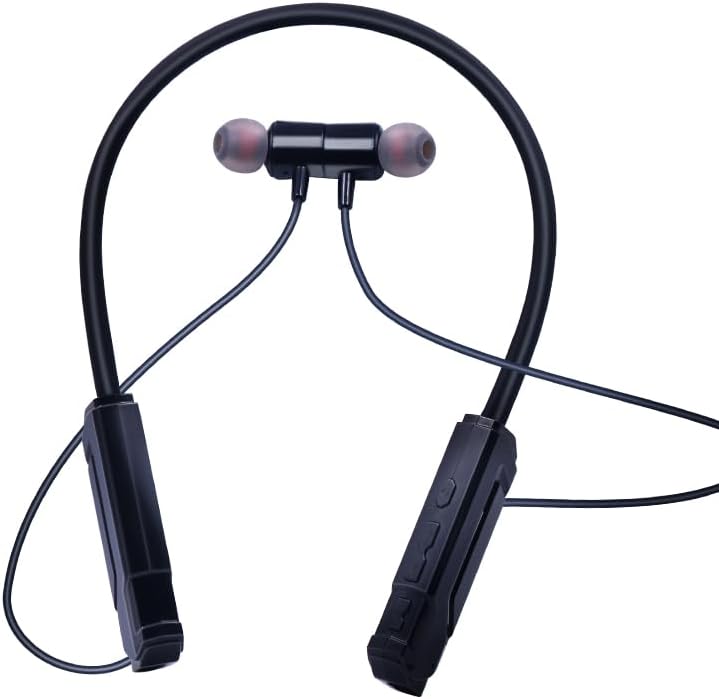
Image: A detailed view of the WT-RS4 neckband headphones, showing the flexible neckband, the in-ear earbuds with silicone tips, and the control modules located on the neckband.
Setup
1. Charging the Device
Before first use, fully charge your WT-RS4 headphones. Use the provided USB data cable to connect the headphones to a compatible USB power source (e.g., computer USB port, wall adapter). The headphones feature Type-C intelligent fast charging.
- A full charge provides approximately 6 hours of music playback and up to 30 hours of call recording.
- The LED indicator will show charging status (refer to the device for specific light patterns).
2. Bluetooth Pairing
- Ensure the headphones are powered off.
- Press and hold the power button until the LED indicator flashes rapidly (usually blue and red), indicating pairing mode.
- On your smartphone or Bluetooth-enabled device, go to Bluetooth settings and enable Bluetooth.
- Search for available devices and select "WT-RS4" from the list.
- Once connected, the LED indicator will typically show a slow blue flash or solid blue light.
- The headphones support Bluetooth 5.3 for a stable connection up to 10 meters.
Operating Instructions
Power On/Off
- Power On: Press and hold the power button for approximately 3 seconds until the LED indicator lights up.
- Power Off: Press and hold the power button for approximately 5 seconds until the LED indicator turns off.
Music Playback
- Play/Pause: Press the Multi-function Button (MFB) once.
- Next Track: Press and hold the Volume Up button.
- Previous Track: Press and hold the Volume Down button.
- Volume Up/Down: Press the Volume Up/Down buttons briefly.
Call Management
- Answer/End Call: Press the MFB once during an incoming call or an active call.
- Reject Call: Press and hold the MFB for 2 seconds during an incoming call.
- Redial Last Number: Double-press the MFB when not on a call.
Call Recording Function
The WT-RS4 supports one-click call recording for both iOS and Android devices without requiring a dedicated app. It features automatic dual-way recording for mobile phone calls and voice chats.

Image: An illustration showing the WT-RS4 headphones compatible with both iOS and Android operating systems for call recording, emphasizing no app download is required.
- Start Recording: During an active call, press the dedicated recording button (refer to device for exact button location, typically a small button separate from volume/MFB).
- Stop Recording: Press the recording button again.
- Recording Playback: Press the recording button once when not on a call to play back the last recorded file.
- Trial Listening: The device supports one-click playback and trial listening for recorded conversations.

Image: A user wearing the WT-RS4 neckband headphones, illustrating its use for recording both mobile phone calls and voice chats, highlighting the automatic dual-way recording feature.
File Management
To manage recorded audio files, connect the WT-RS4 headphones to a computer using the provided USB data cable. The device will appear as a removable storage drive, allowing you to access, transfer, or delete recorded files.
Noise Cancellation
The WT-RS4 features intelligent call noise-cancelling technology. Active and passive noise-cancelling mechanisms work together to neutralize sound waves and counteract noise, ensuring clearer conversations.
Maintenance
- Cleaning: Use a soft, dry cloth to clean the headphones. Do not use abrasive cleaners or immerse the device in water.
- Storage: Store the headphones in a cool, dry place away from direct sunlight and extreme temperatures.
- Battery Care: To prolong battery life, avoid fully discharging the battery frequently. Charge the device regularly, even if not in use for extended periods.
- Ear Tips: Regularly clean the ear tips to prevent wax buildup. Replace them with the spare pairs if they become worn or damaged.
Troubleshooting
| Problem | Possible Solution |
|---|---|
| Headphones do not power on. | Ensure the battery is charged. Connect to a power source and try again. |
| Cannot pair with device. | Ensure headphones are in pairing mode (flashing LED). Turn off and on Bluetooth on your device. Move closer to the device (within 10 meters). |
| No sound during playback. | Check volume levels on both headphones and connected device. Ensure headphones are properly connected via Bluetooth. |
| Call recording not working. | Ensure the recording button is pressed during an active call. Check available storage space on the device. |
| Poor call quality. | Ensure headphones are within Bluetooth range. Check for environmental interference. |
Specifications
| Feature | Detail |
|---|---|
| Model Number | WT-RS4BLACK |
| Brand | Waytronic |
| Connectivity Technology | Wireless (Bluetooth 5.3) |
| Bluetooth Range | Up to 10 meters |
| Ear Placement | In Ear |
| Form Factor | Neckband |
| Noise Control | Sound Isolation, Intelligent Call Noise-Cancelling |
| Battery Capacity | 400mAh |
| Music Playback Time | Approx. 6 hours |
| Call Recording Time | Approx. 30 hours |
| Live Recording Time | Approx. 16 hours |
| Storage Capacity | 512MB |
| Charging Port | Type-C |
| Item Weight | 41 Grams |
| Material | Plastic |
| Compatible Devices | Bluetooth-enabled devices (iOS, Android) |
| Specific Uses | Music, Conference calls, Video, Workout activities |

Image: A visual summary of the headphones' advanced features, including Bluetooth 5.3 for faster transmission, ergonomic design for comfortable all-day wear, and intelligent call noise-cancelling for effective communication.
Warranty and Support
Warranty Information
The Waytronic WT-RS4 Bluetooth Neckband Headphones come with a 1-year warranty from the date of purchase. This warranty covers manufacturing defects. Please retain your proof of purchase for warranty claims.
Customer Support
For further assistance, technical support, or warranty inquiries, please visit the official Waytronic store or contact their customer service. You can find more information and contact details on the Waytronic Store on Amazon.


