
Amplim AMP1708
Amplim Ampmed Non Contact/No Touch Digital Forehead Thermometer
Model: AMP1708
Introduction
The Amplim Ampmed Non Contact/No Touch Digital Forehead Thermometer provides a safe, hygienic, and accurate way to measure temperature for all ages. Its advanced infrared technology ensures quick and reliable readings, making it an essential tool for home health monitoring.
Important Safety Information
Read all instructions before use. This device is intended for household use only. Do not immerse the thermometer in water or other liquids. Keep out of reach of children. Do not drop or expose to direct sunlight or extreme temperatures. Consult a healthcare professional for any health concerns.
What's in the Box
Your Amplim Ampmed Thermometer package includes:
- Amplim Ampmed Non Contact/No Touch Digital Forehead Thermometer
- 2 AAA batteries
- Storage Case
- User Manual

This image displays the Amplim Ampmed Non Contact Thermometer alongside its custom-fit storage case and the two AAA batteries that power it, highlighting the complete package contents.
Product Features
- Non-Contact Measurement: Provides hygienic, touchless temperature readings from the forehead.
- Fast & Accurate: Delivers quick and precise results.
- Large Color LCD Display: Easy-to-read screen with color-coded indicators (green for normal, yellow for elevated, red for high temperature).
- Fever Alarm: Audible alert for temperatures exceeding 100.4°F (38°C).
- Memory Function: Stores up to 32 previous readings for tracking temperature trends.
- Multi-Mode Functionality: Capable of measuring body temperature, object/liquid temperature, and room temperature.
- Celsius/Fahrenheit Switchable: Easily switch between temperature units.
- Auto-Off: Automatically powers off after 30 seconds of inactivity to conserve battery life.
- Battery Operated: Uses 2 AAA batteries (included).

A visual representation of the thermometer's main functionalities, including its large LCD display, high accuracy, memory for 32 readings, ultra-fast measurement, and color-coded fever indicator. It also highlights modes for forehead, surface, and room temperature, along with features like a buzzer, unit conversion, fever alarm, auto-off, and battery operation.
Setup Guide
Battery Installation
The Amplim Ampmed Thermometer requires 2 AAA batteries. These are included in your package.
- Locate the battery compartment on the back of the thermometer.
- Slide open the battery cover.
- Insert the 2 AAA batteries, ensuring correct polarity (+ and - ends match the markings inside the compartment).
- Close the battery cover securely.
This video provides a visual guide to installing the batteries and a general overview of the Amplim No Touch Forehead Thermometer's features and operation.
Operating Instructions
Taking Body Temperature (Forehead Mode)
- Ensure the thermometer is in Body Mode (person icon displayed).
- Hold the thermometer about 1 to 2 inches (2.5 to 5 cm) away from the center of the forehead. Ensure no hair or sweat obstructs the area.
- Press the "Scan/Opt" button.
- The temperature reading will appear on the LCD screen within one second, accompanied by an audible beep.
- Observe the screen color: Green for normal, Yellow for elevated, Red for high temperature.

This image demonstrates the versatility of the Amplim Ampmed thermometer, showing it in use for temperature measurement on individuals across various age groups, from infants to adults and the elderly.
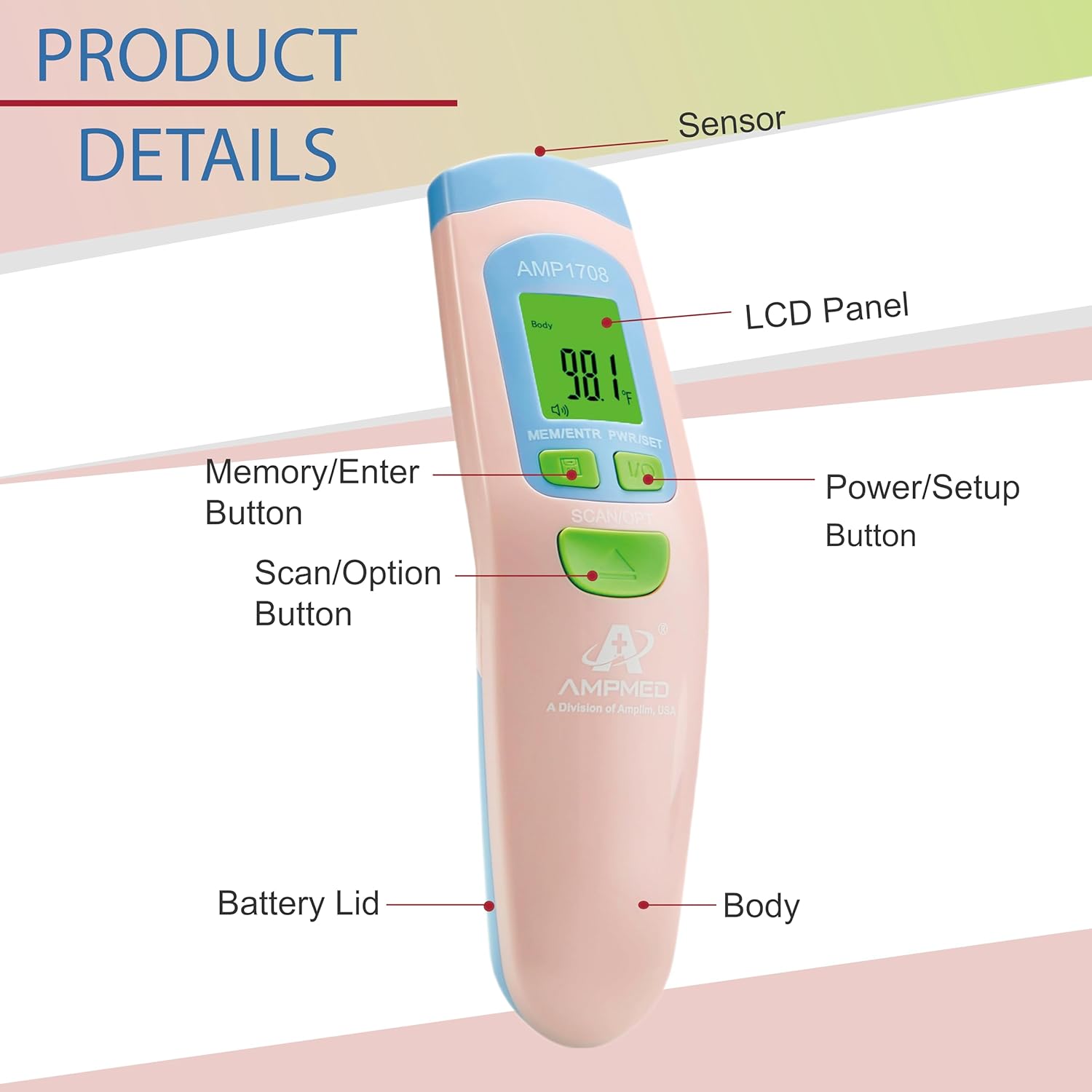
A detailed diagram of the thermometer, clearly labeling its components such as the sensor, LCD screen, and various control buttons for power, memory, and scanning, aiding in user familiarity.
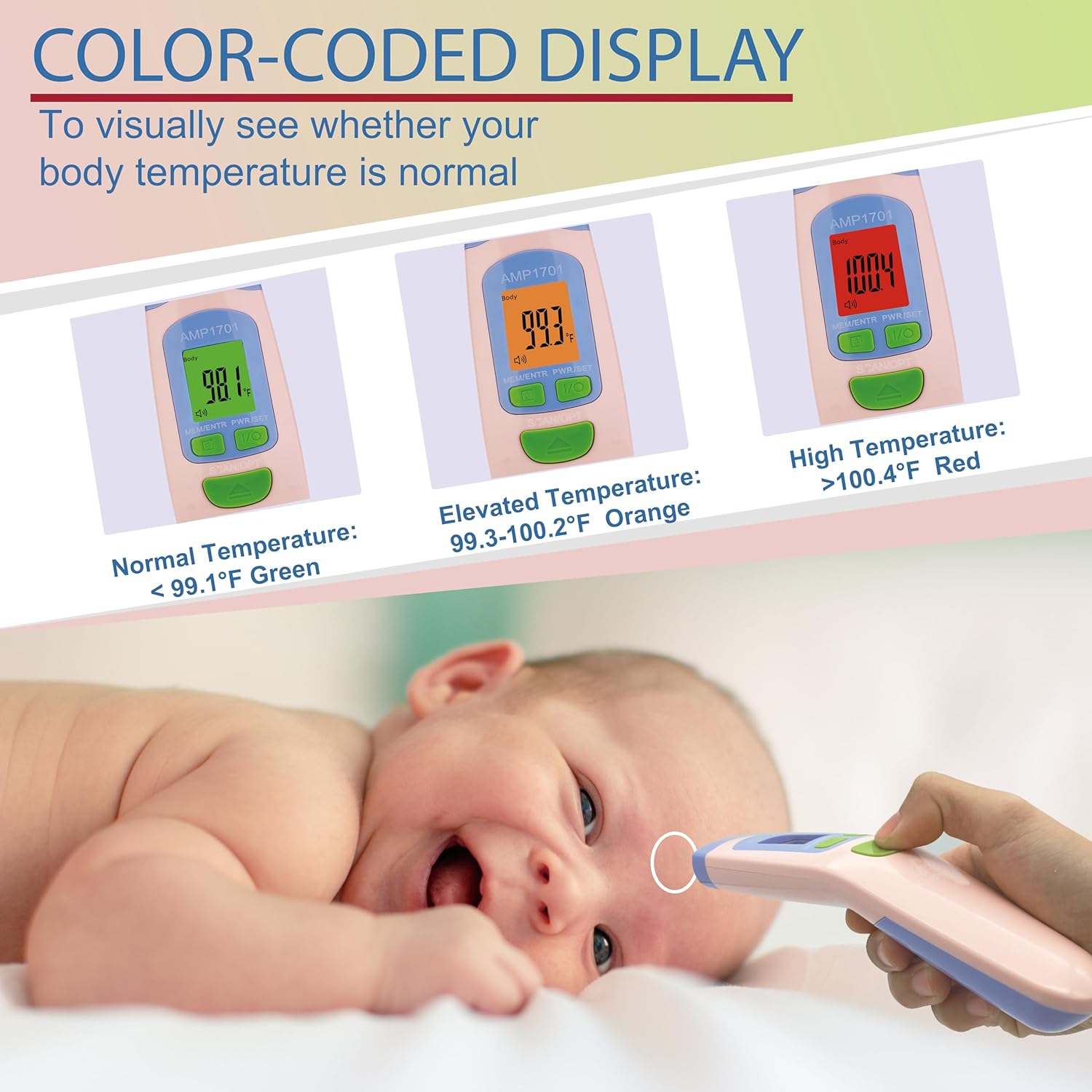
This image explains the thermometer's color-coded display system, which visually indicates temperature ranges: green for normal, orange for elevated, and red for high temperatures, providing an immediate visual alert.
Taking Object/Liquid Temperature (Object Mode)
- Ensure the thermometer is in Object Mode (object icon displayed).
- Point the thermometer at the object or liquid you wish to measure.
- Press the "Scan/Opt" button.
- The temperature reading will appear on the LCD screen.
Taking Room Temperature (Room Mode)
- Ensure the thermometer is in Room Mode (house icon displayed).
- Point the thermometer towards an open area in the room.
- Press the "Scan/Opt" button.
- The ambient room temperature will be displayed.

This image highlights the thermometer's three measurement modes: body temperature, liquid temperature (demonstrated with a glass of milk), and ambient room temperature, showcasing its broad utility.
Switching Between Celsius and Fahrenheit
To switch between Celsius (°C) and Fahrenheit (°F), press the "MEM/ENTR PWR/SET" button repeatedly until the desired unit is displayed.

A visual guide to changing the temperature unit on the thermometer, displaying both Fahrenheit and Celsius options and indicating the free storage case.
Viewing Memory Readings
The thermometer stores up to 32 previous temperature readings. To access these, press the "MEM/ENTR PWR/SET" button when the device is on. Each press will cycle through the stored readings.
Care and Maintenance
Cleaning the Thermometer
Wipe the thermometer body with a soft, dry cloth. For disinfection, use a cloth lightly dampened with 70% isopropyl alcohol. Do not immerse the device in water or use abrasive cleaners.
Storage
Store the thermometer in its provided storage case in a cool, dry place, away from direct sunlight and extreme temperatures. Remove batteries if the device will not be used for an extended period.
Troubleshooting
| Problem | Possible Cause | Solution |
|---|---|---|
| No display/Device won't turn on | Batteries are dead or incorrectly inserted. | Check battery polarity or replace with new AAA batteries. |
| Inaccurate readings | Incorrect measurement distance, forehead obstruction (hair/sweat), or device not acclimated to room temperature. | Ensure correct distance (1-2 inches), clear forehead, and allow thermometer to acclimate to room temperature for 15-30 minutes before use. |
| "Lo" or "Hi" displayed | Temperature is outside the measurable range. | Ensure proper measurement technique and environment. If measuring body temperature, consult a healthcare professional if symptoms persist. |
| Fever alarm not sounding | Alarm function is turned off or temperature is below the fever threshold. | Check device settings to ensure alarm is enabled. Confirm temperature is above 100.4°F (38°C). |
Product Specifications
- Model Number:
- 810477023170 (AMP1708)
- Measurement Range (Body):
- 90.0°F - 109.0°F (32.0°C - 42.9°C)
- Measurement Range (Object/Room):
- 32.0°F - 212.0°F (0.0°C - 100.0°C)
- Accuracy:
- ±0.4°F (±0.2°C)
- Display Resolution:
- 0.1°F / 0.1°C
- Power Source:
- 2 x AAA batteries
- Automatic Shut-off:
- Approx. 30 seconds
- Memory Storage:
- 32 readings
- Dimensions:
- 7.83 x 3.43 x 2.6 inches
- Weight:
- 8.78 ounces (with batteries)
- Color:
- Pink
- Special Features:
- Large Display, Non-Contact, Fast Reading System, Auto Off, High Accuracy
- Manufacturer:
- Amplim
- Country of Origin:
- China
Warranty and Support
Amplim products are designed for quality and reliability. For warranty information or technical support, please refer to the contact details provided in your product packaging or visit the official Amplim website.
This product meets CE and FDA standards and is FSA/HSA approved.
Ask a question about this manual
Ask about setup, troubleshooting, compatibility, parts, safety, or missing instructions. Manuals+ will review the question and use this page’s manual context to help answer it.