
1. Introduction
Thank you for choosing the DONGFXK Motorized Blackout Roller Shades. These shades are designed for ease of installation with a no-drill, cordless design, offering smart control options and 100% blackout capability. This manual provides detailed instructions to ensure proper setup, operation, and maintenance of your new roller shades.
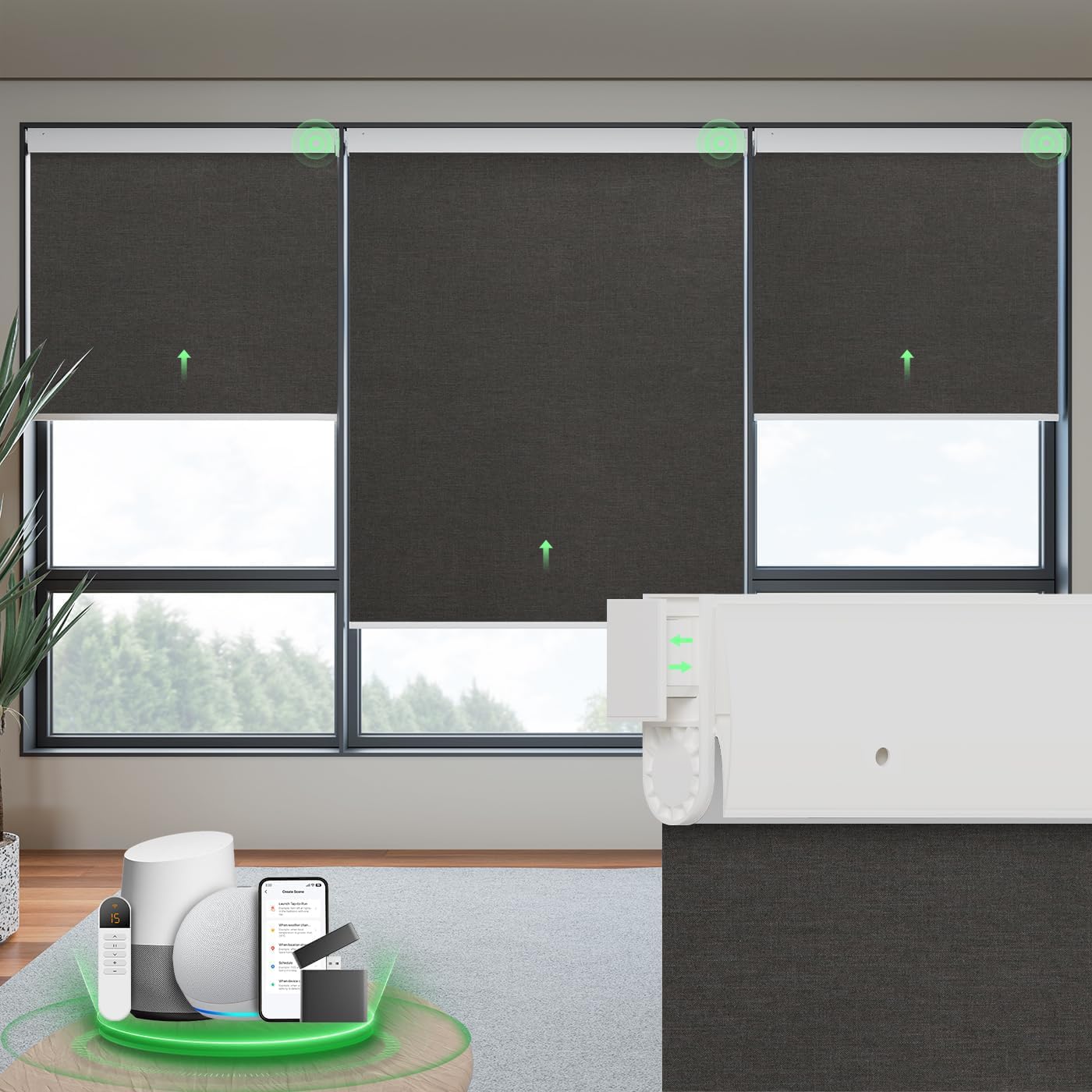
Image: DONGFXK Motorized Blackout Roller Shade in black, showcasing its sleek design.
2. Safety Information
Please read all safety instructions before installation and use. Keep this manual for future reference.
- Children and Pet Safety: The cordless design ensures safety for children and pets. Keep remote controls out of reach of children.
- Installation: Ensure the shades are securely mounted according to the instructions to prevent accidental falls.
- Battery Handling: Use only specified AA batteries. Do not mix old and new batteries. Dispose of used batteries responsibly.
- Operation: Do not attempt to manually pull the shade fabric. Always use the remote control or smart control features.
- Environment: For indoor use only. Do not expose to excessive moisture or extreme temperatures.

Image: Icons indicating 100% safe for pets, anti-tangle, and 100% safe for children, highlighting the cordless design.
3. Package Contents
Verify that all components are present before beginning installation.
- Motorized Roller Shade Unit
- Single-Channel Remote Control
- Installation Instructions Manual
- Mounting Accessories (brackets, screws, wall anchors, anti-slip pads, hex key)
- 6 AA Batteries (pre-installed or included separately)
4. Setup & Installation
4.1. Measuring Your Window
Accurate measurements are crucial for proper fit and function. Determine if you will use an Inside Mount or Outside Mount.

Image: Visual guide for measuring window dimensions for both inside and outside mount installations.
- Inside Mount: Measure the exact width of your window opening at the top, middle, and bottom. Use the smallest measurement. Subtract 1/4 inch from the width for the shade. Window depth should be at least 2 inches.
- Outside Mount: Measure the desired width and height to cover the window frame. Add at least 4 inches to the window width for optimal light blocking.
- The adjustable height range of shades is up to 72 inches.

Image: Table providing size selection recommendations based on actual window width for ordering.
4.2. No-Drill Installation Steps
These shades feature a no-drill design for easy installation, especially suitable for inside mounts. Mounting accessories are included for both no-drill and traditional screw-in methods.
- Step 1: Place the end of the shade with the no-drill device to the left side of the window frame. Push it up against the wall.
- Step 2: If there is a gap between the top rail and the window frame, use a silicone pad to stick to the right side of the top rail. Insert the opposite side of the shade into the window frame.
- Step 3: After installation, tighten the safety lock using the provided hex key to secure the shade in place.
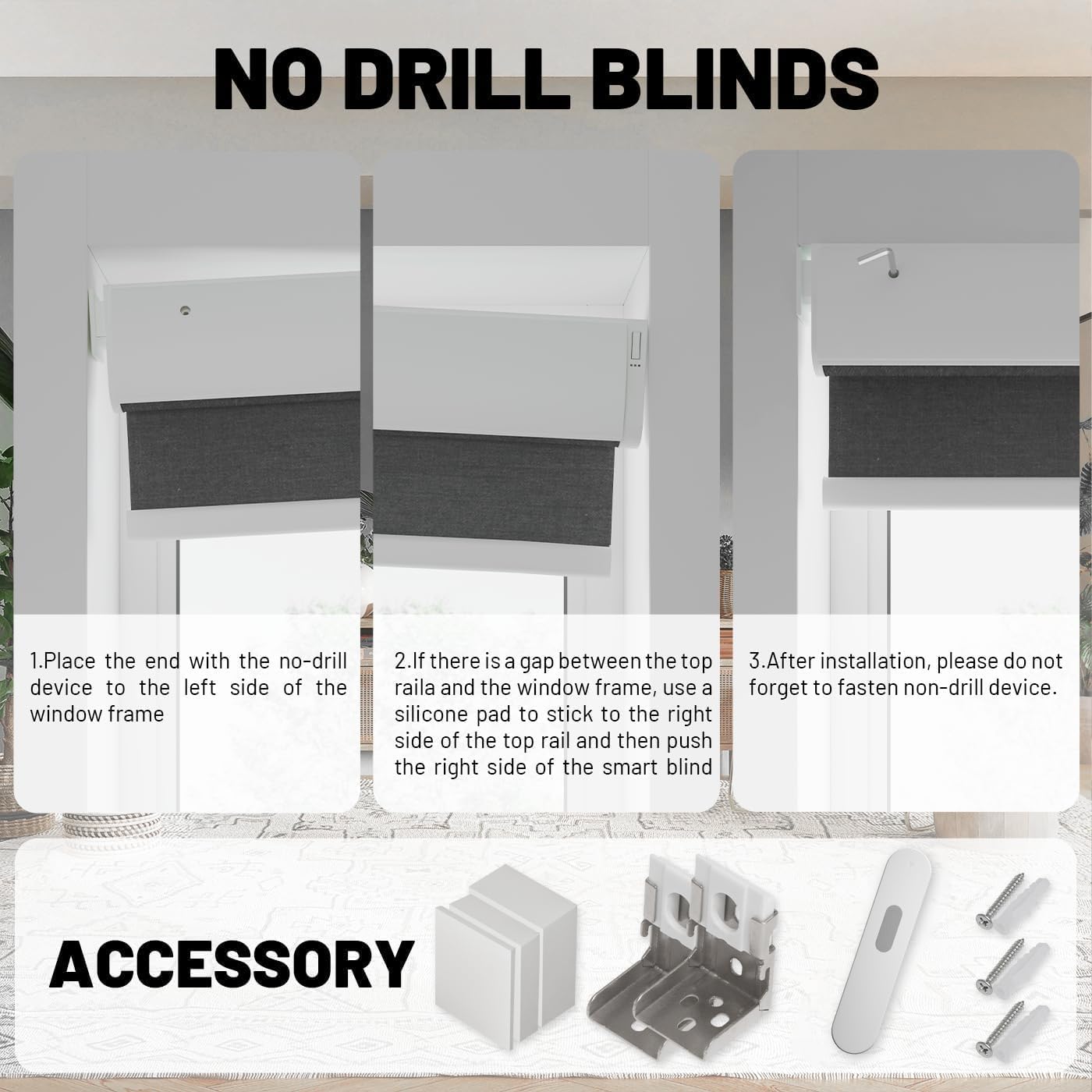
Image: Detailed diagram showing the no-drill installation steps and included accessories.
Video: Step-by-step guide on installing DONGFXK No Drill Motorized Blinds with Remote Control.
5. Operating Instructions
5.1. Remote Control
Your shades come with a single-channel remote control. Optional 15-channel remotes are available for controlling multiple blinds.

Image: Visual representation of remote control, voice control, and app control options for the smart blinds.
- Up Button: Raises the shade.
- Down Button: Lowers the shade.
- Stop/Pause Button: Stops the shade at its current position.
- Refer to the remote's specific instructions for programming upper and lower limits.
5.2. Smart Control (Optional)
For advanced control, you can connect your shades to a smart home system via an optional hub (not included). This allows control through smartphone apps or voice commands with compatible devices like Alexa or Google Home.

Image: Depiction of smart control integration, showing a hub, smartphone app interface, and voice assistant devices.
5.3. Battery Operation
The shades are powered by 6 AA batteries (included). These are designed for easy replacement, typically lasting 4-6 months.
Video: Animation demonstrating the quiet operation and blackout capability of the motorized shades.
6. Maintenance
6.1. Cleaning
The blackout fabric is durable and easy to maintain.
- Fabric: Spot clean only. Use a soft, damp cloth with mild soap for stains. Do not immerse in water or use harsh chemicals.
- Hardware: Wipe the valance and other components with a dry or slightly damp cloth.
6.2. Battery Replacement
When the shades stop responding or operate slowly, it's time to replace the batteries.
- Roll up the blinds completely and lay the unit flat on a stable surface.
- Slide the protruding board aside to access the battery compartment.
- Pull out the old battery box and replace the 6 AA dry batteries.
- Install the new battery box back into the valance, ensuring it clicks into place.

Image: Diagram showing 4 steps for easy battery replacement in motorized blinds.
7. Troubleshooting
If you encounter issues, refer to the following common solutions:
| Problem | Possible Cause | Solution |
|---|---|---|
| Shade does not move. | Dead batteries in shade or remote. Remote not paired. | Replace batteries in both shade and remote. Re-pair remote if necessary (refer to remote instructions). |
| Shade moves slowly or inconsistently. | Low batteries in shade. | Replace the 6 AA batteries in the shade unit. |
| Remote control not responding. | Remote batteries dead. Remote out of range. Interference. | Replace remote batteries. Move closer to the shade. Ensure no obstructions. |
| Shade stops at incorrect positions. | Upper/lower limits need adjustment. | Refer to the remote control's instructions for setting or resetting the upper and lower limits. |
8. Specifications
| Feature | Detail |
|---|---|
| Brand | DONGFXK |
| Model | S3-black 32"W x 72"H |
| Material | Polycotton |
| Product Dimensions | 72"L x 32"W |
| Color | S3-black |
| Opacity | 100% Blackout |
| Operation Mode | Automatic, Motorized |
| Special Feature | Cordless, No-Drill Installation |
| Power Source | 6 AA batteries (included) |
| Mounting Type | Inside Mount (No-Drill), Outside Mount (Optional Screws) |
| Product Care | Spot Clean Only |
9. Warranty & Support
DONGFXK automatic blinds come with a 60-day repair & replacement policy and a 2-year warranty. For customer service and support, please contact DONGFXK directly. They are happy to assist with customized selections and any product-related inquiries.
For further assistance, please refer to the contact information provided with your purchase or visit the official DONGFXK website.
