
1. Introduction
This manual provides detailed instructions for the installation, operation, and maintenance of your DONGFXK Motorized Blackout Smart Roller Shade. Please read this manual thoroughly before installation and use to ensure proper function and safety.
2. Safety Information
- Keep the remote control out of reach of children.
- Ensure the installation area is clear of obstructions.
- Do not attempt to manually force the blinds up or down when the motor is engaged.
- Use only the specified battery type (6 AA batteries) for the motor.
- Avoid exposing the blinds to excessive moisture or direct water.
- If any part is damaged, do not operate the blinds. Contact customer service.
3. Package Contents
Verify that all components are present before beginning installation.
- Motorized Roller Shade unit
- Single-channel Remote Control
- Installation Instructions Manual
- Mounting Accessories (brackets, screws, silicone pad)
- 6 AA Batteries (included)

Image: Components of the DONGFXK Motorized Blackout Smart Roller Shade, showing the main shade unit, remote control, and battery compartment. The image highlights features like 6 AA batteries, noise level below 40dB, and 4-6 months battery life.
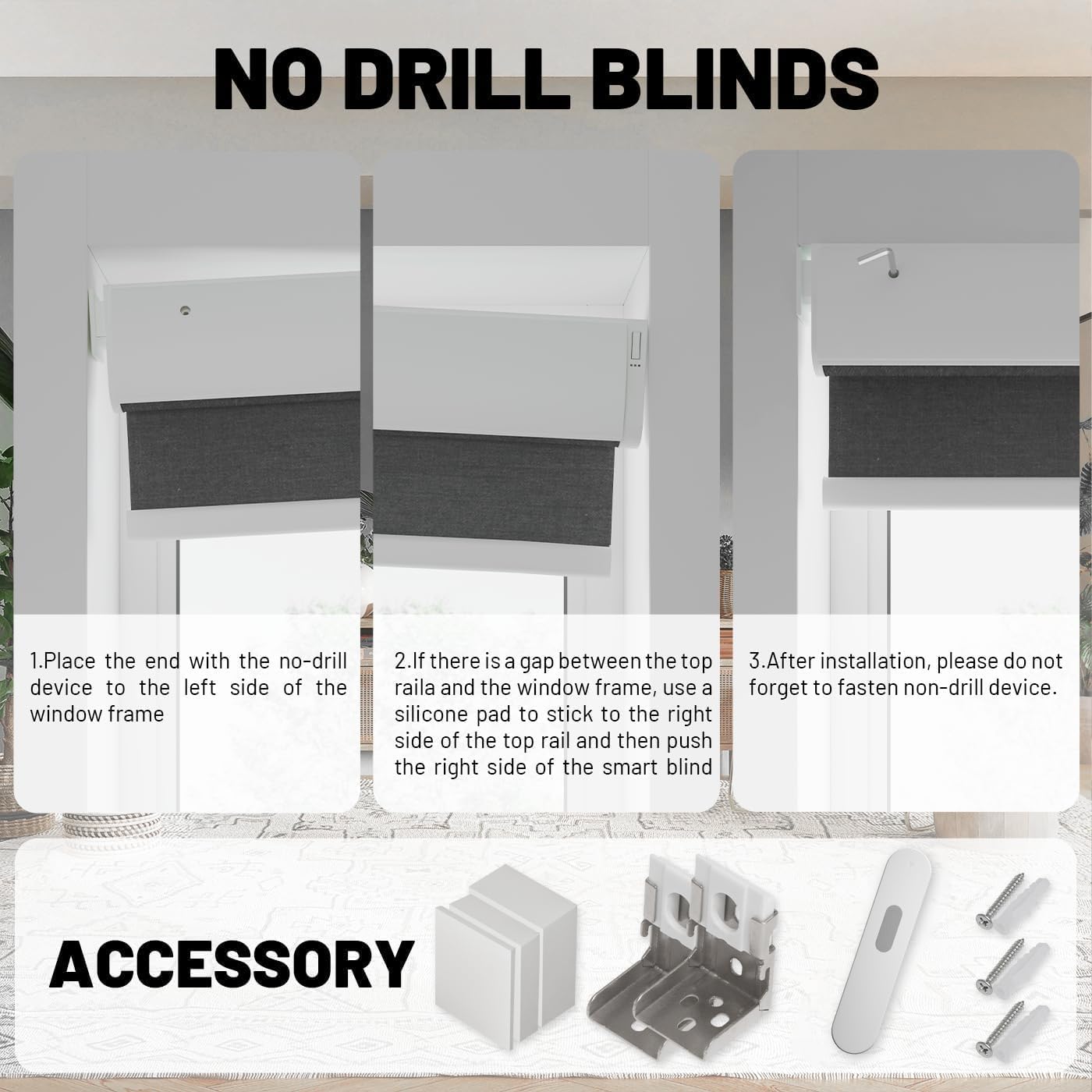
Image: Accessories for no-drill installation, including mounting brackets, screws, and silicone pads, along with a visual guide for the no-drill mechanism.
4. Installation Guide
4.1 Measuring Your Window
Accurate measurements are crucial for proper fit and function. Determine whether you will use an inside mount or outside mount.

Image: Visual guide for measuring windows for both inside and outside mount installations. For inside mount, measure the minimum window size and ensure window depth is at least 1.5 inches. For outside mount, measure the maximum window size and add 4 inches to the width.

Image: Detailed instructions on how to measure for inside and outside mount blinds, including considerations for window depth and adding extra width for outside mounts.
For Inside Mount: The window frame depth must be at least 1.5 inches. If your chosen blind width is 34 inches, the no-drill mechanism adds 0.5 inches, making it suitable for window frames between 34 and 34.5 inches wide. Order width = window width - 0.25 inches.
For Outside Mount: Order width = window width + 4 inches. The adjustable height range of shades is 0-72 inches.
4.2 No-Drill Installation Steps
- Place the end of the blind with the no-drill device to the left side of the window frame.
- If there is a gap between the top rail and the window frame, use a silicone pad to stick to the right side of the top rail, then push the right side of the smart blind into place.
- After installation, ensure to fasten the non-drill device securely.
Image: Step-by-step visual guide for installing the no-drill blinds, showing placement of the device, using a silicone pad for gaps, and fastening the mechanism.
4.3 Battery Installation
The motorized blinds require 6 AA batteries for operation. Ensure correct polarity when installing.
- Roll up the blinds and lay them flat on a stable surface.
- Slide the protruding board aside to access the battery compartment.
- Pull out the battery box and place 6 AA dry batteries inside, observing polarity.
- Install the battery box back into the valance.

Image: Four-step visual guide for easy battery replacement, showing how to access the battery compartment, insert 6 AA batteries, and re-install the battery box.
5. Operating Instructions
5.1 Remote Control Operation
Your smart blinds come with a single-channel remote control. An optional 15-channel remote control is available for managing multiple blinds.
- Use the Up button to raise the blinds.
- Use the Down button to lower the blinds.
- Use the Stop/Pause button to halt the blinds at any desired position.
- Refer to the remote control's specific instructions for pairing and setting upper/lower limits.

Image: The single-channel remote control used to operate the motorized blinds.
5.2 Smart Control (Optional)
For advanced control, you can connect your blinds to a smart home system via a hub (optional accessory). This enables control through smartphone apps or voice commands.
- Connect the optional hub to your home network.
- Pair the blinds with the hub according to the hub's instructions.
- Integrate the hub with your preferred smart home platform (e.g., Google Home, Amazon Alexa).
- Control the blinds using voice commands or through the dedicated smartphone application.

Image: The optional smart home hub, which allows for app and voice control of the blinds.
Video: Demonstration of the motorized blackout roller shades in an indoor setting, showcasing their automatic operation and noise reduction capabilities. The video illustrates the blinds lowering to provide 100% blackout and raising to allow natural light.
6. Maintenance
- Cleaning: Spot clean only. Use a soft, damp cloth to gently wipe any soiled areas. Do not immerse the blinds in water or use harsh chemicals.
- Battery Replacement: Replace the 6 AA batteries when the motor performance degrades or stops. Follow the battery installation steps in Section 4.3.
- General Care: Periodically check the mounting brackets and ensure they are secure. Avoid placing heavy objects on the blinds.
7. Troubleshooting
| Problem | Possible Cause | Solution |
|---|---|---|
| Blinds do not move. | Low or dead batteries; remote not paired; motor malfunction. | Replace batteries (Section 4.3). Re-pair remote control (refer to remote manual). Contact customer service if problem persists. |
| Blinds stop unexpectedly. | Obstruction; battery issue; limit settings incorrect. | Check for obstructions. Replace batteries. Reset upper/lower limits (refer to remote manual). |
| Remote control not responding. | Remote batteries dead; remote out of range; interference. | Replace remote batteries. Move closer to the blinds. Ensure no strong interference sources are nearby. |
| Blinds are noisy during operation. | Normal motor operation; minor misalignment. | A slight motor sound is normal (below 40dB). Ensure blinds are installed level and without obstruction. |
8. Specifications
| Feature | Detail |
|---|---|
| Brand | DONGFXK |
| Model | Motorized Blackout Smart Roller Shade |
| Dimensions (Current Product) | 39"W x 72"H |
| Color | S3-black |
| Material | Polycotton (4 layers thickened privacy fabric) |
| Operation Mode | Automatic, Motorized |
| Control Type | Remote (single-channel included, 15-channel optional), Smartphone (via optional hub), Voice (via optional hub) |
| Special Feature | Cordless, No-Drill Installation, Blackout, UV Protection, Noise Reduction |
| Power Source | 6 AA Batteries (included) |
| Recommended Uses | Indoor (Bedroom, Living Room, Bathroom, Office, Children's Room, Study Room) |
| Product Care | Spot Clean Only |
| Item Weight | 5.04 pounds |
9. Warranty and Support
DONGFXK offers custom service for different window sizes. If you have any questions about the product after receiving your motorized roller shades, please feel free to contact us. We are committed to resolving any issues you may encounter.
For support, please refer to the contact information provided with your purchase or visit the official DONGFXK website.
