
Introduction
This manual provides detailed instructions for the installation, operation, and maintenance of your ROVE R2-4K PRO Dash Cam. Please read thoroughly to ensure proper usage and to maximize the device's features.
Features
- 4K UHD Video Recording: Records videos at 2160P (4K) @30fps, 1440P (2.5K) @60fps/30fps, and 1080P (HD) @60fps/30fps.
- Built-in 5G Wi-Fi: Fast video transfer speeds up to 20MB/s for seamless connectivity with the ROVE App.
- Built-in GPS: Records precise driving routes, locations, and speed stamps directly on the video.
- Supercapacitor: Ensures durability and safety in extreme temperatures, extending product life.
- 24-HR Auto-trigger Parking Mode: Automatically enters parking mode or motion detection when using the ROVE Ultimate 3-Lead Type-C Hardwire Kit (included in bundle).
- Sony STARVIS IMX335 Sensor: Provides superior night vision and clear video quality in low-light conditions.
- 3" IPS Wide Display: For easy viewing and menu navigation.
- Supports Up-To 512GB MicroSDXC Card: Allows for extensive video storage.
- Seamless Loop Recording: Continuously records and overwrites older files when the memory card is full.
- Voice Guidance: Provides important alerts and operational feedback.

Image: ROVE R2-4K PRO Dash Cam showcasing 4K recording capabilities.
Package Contents
The ROVE R2-4K PRO Dash Cam bundle includes the following items:
- ROVE R2-4K PRO Dash Cam
- ROVE Ultimate 3-Lead Type-C Hardwire Kit
- ROVE Ultimate 128GB Micro SD Card
- 360° Suction Mount
- 360° 3M Sticky Mount
- Dual USB Car Charger with Spare USB-C Port
- 1M/3FT USB Type-C Data Cable
- 12FT USB Type-C Car Charging Cable
- 5x Cable Hiding Clips
- Car Wire Trim Tool
- Quick Start Guide
- Warning Sticker & Electrostatic Film
- 2x Alcohol Pads & Cleaning Wipe
- User Manual

Image: All items included in the ROVE R2-4K PRO Dash Cam bundle.

Image: Detailed contents of the ROVE Ultimate 3-Lead Hardwire Kit.
Product Overview
Familiarize yourself with the components of your ROVE R2-4K PRO Dash Cam.
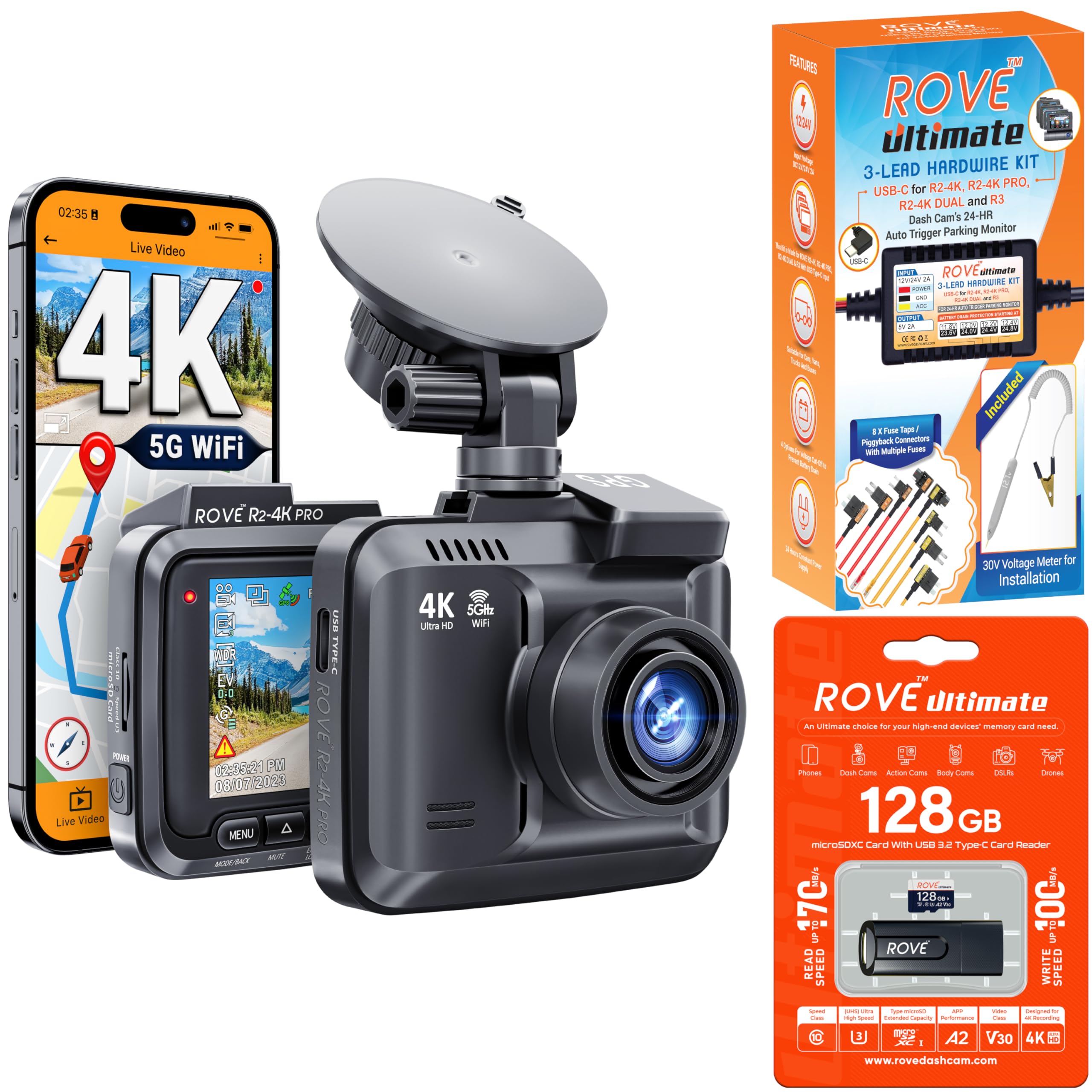
Image: ROVE R2-4K PRO Dash Cam and its companion smartphone application.
Dash Cam Components
- Front Lens: Captures 4K UHD video with a 150° wide-angle view and F1.5 aperture.
- 3" IPS Display: Located on the rear of the dash cam for live view and settings.
- Control Buttons: Menu, Mode/Back, Mute, Emergency Lock/Wi-Fi, Switch Camera View, OK/Confirm.
- USB Type-C Port: For power input/data output.
- MicroSD Card Slot: Supports up to 512GB cards.
- GPS Module: Integrated for location and speed data.
- Speaker & Microphone: For audio recording and voice guidance.
Image: Front view of the ROVE R2-4K PRO Dash Cam.

Image: Side view of the dash cam showing USB-C port and power button.
Setup
1. MicroSD Card Installation
Insert the provided 128GB Micro SD Card into the dash cam's card slot. Ensure the card is formatted within the dash cam settings before first-time use.

Image: ROVE Ultimate 128GB Micro SD Card and USB-C card reader.
2. Dash Cam Mounting
Clean the windshield thoroughly. Attach either the 360° Suction Mount or the 360° 3M Sticky Mount to your desired location on the windshield. Slide the dash cam onto the mount and secure it.

Image: ROVE R2-4K PRO Dash Cam with suction mount and built-in GPS module.
3. Rear Camera Installation
Attach the rear camera to your rear windshield using the adhesive mount. Connect the rear camera to the main dash cam using the provided USB Type-C rear camera cable. Route the cable neatly along the headliner and A-pillar using the cable hiding clips and trim tool.
4. Power Connection
Connect the USB Type-C car charging cable to the dash cam and plug the car charger into your vehicle's 12V auxiliary power outlet. Alternatively, use the ROVE Ultimate 3-Lead Type-C Hardwire Kit for permanent installation and 24-hour parking mode functionality.

Image: ROVE R2-4K PRO Dash Cam with the optional hardwire kit for parking mode.
Operating Instructions
1. Initial Power On & Formatting
Once powered, the dash cam will automatically turn on. Follow the on-screen prompts to format the MicroSD card and set the date/time.
2. Recording Modes
- Loop Recording: The default mode, continuously recording video in segments (e.g., 1, 3, 5, or 10 minutes). Older files are overwritten when the card is full.
- Emergency Recording (G-Sensor): Automatically locks and saves video footage upon detecting sudden impacts or collisions. Sensitivity can be adjusted in settings.
- Parking Mode: When hardwired, the dash cam can automatically trigger recording upon motion detection or impact while the vehicle is parked.
- Time Lapse Video: Records specific images per second at a lower rate, saving storage and capturing long-duration events.

Image: Explanation of the seamless loop recording feature.
3. Wi-Fi Connectivity & ROVE App
Enable Wi-Fi on the dash cam and connect your smartphone to the dash cam's Wi-Fi network. Use the ROVE App to view live video, download recordings, and adjust settings.
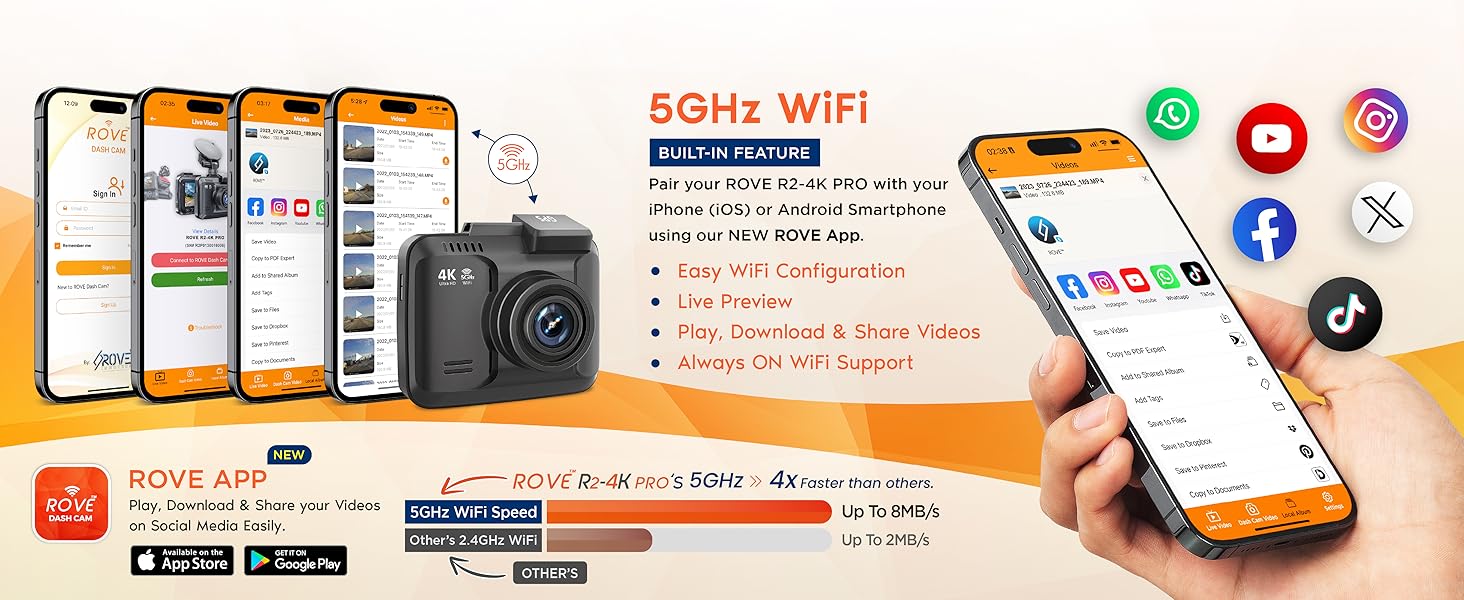
Image: ROVE R2-4K PRO Dash Cam with built-in 5G Wi-Fi for fast downloads.
4. GPS Functionality
The built-in GPS records real-time speed, driving routes, and location data, which can be viewed on the dash cam screen or via the ROVE GPS Player on your PC/Mac.

Image: ROVE R2-4K PRO Dash Cam with built-in GPS for accurate tracking.
Maintenance
1. MicroSD Card Formatting
Regularly format your MicroSD card (e.g., monthly) to ensure optimal performance and prevent data corruption. This can be done through the dash cam's settings menu.
2. Firmware Updates
Keep your dash cam's firmware updated via the ROVE App for the latest features and improvements.

Image: Step-by-step guide for over-the-air firmware updates via the ROVE App.
3. Cleaning
Use the provided cleaning wipes to keep the dash cam lens and screen free from dust and smudges for clear recordings.
Troubleshooting
- "Memory Card Speed Too Slow" Error: Ensure you are using a genuine Class 10, U3 Speed Micro-SD Card. ROVE Ultimate Micro SD Cards are recommended.
- Camera Not Recording: Check if the MicroSD card is inserted correctly and formatted. Ensure the power connection is stable.
- Wi-Fi Connection Issues: Ensure the dash cam's Wi-Fi is enabled and your phone is within range. Restart both devices if necessary.
- Parking Mode Not Activating: Verify that the ROVE Ultimate 3-Lead Type-C Hardwire Kit is correctly installed and connected to your vehicle's fuse box.

Image: Warning message displayed when parking mode is activated.
Specifications
| Feature | Detail |
|---|---|
| Model Name | R2-4K PRO |
| Video Capture Resolution | 2160P (4K) @30fps, 1440P (2.5K) @60fps/30fps, 1080P (HD) @60fps/30fps |
| Connectivity Technology | 5G Wi-Fi |
| Special Feature | Motion Sensing, Built-in GPS, Supercapacitor, Super Night Vision, Wide Dynamic Range |
| Included Components | Dash Cam, Hardwire Kit, 128GB Micro SD Card, Car Charger, Mounts, Cables, Tools, Manual |
| Mounting Type | Suction Mount, Sticky Mount |
| Control Method | Buttons, Touch (via App) |
| Color | Black or Gray |
Warranty and Support
For warranty information, technical support, or any inquiries, please refer to the contact details provided in your Quick Start Guide or visit the official ROVE website.
ROVE offers free firmware updates and app updates for iOS & Android devices to ensure optimal performance and access to the latest features.