
1. Important Safety Information
Please read this instruction manual carefully before operating the ProfiCare PC-HL 3116 wall-mounted ceramic fan heater. Keep this manual for future reference.
- Ensure the appliance is connected to a power supply that matches the specifications (220-240V, 50-60Hz).
- Do not cover the heater. Maintain adequate clearance from walls, furniture, and curtains to prevent overheating.
- This appliance is equipped with overheat protection. If the heater becomes too hot, it will automatically switch off.
- Do not use this heater in the immediate vicinity of a bath, shower, or swimming pool. It has IP24 splash protection, but direct water exposure should be avoided.
- This product is suitable only for well-insulated rooms or for occasional use.
- Keep children and pets away from the appliance during operation.
- Always unplug the heater before cleaning or maintenance.
2. Package Contents
Verify that all items are present in the package:
- ProfiCare PC-HL 3116 Wall-Mounted Ceramic Fan Heater Unit
- Remote Control (battery included)
- Mounting Material (screws and wall plugs)
- Instruction Manual
3. Product Overview
The ProfiCare PC-HL 3116 is a wall-mounted ceramic fan heater designed for efficient and comfortable heating of rooms up to 60 m².

Figure 3.1: Front view of the ProfiCare PC-HL 3116 heater with heat emission indicated.

Figure 3.2: Close-up of the heater's LED display showing temperature and mode indicators.
3.1 Main Features
- PTC Ceramic Heating Element: Provides fast and efficient heat.
- LED Display: Shows current temperature and operational status.
- Remote Control: Full-function remote for convenient operation.
- Open Window Detection: Automatically switches off when a sudden temperature drop is detected.
- Swing Function: Distributes air optimally throughout the room.
- Adjustable Temperature: Range from 18°C to 45°C.
- Two Heating Levels: 1000W and 2000W.
- 8-Hour Timer: For scheduled operation.
- 6 Time Programs: Customizable heating schedules.
- Automatic Mode: Adjusts heating level based on set temperature.
- Overheat Protection: Enhances safety during operation.
- IP24 Splash Protection: Suitable for use in bathrooms (zone 3).
3.2 Remote Control
The included remote control allows for convenient adjustment of all heater functions.

Figure 3.3: Remote control with various function buttons.
The remote control includes buttons for power, temperature adjustment, timer, heating level selection, fan function, time programs, and swing function. A battery is pre-installed.
4. Installation
The PC-HL 3116 heater is designed for wall mounting. Ensure the chosen location is suitable and allows for proper air circulation.
4.1 Choosing a Location
- Select a wall location that is clear of obstructions and flammable materials.
- Ensure there is sufficient space around the heater for optimal heat distribution and safety.
- The power cable length is 1.5 meters, so choose a location within reach of a suitable power outlet.
4.2 Mounting Instructions
Use the provided mounting material (screws and wall plugs) for secure installation.
- Mark the desired mounting points on the wall according to the heater's dimensions. Refer to Figure 4.1 for approximate dimensions.
- Drill holes at the marked points.
- Insert the wall plugs into the drilled holes.
- Secure the heater to the wall using the screws. Ensure it is firmly attached.
- Plug the power cable into a grounded electrical outlet.
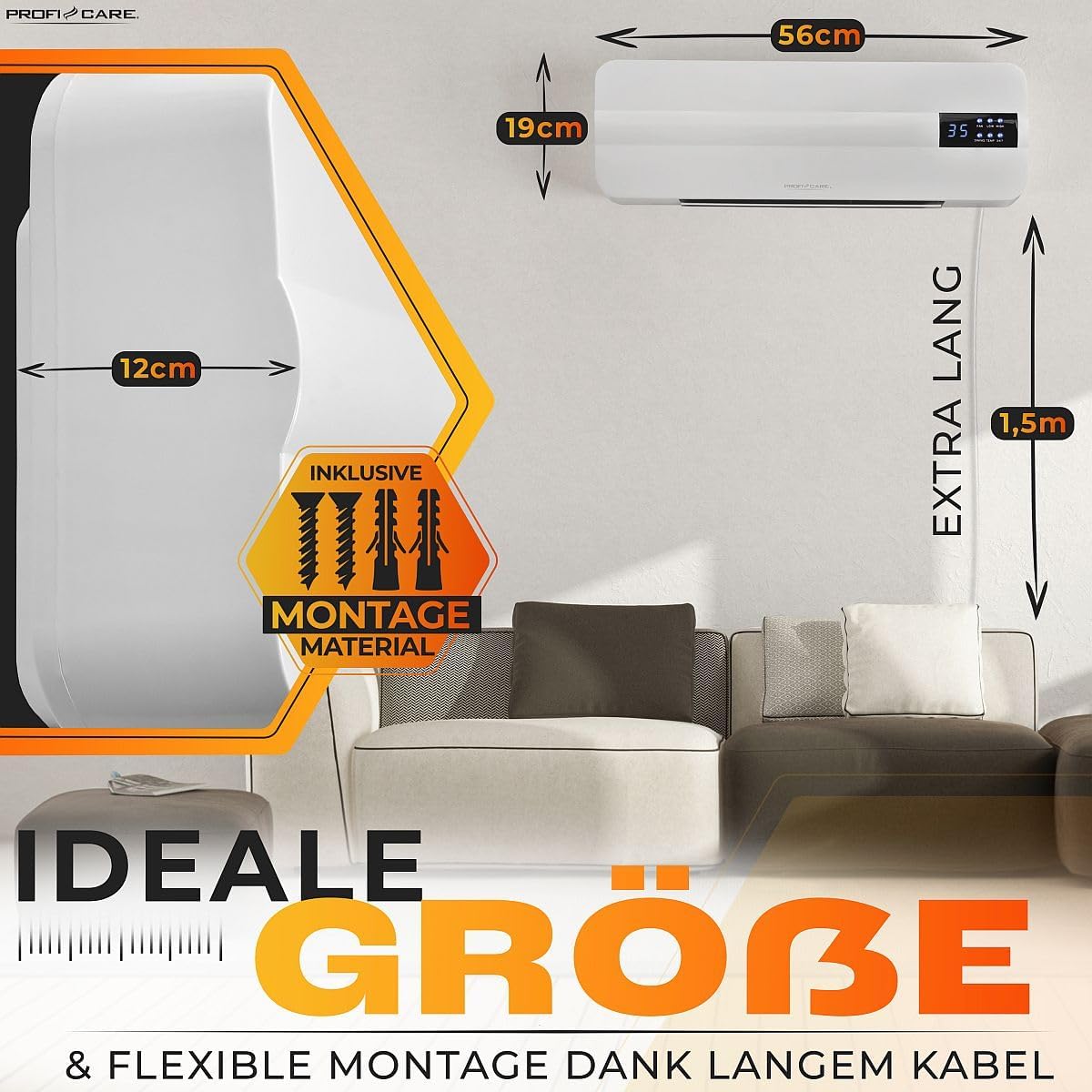
Figure 4.1: Heater dimensions and illustration of mounting material.
5. Operation
Operate the ProfiCare PC-HL 3116 using the control panel on the unit or the remote control.
5.1 Power On/Off
Press the Power button on the remote control or the unit to turn the heater on or off.
5.2 Setting the Temperature
Use the Temperature Up (+) and Temperature Down (-) buttons on the remote control to set the desired room temperature between 18°C and 45°C. The LED display will show the set temperature.
5.3 Heating Levels
Select between two heating levels:
- Low (1000W): For moderate heating or maintaining temperature.
- High (2000W): For rapid heating of the room.
Use the dedicated button on the remote control to cycle through the heating levels.
5.4 Fan Function
The heater can operate in fan-only mode without heat, providing air circulation. Activate this function using the remote control.
5.5 Timer and Time Programs
- 8-Hour Timer: Set the heater to operate for a specific duration up to 8 hours.
- 6 Time Programs: Configure custom heating schedules for different times of the day or week. Refer to the remote control section for specific button functions.
5.6 Swing Function
Activate the Swing function to enable the internal louvers to oscillate, distributing warm air more evenly across the room.
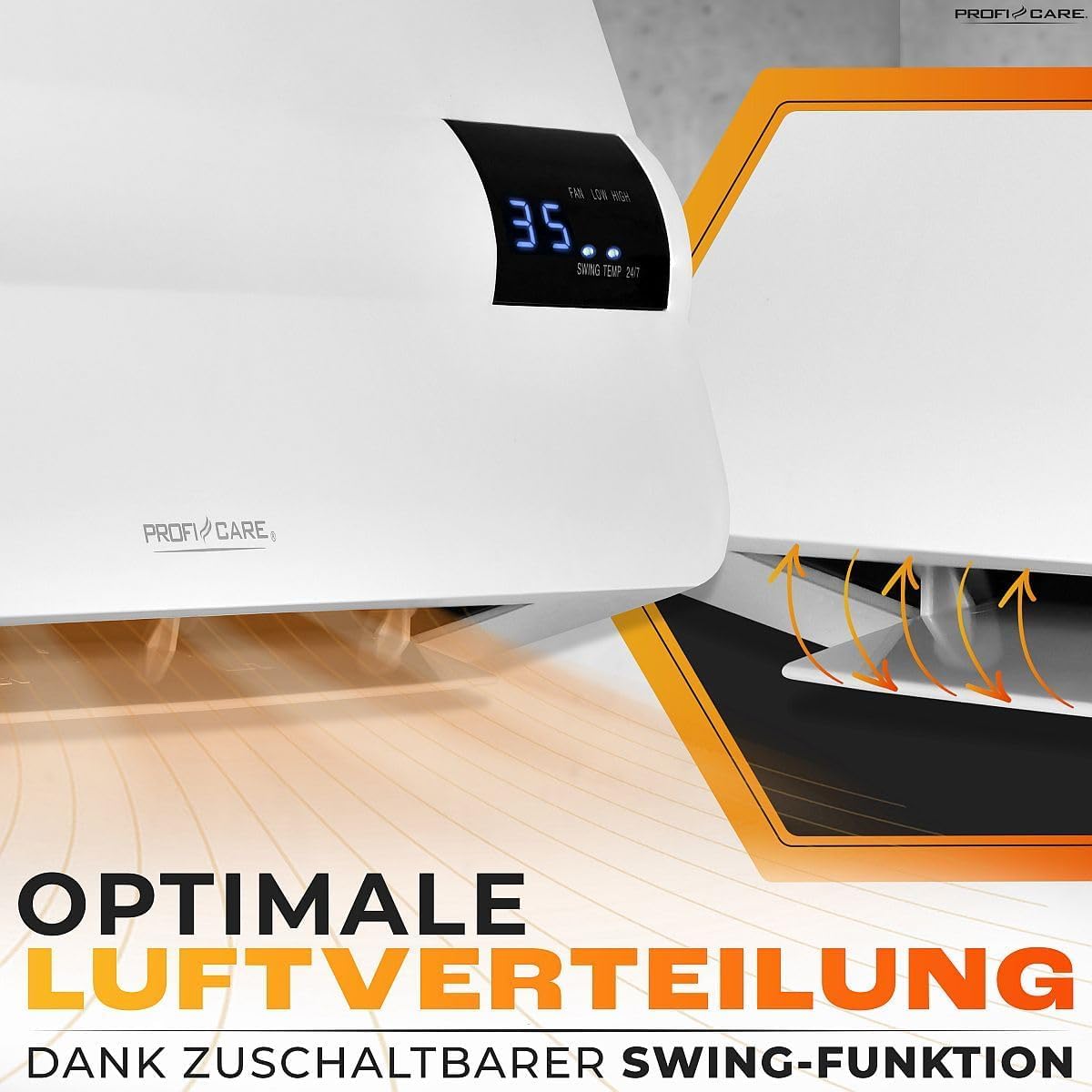
Figure 5.1: Illustration of optimal air distribution via the swing function.
5.7 Automatic Mode
In Automatic Mode, the heater will automatically switch between heating levels (1000W/2000W) or turn off/on to maintain the set temperature efficiently.
5.8 Open Window Detection
The heater features an intelligent open window detection system. If a sudden drop in room temperature is detected (indicating an open window), the heater will automatically switch off to conserve energy. It will resume operation once the window is closed and the temperature stabilizes, or can be manually restarted.

Figure 5.2: Heater demonstrating automatic shut-off with open window detection.
6. Maintenance
Regular cleaning and proper storage will ensure the longevity and efficient operation of your heater.
6.1 Cleaning
- Always unplug the heater from the power outlet and allow it to cool completely before cleaning.
- Wipe the exterior surfaces with a soft, damp cloth. Do not use abrasive cleaners or solvents.
- Ensure no water enters the interior of the appliance.
- Periodically clean the air inlet and outlet grilles with a soft brush or vacuum cleaner to remove dust accumulation.
6.2 Storage
If the heater will not be used for an extended period, unplug it and store it in a cool, dry place, preferably in its original packaging.
7. Troubleshooting
If you encounter issues with your ProfiCare PC-HL 3116 heater, refer to the following common problems and solutions:
| Problem | Possible Cause | Solution |
|---|---|---|
| Heater does not turn on. | No power supply. Power button not pressed. | Check if the power cable is securely plugged in. Ensure the wall outlet is functional. Press the power button on the unit or remote control. |
| No heat output. | Heating level not selected. Open window detection activated. Overheat protection activated. | Select a heating level (1000W or 2000W). Close any open windows; the heater should resume or can be restarted. Unplug the heater, let it cool down for 30 minutes, then plug it back in. Ensure proper ventilation. |
| Swing function not working. | Swing function not activated. | Press the swing button on the remote control. |
| Remote control not working. | Battery depleted. Obstruction between remote and heater. | Replace the battery (12V). Ensure a clear line of sight to the heater's receiver. |
If the problem persists after trying these solutions, please contact customer support.
8. Specifications
| Feature | Specification |
|---|---|
| Brand | ProfiCare |
| Model Number | PC-HL 3116 |
| Power | 2000 Watts |
| Voltage | 230 Volts |
| Dimensions (D x W x H) | 14.5 x 60 x 23.2 cm |
| Weight | 2.35 Kilograms |
| Material | Plastic, PTC Ceramic |
| Heating Method | PTC Ceramic Heating Element |
| Recommended Room Size | Up to 60 m² |
| Temperature Range | 18°C to 45°C |
| Heating Levels | 2 (1000W / 2000W) |
| Timer | 8 hours |
| Time Programs | 6 |
| Special Features | Open Window Detection, Overheat Protection, LED Display, Swing Function, Remote Control, IP24 Splash Protection |
| Cable Length | 1.5 meters |
| Country of Origin | China |
9. Warranty and Support
The manufacturer provides a 2-year availability for spare parts for this product. For warranty claims, technical support, or service inquiries, please refer to the contact information provided with your purchase documentation or visit the official ProfiCare website.


