
CATLINK Baymax
CATLINK Baymax Self-Cleaning Litter Box
Instruction Manual
Introduction
Thank you for choosing the CATLINK Baymax Self-Cleaning Litter Box. This innovative product is designed to simplify cat care by providing an automated, hygienic, and safe litter solution. With smart features like app control, health monitoring, and multiple cleaning modes, the Baymax ensures a clean environment for your cat and convenience for you.
This manual provides essential information for setting up, operating, maintaining, and troubleshooting your CATLINK Baymax litter box. Please read it thoroughly before use to ensure optimal performance and safety.

Image: The CATLINK Baymax Self-Cleaning Litter Box, showcasing its sleek design, accompanying mobile app interface, and various accessories.
Setup
- Unpacking and Component Check: Carefully remove all components from the packaging. Verify that all items listed in the 'Complete Accessories' section are present.
- Placement: Place the litter box on a flat, stable surface in a well-ventilated area. Ensure it is within range of your 2.4 GHz Wi-Fi network for app connectivity. Avoid placing it near heat sources or in direct sunlight.
- Power Connection: Connect the power adapter to the litter box and plug it into a standard electrical outlet.
- Litter Filling: Open the top of the litter box and fill the inner drum with clumping cat litter. Do not exceed the 'MAX' fill line indicated inside the drum. For optimal cleaning, use the blue filter for expanded litter and the orange filter for mixed litter.

Image: A display of all components included with the CATLINK Baymax, such as the main unit, odor neutralizer, user manual, trash bags, privacy curtain, filters, and power supply.

Image: Visual guide on how to fill the litter box up to the maximum line and a comparison of blue and orange filters for different litter types.
- App Download and Connection: Download the CATLINK app from your smartphone's app store. Follow the in-app instructions to connect your litter box to your 2.4 GHz Wi-Fi network. This enables remote control and health monitoring features.
Operating Instructions
The CATLINK Baymax offers four distinct cleaning modes to suit your preferences and your cat's habits:
- Automatic Mode: The litter box automatically cleans after your cat exits, ensuring a consistently fresh environment.
- Scheduled Mode: Set specific times for cleaning cycles via the app. This is ideal for maintaining a routine.
- Manual Mode: Initiate a cleaning cycle manually at any time using the button on the unit or through the app.
- Full Emptying Mode: This mode completely empties the litter from the drum into the waste bin, useful for full litter changes.
Smart Features via CATLINK App:
- Health Monitoring: The app tracks your cat's weight, litter box usage frequency, and duration. It provides real-time alerts for abnormal behaviors, helping you monitor your cat's health.
- Multi-Cat Recognition: Create personalized profiles for each cat in your household. The system can differentiate between multiple cats, providing individual health data.
- Consumable Alerts: Receive notifications when litter levels are low, or when the waste bag or odor neutralizer needs replacement.
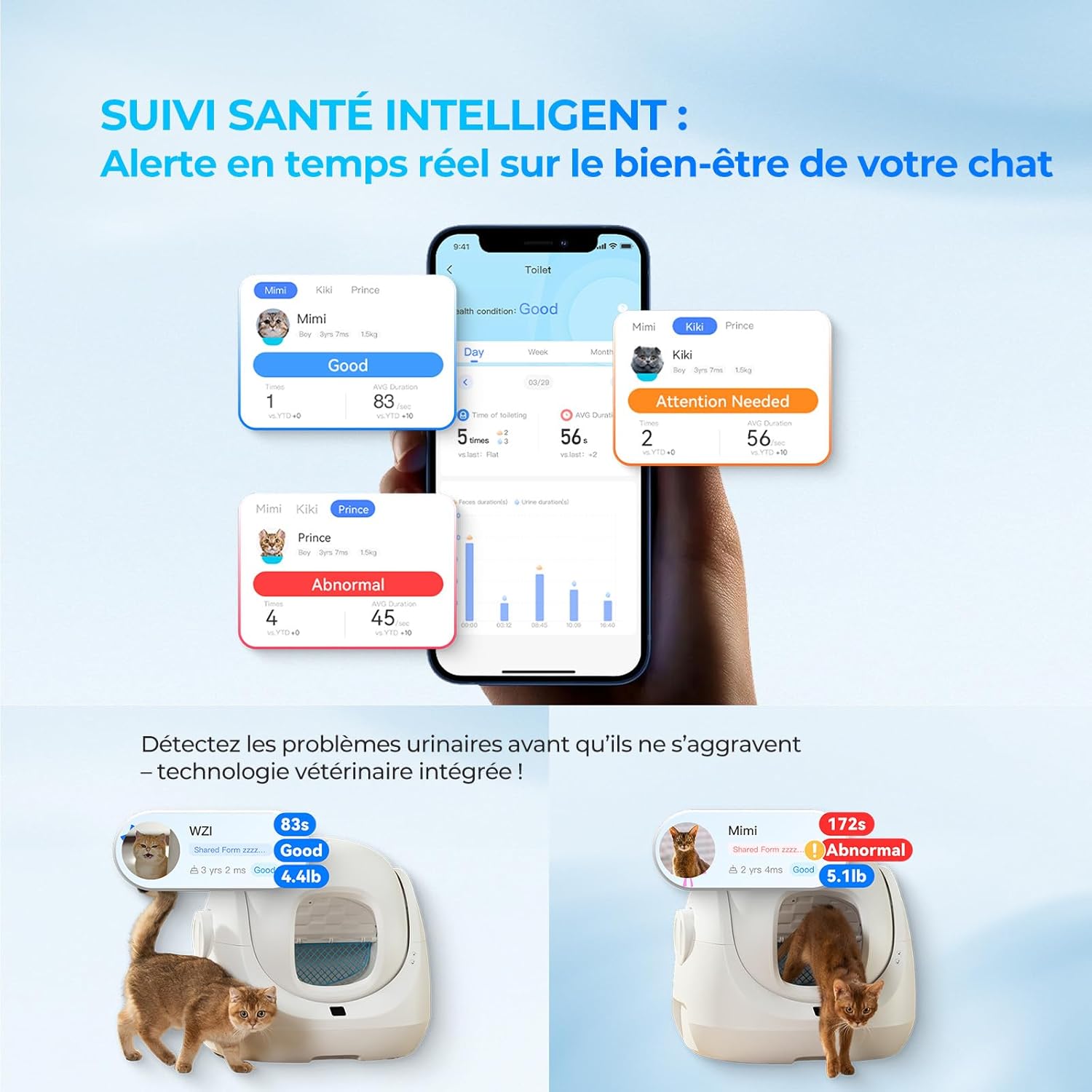
Image: Screenshots of the CATLINK app showing intelligent health monitoring, real-time alerts for cat well-being, and detection of urinary issues.
Maintenance
- Waste Bag Replacement: When the waste bin is full (indicated by an alert on the unit or app), simply remove the full bag and replace it with a new one. The hermetically sealed container prevents odors.
- Cleaning the Unit: The inner sphere is detachable for easy cleaning. Simply remove it, rinse with water, and allow it to dry completely before reassembling. The anti-leak base and anti-adhesive material facilitate cleaning.
- Filter Maintenance: Regularly check and clean the appropriate filter (blue for expanded litter, orange for mixed litter) to ensure efficient sifting. Replace filters as needed.
- Odor Neutralizer: The automatic deodorizer activates after each cleaning cycle. Replace the deodorizing gel as indicated by the app or when effectiveness diminishes.

Image: Visual demonstration of the one-click detachable sphere, highlighting its washability and quick drying for simplified cleaning.

Image: Illustration of the anti-leak solution, featuring a waterproof base and a gentle cleaning mode for soft stools, ensuring hygiene and easy maintenance.
Safety Information
- Do not use for pets under 6 months old or weighing less than 1.5 kg.
- The CATLINK Baymax is equipped with 7 high-performance anti-clogging sensors and 4 advanced protection modes to ensure your cat's safety:
- Infrared Detection: Detects presence of cat.
- Weight Sensor: Stops operation if cat enters during a cycle.
- Smart Rotation: Prevents pinching or trapping.
- Anti-Pinch System: Ensures no body parts are caught.
- Always ensure the unit is unplugged before performing any manual cleaning or maintenance that requires reaching inside the drum.

Image: Diagram illustrating the total protection features of the CATLINK Baymax, including infrared sensors, motor protection, anti-pinch protection, and gravity sensors.
Troubleshooting
- Connection Issues: Ensure your Wi-Fi is 2.4 GHz. Try restarting your router and the litter box. If issues persist, refer to the app's connection guide.
- Cleaning Inefficiency: Check that the litter level is not above the 'MAX' line. Ensure you are using the correct filter for your litter type. Clean the inner drum and sensors regularly.
- Odor Persistence: Verify the waste bag is properly sealed and replaced when full. Ensure the odor neutralizer is active and replaced as needed.
- Unit Not Responding: Check power connection. If the unit is stuck, ensure no foreign objects are obstructing the rotation. Refer to the app for specific error codes or alerts.
- False Alerts: Ensure the litter box is on a stable, level surface. Avoid placing objects near the entrance that could trigger sensors.
For more detailed troubleshooting or persistent issues, please consult the CATLINK app's help section or contact customer support.
Specifications
| Feature | Specification |
|---|---|
| Product Dimensions (L x W x H) | 53.28 x 54.5 x 59.9 cm |
| Weight | 11 Kilograms |
| Model Number | Baymax |
| Color | Baymax |
| Material | Acrylonitrile Butadiene Styrene (ABS) |
| Litter Capacity | 70 Liters (approx.) |
| Waste Bin Capacity | 7 Liters |
| Suitable Cat Weight | 1.5 kg to 10 kg |
| Special Features | Wi-Fi Connectivity, App Control, Real-time Health Monitoring, Multiple Cleaning Modes, Automatic Deodorization |
Warranty and Support
CATLINK provides a one-year free warranty service for the Baymax Self-Cleaning Litter Box. Please retain your proof of purchase for warranty claims.
For any questions, technical assistance, or warranty support, please contact CATLINK customer service. You can typically find contact information within the CATLINK app or on the official CATLINK website.
CATLINK's mission is to create an intelligent pet ecosystem for happier and healthier cats. Your feedback is valuable to us.
Important Note on Videos
This manual focuses on providing comprehensive textual and image-based instructions. No official product videos from the seller were identified for direct embedding based on the provided data. User-generated videos from reviews are not included to maintain the informational and official tone of this manual.
Related documentsBaymax


Ask a question about this manual
Ask about setup, troubleshooting, compatibility, parts, safety, or missing instructions. Manuals+ will review the question and use this page’s manual context to help answer it.