
SunnySky R2207 2580KV
Contents
SunnySky Edge Racing R2207 FPV Brushless Motor User Manual
Model: R2207 2580KV (CCW) | Brand: SunnySky
1. Introduction
This manual provides essential information for the proper installation, operation, and maintenance of your SunnySky Edge Racing R2207 FPV Brushless Motor. Designed for high-performance FPV racing drones, this motor delivers reliable power and efficiency. Please read this manual thoroughly before using the product to ensure optimal performance and safety.
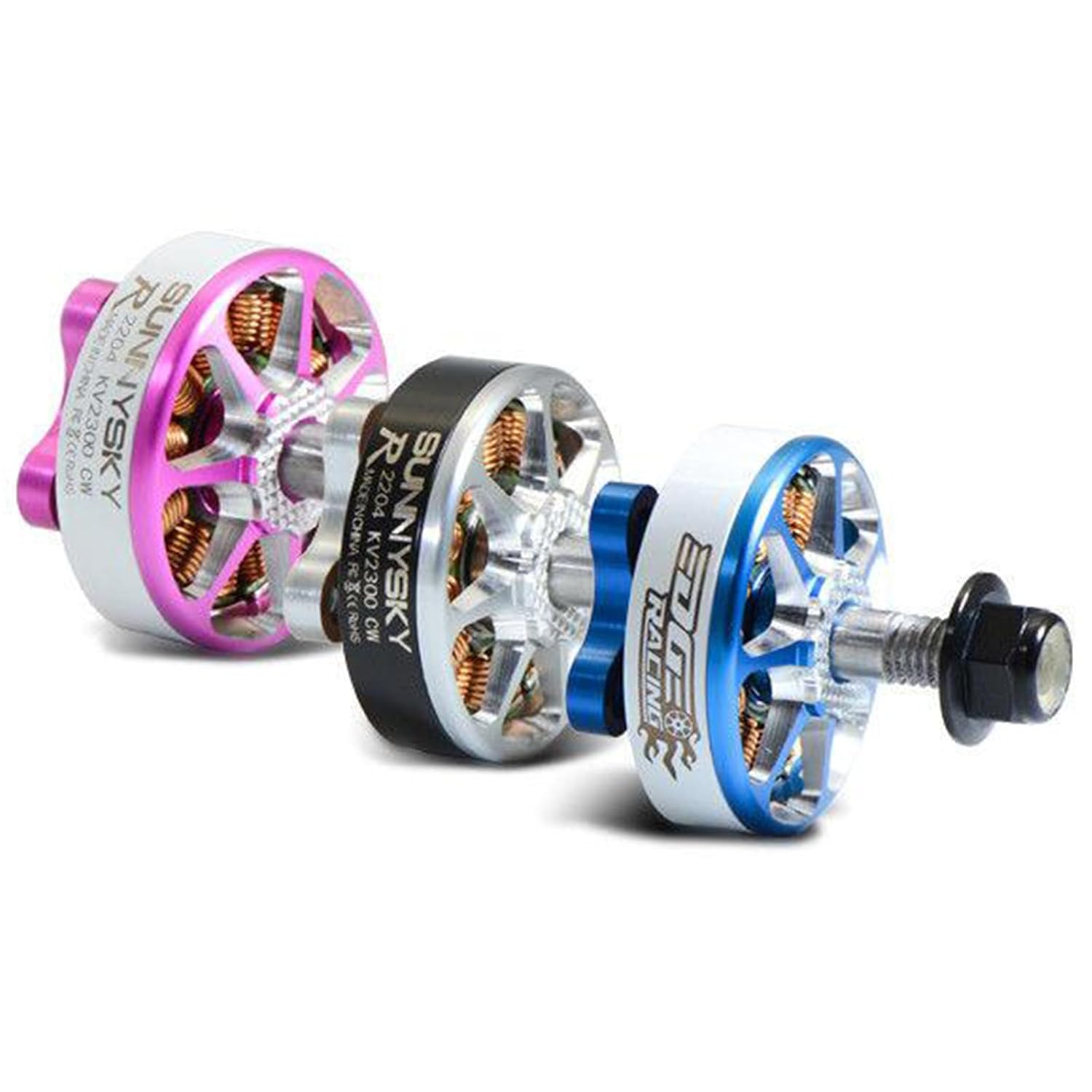
Figure 1: Exploded view of the SunnySky Edge Racing R2207 FPV Brushless Motor, showing its internal components and construction. This motor is designed for high-performance FPV applications.
2. Setup and Installation
Proper installation is crucial for the motor's performance and longevity. Follow these steps carefully:
2.1 Mounting the Motor
- Ensure your drone frame has compatible mounting holes for 22xx series motors (typically 16x16mm or 19x19mm).
- Use the provided mounting screws. Do not use screws that are too long, as they can damage the motor windings. The recommended screw length is typically 4-5mm for standard frame arms.
- Secure the motor to the frame arm using an appropriate screwdriver. Apply gentle, even pressure to all screws to prevent warping.

Figure 2: Front view of the SunnySky Edge Racing R2207 FPV Brushless Motor, showing the mounting holes and the motor bell. This motor is designed for counter-clockwise (CCW) rotation.
2.2 Wiring the Motor
The R2207 motor comes with three wires for connection to an Electronic Speed Controller (ESC). The order of these wires determines the motor's rotation direction.
- Connect the three motor wires to the three ESC phase wires. The order does not matter initially for brushless motors.
- To change the rotation direction (if needed for CW/CCW setup), swap any two of the three motor wires connected to the ESC. Alternatively, most modern ESCs allow changing motor direction via software (e.g., BLHeliSuite).
- Ensure all solder joints are clean, strong, and insulated with heat shrink tubing to prevent short circuits.
2.3 Propeller Installation
This specific motor is a Counter-Clockwise (CCW) variant, meaning it is designed to spin counter-clockwise when viewed from above. Ensure you install the correct propeller type for CCW rotation.
- Place the propeller onto the motor shaft, ensuring it sits flush against the motor bell.
- Thread the propeller nut onto the motor shaft. For CCW motors, the propeller nut typically tightens in a clockwise direction (standard thread).
- Tighten the propeller nut firmly but do not overtighten, as this can damage the propeller or motor shaft.

Figure 3: The SunnySky Edge Racing R2207 FPV Brushless Motor shown with its packaging and included accessories, such as mounting screws and washers. The box indicates the KV rating and CW/CCW type.

Figure 4: Side view of the SunnySky Edge Racing R2207 FPV Brushless Motor, highlighting the robust construction and the "EDGE RACING" branding on the motor bell.

Figure 5: Angled view of the SunnySky Edge Racing R2207 FPV Brushless Motor, showcasing the detailed design and the quality of the windings visible through the bell openings.
For additional product information and verification, you may scan the QR code found on the product packaging or visit the official verification link: http://weixin.qq.com/r/YThIUDrE4GefrX4z921z
3. Operating Guidelines
Once installed, the motor operates in conjunction with an ESC and flight controller. Adhere to the following guidelines for safe and effective operation:
- Initial Spin-up: Before flight, perform a low-power spin-up test to confirm correct motor rotation and smooth operation.
- Propeller Balance: Ensure propellers are balanced to minimize vibrations, which can stress motors and other components.
- Temperature Monitoring: During extended use, periodically check motor temperature. Excessive heat can indicate an issue (e.g., incorrect propeller size, ESC timing, or motor damage).
- Voltage and Current: Operate within the recommended voltage and current limits for your motor and ESC combination. Overloading can lead to premature failure.
- Environmental Conditions: Avoid operating in dusty, sandy, or wet conditions, which can damage bearings and internal components.
4. Maintenance
Regular maintenance extends the lifespan of your brushless motors:
- Cleaning: After each flight session, especially if flying in dirty environments, gently clean the motor to remove dust, dirt, and debris. Use compressed air or a soft brush.
- Bearing Inspection: Periodically check the motor bearings for any signs of wear, roughness, or excessive play. Worn bearings can cause vibrations and reduce efficiency. Replace bearings if necessary.
- Shaft Straightness: Inspect the motor shaft for any bends or damage, particularly after a crash. A bent shaft will cause severe vibrations.
- Wire Integrity: Check motor wires and solder joints for fraying, cuts, or cold solder joints. Repair or re-solder as needed.
5. Troubleshooting
If you encounter issues with your motor, consider the following troubleshooting steps:
| Problem | Possible Cause | Solution |
|---|---|---|
| Motor not spinning or stuttering |
|
|
| Excessive vibrations |
|
|
| Motor gets excessively hot |
|
|
6. Specifications
Key specifications for the SunnySky Edge Racing R2207 FPV Brushless Motor (CCW 2580KV-Purple variant):
- Model: R2207
- KV Rating: 2580KV
- Color: Purple
- Rotation: Counter-Clockwise (CCW)
- Manufacturer: Buddy RC (as listed on Amazon)
- Brand: SunnySky
- UPC: 738956268228
- ASIN: B0CJRKMDTH
- Date First Available: September 25, 2023
7. Warranty and Support
This SunnySky motor is manufactured by Buddy RC. For warranty claims or technical support, please contact the seller or manufacturer directly. Keep your proof of purchase for any warranty inquiries.
General warranty terms typically cover manufacturing defects for a limited period from the date of purchase. Damage resulting from misuse, improper installation, crashes, or unauthorized modifications is generally not covered.
For further assistance, refer to the contact information provided by your retailer or the official SunnySky/Buddy RC website.
Ask a question about this manual
Ask about setup, troubleshooting, compatibility, parts, safety, or missing instructions. Manuals+ will review the question and use this page’s manual context to help answer it.