
Bennett Read KEC402
Bennett Read KEC402 Stainless Steel Compact Oven User Manual
Model: KEC402 | Brand: Bennett Read
Introduction
This manual provides important information for the safe and efficient operation of your Bennett Read KEC402 Stainless Steel Compact Oven. Please read it thoroughly before first use and keep it for future reference.
The Bennett Read KEC402 is a versatile 30-liter compact oven designed to meet your home cooking and baking needs. It features durable stainless steel oven elements, adjustable temperature controls, multiple oven rack positions, and dual solid-design hot plates, offering a complete solution for various recipes.
Important Safety Instructions
When using electrical appliances, basic safety precautions should always be followed, including the following:
- Read all instructions.
- Do not touch hot surfaces. Use handles or knobs.
- To protect against electrical shock, do not immerse cord, plugs, or appliance in water or other liquid.
- Close supervision is necessary when any appliance is used by or near children.
- Unplug from outlet when not in use and before cleaning. Allow to cool before putting on or taking off parts.
- Do not operate any appliance with a damaged cord or plug or after the appliance malfunctions or has been damaged in any manner.
- The use of accessory attachments not recommended by the appliance manufacturer may cause injuries.
- Do not use outdoors.
- Do not let cord hang over edge of table or counter, or touch hot surfaces.
- Do not place on or near a hot gas or electric burner, or in a heated oven.
- Extreme caution must be used when moving an appliance containing hot oil or other hot liquids.
- Always attach plug to appliance first, then plug cord into the wall outlet. To disconnect, turn any control to "off", then remove plug from wall outlet.
- Do not use appliance for other than intended use.
Product Overview
Familiarize yourself with the components of your Bennett Read KEC402 Compact Oven.

Figure 1: Front view of the Bennett Read KEC402 Compact Oven, showcasing its compact design, clear glass door, and control panel on the right side. The oven includes a baking tray and rack inside.
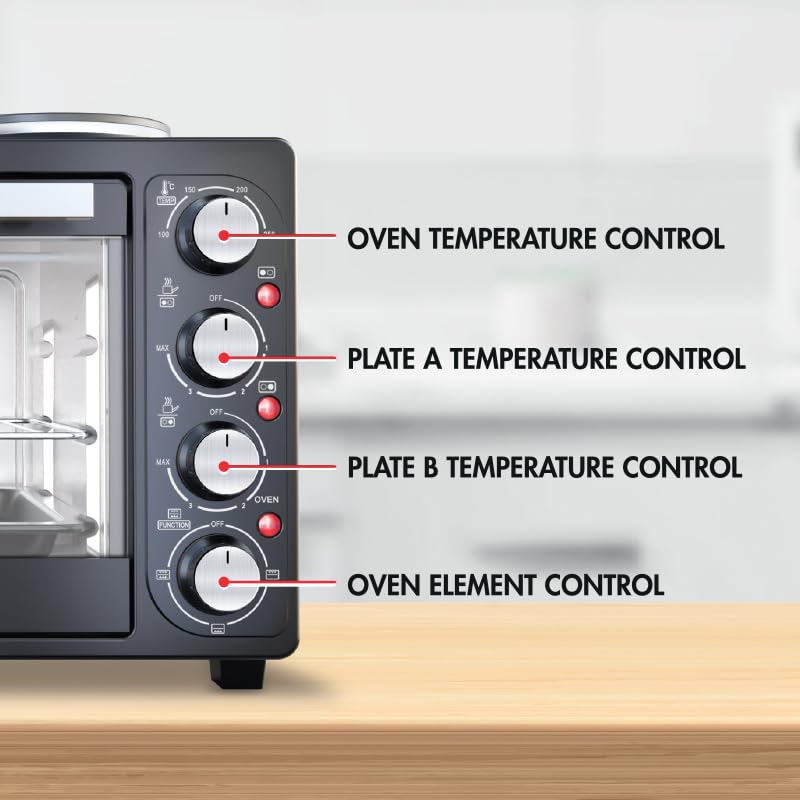
Figure 2: Detailed view of the control panel, highlighting the four main knobs: Oven Temperature Control (up to 250°C), Plate A Temperature Control, Plate B Temperature Control, and Oven Element Control (function selector).
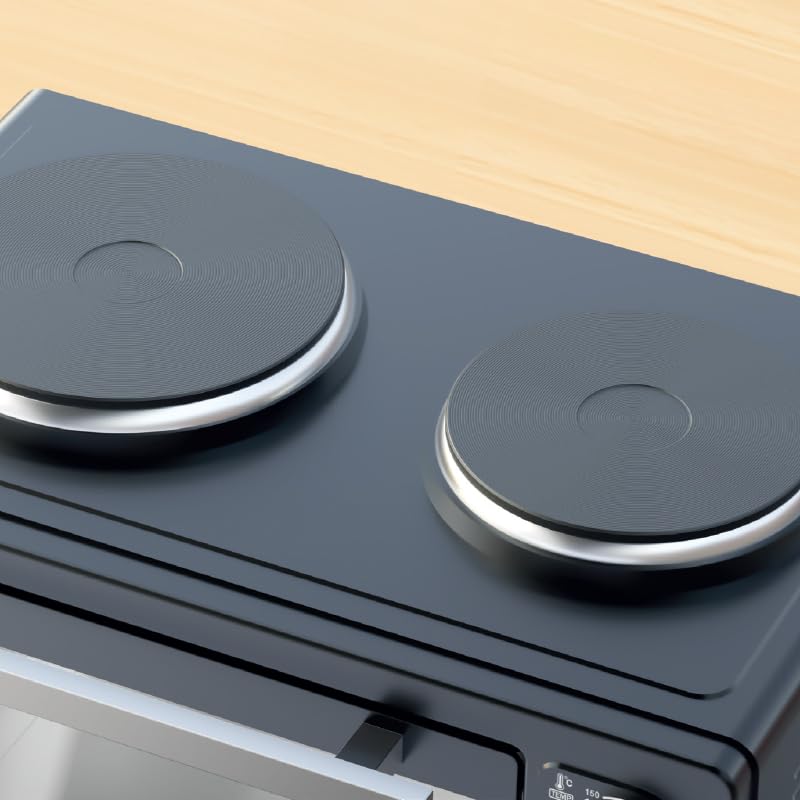
Figure 3: Top view of the compact oven, illustrating the two integrated solid hot plates, which provide additional cooking functionality.
Setup and First Use
- Unpacking: Carefully remove the oven and all accessories from the packaging. Retain packaging for future storage or transport.
- Placement: Place the oven on a stable, heat-resistant, and level surface. Ensure there is adequate ventilation around the appliance (at least 10-15 cm clearance on all sides). Do not place near flammable materials or under cabinets.
- Initial Cleaning: Before first use, wipe down the interior and exterior of the oven with a damp cloth. Wash the baking tray and wire rack with warm, soapy water. Dry thoroughly.
- First Burn-Off: To eliminate any manufacturing odors, operate the oven empty for approximately 15 minutes at the maximum temperature (250°C) with the oven door slightly ajar. Ensure the area is well-ventilated during this process. A small amount of smoke or odor is normal during this initial burn-off.
- Power Connection: Ensure the voltage of your power supply matches the rating label on the appliance (240 Volts). Plug the power cord into a grounded electrical outlet.
Operating Instructions
Using the Oven
- Place Food: Place food on the baking tray or wire rack. Insert the tray/rack into the desired rack position within the oven.
- Set Temperature: Turn the Oven Temperature Control knob to the desired temperature (up to 250°C).
- Select Function: Turn the Oven Element Control knob to select the desired heating function:
- Top Heating: For grilling or browning.
- Bottom Heating: For baking bases or slow cooking.
- Top & Bottom Heating: For general baking and roasting.
- Set Timer (if applicable): The provided information does not specify a timer. If your model has one, set it to the desired cooking time.
- Monitor Cooking: The tempered easy-view glass oven door allows you to monitor cooking progress without opening the door.
- Finish Cooking: Once cooking is complete, turn the temperature and function knobs to "OFF". Carefully remove food using oven mitts.

Figure 4: The compact oven in use, showing a roasted chicken inside, illustrating its capability for roasting and its generous 30-liter capacity.
Using the Hot Plates
The compact oven is equipped with two solid hot plates on top for additional cooking versatility.
- Place Cookware: Place appropriate cookware (flat-bottomed pots or pans) on the desired hot plate.
- Set Temperature: Turn the Plate A Temperature Control or Plate B Temperature Control knob to the desired heat setting (MIN to MAX).
- Cooking: The hot plate will heat up. Adjust the temperature as needed for simmering, boiling, or frying.
- Finish Cooking: Once cooking is complete, turn the hot plate control knob to "OFF". Allow the hot plate to cool down before cleaning.
Note: The oven and hot plates can be used simultaneously, but this may affect the heating efficiency of both functions. For optimal performance, it is recommended to use them independently for heavy-duty tasks.
Maintenance and Cleaning
Regular cleaning and maintenance will ensure the longevity and optimal performance of your compact oven.
- Always Unplug: Before cleaning, always unplug the oven from the power outlet and allow it to cool completely.
- Exterior Cleaning: Wipe the exterior surfaces with a soft, damp cloth. Do not use abrasive cleaners or scouring pads, as they may damage the finish.
- Interior Cleaning: For the interior, wipe down with a damp cloth and mild detergent. For stubborn stains, a non-abrasive oven cleaner designed for compact ovens can be used, following the product's instructions. Ensure all cleaner residue is removed.
- Accessories: The baking tray and wire rack can be washed in warm, soapy water or placed in a dishwasher. Dry thoroughly before storing.
- Hot Plates: Once cooled, wipe the hot plates with a damp cloth. For baked-on spills, a non-abrasive scraper can be used carefully. Do not immerse the hot plates or the entire appliance in water.
- Storage: When not in use, store the oven in a clean, dry place.
Troubleshooting
If you encounter issues with your Bennett Read KEC402 Compact Oven, refer to the following common problems and solutions:
| Problem | Possible Cause | Solution |
|---|---|---|
| Appliance does not turn on. | Not plugged in; power outlet not working; circuit breaker tripped. | Ensure the plug is securely inserted into a working outlet. Check your household circuit breaker. |
| Oven not heating properly. | Temperature knob not set correctly; function knob not selected; door not closed properly. | Verify temperature and function settings. Ensure the oven door is fully closed. |
| Hot plates not heating. | Temperature knob not set correctly for the hot plate. | Ensure the correct hot plate temperature knob is turned to a heat setting. |
| Smoke or odor during first use. | Residual manufacturing oils burning off. | This is normal during the initial burn-off. Ensure good ventilation. It should subside after 15-20 minutes. |
| Oven tripping electricity. | Overload on circuit; internal fault. | Ensure no other high-power appliances are on the same circuit. If the issue persists, discontinue use and contact customer support. |
If the problem persists after attempting these solutions, please contact Bennett Read customer support.
Specifications
- Model: KEC402
- Brand: Bennett Read
- Capacity: 30 Liters
- Power: 1500W (Oven)
- Voltage: 240 Volts
- Temperature Range: Up to 250°C
- Dimensions (L x W x H): 52.4 x 41.3 x 35.5 cm
- Weight: 9.64 kg
- Color: Grey
- Manufacturer: Tevo (Pty) LTD
Warranty and Support
Information regarding the specific warranty period and terms for the Bennett Read KEC402 Compact Oven is not available in the provided product data. Please refer to the product packaging, purchase receipt, or the official Bennett Read website for detailed warranty information.
For technical support, spare parts, or service inquiries, please contact Bennett Read customer service through their official channels. Ensure you have your model number (KEC402) and proof of purchase ready when contacting support.
Ask a question about this manual
Ask about setup, troubleshooting, compatibility, parts, safety, or missing instructions. Manuals+ will review the question and use this page’s manual context to help answer it.