
1. Introduction
This manual provides detailed instructions for the safe and effective use of your Viconor Red Light Therapy Foot Wraps. This device is designed to deliver red light (660 nm) and near-infrared light (850 nm) to the feet and ankles. Please read this manual thoroughly before first use and retain it for future reference.
2. Safety Information
Important: Statements regarding this device have not been evaluated by the FDA and this product is not intended to diagnose, treat, cure, or prevent any disease or health condition. Consult with a healthcare professional before using this device if you have any medical conditions, are pregnant, or are taking medications.
- Do not look directly into the LED lights during operation.
- Do not use on broken, irritated, or infected skin.
- Keep the device out of reach of children.
- Do not immerse the device in water or other liquids.
- If you experience any discomfort or adverse reactions, discontinue use immediately and consult a healthcare professional.
- Ensure the power adapter and cables are not damaged before use.
3. Product Components
Your Viconor Red Light Therapy Foot Wraps package includes the following items:
- 2 x Viconor Red Light Therapy Foot Wraps
- 1 x Controller with integrated cable
- 1 x Power Adapter (for wall socket use)
- 1 x USB Cable (for power bank use, power bank not included)

4. Setup
Follow these steps to set up your Viconor Red Light Therapy Foot Wraps:
- Connect the Wraps: Plug the cables from each foot wrap into the designated ports on the controller.
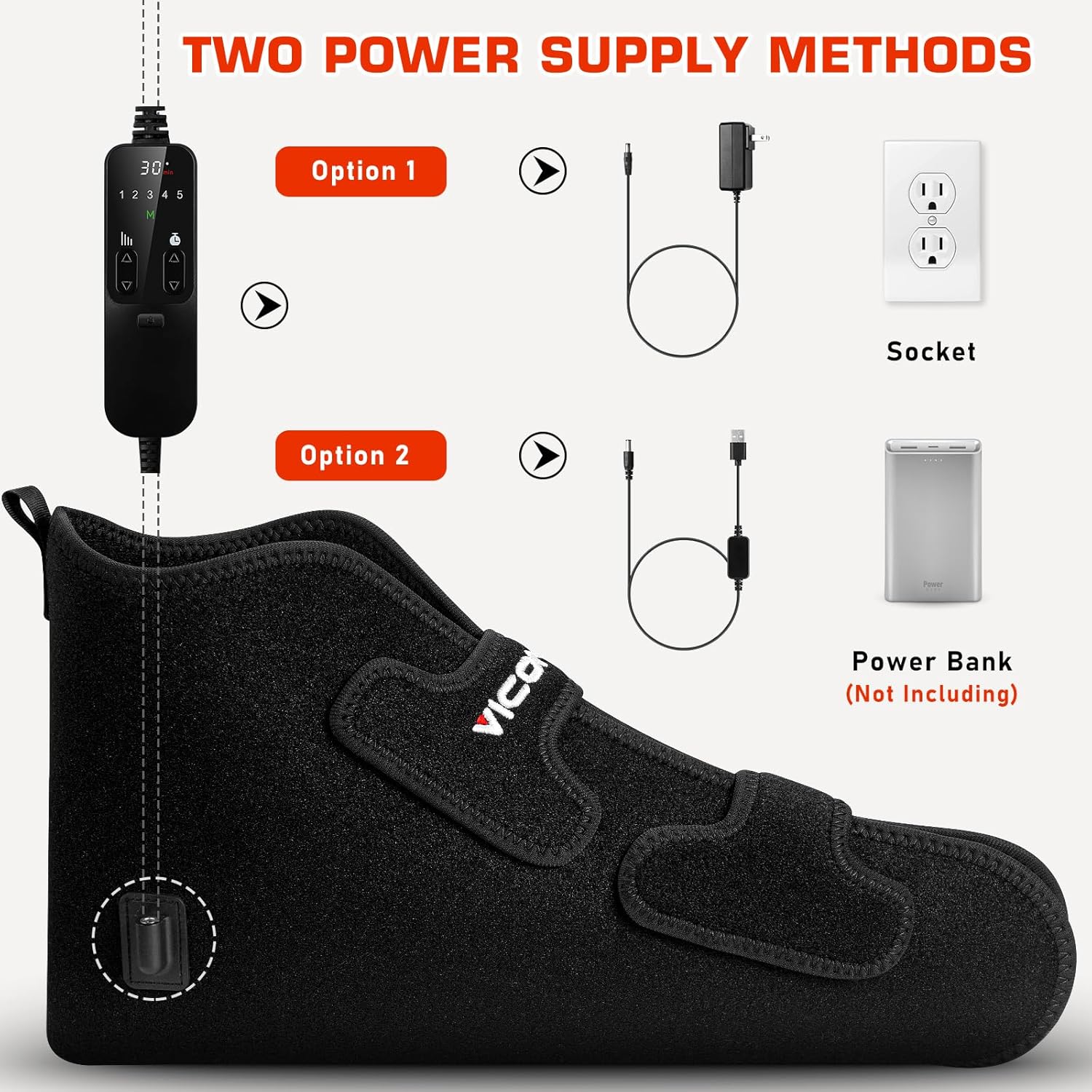
- Choose Power Source: You have two options for powering the device:
- Option 1 (Wall Socket): Connect the power adapter to the controller's input port, then plug the adapter into a standard electrical outlet.
- Option 2 (Power Bank): Connect the USB cable to the controller's input port, then plug the USB cable into a compatible power bank (not included).
- Prepare for Use: Ensure all connections are secure before proceeding to operation.
5. Operating Instructions
To begin using your Viconor Red Light Therapy Foot Wraps:
- Wear the Wraps: Place your feet into the wraps. Adjust the Velcro straps to ensure a comfortable and secure fit around your feet and ankles. The ergonomic design allows for use on various joint parts, including ankles and elbows.
- Power On: Press the power button on the controller to turn on the device. The default setting is typically 30 minutes.
- Select Mode: Use the 'M' button on the controller to cycle through the 5 available modes. Refer to Section 6 for details on each mode.
- Adjust Intensity: Use the up and down arrow buttons to adjust the intensity level (1-4) or to activate the pulse mode (Mode 5).
- Set Time: The device has a default timer. If adjustable, use the timer buttons on the controller to set your desired session duration.
- Relax and Enjoy: Once settings are configured, you can relax while the device operates.
- Power Off: The device will automatically shut off after the set time. You can also manually turn it off by pressing the power button.


6. Modes and Settings
The controller allows you to select from 5 different modes, each offering varying intensity levels:
| Mode | Intensity (Watt) | Energy Absorption |
|---|---|---|
| 1 | 4W | 25% |
| 2 | 9W | 50% |
| 3 | 13W | 75% |
| 4 | 25W | 100% |
| 5 | 12W | Pulse mode |
Use the 'M' button to switch between modes and the arrow buttons to adjust intensity or activate pulse mode. The default session time is 30 minutes.

7. Maintenance
Proper maintenance ensures the longevity and performance of your device:
- Cleaning: Disconnect the device from the power source before cleaning. Wipe the surface of the wraps with a soft, slightly damp cloth. Do not use harsh chemicals or abrasive cleaners. Ensure the device is completely dry before storage or next use.
- Storage: Store the device in a cool, dry place away from direct sunlight and extreme temperatures. Keep it in its original packaging or a protective bag to prevent dust accumulation.
- Inspection: Regularly inspect the cables and connections for any signs of wear or damage. If any damage is found, discontinue use and contact customer support.
8. Troubleshooting
If you encounter issues with your Viconor Red Light Therapy Foot Wraps, refer to the following common problems and solutions:
- Device does not turn on:
- Ensure the power adapter is securely plugged into both the controller and the wall outlet, or that the USB cable is firmly connected to a charged power bank.
- Check if the power outlet is functional by plugging in another device.
- Verify that the foot wraps are correctly connected to the controller.
- Lights are dim or flickering:
- Check the power connection. A loose connection can cause inconsistent power supply.
- Ensure the power source (wall outlet or power bank) is providing sufficient power.
- Try adjusting the intensity settings on the controller.
- Controller buttons are unresponsive:
- Disconnect and reconnect the power source to reset the device.
- Ensure the controller cable is not damaged.
If these steps do not resolve the issue, please contact Viconor customer support for further assistance.
9. Specifications
| Feature | Detail |
|---|---|
| Model Number | 2 Packs |
| Light Wavelengths | 660 nm (Red Light) + 850 nm (Near Infrared Light) |
| Power Source | Battery Powered (via power bank) or Wall Adapter |
| Item Weight | 1.02 Kilograms (2.24 Pounds) |
| Package Dimensions | 14.33 x 8.5 x 2.44 inches |
| Style | Modern |
10. Warranty and Support
Viconor offers a 90-day hassle-free return support for this product. If you have any questions, concerns, or require assistance with your device, please do not hesitate to contact the Viconor After-Sales Service Team. They are available to provide customized light therapy advice and support.
For support, please refer to the contact information provided with your purchase or visit the official Viconor website.