
1. Introduction
This manual provides comprehensive instructions for the LASER TREE 5W Laser Module Kit (Model LT-40W-AA-JP), detailing its features, setup, operation, and maintenance for optimal engraving and cutting performance. This high-performance laser module is designed for precision and versatility, featuring a 45mm fixed focus, integrated air assist, and a magnetic eye shield for enhanced safety and ease of use.
2. Safety Information
WARNING: Laser radiation can cause eye and skin damage. Always follow safety precautions.
- Never look directly into the laser beam.
- Ensure the magnetic eye shield is properly installed during operation.
- Operate the laser module in a well-ventilated area to avoid inhaling fumes.
- Keep children and pets away from the operating area.
- Do not engrave or cut reflective, transparent, blue, purple, or white materials as they can reflect or transmit the laser beam, causing damage or injury.
- Always have a fire extinguisher nearby when operating the laser.
3. Package Contents
Verify that all items listed below are included in your package:

Image: Complete LASER TREE 5W Laser Module Kit with all included components.
- LASER TREE 5W Laser Module (LT-40W-AA-JP)
- Driver Board
- 1.5# L Wrench
- 1*Replaceable Protective Window Glass
- 1*3-pin 80cm Input Cable
- 3*Focus Fixing Plates (3mm, 4mm, 5mm)
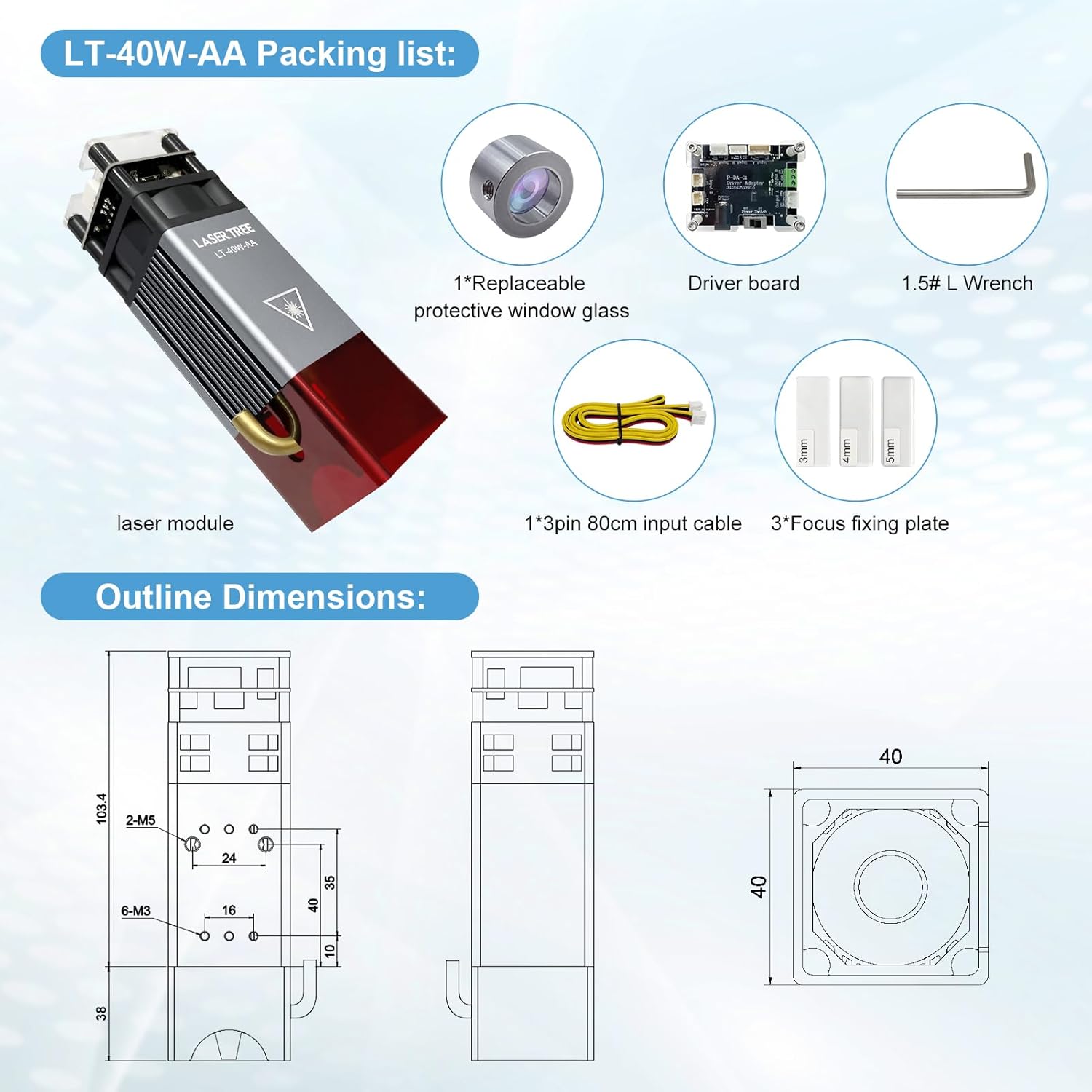
Image: Detailed view of the LT-40W-AA-JP packing list and outline dimensions.
4. Setup
4.1. Module Installation and Connection
The LASER TREE 5W module is designed for wide compatibility with various laser engraving machines. Ensure your machine supports a 12V, 450nm laser module with PWM (0/5-12V, 0-5kHz) and GND connections.

Image: Wiring diagram showing VCC (DC 12V/24V), GND, and PWM (0/5-12V, 0-5kHz) connections for broad compatibility with DIY engraving machines.
4.2. Focusing the Laser
Proper focusing is crucial for optimal engraving and cutting results. Use the provided focus fixing plates to set the correct focal distance.
- Place the material to be engraved or cut on the work surface.
- Select the appropriate focus fixing plate (3mm, 4mm, or 5mm) based on your material thickness and desired operation (cutting or engraving).
- Position the laser module so that the bottom of the focus fixing plate just touches the surface of your material.
- Secure the laser module in this position.

Image: Diagram illustrating focus settings for cutting. For example, to cut 4mm plywood, use the 5mm focus fixing plate.

Image: Diagram illustrating focus settings for laser engraving. For example, for engraving, use the 7mm focus fixing plate.
5. Operating Instructions
5.1. Engraving Capabilities
The 5W laser module offers excellent engraving performance on a variety of materials, including direct engraving on mirror stainless steel without the need for black paint.

Image: The laser module performing ultra-fast engraving on a stainless steel surface, demonstrating its precision and speed.
High-speed engraving on 304 stainless steel can reach up to 800mm/s at a 45mm focal distance.
5.2. Cutting Capabilities
This module is capable of cutting various materials with precision, especially when utilizing the air assist feature.

Image: The laser module cutting through 4mm bass plywood in a single pass, highlighting its cutting power.
It can cut 4mm thick plywood in one pass at speeds of 80-190mm/min with a 45mm focal distance.
Video: Demonstration of the laser module cutting 20mm pine wood. This video illustrates the module's capability to cut thicker wood materials.
Video: Demonstration of the laser module cutting 9.5mm acrylic. This video showcases the module's ability to precisely cut acrylic materials.
Video: Demonstration of the laser module cutting 8mm plywood in a single pass. This video highlights the efficiency of the module for thicker plywood.
5.3. Air Assist Function
The integrated air assist device significantly improves cutting and engraving quality by providing a smoother finish and reducing material burning.

Image: Comparison showing clean-cut edges with air assist versus scorched edges without air assist, demonstrating the benefit of the feature.
5.4. Compatible Materials
The module supports a wide range of materials for engraving and cutting:
- Engravable/Cuttable: Plywood, black acrylic, MDF, wood, paper, leather, bamboo, plastic, rubber, aluminum, stainless steel.
- Not Engravable/Cuttable: Blue, purple, white, transparent materials, and aluminum without an oxide film.
6. Maintenance
To ensure consistent performance and longevity of your laser module, regular maintenance is recommended.
6.1. Replacing the Protective Window Glass
The module features a replaceable protective window glass to shield the lens from contamination. If the window becomes dirty or damaged, it can be easily replaced without tools.
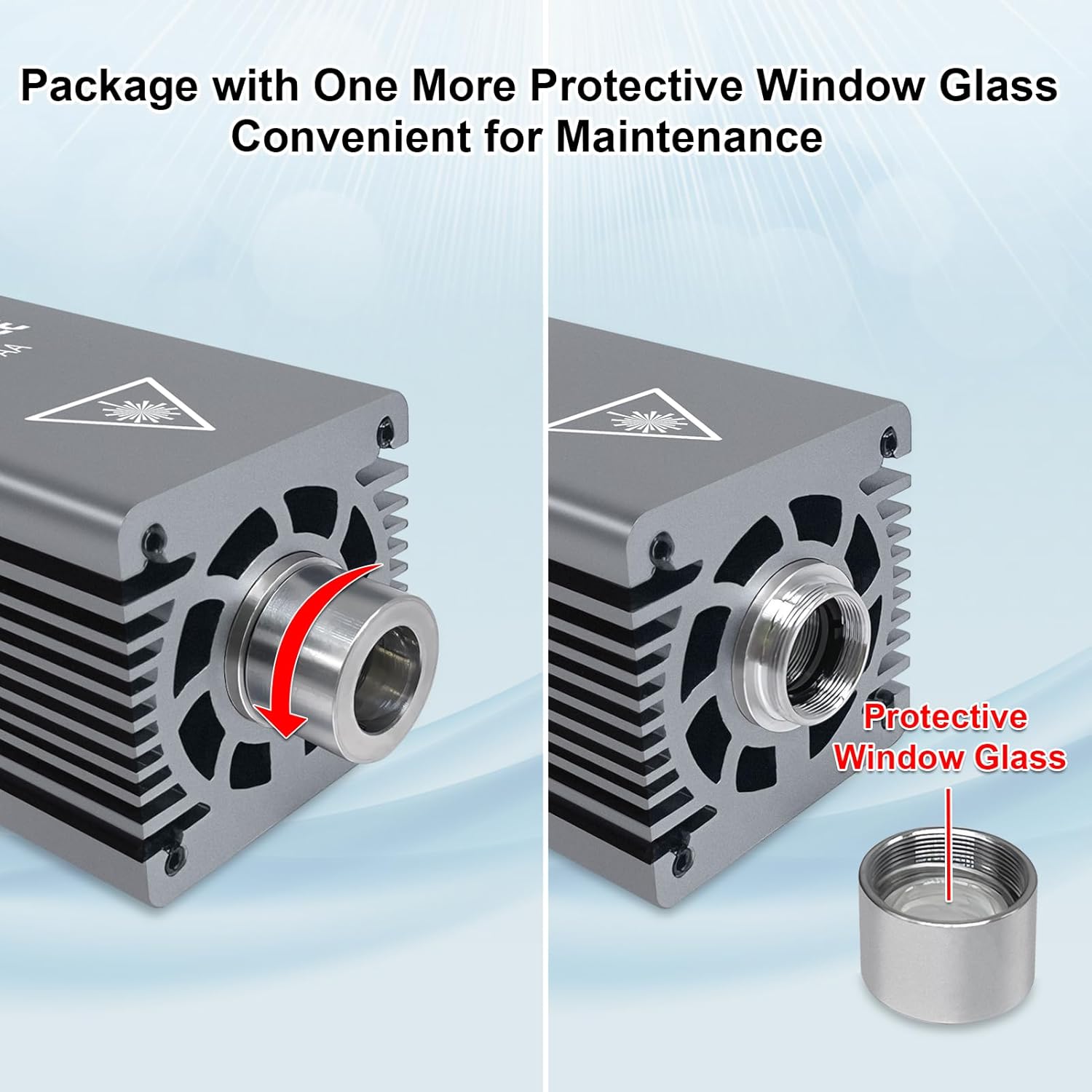
Image: Instructions for replacing the protective window glass, which twists off for easy maintenance.
7. Troubleshooting
If you encounter any issues with your LASER TREE 5W Laser Module, please refer to the following general troubleshooting tips:
- No Laser Output: Check power connections, ensure the module is properly seated, and verify software settings.
- Poor Engraving/Cutting Quality: Re-check focal distance, adjust power and speed settings, ensure material is clean, and verify air assist is functioning if used.
- Module Overheating: Ensure adequate ventilation and check for any obstructions to the cooling fan.
For more detailed assistance, please contact customer support as described in the Warranty & Support section.
8. Specifications
| Feature | Detail |
|---|---|
| Brand | LASER TREE |
| Model Name | LT-40W-AA-JP |
| Laser Output Power | 5W |
| Wavelength | 450nm |
| Fixed Focus Distance | 45mm |
| Input Voltage | 12V |
| Item Weight | 610 g |
| Package Dimensions | 19.3 x 11.5 x 7.4 cm |
| ASIN | B0CJNBSRRS |
9. Warranty & Support
LASER TREE is committed to providing high-quality laser modules and comprehensive customer service.
- Warranty: This product comes with a 12-month warranty from the date of purchase.
- Technical Support: For any questions or technical assistance, please contact us through Amazon or our official website. Our professional technical support team will respond promptly.


