
1. Introduction
This manual provides detailed instructions for the assembly, operation, maintenance, and troubleshooting of your new PayLessHere 47 Inch Modern Z-Shaped Gaming Desk. Designed for both home office and gaming setups, this desk offers a sturdy and functional workspace with a modern aesthetic. Please read this manual thoroughly before assembly and use to ensure proper setup and longevity of your product.

Figure 1.1: The PayLessHere 47 Inch Modern Z-Shaped Gaming Desk, showcasing its design and potential setup with dual monitors, keyboard, mouse, and headphones.
2. Safety Information
Please observe the following safety precautions to prevent injury and damage to the product.
- Ensure all components are present and undamaged before beginning assembly. Do not proceed with assembly if any parts are missing or broken.
- Assemble the desk on a soft, clean surface (e.g., carpet or cardboard) to prevent scratches.
- Always use the correct tools as specified in the assembly instructions.
- Do not overtighten screws during assembly, as this may strip threads or damage components.
- Keep small parts and packaging materials away from children and pets to avoid choking hazards.
- Do not stand or sit on the desk. It is designed for holding computer equipment and office supplies.
- Distribute weight evenly across the desktop to maintain stability.
- Regularly check all fasteners to ensure they remain tight. Retighten if necessary.
3. Package Contents
Verify that all the following components are included in your package. If any parts are missing or damaged, please contact customer support.
- Desktop Panel (Carbon Fiber Texture)
- Z-Shaped Leg Frames (Alloy Steel)
- Support Beams/Crossbars
- Headphone Hook
- Adjustable Leg Pads
- Assembly Hardware (Screws, Allen Wrench, etc.)
- Instruction Manual

Figure 3.1: The Z-shaped gaming desk integrated into a home office environment, demonstrating its compact and functional design.
4. Setup and Assembly
Follow these step-by-step instructions carefully to assemble your Z-Shaped Gaming Desk. It is recommended to have two people for assembly, though one person can manage.
- Unpack and Identify Parts: Lay out all components on a clean, soft surface. Refer to the parts list in Section 3 to ensure all pieces are present.
- Assemble Leg Frames: Attach the support beams to the Z-shaped leg frames using the provided screws. Do not fully tighten screws at this stage.
- Attach Desktop: Carefully place the desktop panel onto the assembled leg frame. Align the pre-drilled holes on the desktop with the holes on the frame. Secure the desktop to the frame using the appropriate screws.
- Install Headphone Hook: Locate the designated mounting point under the desktop for the headphone hook. Attach the hook using the provided screws.
- Install Adjustable Leg Pads: Screw the adjustable leg pads into the bottom of each leg frame. These pads help stabilize the desk on uneven surfaces.
- Final Tightening: Once all components are loosely assembled, go back and fully tighten all screws. Ensure the desk is stable and level.
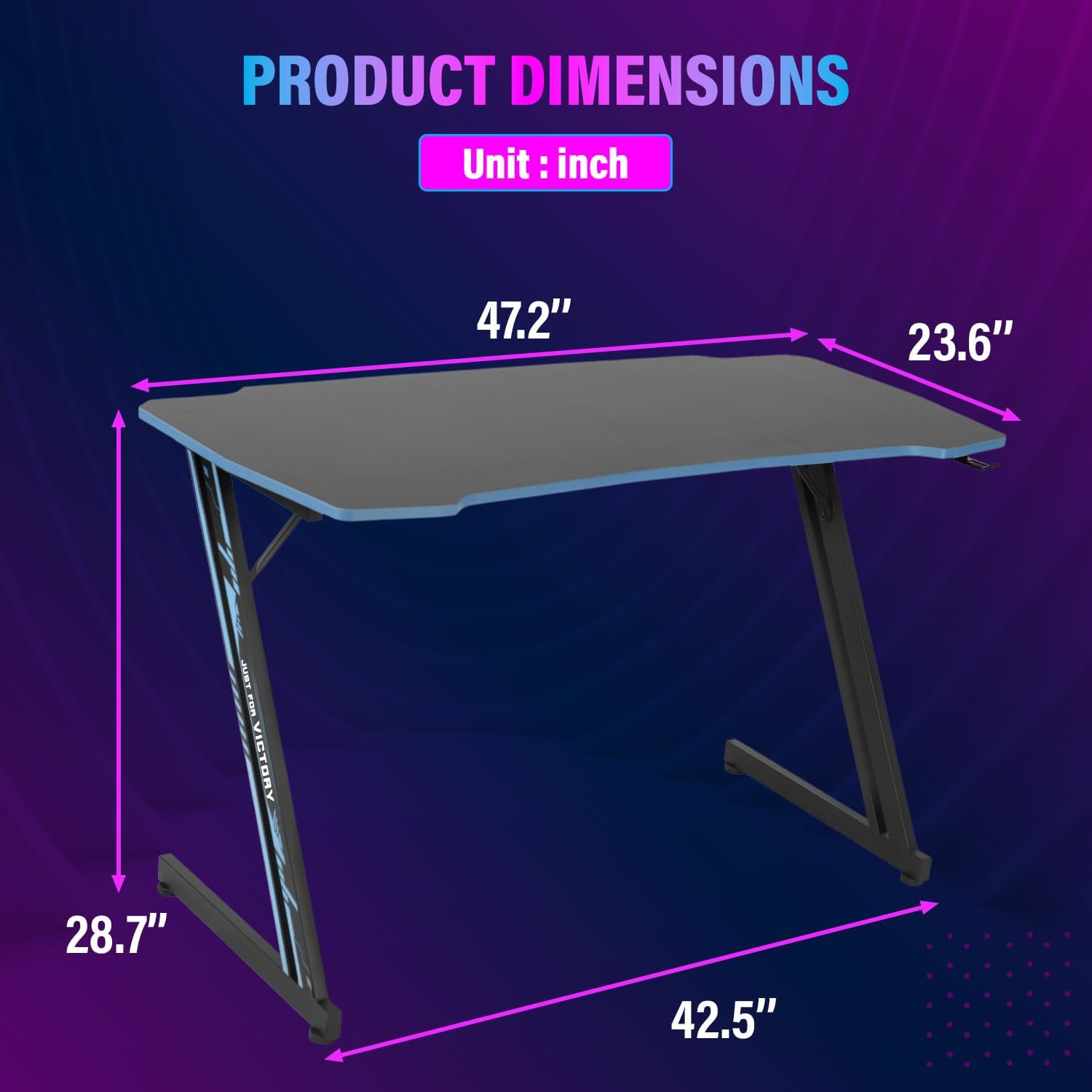
Figure 4.1: Close-up view of the Z-shaped leg structure, highlighting its stable design and metal construction.

Figure 4.2: Detailed features of the desk, showing the 15mm desktop thickness, integrated headphone hook, and 100% metal legs for durability.

Figure 4.3: An adjustable leg pad, designed to provide stability on various floor types and allow for minor height adjustments.
5. Features and Usage
Your PayLessHere Z-Shaped Gaming Desk is designed with several features to enhance your productivity and gaming experience.
- Z-Shaped Structure: The unique Z-shaped design provides exceptional stability and a modern aesthetic, ensuring a wobble-free workspace.
- Spacious Desktop: With a generous surface area, the desk can comfortably accommodate multiple monitors, a keyboard, mouse, and other peripherals, providing ample space for work or gaming.
- Built-in Headphone Hook: A convenient hook located under the desktop keeps your headphones organized and easily accessible, helping to maintain a clutter-free workspace.
- Carbon Fiber Texture Surface: The desktop features a carbon fiber texture, which is not only aesthetically pleasing but also offers improved resistance to water and sweat, making it easy to clean and maintain.
- Adjustable Leg Pads: The desk is equipped with adjustable leg pads to compensate for uneven flooring, ensuring a stable and level surface.

Figure 5.1: Overview of the E-Sport Desktop Desk, emphasizing its multi-functional design, ease of setup, adjustable feet, and safety features.

Figure 5.2: Close-up of the carbon fiber textured surface, demonstrating its waterproof and sweatproof properties for enhanced durability and easy cleaning.
6. Maintenance and Care
Proper care will ensure the longevity and appearance of your desk.
- Cleaning: Wipe the desktop and frame with a soft, damp cloth. For stubborn marks, use a mild soap solution and then wipe dry immediately. Avoid abrasive cleaners or harsh chemicals.
- Spills: Although the carbon fiber surface is water-resistant, wipe up spills immediately to prevent potential damage, especially around edges and seams.
- Heat Protection: Avoid placing hot items directly on the desktop. Use coasters or protective pads for hot beverages or dishes.
- Weight Distribution: Distribute heavy items evenly across the desktop to prevent stress on any single point.
- Fastener Check: Periodically check all screws and bolts to ensure they are tight. Retighten if necessary to maintain stability.
7. Troubleshooting
If you encounter any issues with your desk, refer to the table below for common problems and their solutions.
| Problem | Possible Cause | Solution |
|---|---|---|
| Desk is wobbly | Screws are loose; Uneven floor; Leg pads not adjusted | Ensure all assembly screws are fully tightened. Adjust the leg pads to level the desk on uneven surfaces. |
| Parts do not align during assembly | Incorrect orientation of parts; Screws overtightened prematurely | Review the assembly instructions to ensure parts are oriented correctly. Loosen all screws, align parts, then retighten. |
| Scratches on desktop | Sharp objects; Rough handling | Use a soft cloth for cleaning. Avoid dragging items across the surface. Use desk mats or pads for protection. |
8. Specifications
Detailed technical specifications for the PayLessHere Z-Shaped Gaming Desk.
| Attribute | Detail |
|---|---|
| Brand | PayLessHere |
| Model Name | Desk Computer Desk for Home Office with Headphone Hook |
| Model Number | 35/39/47 Inch Modern Z-Shaped Computer |
| Product Dimensions | 53.34 x 88.9 x 71.12 cm (D x W x H) |
| Item Weight | 8.62 kg |
| Material Type | Carbon Fiber (Desktop), Alloy Steel (Base) |
| Colour | Blue |
| Special Features | Z-shaped design, built-in headphone hook, multiple storage shelves (implied by description), cable management options (implied by description), robust materials, adjustable leg pads, waterproof/sweatproof surface |
| Mounting Type | Floor Mount |

Figure 8.1: Diagram illustrating the key dimensions of the desk in inches: 47.2" width, 23.6" depth, and 28.7" height.
9. Warranty and Support
PayLessHere stands behind the quality of its products.
Warranty Information
This product comes with a standard manufacturer's warranty against defects in materials and workmanship. The specific duration and terms of the warranty may vary. Please retain your proof of purchase for warranty claims. For detailed warranty information, refer to the documentation included with your purchase or contact PayLessHere customer support.
Customer Support
If you have any questions, require assistance with assembly, or need to report a missing/damaged part, please contact PayLessHere customer support.
- Website: Visit the official PayLessHere website for FAQs and support resources.
- Email: Refer to your purchase documentation for customer service email.
- Phone: Refer to your purchase documentation for customer service phone number.
When contacting support, please have your product model number (35/39/47 Inch Modern Z-Shaped Computer) and proof of purchase ready.