
1. Product Overview
The Fenge 108 cm 2-Level Monitor Stand is designed to enhance your workspace organization and ergonomics. This stand features a two-tier design, providing ample space for multiple devices and accessories.
- Dual Monitor Support: The top shelf is designed to accommodate two monitors, optimizing screen real estate.
- Ergonomic Design: With a 12 mm height adjustment, the stand elevates your computer screen to an ergonomic viewing position, which can help alleviate neck, back, and joint pain associated with prolonged computer use.
- Modern Aesthetic: Constructed with strong acrylic legs and a solid board, this stand offers a contemporary look and robust support with a maximum load capacity of 45 kg (99 lbs).
- Versatile Storage: The lower shelf provides additional space for laptops, keyboards, mice, earphones, and other office essentials, helping to keep your desk tidy.
- Durable Construction: Made from scratch-resistant solid board and metal, the stand is easy to clean and maintain.

This image displays the Fenge 2-level monitor stand in use, supporting two computer monitors on the top shelf. The lower shelf provides space for a keyboard, mouse, and other desk accessories, illustrating its organizational capabilities.
2. Safety Information
Please read and understand all safety instructions before installation and use. Failure to follow these instructions may result in product damage or personal injury.
- Read the entire instruction manual before you start installation and assembly.
- Ensure all parts are present before assembly.
- Mounts must be attached as specified in assembly instructions. Incorrect installation may result in damage or serious personal injury.
- Ensure the mounting surface will safely support the combined weight of the equipment and all attached hardware and components.
- Never exceed the maximum load capacity of 45 kg (99 lbs).
- This product contains small items that could be a choking hazard if swallowed. Keep these items away from children.
- Use this product for indoor use only.
- If any parts are missing or faulty, contact your local distributor for a replacement.

An image containing safety warnings and maintenance guidelines for the Fenge monitor stand, presented in multiple languages including English, German, French, Spanish, and Japanese.
3. Package Contents
Verify that all components are present before beginning assembly. If any parts are missing or damaged, please contact customer support.
- Top Shelf Panel
- Bottom Shelf Panel
- Acrylic Support Legs (4 pieces)
- Assembly Hardware (screws, Allen wrench)
- Instruction Manual
4. Setup and Assembly Instructions
The Fenge monitor stand is designed for easy assembly. Follow these steps to set up your stand:
- Unpack Components: Carefully remove all parts from the packaging and lay them out on a clean, flat surface. Verify that all listed package contents are present.
- Attach Acrylic Legs to Bottom Shelf: Align the acrylic support legs with the pre-drilled holes on the underside of the bottom shelf panel. Secure them using the provided screws and Allen wrench. Ensure they are firmly tightened.
- Attach Top Shelf to Acrylic Legs: Place the top shelf panel onto the acrylic legs, aligning the pre-drilled holes. Secure the top shelf to the legs using the remaining screws and Allen wrench. Ensure all connections are stable and tight.
- Position the Stand: Place the assembled monitor stand on your desired desk or surface. Ensure the surface is stable and can support the stand's weight along with your equipment.

A detailed diagram illustrating the precise measurements of the Fenge monitor stand, including its length, width, height, and internal shelf dimensions, crucial for planning desk space.
5. Operating Instructions
The Fenge monitor stand is designed for versatile use to organize and elevate your workspace.
- Monitor Placement: Place one or two monitors on the top shelf. Ensure the weight is evenly distributed and does not exceed the maximum load capacity of 45 kg (99 lbs).
- Lower Shelf Utilization: Use the lower shelf to store items such as your laptop, keyboard, mouse, external hard drives, notebooks, or other desk accessories. This helps to free up space on your main desk surface.
- Ergonomic Benefits: The elevated height of the stand helps to raise your monitor(s) to eye level, promoting better posture and reducing strain on your neck and back during long periods of use.
- Versatile Applications: The stand can also be used as a printer station, a TV stand, or for other organizational needs in your home or office.
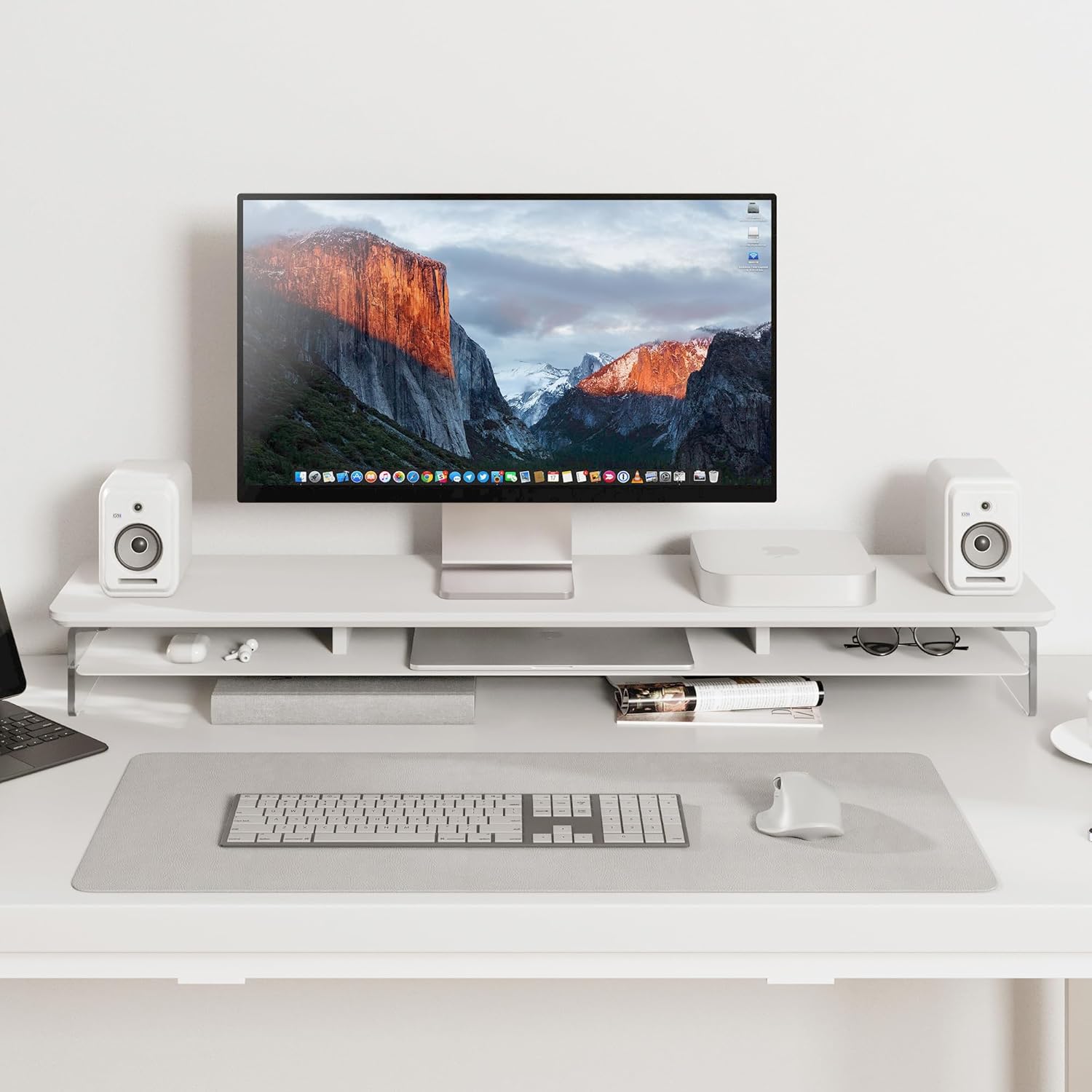
This image shows the Fenge monitor stand used with a single monitor, two speakers, and a Mac Mini. The lower shelf is utilized for a keyboard, mouse, and other small items, demonstrating a tidy workspace.

This image illustrates the versatility of the Fenge monitor stand, showing it configured as a printer station, a dual monitor setup, and a TV stand, highlighting its adaptability to various needs.
6. Maintenance
Proper maintenance ensures the longevity and stability of your Fenge monitor stand.
- Cleaning: The stand is scratch-resistant and easy to clean. Use a soft, damp cloth to wipe down surfaces. Avoid using abrasive cleaners or harsh chemicals, as these may damage the finish.
- Fastener Check: Periodically (at least every three months), check all fasteners and screws to ensure they remain tight. Re-tighten if necessary to maintain stability.
- Inspection: Regularly inspect the stand for any signs of wear, tear, or damage.
7. Troubleshooting
If you encounter any issues with your Fenge monitor stand, please refer to the following common solutions:
- Stand is Unstable: Ensure all assembly screws are fully tightened. Verify that the stand is placed on a flat and stable surface.
- Missing or Faulty Parts: If any components were missing or damaged upon arrival, do not proceed with assembly. Contact your local distributor or customer support for assistance and replacement parts.
- Damage During Use: If the stand becomes damaged during use, discontinue use immediately and contact customer support for guidance.
8. Specifications
| Model Number | G04Y2101A-U |
| Brand | Fenge |
| Material | Acrylic, Metal |
| Color | White |
| Item Weight | 19.89 pounds (9.02 kg) |
| Package Dimensions | 45.75 x 11.22 x 4.72 inches (116.2 x 28.5 x 12 cm) |
| Product Dimensions (L x W x H) | 108 x 23.5 x 12 cm (42.5 x 9.3 x 4.7 inches) |
| Load Capacity | 45 kg (99 lbs) |
| Base Type | Leg |
| Assembly Required | Yes |
9. Warranty and Support
For product support, warranty inquiries, or to report missing/faulty parts, please contact the manufacturer or the EU representative using the details below:
Manufacturer
Name: NINGBO SOMLE AUDIO-VISUAL TECHNOLOGY CO.,LTD
Address: NO.918,CIDONG ROAD,CIXI,NINGBO , ZHEJIANG, CHINA
Email: cidong@homury.com
EU Representative
Name: Somle Moebel GmbH
Address: Karl-Benz-Straße 3-5, Langenfeld, DE
Email: sm09@somle.com

This image provides contact details for the Fenge manufacturer (NINGBO SOMLE AUDIO-VISUAL TECHNOLOGY CO.,LTD) and their EU representative (Somle Moebel GmbH), including names, addresses, and email.