1. Introduction
This instruction manual provides essential information for the safe and correct installation, operation, and maintenance of your NieKe Washing Machine Computer Board. This replacement part is designed for compatibility with specific LG washing machine models. Please read this manual thoroughly before attempting any installation or repair to ensure proper function and safety.
2. Product Overview
The NieKe Washing Machine Computer Board serves as the main control unit for compatible LG washing machines. It manages various functions including wash cycles, water levels, spin speeds, and error detection. This board is a critical component for the proper operation of your appliance.
- Easy and convenient to install and remove: Designed for straightforward replacement.
- Selected materials for durability: Constructed with high-quality components to ensure longevity.
- Ensures long lifetime: Manufactured to meet performance and durability standards.
- Perfectly compatible with old products: Engineered to integrate seamlessly with existing washing machine systems.
- Compatible For LG: Specifically designed for use with LG washing machines.

Image 1: Overview of three NieKe washing machine computer boards. These boards are the central control units for washing machines, featuring various electronic components, connectors, and heat sinks. They appear to be different revisions or models, distinguished by minor variations in component layout and connector types.
3. Model Identification
It is crucial to identify the exact model number of your existing washing machine computer board to ensure compatibility. While this product is compatible with models EBR872005-06, EBR84121206, and EBR88873906, variations exist. Please locate the model number printed on your original board before proceeding with installation.
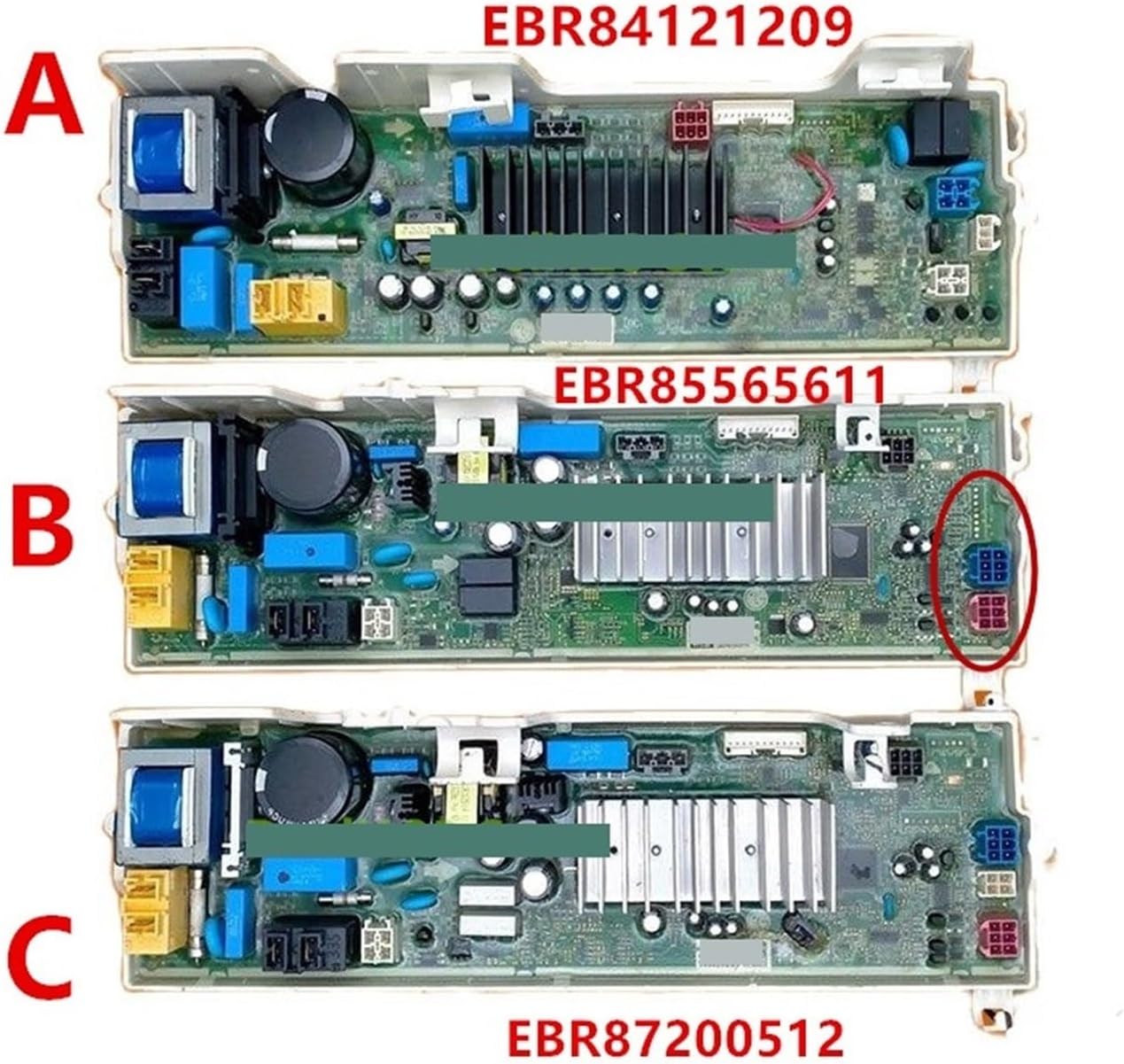
Image 2: Detailed view of three NieKe washing machine computer boards, labeled A, B, and C. Board A is identified as EBR84121209, Board B as EBR85565611, and Board C as EBR87200512. This image helps in visually identifying the specific board type based on its layout and printed model number, which is essential for correct replacement.
Note: The model numbers shown in the image (EBR84121209, EBR85565611, EBR87200512) are examples for identification. Always cross-reference with the model number on your specific washing machine's original board and the product description to confirm compatibility.
4. Safety Information
WARNING: Electrical shock hazard. Always disconnect power to the washing machine before servicing. Failure to do so can result in serious injury or death.
- Ensure the washing machine is unplugged from the electrical outlet before beginning any work.
- Wear appropriate personal protective equipment, such as insulated gloves.
- If you are not comfortable performing electrical repairs, it is highly recommended to seek assistance from a qualified appliance technician.
- Handle the computer board by its edges to avoid damaging electronic components or static discharge.
5. Installation Instructions
These instructions are a general guide. Specific steps may vary depending on your washing machine model. Always refer to your washing machine's service manual for detailed instructions.
- Disconnect Power: Unplug the washing machine from the electrical outlet. Turn off the water supply valves.
- Access the Control Board: Depending on your washing machine model, you may need to remove the top panel, back panel, or front control panel to access the computer board. This usually involves unscrewing fasteners.
- Document Connections: Before disconnecting any wires, take clear photos or make a diagram of all wire connections to the old board. This is crucial for correct reassembly.
- Disconnect Wires and Components: Carefully disconnect all wire harnesses, ribbon cables, and other components connected to the old computer board. Note any clips or locking mechanisms.
- Remove Old Board: Unscrew or unclip the old computer board from its mounting brackets.
- Install New Board: Position the new NieKe computer board in the same location as the old one and secure it with the original screws or clips.
- Reconnect Wires: Using your photos or diagrams, carefully reconnect all wire harnesses, ribbon cables, and components to the new board. Ensure all connections are secure and correctly seated.
- Reassemble Washing Machine: Reattach any panels or covers that were removed.
- Restore Power and Test: Plug the washing machine back into the electrical outlet and turn on the water supply. Run a short test cycle to verify proper operation. Check for any error codes or unusual behavior.
6. Functionality
Once correctly installed, the NieKe Washing Machine Computer Board will restore the full functionality of your compatible LG washing machine. It processes user inputs from the control panel, controls motor speed, water intake and drainage, heating elements, and spin cycles. It also monitors sensors to ensure safe and efficient operation, displaying error codes if issues arise.
7. Troubleshooting
If your washing machine is not functioning correctly after replacing the computer board, consider the following troubleshooting steps:
- No Power: Ensure the washing machine is securely plugged into a working outlet and the circuit breaker has not tripped.
- Error Codes: Consult your washing machine's user manual to interpret any displayed error codes. These codes can indicate specific issues with components connected to the board.
- Incorrect Connections: Double-check all wire harnesses and ribbon cables on the new board. Ensure they are fully seated and connected to the correct terminals as per your documentation photos.
- Component Failure: While rare, a new board could be faulty. If all connections are correct and the issue persists, further diagnosis by a professional may be required.
- Other Components: The issue might not be the computer board itself but another component (e.g., motor, pump, sensor) that the board controls.
If troubleshooting steps do not resolve the issue, it is recommended to contact a qualified appliance repair technician.
8. Specifications
| Brand | NieKe |
| Compatible Models | EBR872005-06, EBR84121206, EBR88873906 (for LG washing machines) |
| Item Weight | 1.76 ounces (approximately 50 grams) |
| Package Dimensions | 0.39 x 0.39 x 0.39 inches (approximately 1 x 1 x 1 cm) |
| Manufacturer | jiangliying |
| Batteries Required | No |
Note: The provided package dimensions and item weight are unusually small and may represent shipping packaging rather than the product itself. Always verify product specifications upon receipt.
9. Care and Storage
- Store the computer board in its original anti-static packaging until ready for installation.
- Keep the board in a dry, cool environment, away from direct sunlight and extreme temperatures.
- Avoid touching the electronic components directly; handle by the edges.
- Do not expose the board to moisture or corrosive substances.
10. Warranty and Support
Information regarding specific warranty terms for this NieKe product is not provided in the product details. Please refer to the retailer or manufacturer's website for warranty information and customer support contacts. For technical assistance, it is recommended to consult a qualified appliance repair professional.


