
PayLessHere PayLessHere Office Chair
PayLessHere Ergonomic Mesh Office Chair
Instruction Manual
Model: PayLessHere Office Chair
Introduction
Thank you for choosing the PayLessHere Ergonomic Mesh Office Chair. This manual provides detailed instructions for the assembly, operation, maintenance, and troubleshooting of your new office chair. Please read this manual thoroughly before assembly and use to ensure proper function and safety.
This chair is designed to provide optimal support and comfort with features such as an ergonomic backrest, built-in lumbar support, a rocking mode, 360-degree swivel, and height adjustability. It is suitable for various uses including office work and gaming.
Safety Information
- Maximum Weight Capacity: This chair is designed to support a maximum weight of 250 pounds (113 kg). Do not exceed this weight limit.
- Tilting Caution: Use caution when utilizing the tilting feature to prevent accidental falls or instability.
- Assembly: Ensure all screws and bolts are securely tightened before use. Periodically check and re-tighten fasteners as needed.
- Placement: Use the chair on a flat, stable surface. Avoid placing the chair on uneven ground or near obstacles that could impede movement.
- Children: Keep children away from the chair during assembly. Do not allow children to play on or around the chair unsupervised.
- Maintenance: Follow the cleaning instructions to maintain the chair's condition and prevent damage.
Package Contents
Before beginning assembly, please verify that all components are present and undamaged. If any parts are missing or damaged, please contact customer support.
- Backrest (1)
- Seat Cushion (1)
- Armrests (2)
- Gas Lift Cylinder (1)
- Base (1)
- Casters (5)
- Mechanism Plate (1)
- Hardware Pack (Screws, Washers, Allen Wrench) (1)
Setup and Assembly
Assembly of your PayLessHere Office Chair is designed to be straightforward. Please follow these steps carefully. It is recommended to assemble the chair on a soft, clean surface to prevent scratches.
- Attach Casters to Base: Insert each of the five casters into the holes at the end of each leg of the chair base. Push firmly until they click into place.
- Insert Gas Lift into Base: Place the gas lift cylinder into the center hole of the assembled base.
- Attach Mechanism Plate to Seat Cushion: Align the mechanism plate with the pre-drilled holes on the underside of the seat cushion. Ensure the front of the mechanism (usually indicated by an arrow or "FRONT" label) faces the front of the seat. Secure with screws provided in the hardware pack.
- Attach Armrests to Seat Cushion: Attach the armrests to the sides of the seat cushion using the provided screws. Do not fully tighten yet.
- Attach Backrest to Armrests/Seat: Connect the backrest to the armrests and/or the seat cushion using the remaining screws. Once all connections are made, tighten all screws securely.
- Connect Seat Assembly to Gas Lift: Carefully place the assembled seat and backrest onto the gas lift cylinder, ensuring the center hole of the mechanism plate aligns with the top of the gas lift. Press down firmly to secure.

Figure 1: Fully assembled PayLessHere Ergonomic Mesh Office Chair.
Operating Instructions
Your PayLessHere Office Chair offers several adjustable features to enhance your comfort and productivity.
- Height Adjustment: To adjust the seat height, pull the lever located on the right side of the seat upwards. While holding the lever, stand up to raise the chair or remain seated and apply pressure to lower it. Release the lever to lock the height in place.

Figure 2: Illustration of the chair's height adjustment range (approximately 3 inches).
- Rocking Mode: To activate the rocking function, pull the same lever (used for height adjustment) outwards. The chair will now allow for a gentle rocking motion. To lock the chair in an upright position, push the lever inwards.
- 360-Degree Swivel: The chair is equipped with a smooth 360-degree swivel function, allowing you to rotate freely without moving the base.
- Lumbar Support: The ergonomic design of the backrest provides built-in lumbar support. This feature helps maintain the natural curve of your lower back, reducing strain during prolonged sitting.
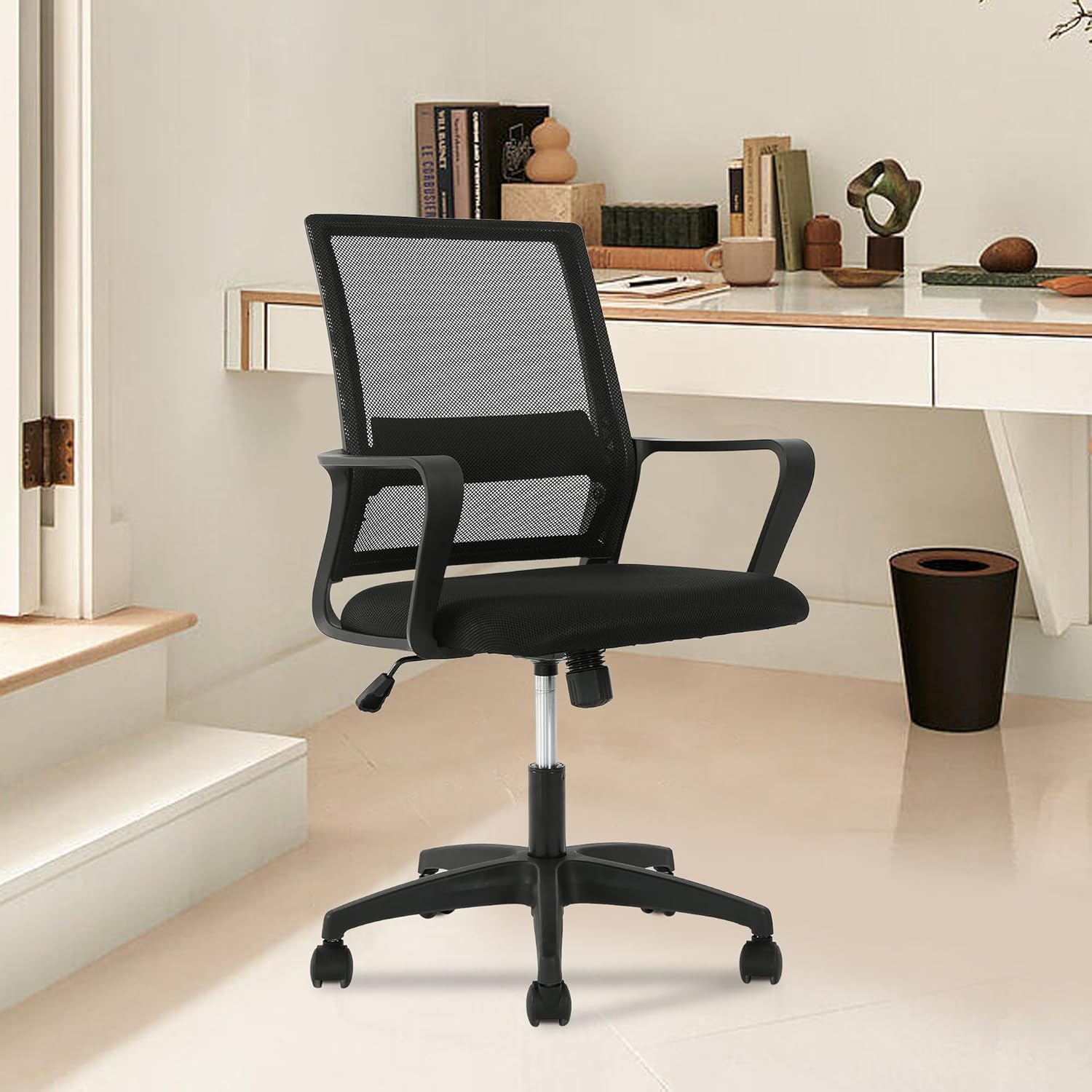
Figure 3: The ergonomic backrest with integrated lumbar support for improved posture.
- Smooth-Rolling Casters: The five casters allow for easy movement across various floor surfaces.
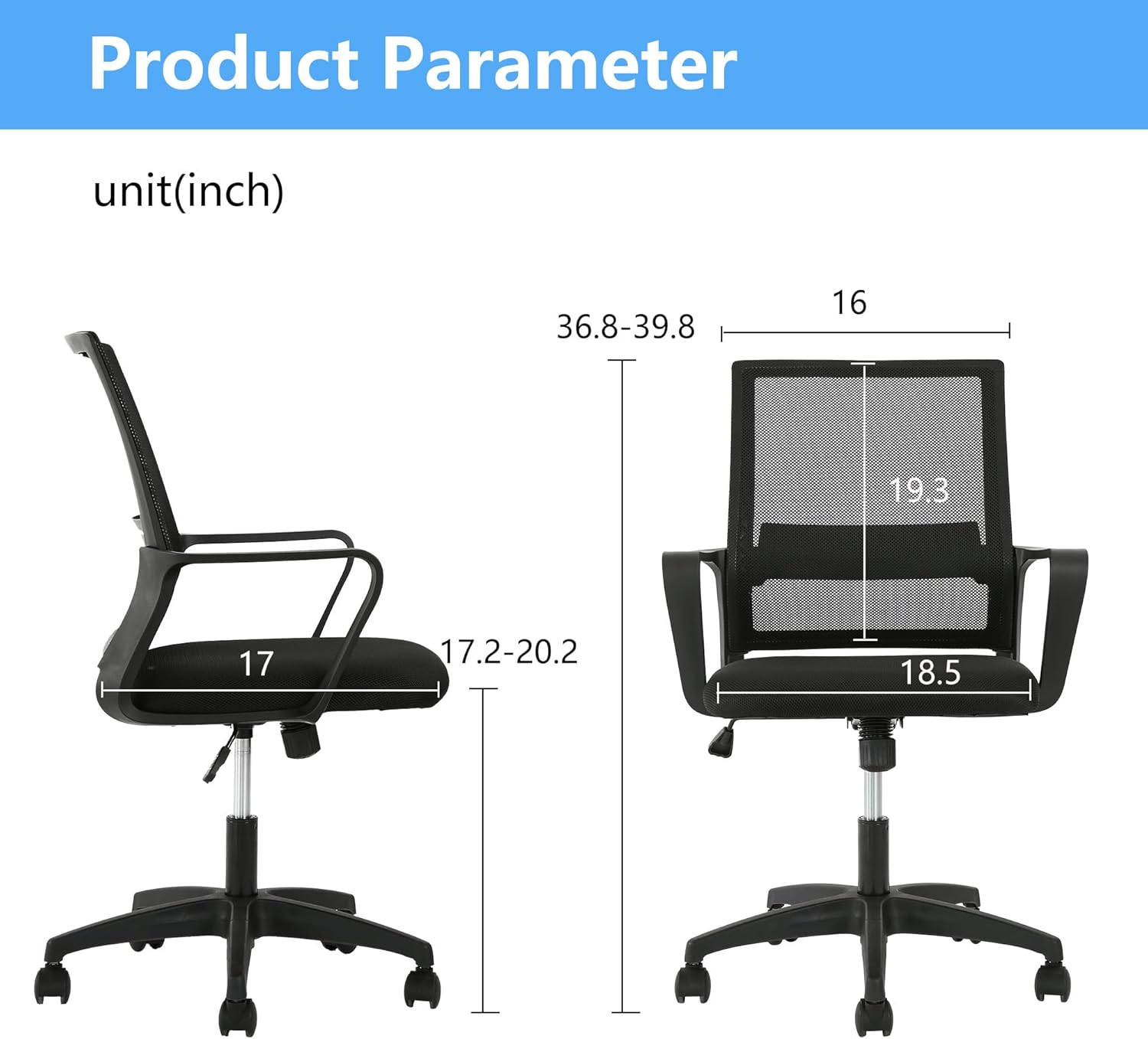
Figure 4: Detail of the five-star foot design and 360-degree rotatable wheels.
Maintenance
Proper care and maintenance will extend the life of your PayLessHere Office Chair.
- Cleaning: Wipe clean with a damp cloth. For stubborn stains on fabric or mesh, use a mild soap solution and a soft brush, then wipe dry. Avoid harsh chemicals or abrasive cleaners.
- Fasteners: Periodically check all screws and bolts to ensure they are tight. Re-tighten if necessary to maintain stability and safety.
- Casters: Keep casters free of hair, dust, and debris to ensure smooth rolling.
- Avoid Direct Sunlight: Prolonged exposure to direct sunlight can cause fading or degradation of materials.
Troubleshooting
| Problem | Possible Cause | Solution |
|---|---|---|
| Chair is wobbly or unstable. | Loose screws or improper assembly. | Check all assembly screws and bolts, especially those connecting the seat, backrest, and armrests. Tighten them securely using the provided Allen wrench. Ensure the gas lift is properly seated in the base. |
| Chair does not adjust height. | Gas lift malfunction or lever not engaged. | Ensure the height adjustment lever is fully pulled up. If the issue persists, the gas lift cylinder may need replacement. Contact customer support. |
| Casters do not roll smoothly. | Debris caught in casters or damaged casters. | Turn the chair over and inspect the casters. Remove any hair, lint, or debris. If casters are damaged, they may need to be replaced. |
| Backrest screw issue (as per customer review). | Incorrect screw length or alignment during assembly. | Ensure you are using the correct screws for each part as indicated in the assembly instructions. If a screw feels loose or does not thread properly, re-check alignment and try again. Do not force screws. If issues persist, contact customer support for replacement hardware. |
Specifications
| Brand | PayLessHere |
| Model Name | Computer Chair |
| Product Dimensions | 17"D x 18"W x 39"H |
| Item Weight | 18 pounds (8.16 kg) |
| Maximum Weight Recommendation | 250 Pounds (113 kg) |
| Color | Black |
| Material | Foam (cushion), Mesh (backrest) |
| Back Style | Solid Mesh Back |
| Special Features | Cushion Availability, Ergonomic, Rolling, Lumbar Support, Rocking Mode, 360-Degree Swivel, Height Adjustable |
| Recommended Uses | Gaming, Office |
| UPC | 195030091927 |

Figure 5: Detailed product dimensions (in inches).
Warranty and Support
PayLessHere offers a customer guarantee for this product, ensuring your satisfaction. While specific warranty terms are not detailed in this manual, please retain your proof of purchase.
For any questions, missing parts, or issues not covered in this manual, please contact PayLessHere customer support through the retailer where the product was purchased or refer to the contact information provided with your product packaging.
Ask a question about this manual
Ask about setup, troubleshooting, compatibility, parts, safety, or missing instructions. Manuals+ will review the question and use this page’s manual context to help answer it.