
Introduction
This manual provides essential information for the safe and effective use of your BLACK+DECKER Queen Micro Plush Electric Heated Blanket. Please read all instructions carefully before use and retain this manual for future reference.

Image: The BLACK+DECKER Queen Micro Plush Electric Heated Blanket in grey, shown folded with its two digital controllers. The product packaging, highlighting features like "10 Heat Settings" and "Automatic Shut-Off after 10 Hour run-time," is visible in the background.
Important Safety Information
Your safety is paramount. This heated blanket is designed with multiple safety features. Always follow these guidelines to prevent fire, electric shock, injury, or product damage.
- Overheat Protection: The blanket is designed to automatically shut off if it reaches excessive temperatures.
- Auto Shut-off: For safety and energy efficiency, the blanket features an auto-off mechanism that activates after 10 hours of continuous use.
- Overcurrent Shut-off: An overcurrent protection system is implemented to further enhance safety.
General Safety Precautions:
- Do not use with infants, children, incapacitated persons, or anyone insensitive to heat.
- Do not use with pets.
- Never use the blanket if it is wet.
- Do not use the blanket if it is folded, bunched, or tucked in. Ensure it lies flat.
- Avoid placing heavy objects on the blanket while it is in use.
- Do not use pins or other metallic objects with the blanket.
- Always unplug the blanket from the power outlet when not in use.
- Do not dry clean this product. Dry cleaning solvents may damage the insulation of the heating element.
- Inspect the blanket, cord, and controller regularly for any signs of wear or damage. If any damage is found, discontinue use immediately and contact customer support.

Image: A grey BLACK+DECKER heated blanket with two controllers, surrounded by icons indicating key safety and feature aspects: UL Certified, Over-Current Protection, Fast Heating, Overheat Protection, 10-hour Auto-Off, Smart Control, and Dual Control.
Setup Instructions
- Unpack: Carefully remove the heated blanket and its components from the packaging.
- Inspect: Before first use, thoroughly inspect the blanket, power cord, and controller for any signs of damage. Do not use if damaged.
- Positioning: Lay the blanket flat on your bed. Ensure there are no folds, creases, or bunched areas. The connectors for the controllers should be positioned at the foot of the bed.
- Connect Controllers: Firmly plug the controller cord(s) into the blanket's connector(s). For Queen size blankets, there are two controllers for dual zone heating.
- Power Connection: Plug the power cord(s) from the controller(s) into a standard 120V AC electrical outlet. Ensure the outlet is easily accessible.
- Avoid Tucking: Do not tuck the blanket under the mattress. The entire blanket must be visible and lie flat on the bed.
Operating Instructions
Your BLACK+DECKER heated blanket features smart digital controls for customized comfort.

Image: A close-up view of a hand operating the BLACK+DECKER digital controller. The display shows temperature and timer settings, and the controller features buttons for adjusting temperature and time. The cord length is noted as 15 feet (4.6 meters).
Powering On/Off
- Press the Power button (usually a circle with a vertical line) on the controller to turn the blanket on or off.
Adjusting Heat Levels
- The blanket offers 10 adjustable heat levels.
- Use the TEMP + and TEMP - buttons to increase or decrease the heat setting to your desired comfort level. The current setting will be displayed on the digital screen.
Setting the Timer
- The blanket includes a timer function for automatic shut-off.
- Press the TIME + and TIME - buttons to set the desired operating duration. The timer can typically be set from 1 to 10 hours.
- The blanket will automatically turn off once the set time has elapsed.
Dual Zone Heating (Queen Size)
- Queen size blankets are equipped with two independent controllers, allowing each side of the bed to have its own temperature and timer settings.
- Operate each controller separately to customize comfort for individual users.
Fast Heating
- The blanket is designed for rapid heat-up, providing warmth quickly.
Video: This video demonstrates the features of the BLACK+DECKER Heated Bed Blanket, including its smart digital control, fast heating capability, and safety features like overheat protection and auto-off timer. It shows a user comfortably wrapped in the blanket, adjusting settings.
Maintenance and Care
Proper care ensures the longevity and safe operation of your heated blanket.

Image: A person is shown placing the BLACK+DECKER heated blanket into a washing machine. An inset image highlights the crucial step of unplugging the controller cord from the blanket before washing.
Washing Instructions
- Disconnect: Always disconnect the controller cord(s) from the blanket before washing.
- Machine Wash: Place the blanket into a washing machine. Use a gentle cycle with cold water and mild detergent.
- Rinse: Ensure the blanket is thoroughly rinsed to remove all detergent residue.
- Drying:
- Air Drying: We recommend air-drying the blanket by draping it over a clothesline or shower rod. Ensure it is completely dry before plugging it back in.
- Machine Drying: If using a dryer, select a low-temperature setting. Remove the blanket promptly once dry to prevent heat damage.
- Never Plug In When Wet: For safety, never plug in the blanket until it is completely dry.
- Do Not Dry Clean: Dry cleaning solvents can damage the internal wiring and insulation.
- Do Not Iron: Ironing can damage the heating elements.
Troubleshooting
If your heated blanket is not functioning as expected, please refer to the following common issues and solutions:
| Problem | Possible Cause | Solution |
|---|---|---|
| Blanket does not heat. |
|
|
| Controller display is not working. |
|
|
| Blanket heats unevenly. |
|
|
If you experience any other issues or the above solutions do not resolve the problem, please contact BLACK+DECKER customer support.
Product Specifications
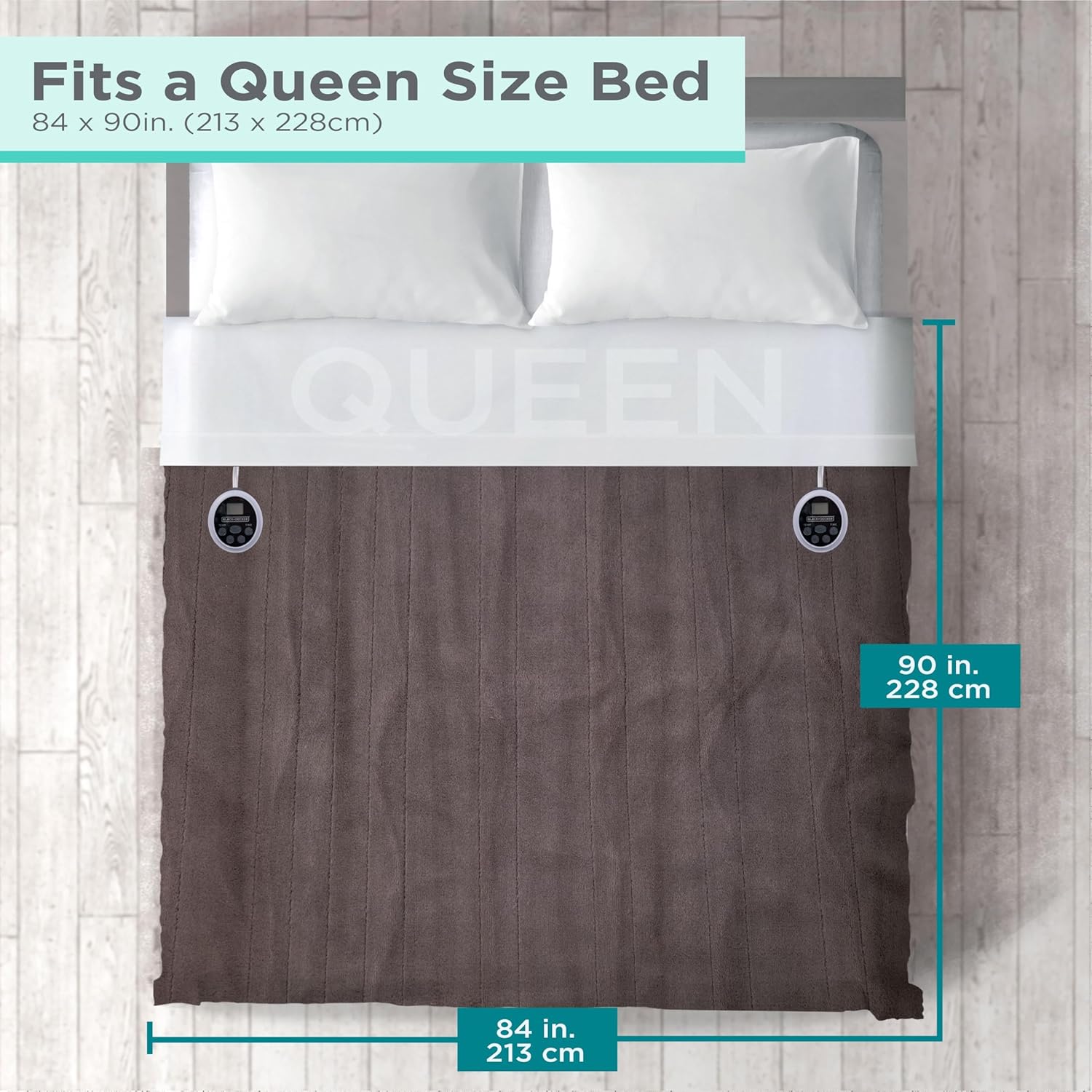
Image: A top-down diagram illustrating a Queen size bed with the heated blanket. Dimensions are clearly marked: 84 inches (213 cm) in width and 90 inches (228 cm) in length, confirming it fits a Queen size bed.
- Brand: BLACK+DECKER
- Model Name: 32492
- Size: Queen (84"L x 90"W)
- Color: Grey
- Material: Micro Plush (Fabric Type: Micro Plush, Fill Material: Polyester)
- Special Features: Corded Electric, Durable, Fluffy, Lightweight, Thermal, 10 Heating Levels, 10H Timer, Auto Shutoff, Dual Zone Heating, Fast Heating
- Product Care Instructions: Machine Wash
- Item Weight: 6.98 pounds
- Included Components: 84x90 Queen Blanket, Detachable Heat Controller(s), Product Manual
- UPC: 810087324926

Image: The back of the BLACK+DECKER Heated Bed Blanket packaging, detailing key features such as 10 Heat Settings, Automatic Shut-Off after 10 hours, and Overheat and Overcurrent Protection. Size information for the Queen blanket (84x90 inches) is also visible.
Warranty and Support
For warranty information, please refer to the documentation included with your product or visit the official BLACK+DECKER website. For technical support or assistance, please contact BLACK+DECKER customer service.
Manufacturer: Mr. Brands, LLC.