
BOBOVR M3 Pro
BOBOVR M3 Pro Head Strap User Manual
Model: M3 Pro
1. Introduction
The BOBOVR M3 Pro Head Strap is an accessory designed to enhance the comfort and extend the battery life of your Meta Quest 3 or Quest 3S VR headset. It features a balanced design to reduce facial pressure and a magnetic quick-release battery pack for convenient power supply.
2. Package Contents
Please verify that all items are present in your package:
- Head Strap x 1
- B2 Battery x 1
- PU Leather Pad x 1
- USB-C Cable x 1
- Honeycomb Pad (optional, for alternative comfort)

Figure 2.1: Contents of the BOBOVR M3 Pro Head Strap package.
3. Setup and Installation
Follow these steps to install the BOBOVR M3 Pro Head Strap onto your Meta Quest 3/3S headset:
- Remove Original Head Strap: Carefully detach the pre-installed head strap from your Meta Quest 3/3S headset.
- Attach M3 Pro Fixing Arm: Place the M3 Pro fixing arm over the speaker structure on both sides of the Quest 3/3S. Ensure it clicks securely into place.
- Attach Back Head Support: Connect the back of the head support to the designated slot on the new head strap.
- Thread Webbing: Thread the webbing through the Quest 3/3S retaining ring, spacing it 1-2cm apart. This step may require careful manipulation.
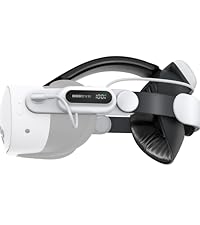
Figure 3.1: Step-by-step installation guide for the M3 Pro Head Strap.
The head strap is designed for seamless compatibility with both Meta Quest 3 and Quest 3S, ensuring a proper fit for either model.

Figure 3.2: Compatibility of the M3 Pro Head Strap with Meta Quest 3 and Quest 3S.
4. Operating Instructions
4.1 Adjusting for Comfort
The M3 Pro Head Strap features multi-point adjustability and a gravity balance design to distribute the headset's weight evenly, reducing facial pressure. Use the adjusting knob at the back to tighten or loosen the strap for a secure yet comfortable fit. The top strap can also be adjusted to further balance the weight.

Figure 4.1: Adjusting the head strap for optimal balance and comfort.
The unique triangle stability design suspends the headset in front of your face, further minimizing direct pressure.

Figure 4.2: Triangle Stability Design for reduced facial pressure.
4.2 Using the B2 Battery Pack
The included B2 battery pack provides approximately 1.5 to 2 hours of additional VR playtime. It attaches magnetically to the back of the head strap for easy installation and removal.

Figure 4.3: B2 Battery Pack and estimated playtime.
The magnetic quick-release design allows for hot-swapping of batteries, meaning you can replace a depleted battery with a charged one without interrupting your VR experience. This feature is particularly useful if you have a second battery pack (sold separately).

Figure 4.4: Magnetic quick-release battery system.
To charge the B2 battery pack, connect it using the provided USB-C cable. Charging time is approximately 2 hours to reach 80% capacity and 3 hours for a full charge.

Figure 4.5: Charging the B2 Battery Pack.
4.3 Enhanced MR Experience
For an expanded field of view in Mixed Reality (MR) mode, you have the option to remove the facial interface of your Quest 3/3S while using the BOBOVR M3 Pro Head Strap. This allows for a more immersive MR experience by reducing physical obstruction.

Figure 4.6: Removing facial interface for enhanced MR experience.
5. Maintenance
- Cleaning: Use a soft, dry cloth to wipe down the head strap and battery pack. For the PU leather pad, a slightly damp cloth can be used, but ensure it is completely dry before reattaching.
- Storage: Store the head strap in a cool, dry place away from direct sunlight and extreme temperatures.
- Battery Care: Avoid fully discharging the battery pack frequently. For long-term storage, charge the battery to approximately 50-60% to preserve its lifespan.
- Pad Replacement: The PU leather pad and honeycomb pad are interchangeable. Clean or replace them as needed for hygiene and comfort.
6. Troubleshooting
| Problem | Possible Cause | Solution |
|---|---|---|
| Head strap feels uncomfortable or causes pressure. | Incorrect adjustment; facial interface still attached (for MR). | Adjust the rear knob and top strap for even weight distribution. Consider removing the facial interface for MR use. |
| Battery pack not charging or providing power. | Loose connection; depleted battery; faulty cable. | Ensure the USB-C cable is securely connected to both the battery and a power source. Check battery indicator lights. Try a different USB-C cable. |
| Battery pack makes a buzzing sound during use/charging. | Normal operation for some units; potential interference. | This can sometimes be normal. If the buzzing is excessive or new, ensure the battery is securely attached and not overheating. If it persists and is disruptive, contact customer support. |
| Head strap feels loose or shifts during movement. | Insufficient tightening; improper fit. | Tighten the rear adjusting knob until the strap feels snug but not overly tight. Ensure the top strap is also adjusted correctly. |
7. Specifications
| Feature | Detail |
|---|---|
| Model Number | M3 Pro |
| Compatibility | Meta Quest 3 / Quest 3S |
| Battery Capacity (B2) | 5200mAh (single battery pack) |
| Additional VR Time | Approx. 1.5 - 2 hours (APP dependent) |
| Battery Pack Weight | 140g (approx. 4.9 ounces) |
| Charging Time (B2) | 2 hours to 80%, 3 hours to 100% |
| Design Features | Suspended design, multi-point adjustment, magnetic quick-release battery |
| Manufacturer | ShenZhen XiaoZhai Technology Co., Ltd |
| First Available | October 10, 2023 |
8. Warranty and Support
For warranty information and technical support, please contact BOBOVR customer service through their official website or the platform where you purchased the product. Keep your proof of purchase for warranty claims.
You can visit the BOBOVR Store on Amazon for more information and contact options: BOBOVR Amazon Store
Related documentsM3 Pro


Ask a question about this manual
Ask about setup, troubleshooting, compatibility, parts, safety, or missing instructions. Manuals+ will review the question and use this page’s manual context to help answer it.