
COUGAR 4710483774805
Contents
COUGAR Royal 120 Mossa Black Gaming Desk User Manual
Model: 4710483774805
Introduction
Thank you for choosing the COUGAR Royal 120 Mossa Black Gaming Desk. This manual provides essential information for the proper setup, operation, and maintenance of your new desk. Please read this manual thoroughly before using the product to ensure safe and efficient operation.
The COUGAR Royal Mossa 120 gaming desk is a compact, electric, functional, and elegant solution designed to provide a suitable workspace for various applications. It is constructed with reliable materials to ensure durability during long gaming sessions or work periods.
Safety Information
Always follow these basic safety precautions when using the COUGAR Royal 120 Mossa Black Gaming Desk:
- Ensure the desk is placed on a stable, level surface to prevent tipping.
- Keep hands and fingers clear of moving parts during height adjustment.
- Do not overload the desk beyond its specified weight capacity.
- Keep liquids away from electrical components to prevent short circuits.
- Unplug the desk from the power outlet before cleaning or performing any maintenance.
- Do not allow children to operate the desk's electric functions without adult supervision.
- Use only the power adapter supplied with the desk.
Package Contents
Please check the package to ensure all items are present and undamaged:
- COUGAR Royal 120 Mossa Black Gaming Desk (Main Unit)
- Power Adapter and Cable
- User Manual (This document)
Setup
The COUGAR Royal 120 Mossa Black Gaming Desk is designed for minimal assembly. According to product specifications, assembly is not required for the main structure. Follow these steps for initial setup:
- Unpacking: Carefully remove all components from the packaging. Retain packaging materials for future transport or storage if needed.
- Placement: Choose a suitable location for your desk. Ensure it is on a flat, stable surface, away from direct sunlight, heat sources, and excessive moisture. Allow sufficient space around the desk for height adjustment.
- Power Connection: Locate the power input port on the desk's control box (usually underneath the desktop). Connect the power cable to the desk and then plug the power adapter into a standard wall outlet.
- Cable Management: Utilize any integrated cable management features (e.g., cable grommets, trays) to organize your device cables for a tidy and safe workspace.
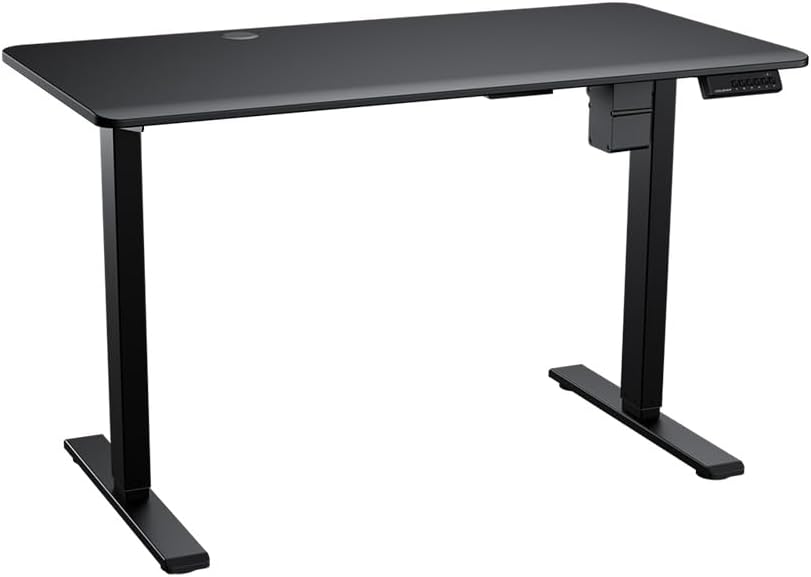
Image: The COUGAR Royal 120 Mossa Black Gaming Desk, showing its sleek black design, sturdy legs, and integrated control panel on the right side. The desk features a cable management grommet near the back center of the desktop.
Operating Instructions
The COUGAR Royal 120 Mossa Black Gaming Desk features an electric height adjustment system. The control panel is typically located on the front edge of the desk, on the right side.
Height Adjustment
- Raising the Desk: Press and hold the "Up" arrow button on the control panel. The desk will move upwards. Release the button when the desired height is reached.
- Lowering the Desk: Press and hold the "Down" arrow button on the control panel. The desk will move downwards. Release the button when the desired height is reached.
Memory Presets
Many electric desks include memory functions to save preferred heights. While specific button labels may vary, the general procedure is:
- Adjust the desk to your desired height using the Up/Down buttons.
- Press the "M" or "Set" button (if present) once.
- Within a few seconds, press the desired preset number button (e.g., "1", "2", "3") to save the current height to that memory slot.
- To recall a saved height, simply press the corresponding preset number button. The desk will automatically move to the saved position.
Refer to the specific markings on your desk's control panel for exact button functions and programming instructions.
Maintenance
Regular maintenance will help prolong the life and appearance of your COUGAR Royal 120 Mossa Black Gaming Desk:
- Cleaning: Wipe the desk surface with a soft, damp cloth. For stubborn marks, use a mild, non-abrasive cleaner. Avoid harsh chemicals or abrasive materials that could damage the finish.
- Dusting: Regularly dust the desk and its components, especially around the motor and control panel, to prevent dust buildup.
- Cable Check: Periodically inspect all cables for any signs of wear, fraying, or damage. Replace damaged cables immediately.
- Motor Care: The electric motor is generally maintenance-free. Avoid obstructing the motor or lifting mechanism.
Troubleshooting
If you encounter issues with your COUGAR Royal 120 Mossa Black Gaming Desk, refer to the following common problems and solutions:
| Problem | Possible Cause | Solution |
|---|---|---|
| Desk does not move. | No power; cable disconnected; motor overload. | Check power connection to wall outlet and desk. Ensure all cables are securely plugged in. Unplug for 10 minutes, then plug back in to reset. Reduce weight on desk. |
| Desk moves unevenly or makes unusual noises. | Obstruction; uneven load; damaged component. | Check for any obstructions under or around the desk. Redistribute weight evenly. If problem persists, contact customer support. |
| Control panel not responding. | Power issue; control panel malfunction. | Verify power connection. Try unplugging and replugging the desk. If still unresponsive, contact customer support. |
If the problem persists after trying these solutions, please contact COUGAR customer support.
Specifications
- Brand: COUGAR
- Model Number: 4710483774805
- Type: Electric Gaming Desk
- Material: Engineered Wood (Top Surface)
- Shape: Rectangular
- Assembly Required: No (for main structure)
- Features: Compact, Electric Height Adjustment
Warranty and Support
COUGAR products are manufactured to high-quality standards. For information regarding warranty coverage, please refer to the warranty card included with your product or visit the official COUGAR website.
For technical support, troubleshooting assistance, or spare parts inquiries, please contact COUGAR customer service through their official channels. When contacting support, please have your product model number (4710483774805) and purchase information ready.
Official COUGAR Website: https://cougargaming.com/
Documents and downloads
Ask a question about this manual
Ask about setup, troubleshooting, compatibility, parts, safety, or missing instructions. Manuals+ will review the question and use this page’s manual context to help answer it.