
Introduction
Thank you for purchasing the Celly PARTYSPEAKERBK Bluetooth Speaker. This manual provides essential information for the safe and efficient operation of your device. Please read it thoroughly before use and retain it for future reference.
The Celly PARTYSPEAKERBK is a powerful 40W portable Bluetooth speaker equipped with vibrant RGB lights and a wired microphone, designed for versatile audio playback and entertainment. It offers multiple connectivity options including Bluetooth, AUX, and USB, ensuring compatibility with various devices.
Package Contents
Ensure all items are present in the package:
- Celly PARTYSPEAKERBK Bluetooth Speaker
- Wired Microphone
- Charging Cable (USB)
- User Manual

Image: The Celly PARTYSPEAKERBK speaker shown within its retail box, indicating typical packaging contents.
Product Overview
Familiarize yourself with the speaker's components and controls.
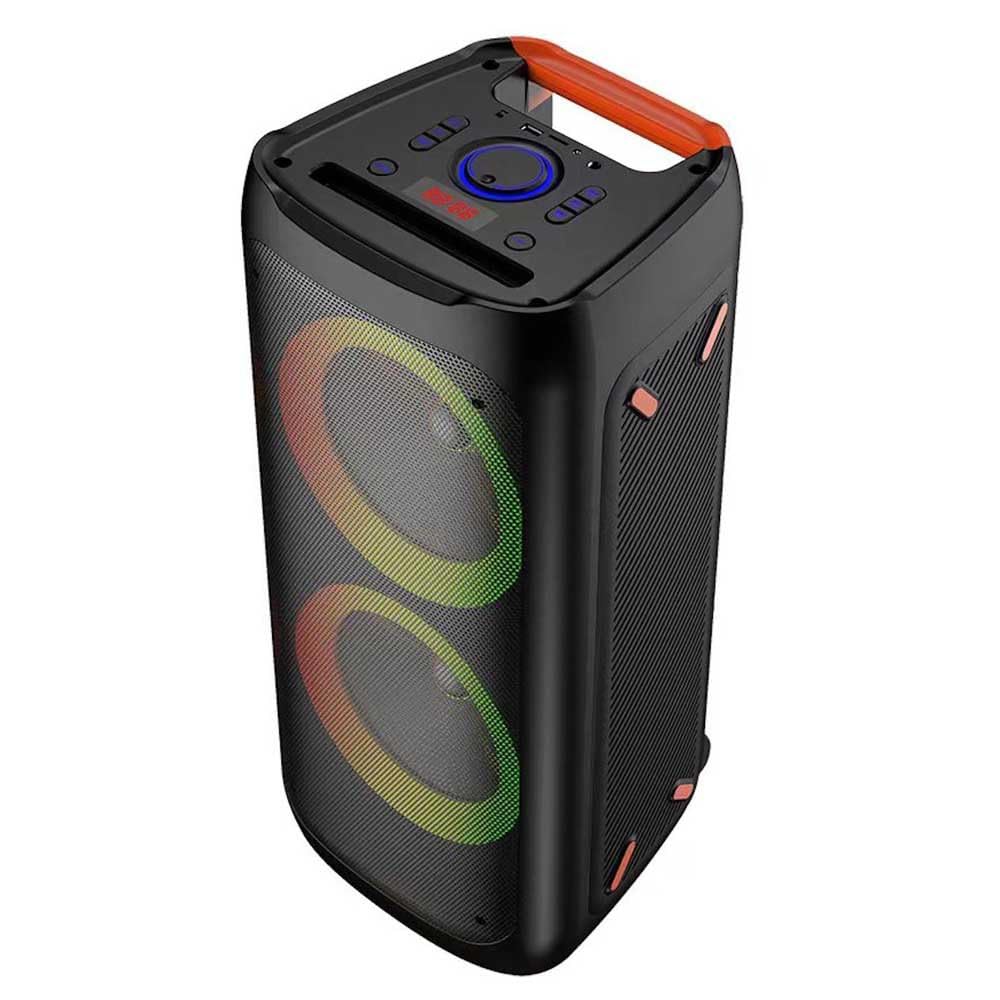
Image: Front view of the Celly PARTYSPEAKERBK speaker, highlighting the dual speaker grilles with RGB lighting and the extendable handle.
Key Features:
- 40W Powerful Audio: Delivers clear and deep sound.
- Bluetooth Connectivity: Wireless audio streaming up to 20 meters.
- Wired Microphone: For karaoke or public speaking.
- RGB Lights: Dynamic lighting effects for atmosphere.
- Multiple Inputs: Supports AUX and USB for diverse audio sources.
- Portable Design: Features an extendable handle for easy transport.

Trolley Handle

Wired Microphone

RGB Lights

AUX & USB Input
Setup
1. Charging the Speaker
- Connect the provided USB charging cable to the speaker's charging port.
- Plug the other end of the USB cable into a compatible USB power adapter (not included) or a computer's USB port.
- The charging indicator light will illuminate, typically red, during charging.
- Once fully charged, the indicator light will change or turn off (refer to the speaker's display or specific indicator for details).
- A full charge provides extended playback time.
2. Powering On/Off
- To Power On: Press and hold the Power button (usually located on the top panel) for a few seconds until the speaker powers on and the display illuminates.
- To Power Off: Press and hold the Power button again for a few seconds until the speaker powers off.
Operating Instructions
1. Bluetooth Pairing
- Ensure the speaker is powered on and in Bluetooth mode. If not, press the Mode button to switch to Bluetooth. The display will show 'BT' or a Bluetooth icon, and an audible prompt may sound.
- On your mobile device (smartphone, tablet, computer), enable Bluetooth.
- Search for available Bluetooth devices. You should see "PARTYSPEAKERBK" in the list.
- Select "PARTYSPEAKERBK" to pair. Once connected, an audible confirmation will sound, and the display will indicate a successful connection.
- You can now play audio from your device through the speaker.
2. AUX Input Playback
- Connect one end of a 3.5mm audio cable (not included) to the AUX port on the speaker.
- Connect the other end of the 3.5mm audio cable to the headphone jack or audio output of your external device.
- Press the Mode button on the speaker until 'AUX' is displayed.
- Play audio from your external device. The sound will be routed through the speaker.
3. USB Playback
- Insert a USB flash drive containing MP3 audio files into the USB port on the speaker.
- The speaker should automatically switch to USB mode and begin playing the audio files. If not, press the Mode button until 'USB' is displayed.
- Use the speaker's playback controls (Play/Pause, Next/Previous Track) to manage your music.
4. Microphone Usage
- Connect the wired microphone to the designated microphone input port on the speaker.
- Adjust the microphone volume using the dedicated knob or buttons on the speaker's control panel.
- Speak into the microphone. Your voice will be amplified through the speaker.
5. RGB Light Control
- The speaker features integrated RGB lights. There is typically a dedicated button to cycle through different light modes or to turn the lights on/off. Refer to the control panel for the specific light control button.
6. Volume and Audio Controls
- Master Volume: Use the main volume knob or buttons on the speaker to adjust the overall sound output.
- Bass/Treble: Some models may offer separate controls for bass and treble to fine-tune the audio.
- Track Navigation: Use the 'Previous' and 'Next' buttons to skip tracks during Bluetooth or USB playback.
- Play/Pause: Use the Play/Pause button to control media playback.
Maintenance
1. Cleaning
- Always power off and unplug the speaker before cleaning.
- Use a soft, dry, lint-free cloth to wipe the exterior surfaces.
- Do not use abrasive cleaners, waxes, or solvents as they may damage the finish.
- Avoid getting moisture into any openings.
2. Storage
- Store the speaker in a cool, dry place away from direct sunlight and extreme temperatures.
- If storing for an extended period, charge the battery to approximately 50% every few months to maintain battery health.
3. Battery Care
- Avoid fully discharging the battery frequently.
- Do not expose the battery to high temperatures.
- Use only the provided or recommended charging cables.
Troubleshooting
| Problem | Possible Cause | Solution |
|---|---|---|
| Speaker does not power on. | Battery is depleted. | Charge the speaker for at least 3-4 hours. |
| No sound from speaker. | Volume is too low or muted. Incorrect input mode. | Increase volume on both speaker and connected device. Ensure correct mode (BT, AUX, USB) is selected. |
| Bluetooth device cannot pair. | Speaker not in pairing mode. Device too far. Interference. | Ensure speaker is in Bluetooth pairing mode. Move device closer to speaker (within 20m). Turn off other Bluetooth devices. |
| Microphone not working. | Microphone not properly connected. Microphone volume too low. | Ensure microphone is securely plugged into the correct port. Increase microphone volume. |
| RGB lights not working. | Lights are turned off. | Press the light control button to activate or change light modes. |
Specifications
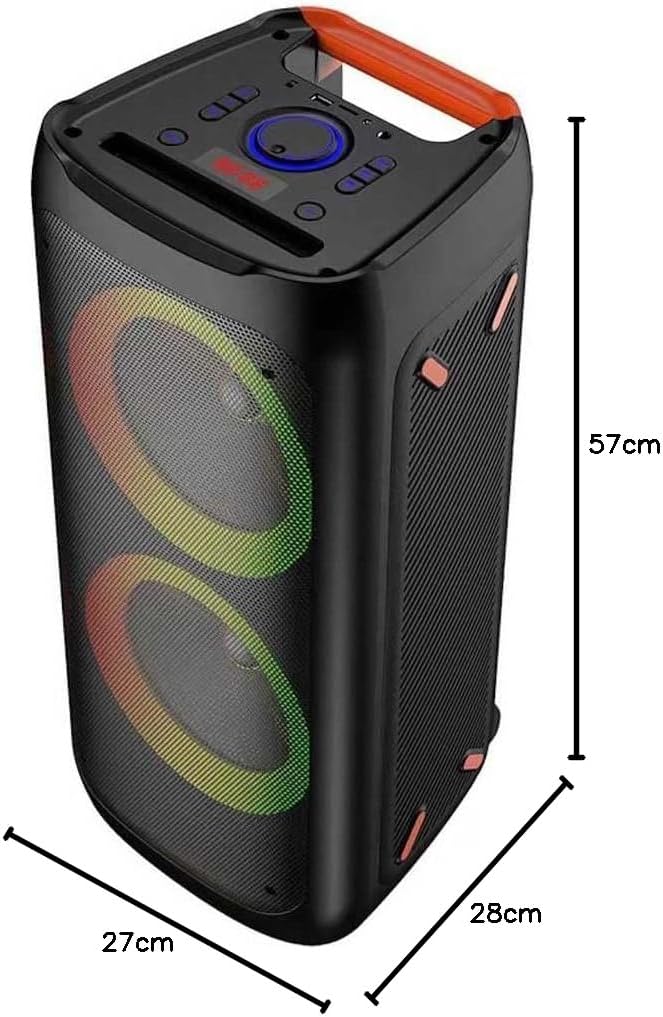
Image: The Celly PARTYSPEAKERBK speaker with its approximate dimensions: 57cm height, 27cm width, and 28cm depth.
| Feature | Detail |
|---|---|
| Model Name | PARTYSPEAKERBK |
| Brand | Celly |
| Speaker Output Power | 40 Watts |
| Connectivity Technology | Bluetooth, AUX, USB |
| Bluetooth Range | Up to 20 meters (65 feet) |
| Audio Output Mode | Mono (2 audio channels) |
| Special Features | RGB Lights, Wired Microphone |
| Power Source | Battery (1 Lithium Ion battery included) |
| Control Method | On-device controls, App (if available) |
| Dimensions (D x W x H) | 28P x 27l x 57H cm (approximately 11 x 10.6 x 22.4 inches) |
| Item Weight | 6.86 Kilograms (approximately 15.1 lbs) |
| Waterproof | No |
| Recommended Use | Parties, computer audio, smartphone audio |
| Compatible Devices | Laptop, Smartphone, Tablet, Television |
Warranty Information
This Celly product is covered by a 2-year manufacturer's limited warranty from the date of purchase. The warranty covers defects in materials and workmanship under normal use. It does not cover damage caused by misuse, accidents, unauthorized modifications, or normal wear and tear.
To claim warranty service, please retain your proof of purchase and contact Celly customer support.
Support
For further assistance, technical support, or warranty inquiries, please visit the official Celly website or contact their customer service department.
Celly Official Website: www.celly.com
Please have your product model (PARTYSPEAKERBK) and proof of purchase ready when contacting support.


