
1. Introduction
Thank you for choosing the PayLessHere 35-Inch Z-Shaped Gaming/Computer Desk. This manual provides essential information for the safe assembly, operation, and maintenance of your new desk. Designed for both gaming and home office use, this desk features a sturdy Z-shaped structure, a spacious carbon fiber desktop, and a convenient headphone hook.
Please read this manual thoroughly before assembly and retain it for future reference.

Image: The PayLessHere 35-Inch Z-Shaped Gaming Desk, showcasing its design and typical setup with a monitor, keyboard, and headphones.
2. Safety Information
To ensure safe use and prolong the life of your desk, please adhere to the following safety guidelines:
- This desk is intended for working use.
- Ensure the maximum monitor/equipment height does not exceed 28 inches to maintain stability.
- Proper assembly and secure use of the headphone hook are required. Do not overload the hook.
- Do not stand or sit on the desk.
- Keep liquids away from electronic equipment placed on the desk.
- Regularly check all screws and connections to ensure they remain tight.
- Avoid placing excessively heavy items on the desk, especially near the edges.
3. Package Contents
Before beginning assembly, please verify that all components are present and undamaged. If any parts are missing or damaged, please contact customer support.
- Desktop Panel (1)
- Z-Shaped Leg Frames (2)
- Headphone Hook (1)
- Hardware Kit (screws, bolts, adjustable foot pads, assembly tools if included)
- Assembly Instructions Manual (1)
4. Setup and Assembly
The PayLessHere Z-Shaped Gaming Desk is designed for easy assembly. It is recommended that one person assembles the desk. Please follow the step-by-step instructions provided in the included assembly guide.
Key Assembly Features:
- Z-Shaped Structure: The unique Z-shaped design provides exceptional stability and a modern aesthetic.
- Adjustable Foot Pads: Ensure stability on uneven surfaces by adjusting the foot pads at the base of the legs.
- Headphone Hook: Easily attach the headphone hook to keep your workspace organized.

Image: Detail showing the sturdy Z-shaped leg design and the adjustable foot pad for leveling the desk.

Image: The integrated headphone hook, designed for convenient storage of gaming headsets or headphones.
5. Operating Instructions
Your PayLessHere Z-Shaped Gaming Desk is ready for use once assembled. It provides a versatile surface for various activities:
- Gaming Setup: The spacious desktop can accommodate multiple monitors, keyboards, mice, and other gaming peripherals. The ergonomic curved design provides comfortable access.
- Home Office Workstation: Ideal for laptops, desktop computers, and office supplies, offering ample space for productivity.
- Study Desk: Provides a stable and comfortable area for reading, writing, and studying.

Image: The gaming desk integrated into a modern room setup, demonstrating its use as a gaming workstation.

Image: A detailed view of the ergonomic curved design along the front edge of the desktop, enhancing user comfort.
6. Maintenance
To keep your desk in optimal condition, follow these simple maintenance tips:
- Cleaning: Wipe the desktop and frame with a soft, damp cloth. Avoid abrasive cleaners or harsh chemicals that could damage the finish. The carbon fiber desktop is waterproof and scratch-proof, making it easy to clean.
- Inspection: Periodically check all screws and connections to ensure they are tight. Re-tighten if necessary.
- Placement: Avoid prolonged exposure to direct sunlight or extreme temperatures, which can affect the material integrity.

Image: A close-up view of the carbon fiber desktop, highlighting its texture and durable surface properties.
7. Troubleshooting
If you encounter any issues with your desk, refer to the following common problems and solutions:
- Desk is Wobbly:
Solution: Ensure all assembly screws are securely tightened. Adjust the individual foot pads at the bottom of the Z-shaped legs to level the desk on uneven floors. - Headphone Hook is Loose:
Solution: Check the attachment point of the headphone hook and ensure its screws are tightened. - Surface Scratches/Damage:
Solution: The carbon fiber desktop is designed to be scratch-proof. For minor marks, try cleaning with a soft cloth and mild cleaner. For significant damage, contact customer support.
8. Specifications
Detailed specifications for the PayLessHere 35-Inch Z-Shaped Gaming/Computer Desk:
| Feature | Detail |
|---|---|
| Model Number | 35 Inch Modern Z-Shaped Computer Desk |
| Product Dimensions (D x W x H) | 21"D x 35"W x 28"H |
| Color | Red |
| Style | Modern |
| Base Material | Alloy Steel |
| Top Material Type | Wood (Carbon Fiber Texture) |
| Finish Type | Steel |
| Item Weight | 19 Pounds |
| Special Feature | Adjustable (Foot Pads), Headphone Hook |
| Required Assembly | Yes |
| Recommended People for Assembly | 1 |
| Shape | Z-Shape |
| Tabletop Thickness | 1 Inches |
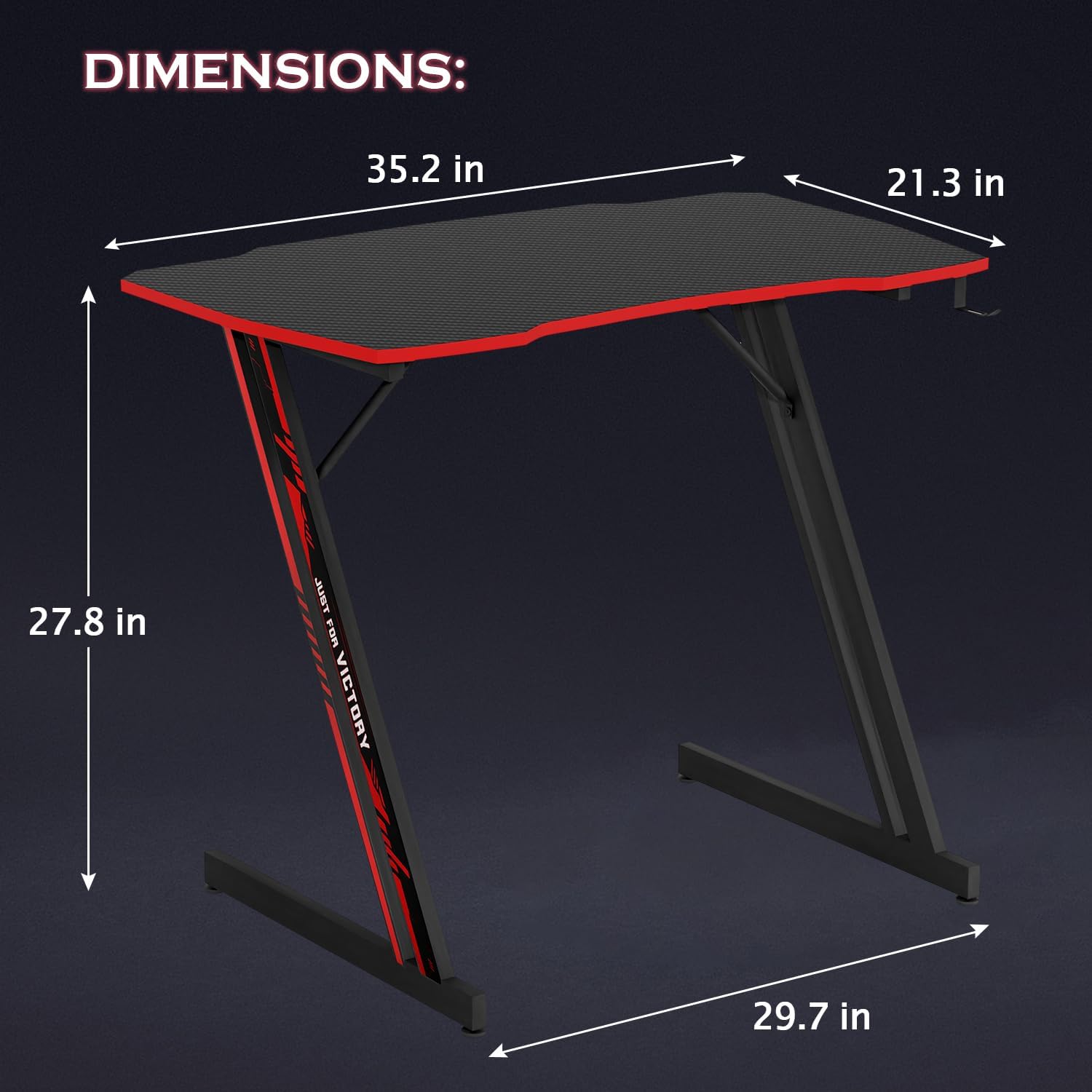
Image: A visual representation of the desk's dimensions, including length, width, and height.
9. Warranty and Support
For information regarding product warranty, please refer to the documentation included with your purchase or contact the retailer directly. PayLessHere is committed to providing quality products and customer satisfaction.
If you have any questions, require assistance with assembly, or need troubleshooting support, please contact PayLessHere customer service through the platform where you purchased the product.