
Introduction
This manual provides detailed instructions for the installation, operation, and maintenance of your Lemnoi 6W Solar Panel. This solar panel is designed to provide continuous power to compatible surveillance cameras, ensuring uninterrupted operation.
The Lemnoi 6W Solar Panel is specifically compatible with Lemnoi camera models B30, S52, and S72, featuring an IP66 waterproof rating. It can also connect to most other solar-powered surveillance cameras or equipment with a Type-C port. Please note that the Type-C connection interface itself is not waterproof, so ensure proper protection for the connection point if used with non-IP66 rated devices.

Image: Lemnoi 6W Solar Panel shown with compatible camera models S72, S52, and B30, illustrating its intended use for continuous power supply.
Package Contents
Before proceeding with installation, please verify that all components are present in the package:
- 1 x Lemnoi 6W Solar Panel
- 1 x Mounting Bracket
- 1 x Installation Accessories (screws, wall plugs)
Setup and Installation
Follow these steps to properly install your solar panel:
- Choose an Optimal Location: Select a location that receives maximum direct sunlight throughout the day. Avoid areas with obstructions like trees or buildings that could cast shadows on the panel.
- Mount the Bracket: Use the provided mounting bracket and installation accessories to securely attach the bracket to a wall or wooden fence. Ensure the surface is stable enough to support the panel.
- Attach the Solar Panel: Secure the solar panel to the mounting bracket. The bracket allows for 360-degree rotation, enabling you to adjust the panel's orientation to capture the most sunlight.
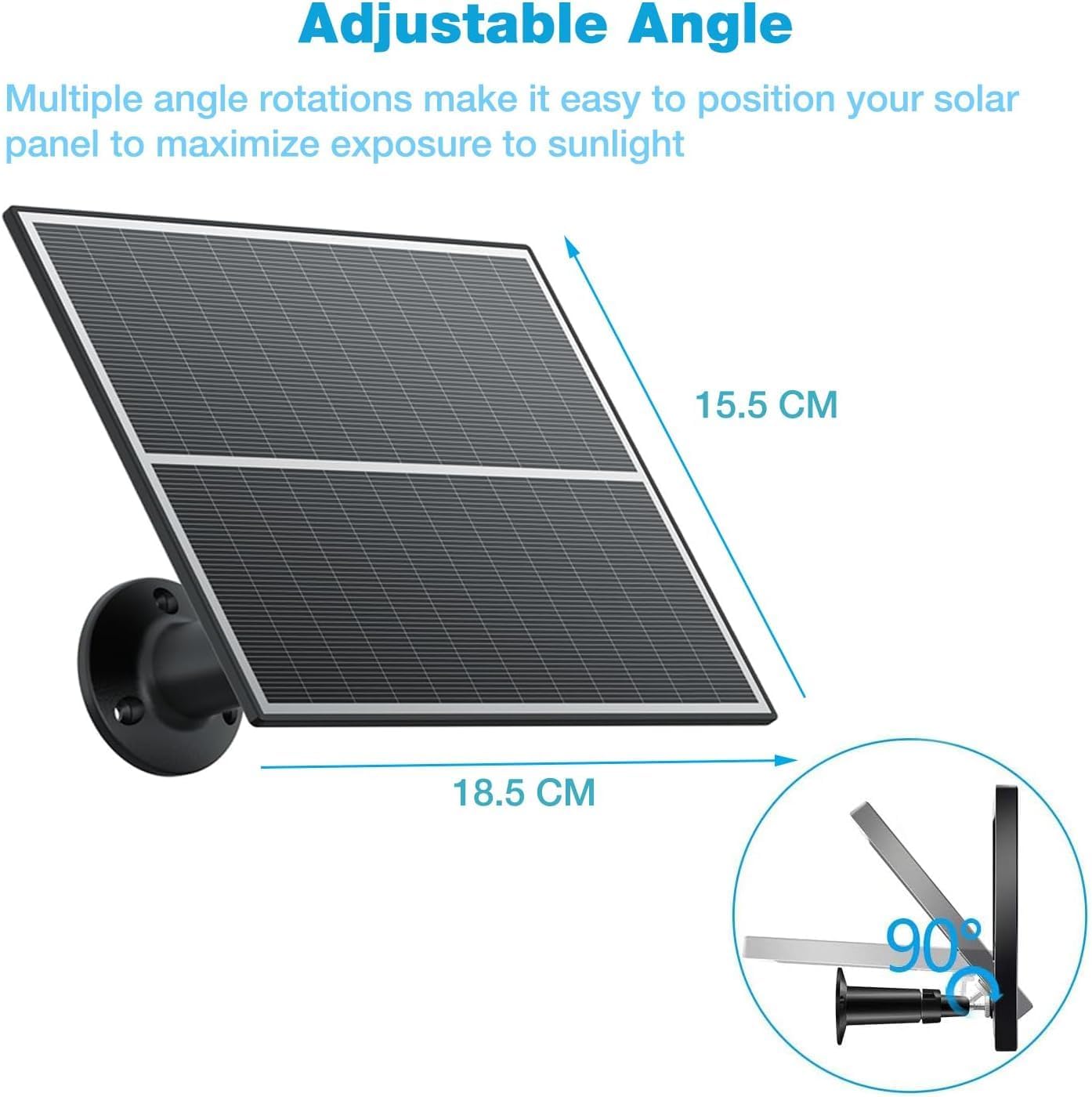
Image: The solar panel attached to its mounting bracket, demonstrating the adjustable angle feature for optimal sun exposure. Dimensions are shown as 18.5 cm width and 15.5 cm height.
- Connect to Camera: Use the integrated 3-meter Type-C cable to connect the solar panel to your compatible surveillance camera. The long cable provides flexibility in placement, allowing the panel to be positioned in optimal sunlight even if the camera is in a shaded area.
- Secure the Connection: For cameras with an IP66 rating, the connection to the solar panel is designed to be weather-resistant. If connecting to a device that is not IP66 rated, ensure the Type-C interface is protected from moisture.
Operating Instructions
Once installed, the Lemnoi 6W Solar Panel operates automatically to charge your connected surveillance camera.
- Automatic Charging: The solar panel will convert sunlight into electrical energy to charge the camera's battery. This process is automatic and requires no manual intervention.
- Continuous Power: With sufficient sunlight, the 6W solar panel, combined with a built-in 10400mAh battery (if present in the camera), provides continuous power, ensuring your camera remains operational for extended periods, potentially up to 365 days without interruption.

Image: A surveillance camera powered by the Lemnoi solar panel, illustrating the concept of 365 days of non-stop power through solar charging and a rechargeable battery.
- Angle Adjustment: Periodically check the panel's angle and adjust it as seasons change to maximize sun exposure and charging efficiency.
Maintenance
To ensure optimal performance and longevity of your solar panel, follow these maintenance guidelines:
- Regular Cleaning: Clean the surface of the solar panel periodically to remove dust, dirt, leaves, or snow that may accumulate and reduce charging efficiency. Use a soft, damp cloth. Avoid abrasive cleaners or harsh chemicals.
- Check for Obstructions: Regularly inspect the area around the solar panel for any new obstructions (e.g., growing tree branches) that might cast shadows.
- Inspect Connections: Periodically check the Type-C cable connection to ensure it is secure and free from damage. If the connection is exposed to the elements, ensure any protective covers are intact.
- Weather Resistance: The solar panel has an IP66 waterproof rating, making it resistant to dust and powerful water jets. It is designed to operate in temperatures ranging from -30°C to 60°C.

Image: The solar panel and a connected camera shown in rainy conditions, highlighting its IP66 weatherproof rating and operational temperature range of -30°C to 60°C.
Troubleshooting
If your solar panel is not performing as expected, consider the following:
- Camera Not Charging:
- Ensure the solar panel is receiving direct sunlight for several hours a day.
- Check for any shadows cast by trees, buildings, or other objects.
- Clean the surface of the solar panel to remove any dirt or debris.
- Verify that the Type-C cable is securely connected to both the solar panel and the camera.
- Confirm that your camera model is compatible with the solar panel.
- Loose Connection: If the cable feels loose, disconnect and reconnect it firmly. Ensure the Type-C port on your camera is clean and free of debris.
- Reduced Charging Efficiency in Winter/Cloudy Weather: Solar panel performance can decrease in low light conditions or during shorter winter days. This is normal. Ensure the panel is angled optimally for the available sunlight.
Specifications
| Feature | Detail |
|---|---|
| Brand | LEMNOI |
| Model Number | SOLA |
| Power Output | 6 Watts |
| Maximum Voltage | 5 Volts |
| Compatible Camera Models | Lemnoi B30, S52, S72 (and other Type-C solar-powered devices) |
| Waterproof Rating | IP66 |
| Cable Length | 3 meters (± 50 mm) |
| Product Dimensions | 185 x 158 x 15 mm (18 x 15 x 2 cm) |
| Product Weight | 490 g |
| Material | Plastic |
| Mounting Compatibility | Wall mount |
Warranty and Support
For warranty information and technical support, please refer to the documentation provided with your purchase or contact Lemnoi customer service through their official website or the retailer where the product was purchased.
Manufacturer: Lemnoi
First Available Date: September 21, 2023