
1. Introduction
This manual provides detailed instructions for the safe and effective use of your Godox V350O TTL Flash. Please read this manual thoroughly before operation to ensure proper functionality and to prevent damage to the product or injury to yourself.
The Godox V350O is a compact and versatile TTL Li-ion camera flash designed for Olympus and Panasonic camera systems. It offers a range of advanced features including TTL autoflash, manual flash, multi flash, high-speed sync, and a built-in 2.4G wireless system.

Figure 1.1: Godox V350O TTL Flash and included accessories.
2. Safety Information
To prevent damage to your product or injury to yourself or others, read the following safety precautions completely before using this equipment. Keep these safety instructions where all who use the product will read them.
- Do not disassemble or modify the flash unit. If the product breaks down, it must be repaired by an authorized maintenance center.
- Keep this product dry. Do not handle with wet hands or immerse in water.
- Do not use the flash unit in the presence of flammable gases, chemicals, or other materials. In certain circumstances, these materials might be sensitive to the strong light emitted from this flash unit, and fire or electromagnetic interference may result.
- Do not leave or store the flash unit in high-temperature environments, such as in a car on a hot day.
- Do not fire the flash directly into the eyes (especially those of infants) within short distances. Otherwise, visual impairment may occur.
- Remove the battery when the product will not be used for an extended period.
3. Package Contents
Verify that all items are present in your package:
- 1 x Godox V350O Camera Flash
- 1 x Li-ion Battery Pack (7.2V/2000mAh)
- 1 x Battery Charger
- 1 x Battery Charger Cable
- 1 x Mini Stand
- 1 x Diffuser
- 1 x Protection Case
- 1 x Instruction Manual
- 1 x Cleaning Cloth
4. Product Overview
The Godox V350O features a compact design with an intuitive LCD panel and control buttons for easy operation.

Figure 4.1: Flash unit with battery and LCD panel details.
4.1. Flash Head
The flash head can be swiveled horizontally from 0 to 270 degrees and tilted vertically from -7 to 90 degrees, allowing for bounce flash and flexible lighting angles.

Figure 4.2: Flash head movement capabilities.
4.2. Control Panel
The LCD panel displays current settings, while four function buttons and a select dial allow for easy navigation and adjustment of various parameters.
5. Setup
5.1. Battery Installation and Charging
- Open the battery compartment cover on the side of the flash unit.
- Insert the provided 7.2V/2000mAh Li-ion battery pack, ensuring correct polarity.
- Close the battery compartment cover securely.
- To charge the battery, connect the battery pack to the charger and then plug the charger into a power outlet using the provided cable. The indicator light on the charger will show charging status.
5.2. Mounting the Flash on a Camera
The Godox V350O is compatible with specific Olympus and Panasonic camera models. Ensure your camera is listed as compatible before mounting.

Figure 5.1: Flash mounted on a compatible camera.
- Slide the flash unit's mounting foot into your camera's hot shoe.
- Rotate the locking ring on the flash unit clockwise until it is securely fastened to the camera.
- To remove, rotate the locking ring counter-clockwise and slide the flash out of the hot shoe.
6. Operating Modes
The Godox V350O offers various flash modes to suit different photographic needs.

Figure 6.1: Visual examples of TTL flash functions.
6.1. TTL Autoflash Mode
In TTL mode, the flash output is automatically adjusted to achieve correct exposure. This mode supports:
- Flash Exposure Compensation (FEC): Adjust the flash output from -3 to +3 stops in 1/3 stop increments.
- High-Speed Sync (HSS): Allows flash synchronization at shutter speeds up to 1/8000s.
- Front Curtain Sync: Flash fires immediately after the shutter opens.
- Rear Curtain Sync: Flash fires just before the shutter closes, creating a trail of light behind moving subjects.
6.2. Manual Flash Mode (M)
In Manual mode, you set the flash output power manually from 1/1 (full power) to 1/128 in 22 steps. This provides precise control over lighting.
6.3. Multi Flash Mode (Stroboscopic)
Multi flash mode allows the flash to fire a rapid series of flashes during a single exposure, useful for capturing multiple stages of movement in one image. You can set the frequency (Hz) and number of flashes.
6.4. Wireless Flash Function (2.4G Transmission)
The V350O features a built-in 2.4G wireless system, allowing it to function as a master or slave unit. It supports 3 controllable slave groups (A, B, C) and 16 channels, with a transmission range of approximately 50 meters.
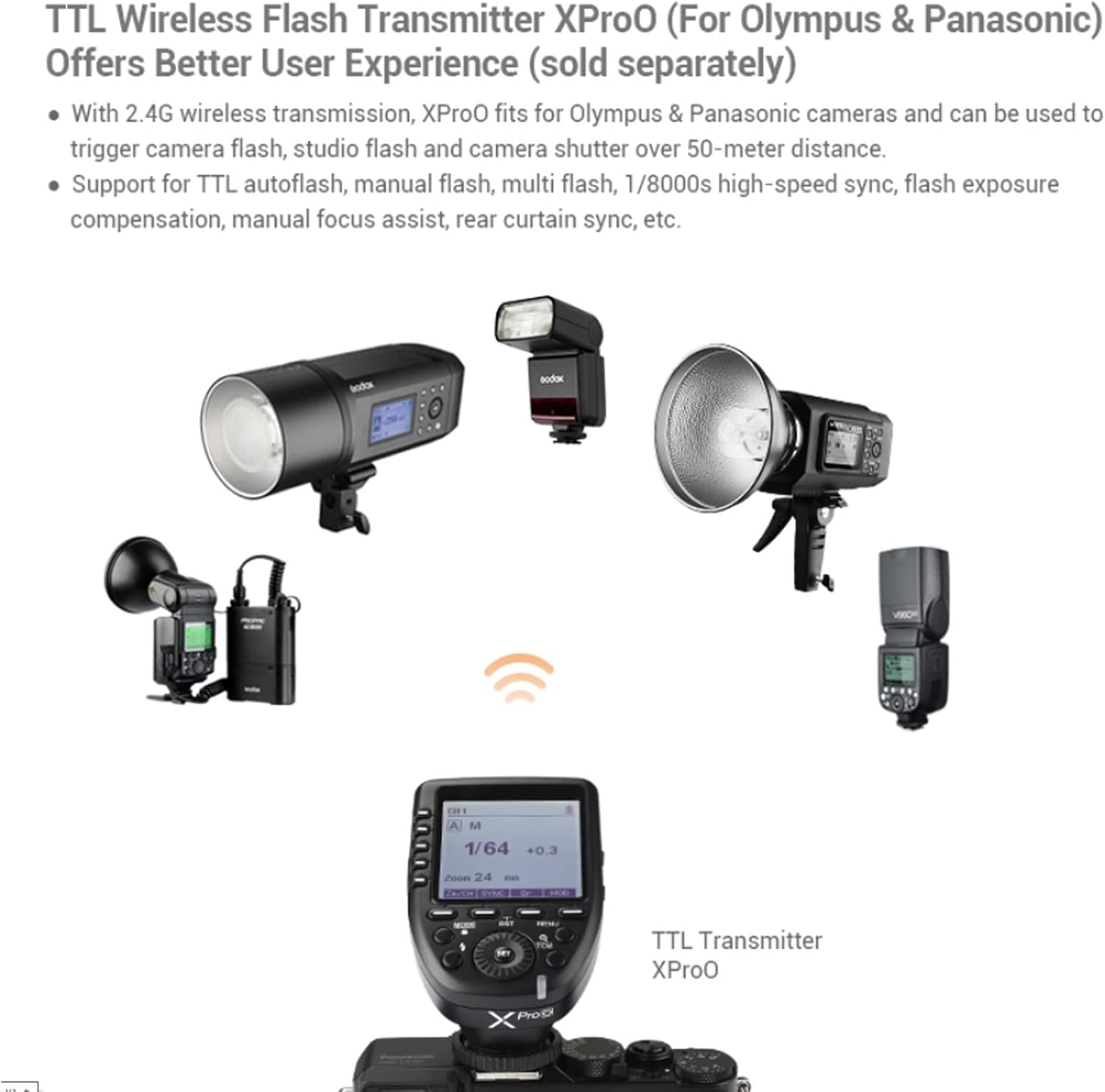
Figure 6.2: Wireless flash system setup with XProO transmitter (sold separately).
When used with a compatible Godox XPro-O or X2T-O wireless flash trigger (sold separately), the V350O can be triggered remotely and its settings adjusted from the transmitter.
7. Advanced Functions
7.1. Custom Functions (C.Fn)
The flash unit includes custom function settings (C.Fn) that allow you to personalize various parameters to your shooting preferences. Refer to the on-screen menu for available options and adjustments.
7.2. Firmware Upgrade
The Godox V350O supports USB firmware upgrades. This allows for improvements and new features to be added to the flash unit. Visit the official Godox website for the latest firmware and instructions.

Figure 7.1: USB Firmware Upgrade process.
8. Maintenance
8.1. Battery Care
- Fully charge the battery before first use.
- Avoid completely draining the battery to prolong its lifespan.
- Store the battery in a cool, dry place when not in use for extended periods.
- If the battery will not be used for a long time, charge it to approximately 50% capacity every three months.
8.2. Cleaning
- Use a soft, dry cloth to clean the flash unit.
- For stubborn dirt, use a cloth lightly dampened with water or a neutral detergent. Do not use strong solvents.
- Use the provided cleaning cloth for the LCD screen and flash tube.
9. Troubleshooting
If you encounter issues with your Godox V350O flash, refer to the following common problems and solutions:
- Flash does not fire: Ensure the flash is securely mounted, the battery is charged, and the flash is powered on. Check camera settings for flash activation.
- Flash output is too dark/bright: Adjust Flash Exposure Compensation (FEC) or manual power settings. Check camera ISO and aperture settings.
- Wireless communication issues: Ensure both master and slave units are on the same channel and group. Check the distance between units and for any obstructions.
- Slow recycle time: Ensure the battery is fully charged. Recycle time naturally increases at higher power outputs.
If the problem persists, contact Godox customer support or an authorized service center.
10. Specifications
| Feature | Specification |
|---|---|
| Model | V350O |
| Guide No. (1/1 output @ 105mm) | 36 (m ISO 100) |
| Flash Coverage | 24 to 105mm (Auto/Manual Zoom) |
| Swinging/Tilting Flash Head | Horizontal: 0 to 270°, Vertical: -7° to 90° |
| Flash Duration | 1/350 to 1/20000 seconds |
| Exposure Control System | TTL Autoflash, Manual Flash |
| Flash Exposure Compensation (FEC) | ±3 stops in 1/3 stop increments |
| Sync Mode | High-Speed Sync (up to 1/8000s), First-Curtain Sync, Rear-Curtain Sync |
| Multi Flash | Provided (up to 90 times, 99Hz) |
| Wireless Flash Function | Master, Slave, Off (2.4G transmission) |
| Controllable Slave Groups | 3 (A, B, and C) |
| Transmission Range (approx.) | ≤50m |
| Channels | 16 (1–16) |
| Auto Focus Assist Beam Effective Range (approx.) | Center: 0.6–4m / Periphery: 0.6–2.5m |
| Power Source | 7.2V/2000mAh Li-ion Polymer Battery |
| Recycle Time | Approx. 0.1–1.7 seconds |
| Full Power Flashes | Approx. 500 |
| Dimensions (W x H x D) | 2.36 x 6.34 x 7.56 inches (approx.) |
| Weight (with battery) | 1.32 pounds (approx.) |
11. Compatible Camera Models
The Godox V350O TTL Flash is designed for use with the following Olympus and Panasonic camera models:

Figure 11.1: V350O compatibility.
Olympus Cameras:
- E-M10II
- E-M5III
- E-M1
- E-PL8
- E-PL7
- E-PL6
- E-PL5
- E-P5
- E-P3
- PEN-F
Panasonic Cameras:
- DMC-GX85
- DMC-G7
- DMC-GF1
- DMC-LX100
- DMC-G85
- DMC-GH4
- DMC-FZ2500GK
12. Warranty and Support
This product is covered by a manufacturer's warranty. Please refer to the warranty card included in your package for specific terms and conditions. For technical support, service, or further inquiries, please contact Godox customer service through their official website or your local distributor.