

Introduction
The AGARO Alpha Robot Vacuum Cleaner is a versatile 2-in-1 automatic cleaning device designed for both dry vacuuming and wet mopping. It features advanced SLAM Lidar technology for intelligent mapping and route planning, ensuring efficient coverage of your home. Equipped with multiple sensors, it prevents falls and collisions, navigating safely around obstacles. The powerful brushless motor provides up to 3000 Pa of suction, adjustable across four modes (Eco, Standard, Strong, Super Strong) to suit different cleaning needs and floor types. It supports various cleaning options including Quick Cleaning, Y-Shaped Mopping, and Edge Cleaning, all programmable via a smart app or voice control (Alexa & Google Assistant). The device includes a rechargeable battery offering up to 100 minutes of run time and automatically returns to its charging dock when power is low.

Image: AGARO Alpha Robot Vacuum Cleaner operating in a modern living room, demonstrating dry suction and wet mop capabilities.
What's in the Box
Before starting, please ensure all components are present and undamaged.
- Main Unit
- Charging Dock
- Cleaning Brush
- HEPA & Sponge Filter (2 pcs)
- Power Adapter
- Mop Board
- Side Brush (4 pcs)
- Mop Cloth (2 pcs)
- User Manual
- Dust & Water Container
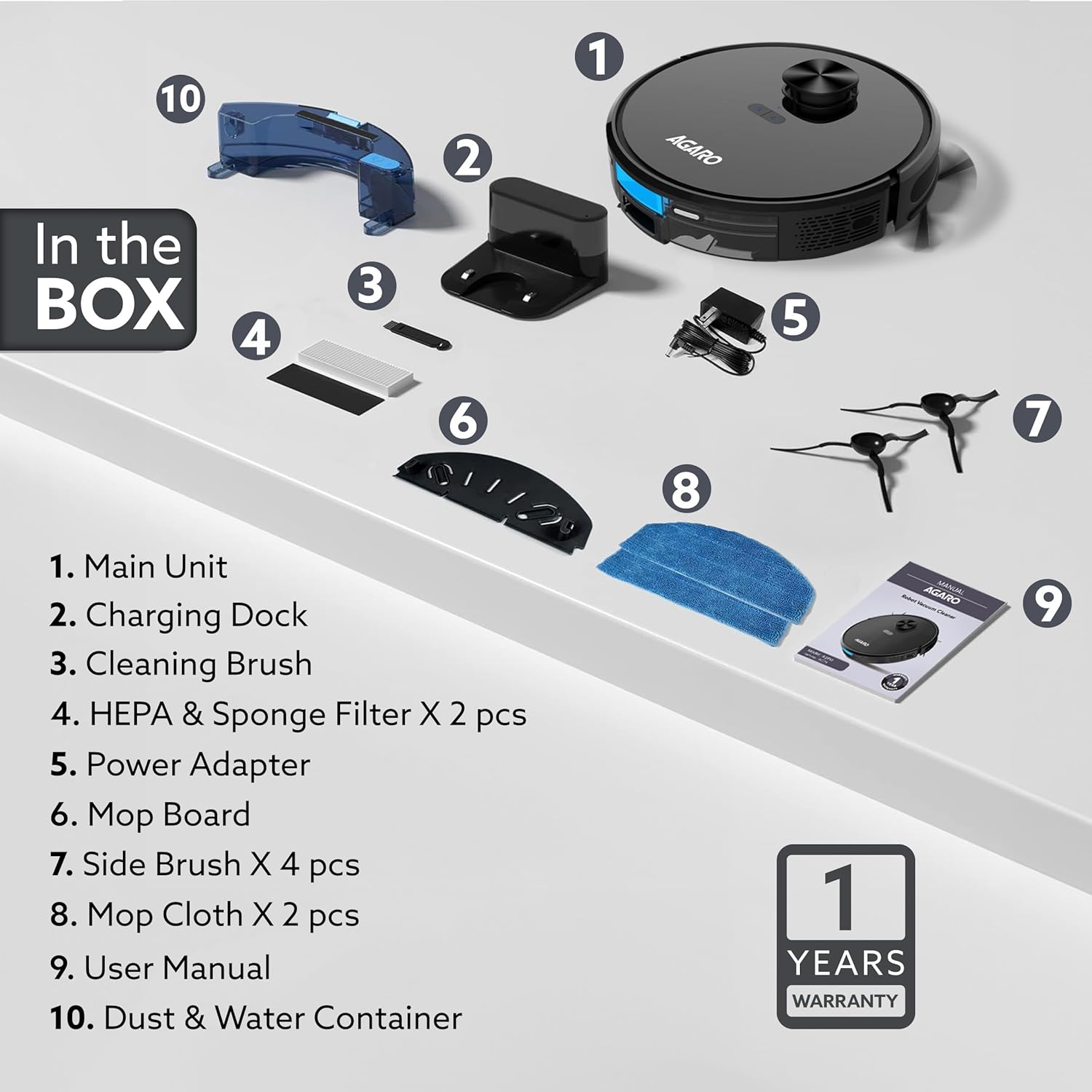
Image: All components of the AGARO Alpha Robot Vacuum Cleaner laid out, including the main unit, charging dock, brushes, filters, and mop cloths.
Setup
1. Initial Charging
Place the charging dock against a wall in an open area. Ensure there are no obstacles within 1 meter to the sides and 1.5 meters in front of the dock. Connect the power adapter to the charging dock and plug it into a power outlet. Place the robot on the charging dock to fully charge before first use.
2. App Installation and Connection
- Search for 'Smart Life' in your mobile app store and download the application.
- Register and log into the app. Click 'Add a device' or the '+' icon in the top right corner.
- Select 'Small household appliance' then 'Robot vacuum cleaner (Wi-Fi)'.
- Select your 2.4GHz Wi-Fi network and enter the password. Note: The device only connects to 2.4GHz Wi-Fi networks and will not connect to any other bandwidth.

Image: A four-step visual guide demonstrating how to connect the AGARO Alpha Robot Vacuum Cleaner to the 'Smart Life' mobile application.
3. Mapping
The robot uses advanced SLAM Lidar technology to accurately scan and map your room, planning efficient cleaning routes. Allow the robot to complete its first cleaning cycle to create a comprehensive map of your home.

Image: Diagram illustrating the Lidar 2.0 SLAM 9.0 technology used by the robot vacuum for accurate scanning, mapping, and route planning.
Operating Instructions
1. Cleaning Modes
The AGARO Alpha offers flexible cleaning options:
- Sweep & Mop: Simultaneous dry vacuuming and wet mopping.
- Sweep: Dry vacuuming only.
- Mop: Wet mopping only.

Image: The robot vacuum cleaner performing both dry vacuuming and wet mopping on a hard floor.
2. Suction Settings
Adjust the suction power based on your cleaning needs:
- Eco: 800 Pa
- Standard: 1200 Pa
- Strong: 1800 Pa
- Super Strong: 3200 Pa
The intelligent suction adjustment system automatically adapts power when detecting different flooring types.

Image: Visual representation of the five cleaning types and four adjustable suction settings available on the robot vacuum.
3. Cleaning Options
Select specific cleaning patterns for targeted results:
- Quick Cleaning: Edge & planning.
- Y Shaped Cleaning: Ideal for mopping.
- Edges: Cleans along walls.
4. Scheduling
Schedule cleaning activities using the app:
- Set specific times and days for cleaning.
- Define targeted areas for cleaning or set 'No-Go Zones'.

Image: An illustration showing how to set a customized cleaning schedule for different rooms using the mobile application.
5. Safety Features
The robot is equipped with multiple sensors for safe operation:
- Anti-Drop Sensors: Prevents falling down stairs or ledges.
- Anti-Collision Sensors: Detects and avoids obstacles.

Image: The robot vacuum cleaner demonstrating its anti-drop and anti-collision sensor technology near a step.
6. Automatic Charging
When the battery is low, the robot automatically searches for its charging dock and connects itself to recharge.
Maintenance
Regular maintenance ensures optimal performance and extends the lifespan of your robot vacuum cleaner.
- Switch off the machine: Always power off the robot before performing any maintenance.
- Open and drain the dirt collecting tank: Remove the tank and empty any collected water.
- Detach the Mopping head: Carefully remove the mopping pad from the tank.
- Open and clean the dirt collecting container: Open the container and use the provided cleaning brush to remove dirt and debris.
- Clean the HEPA filter: Remove the HEPA filter and clean it with the provided brush. Do not wash the HEPA filter with water.
- Open and clean the Roller Brush: Remove the roller brush cover and clean any tangled hair or debris using the cleaning tool.
- Open and clean the Side brushes: Remove the side brushes and clean any accumulated debris.
- Re-install the accessories: Once cleaned, re-install all components securely.
Video: A step-by-step guide on how to perform maintenance on the AGARO Alpha Robot Vacuum Cleaner, including cleaning the dustbin, filters, and brushes.
Specifications
| Brand | AGARO |
| Model Name | Alpha |
| Special Feature | HEPA Filter |
| Colour | Black |
| Product Dimensions | 3.2L x 3.2W x 0.93H Meters |
| Filter Type | HEPA |
| Battery Life | 100 Minutes |
| Cleaning Path Width | 26 Centimeters |
| Water Tank Capacity | 250 Milliliters |
| Power Source | Battery Powered |
| Control Method | Voice, App |
| Compatible Devices | Amazon Echo, Google Home |
| Surface Recommendation | Hard Floor, Carpet |
Warranty
The AGARO Alpha Robot Vacuum Cleaner comes with a 1 Year manufacturing Warranty from the date of purchase. Please retain your purchase receipt for warranty claims.
Support
For further assistance, please contact our customer service team:
- Phone: 9821486487
- Email: info@uclindia.com
